Our Short List of 3

- Best for: A gaming rig with an unlocked i7 or i5 that you intend to keep running for years.
- Socket: LGA1151, Intel Z270 chipset, ATX form factor
- Memory: 4 DDR4 DIMM slots, dual channel, up to 64GB, 4133+(OC) MHz
- Expansion: 3 PCIe 3.0 x16 slots, 2-way SLI and 3-way CrossFire support
- Storage: 3 M.2 slots, 6 SATA 6Gb/s ports
- Best for: A windowed gaming build that needs strong onboard audio and dual NVMe storage.
- Socket: LGA1151, Intel Z270 chipset, ATX form factor
- Memory: 4 DDR4 DIMM slots, up to 64GB, 4133 MHz (OC)
- Expansion: 3 PCIe 3.0 x16 slots, SLI and CrossFireX support
- Storage: 2 M.2 slots, 6 SATA 6Gb/s ports

- Best for: A like-for-like repair or a mixed work-and-gaming PC that needs no gaming extras.
- Socket: LGA1151, Intel Z270 chipset, ATX form factor
- Memory: 4 DDR4 DIMM slots, up to 64GB
- Expansion: 3 PCIe 3.0 x16 slots, 2-way SLI and 3-way CrossFireX support
- Storage: 2 M.2 slots, 6 SATA 6Gb/s ports
All 4 Picks at a Glance
| Product | Specs | Action |
|---|---|---|
| MSI Z270 GAMING M7 |
| Check price on Amazon |
| ASUS ROG Maximus IX Hero |
| Check price on Amazon |
| ASUS Prime Z270-A |
| Check price on Amazon |
 ASUS ROG Maximus IX Code |
| Check price on Amazon |
Key takeaways
- Four Z270 motherboards still listed on Amazon US for Skylake and Kaby Lake builds, compared by condition, M.2 slots, memory support and onboard extras.
A Z270 board is not something anyone buys for a fresh build anymore; it is the board you buy when a six- or seven-year-old PC still does its job and only the motherboard has given up. The real decision is not which chipset to pick, because the chipset is already fixed by your processor. It is which surviving board, in what condition, gives your existing Core i7-7700K or i5-7600K a stable home without paying collector money for features you will never use.
This roundup is for owners of Skylake and Kaby Lake processors who need a replacement board, builders finishing a period-correct gaming rig, and anyone keeping a second PC alive as a home server or a child’s first machine. Every board below is a genuine Z270 model whose listing could still be found on Amazon US, and each pick was chosen from the name and specifications on its product page rather than from old launch coverage.
Quick Picks
As an Amazon Associate we earn from qualifying purchases
| Product | Best for | Key spec from title |
|---|---|---|
| MSI Z270 GAMING M7 | Overclocked Kaby Lake gaming rigs | DDR4, VR Ready, ATX |
| ASUS ROG Maximus IX Hero | High-end single-GPU builds | Dual M.2, USB 3.1, ATX |
| ASUS Prime Z270-A | Straightforward board replacement | DP, HDMI and DVI outputs, M.2 |
| ASUS ROG Maximus IX Code | Builds that need onboard Wi-Fi | Onboard AC WiFi, dual M.2 |
How to Choose
Start With the Condition of the Board
Z270 left production years ago, so the listing in front of you is almost always used, renewed, or old stock held by a third-party seller. That makes condition the first filter rather than a footnote. Read the condition field carefully, look for a note saying the board has been tested, and check what is actually in the box: a missing I/O shield or Wi-Fi antenna is a minor detail until you are sourcing one separately. Socket pins deserve special attention on used boards, because one bent pin can quietly kill a memory channel.
Match the Board to Your Exact Processor
Z270 only works with Intel’s 6th-generation Skylake and 7th-generation Kaby Lake chips. An 8th- or 9th-generation Core processor carries the same LGA1151 socket name but will not work here, and no BIOS update changes that. If your chip has a K suffix, Z270 is also the chipset that unlocks multiplier overclocking, which is the main reason to choose it over a cheaper H270 or B250 board. Check the board maker’s CPU support list against your exact model before ordering, especially on early-production boards that may need a newer BIOS to recognise a Kaby Lake chip.
Count M.2 Slots and Watch the Lane Sharing
Storage is where these boards differ most in daily use. Z270 models carry anywhere from one to three M.2 slots, and populating one often disables a SATA port or two because the chipset shares its lanes between them. If your build runs an NVMe boot drive plus several SATA drives, read the manual’s lane-sharing table before assuming every connector works at once. Memory is simpler: every board here takes DDR4 only, tops out at 64GB across four slots, and treats its headline speeds as overclocked XMP figures rather than guaranteed defaults.
Decide Which Extras Are Worth Paying For
On a platform this old, the extras are what separate one listing from another. Onboard Wi-Fi removes the need for an add-in card, a better audio codec matters if you drive headphones straight from the rear panel, and USB 3.1 Gen 2 is worth having if you move large files to external drives. Multi-GPU support, reinforced slots and lighting headers are nice for a show build but add nothing to a repair job. Decide which of these you will genuinely plug in, then let that shortlist, not the original launch positioning, rank the boards.
The 4 Best Options
MSI Z270 GAMING M7
- Best for: A gaming rig with an unlocked i7 or i5 that you intend to keep running for years.
- Socket: LGA1151, Intel Z270 chipset, ATX form factor
- Memory: 4 DDR4 DIMM slots, dual channel, up to 64GB, 4133+(OC) MHz
- Expansion: 3 PCIe 3.0 x16 slots, 2-way SLI and 3-way CrossFire support
- Storage: 3 M.2 slots, 6 SATA 6Gb/s ports
A gaming rig with an unlocked i7 or i5 that you intend to keep running for years.
There is no onboard Wi-Fi, and remaining stock varies in condition, so confirm the I/O shield and accessories are included before ordering.
The GAMING M7 was MSI’s flagship-grade Z270 board, and it remains the strongest all-round pick for someone keeping an overclocked Kaby Lake gaming PC alive. Three M.2 slots give it unusual storage flexibility for the platform, the power delivery was built around pushing a 7700K, and the layout suits a full-size case with a long graphics card. Choose it if your existing rig is a proper gaming machine rather than a basic desktop, and you want the replacement board to feel like an upgrade in storage and connectivity rather than a compromise.
ASUS ROG Maximus IX Hero
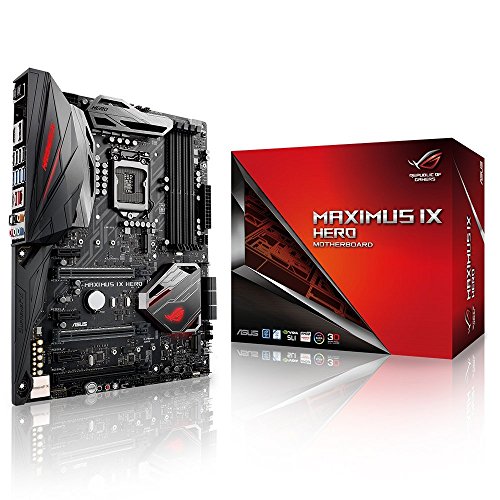
- Best for: A windowed gaming build that needs strong onboard audio and dual NVMe storage.
- Socket: LGA1151, Intel Z270 chipset, ATX form factor
- Memory: 4 DDR4 DIMM slots, up to 64GB, 4133 MHz (OC)
- Expansion: 3 PCIe 3.0 x16 slots, SLI and CrossFireX support
- Storage: 2 M.2 slots, 6 SATA 6Gb/s ports
A windowed gaming build that needs strong onboard audio and dual NVMe storage.
Wireless is not built in; the board only provides an M.2 E-key slot for a Wi-Fi module, so budget for a separate card if you need it.
The Maximus IX Hero sits a step below the Code in the ROG line but keeps most of what matters: dual M.2 slots, the SupremeFX audio solution and Aura Sync lighting headers for a case with a window. It suits one powerful graphics card better than a multi-GPU experiment, and its rear panel covers the essentials with USB 3.1 in both plug shapes. Pick the Hero if the board that died was a mid-to-high-end gaming model and you want the same tier of audio, lighting control and storage without chasing the armoured Code.
ASUS Prime Z270-A
- Best for: A like-for-like repair or a mixed work-and-gaming PC that needs no gaming extras.
- Socket: LGA1151, Intel Z270 chipset, ATX form factor
- Memory: 4 DDR4 DIMM slots, up to 64GB
- Expansion: 3 PCIe 3.0 x16 slots, 2-way SLI and 3-way CrossFireX support
- Storage: 2 M.2 slots, 6 SATA 6Gb/s ports
A like-for-like repair or a mixed work-and-gaming PC that needs no gaming extras.
Check the listing title closely, because later Prime boards with similar names use the Z370 and Z390 chipsets and will not run a 6th- or 7th-generation chip.
The Prime Z270-A is the sensible replacement board: it skips the gaming armour and lighting drama and concentrates on the fundamentals of the platform. You still get dual M.2 slots, support for both SLI and CrossFire, and three different display outputs, which helps when troubleshooting or running on integrated graphics. It fits a work-and-play PC that happens to game, a family machine built around a hand-me-down i5, or any repair where the goal is simply to get a Skylake or Kaby Lake system running again with a board from a mainstream series.
ASUS ROG Maximus IX Code
- Best for: A build that needs built-in Wi-Fi and a finished, armoured look inside a windowed case.
- Socket: LGA1151, Intel Z270 chipset, ATX form factor
- Memory: 4 DDR4 DIMM slots, up to 64GB, 4133 MHz (OC)
- Wireless: Onboard 802.11ac Wi-Fi and Bluetooth
- Storage: 2 M.2 slots, 6 SATA 6Gb/s ports
A build that needs built-in Wi-Fi and a finished, armoured look inside a windowed case.
Stock is thin and listings vary a lot in completeness, so verify the Wi-Fi antennas, armor and I/O shield are all present in the specific listing.
The Maximus IX Code is the pick when the replacement has to include Wi-Fi, because it is one of the few Z270 boards with 802.11ac wireless built in rather than left to an add-in card. Its ROG Armor covers much of the board, which helps a show build and protects the surface during installation, and its water-cooling zone headers suit a custom loop. Remaining listings are scarce and come from third-party sellers, so treat this as the feature-led choice and confirm the antennas and accessories are included before you commit to one.
Which One Fits Your Situation
Your Board Died but the Processor Is Fine
Go straight to the Prime Z270-A. It covers everything a typical Skylake or Kaby Lake system needs, including dual M.2 slots and three display outputs for troubleshooting, without charging you for gaming extras your build never had. Because it was a high-volume mainstream board, listings also tend to be easier to find in tested condition than the low-volume ROG models above it in this list.
You Are Keeping an Overclocked Gaming Rig
Choose between the GAMING M7 and the Maximus IX Hero. The M7 brings a third M.2 slot and MSI’s gaming feature set, while the Hero answers with SupremeFX audio and Aura Sync headers for a lit case. Both were designed around unlocked K-series chips, so either keeps an overclocked 7700K or 7600K build feeling complete rather than patched together.
The PC Sits Where No Ethernet Cable Reaches
The Maximus IX Code is the only board here with Wi-Fi on the board itself, which saves a slot and avoids a USB dongle hanging off the back. That matters for a living-room PC, a workshop machine or any desk far from the router. If the Code’s listings look too rough, the fallback is the Hero plus a separate wireless card in its E-key slot.
You Are Finishing a Period-Correct Show Build
The Hero and the Code both carry Aura Sync headers, so either can run the lighting plan of a 2017-era showcase PC. The Code’s full armor gives the cleaner finished look, while the Hero leaves the components visible, which suits builds that show off the board itself. Match the choice to the case and the rest of the parts you already own.
Common Mistakes
- Buying a Z370 or Z390 board for a 7700K because the socket name matches; the 300-series boards reject 6th- and 7th-generation chips entirely.
- Assuming a listing is new old stock when it is actually a used or renewed board with a condition grade buried in the listing details.
- Ordering DDR3 memory out of habit; every Z270 board takes DDR4 only, and the two standards are not interchangeable.
- Skipping the socket inspection on a used board, when a single bent pin can disable a memory channel or a PCIe slot.
- Filling every M.2 and SATA connector at once without checking the manual, then finding that lane sharing has switched off the ports you needed.
Frequently Asked Questions
Can a Z270 motherboard run an 8th or 9th generation Intel CPU?
No. Although those processors use a socket also called LGA1151, they are electrically and firmware-wise a different platform and only work on 300-series boards. Z270 supports 6th-generation Skylake and 7th-generation Kaby Lake processors, including the Core i7-7700K and i5-7600K, and nothing newer. If your CPU is an 8th- or 9th-generation model, none of the boards in this roundup will boot with it.
What is the difference between Z270 and Z170?
Z270 is the refreshed version of the same platform. It adds Intel Optane memory support, a few more chipset PCIe lanes for storage devices, and out-of-the-box support for Kaby Lake processors, where a Z170 board may need a BIOS update first. The two chipsets take the same processors, the same DDR4 memory and the same coolers, so a Z170 board is a valid substitute if a Z270 listing falls through.
How much memory does a Z270 motherboard support?
Every board in this roundup has four DDR4 DIMM slots and a 64GB ceiling, filled as four 16GB modules. Rated speeds run well beyond the official DDR4-2400 baseline of Kaby Lake, but those headline figures are overclocked XMP results that depend on your specific memory kit and processor. For a stable older system, a matched 16GB or 32GB kit at a moderate XMP profile is the practical choice.
Is it worth buying a Z270 board in 2026?
Only in one case: you already own a working Skylake or Kaby Lake processor and the rest of the system, and the motherboard is the part that failed or is missing. A board from this list restores a capable machine with less effort than a platform change. As the base of a brand-new build it makes no sense, because entry-level platforms outperform it and take newer memory and storage standards.
FAQ
Can a Z270 motherboard run an 8th or 9th generation Intel CPU?
What is the difference between Z270 and Z170?
How much memory does a Z270 motherboard support?
Is it worth buying a Z270 board in 2026?
More from Amazon
Programs that pair well with the guide above. Offers and eligibility are set by Amazon and may change.
Free shipping on eligible items, Prime Video and more. Eligible new members can start with a free trial.
Start a Prime free trialAd-free music streaming. Eligible new subscribers can start with a free trial.
Try Music Unlimited freeA Prime membership for ages 18-24 with a trial period. Eligibility is set by Amazon.
See Prime for Young AdultsAudiobooks and podcasts to listen to on the go. Eligible new members can start with a free trial.
Try Audible freeAs an Amazon Associate we earn from qualifying purchases.