Our Short List of 3
- Panel: 32-inch (31.5-inch viewable) WOLED, flat
- Resolution: 3840 x 2160 (4K UHD)
- Refresh rate: 240Hz at 4K, Dual Mode 1080p at 480Hz
- Response time: 0.03ms (GtG)

- Panel: 32-inch Quantum Mini-LED VA, 1000R curved
- Resolution: 3840 x 2160 (4K UHD)
- Refresh rate: 165Hz
- Response time: 1ms (GtG)

- Panel: 27-inch Nano IPS, flat
- Resolution: 3840 x 2160 (4K UHD)
- Refresh rate: 144Hz (overclock to 160Hz over DisplayPort)
- Response time: 1ms (GtG)
All 5 Picks at a Glance
| Product | Specs | Action |
|---|---|---|
| LG UltraGear 32GS95UE-B |
| Check price on Amazon |
| Samsung Odyssey Neo G7 32-Inch |
| Check price on Amazon |
| LG UltraGear 27GP950-B |
| Check price on Amazon |
 Gigabyte M28U |
| Check price on Amazon |
 LG UltraGear 27GP850-B |
| Check price on Amazon |
Key takeaways
- Compare the best gaming monitors for Series X with HDMI 2.1, 4K 120Hz and high-refresh 1440p panels, VRR support and low input lag for smooth console play.
The Xbox Series X is built to output far more than a basic desk monitor can show. It targets 4K gaming at up to 120 frames per second, supports variable refresh rate to smooth out frame drops, and can also run a sharp 1440p picture at 120Hz for players who prefer speed over raw pixel count. Plug the console into an older 60Hz office panel and all of that hardware goes to waste: the picture is capped at 60Hz, VRR never engages, and fast games feel noticeably heavier than they should.
This guide is fenced tightly to the Series X itself. Every pick below is a gaming monitor that accepts at least 120Hz over HDMI, so the console’s high-refresh modes actually work. There are no TVs and no 60Hz office monitors in the list. The lineup covers 4K panels with full HDMI 2.1 bandwidth for 4K at 120Hz, plus one high-refresh 1440p option for players who would rather have a lower-cost screen that still runs the console’s 1440p 120Hz mode. General 4K 120Hz monitor roundups treat PC and console needs as one topic, and older Xbox One S guides predate the 120Hz era entirely, so neither answers the question a Series X owner is actually asking: which desk monitor unlocks everything this console can do?
As an Amazon Associate, we earn from qualifying purchases.
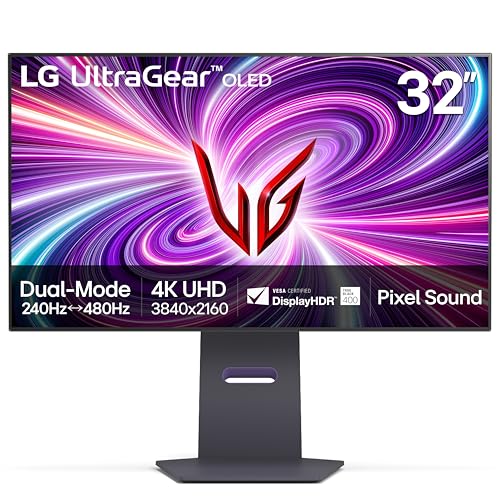
LG UltraGear 32GS95UE-B
- Panel: 32-inch (31.5-inch viewable) WOLED, flat
- Resolution: 3840 x 2160 (4K UHD)
- Refresh rate: 240Hz at 4K, Dual Mode 1080p at 480Hz
- Response time: 0.03ms (GtG)
Tier: premium
The UltraGear 32GS95UE-B is the no-compromise pick for a Series X desk setup. Its 32-inch WOLED panel pairs a full 4K resolution with a 240Hz native refresh rate, and because both of its HDMI 2.1 ports carry full bandwidth, the Series X runs at 4K and 120Hz with VRR active, exactly as the console intends. OLED pixel response is effectively instant at 0.03ms, so fast camera pans in shooters and racing games stay clean instead of smearing, and the per-pixel lighting delivers the deep black levels that LCD panels cannot match in a dark room.
LG also builds in a Dual Mode that trades resolution for speed, switching the panel to 1080p at 480Hz for PC play. The Series X cannot use that mode, but it makes the monitor a genuine two-machine screen for anyone who also games on a desktop. DisplayHDR True Black 400 certification, FreeSync Premium Pro, and G-SYNC compatibility round out the gaming feature set, and the built-in Pixel Sound speakers are a step above the token speakers most monitors ship with, though a headset or soundbar still wins for serious sessions.
Samsung Odyssey Neo G7 32-Inch
- Panel: 32-inch Quantum Mini-LED VA, 1000R curved
- Resolution: 3840 x 2160 (4K UHD)
- Refresh rate: 165Hz
- Response time: 1ms (GtG)
Tier: premium
The Odyssey Neo G7 takes the opposite route to a premium picture. Instead of OLED, it uses a 32-inch Quantum Mini-LED VA panel with a steep 1000R curve that wraps the image around your field of view, which suits racing games, flight sims, and open-world titles played from a desk chair. The panel runs 4K at up to 165Hz, and its HDMI 2.1 ports give the Series X the full 4K 120Hz mode with VRR, so console play is not limited in any way.
Where the Neo G7 really separates itself is HDR. The Quantum Matrix backlight with local dimming and Quantum HDR 2000 branding points at genuinely bright highlights, the kind that make neon signage, explosions, and sunlit scenes pop in a way standard edge-lit LCD monitors cannot reproduce. FreeSync Premium Pro keeps frame pacing smooth when a game dips below its target, and the rear Core Lighting adds ambient glow behind the screen. The trade-offs are the curve itself, which some players love and others never warm to, and viewing angles that are narrower than an IPS panel when you lean off to one side.
LG UltraGear 27GP950-B
- Panel: 27-inch Nano IPS, flat
- Resolution: 3840 x 2160 (4K UHD)
- Refresh rate: 144Hz (overclock to 160Hz over DisplayPort)
- Response time: 1ms (GtG)
Tier: mid-range
The 27GP950-B is the classic enthusiast pick and still one of the most complete 27-inch 4K gaming monitors sold. Its Nano IPS panel runs 4K at 144Hz, with an overclock to 160Hz available over DisplayPort for PC use, and the twin HDMI 2.1 ports hand the Series X its full 4K 120Hz output with VRR. At 27 inches, 4K resolution produces a very sharp image at desk distance, so text in menus, HUD elements, and fine detail in strategy and simulation games all stay crisp.
Nano IPS color is a strength here, with a wide DCI-P3 gamut and VESA DisplayHDR 600 support giving HDR games more punch than entry-level 4K panels manage. Response time is rated at 1ms, and both FreeSync Premium Pro and G-SYNC compatibility are on board, which makes the monitor an easy dual-purpose screen for a desk that holds a PC next to the console. The stand adjusts for height, tilt, and pivot, and the USB hub keeps peripherals tidy. If 32 inches feels too large for your desk, or OLED pricing is a stretch, this is the balanced premium-feeling option.
Gigabyte M28U
- Panel: 28-inch SuperSpeed IPS, flat
- Resolution: 3840 x 2160 (4K UHD)
- Refresh rate: 144Hz
- Response time: 1ms (GtG)
Tier: budget
The M28U is the value anchor of this list: a 28-inch 4K 144Hz monitor with proper HDMI 2.1 that costs far less than the flagship names while keeping every feature the Series X actually needs. The console runs at 4K and 120Hz with VRR over either HDMI 2.1 port, and the SuperSpeed IPS panel answers with a 1ms response time and FreeSync Premium Pro support, so gameplay feels as responsive as the more expensive screens in this guide.
Gigabyte adds a few extras that punch above the price tier. A built-in KVM switch and USB-C input make it easy to share the screen and peripherals with a work laptop, the USB hub keeps a tidy desk, and the small built-in speakers cover menus and casual video when you do not feel like putting a headset on. HDR support is limited to DisplayHDR 400, so HDR games look good rather than spectacular, and the stand lacks the premium feel of the LG models. Neither point changes the core equation: for 4K 120Hz console gaming on a sensible budget, the M28U is the monitor most players should start with.
LG UltraGear 27GP850-B
- Panel: 27-inch Nano IPS, flat
- Resolution: 2560 x 1440 (QHD)
- Refresh rate: 165Hz (overclock to 180Hz)
- Response time: 1ms (GtG)
Tier: budget
Not every Series X setup needs 4K. The console also outputs a native 1440p signal at 120Hz, and for fast-paced shooters and sports titles many players prefer the lower price and higher frame-rate headroom of a good QHD screen. The 27GP850-B is exactly that: a 27-inch Nano IPS panel at 2560 x 1440 with a 165Hz refresh rate that overclocks to 180Hz for PC play. The Xbox connects over HDMI and runs its 1440p 120Hz mode with VRR, because the console supports that resolution and refresh combination without needing HDMI 2.1 bandwidth.
Picture quality holds up well for the tier. Nano IPS color, DisplayHDR 400 support, and a 1ms response time keep games looking clean and feeling responsive, and FreeSync Premium plus G-SYNC compatibility cover both console and PC use. The honest limitation is resolution: on a 27-inch screen, 1440p is visibly softer than 4K in slow, detailed games, and the Series X will not upscale its way around that. Buy this monitor if competitive speed and a lower spend matter more than maximum sharpness, and it will serve the console properly for years.
How to Choose
Start with the resolution decision, because it drives everything else. Choose 4K if you play story-driven, open-world, or visually detailed games and sit at a normal desk distance; the Series X was designed around 4K output and the image quality difference is easy to see on a 27-inch or 32-inch screen. Choose 1440p if your library leans competitive, where holding a locked 120 frames per second matters more than pixel density, or if the budget simply works better. Both routes are legitimate, and the console handles each natively.
Next, confirm the HDMI situation before anything else. For 4K at 120Hz the monitor must have HDMI 2.1 ports with full bandwidth, which all three 4K tiers in this guide provide. For 1440p at 120Hz, HDMI 2.0 is enough because the signal is smaller, which is why the 27GP850-B qualifies despite its older ports. What you must avoid is any monitor whose HDMI input tops out at 60Hz at your chosen resolution, because the console will silently fall back to 60Hz and the purchase misses the point.
VRR is the third requirement. Variable refresh rate lets the monitor match the console’s frame output moment by moment, which removes screen tearing and softens the judder when a demanding scene dips below its target frame rate. On Xbox it works over HDMI with FreeSync-based monitors, so look for FreeSync or FreeSync Premium branding and make sure the feature is enabled in both the console settings and the monitor menu. While you are in the console settings, turn on the 120Hz mode and allow variable refresh rates under the TV and display options, and use the HDMI cable that came with the console, since it is rated for the full bandwidth the Series X outputs.
Panel type shapes the experience after that. OLED delivers perfect black levels and the fastest response, at the highest prices. Mini-LED VA panels like the Neo G7 offer very bright HDR and a curved, immersive shape. IPS panels are the all-rounders, with the best viewing angles and strong color at moderate prices. Finally, think about the second machine: a KVM switch, USB-C input, and a USB hub matter if a PC or work laptop shares the desk, and a height-adjustable stand matters everywhere, because a monitor you cannot position properly is uncomfortable long before it looks bad.
Frequently Asked Questions
Does the Xbox Series X need HDMI 2.1 for 120Hz gaming?
Only for 4K at 120Hz. That combination needs the full bandwidth of HDMI 2.1, so a 4K monitor must have HDMI 2.1 ports to unlock it. At 1440p, the Series X can output 120Hz over HDMI 2.0, because the smaller signal fits within the older standard’s bandwidth. At 1080p it can also run 120Hz over HDMI 2.0. The simplest rule is to match the port to the resolution: HDMI 2.1 for a 4K screen, HDMI 2.0 or better for a 1440p screen, and then enable 120Hz in the console’s display settings.
Is 4K or 1440p better for the Xbox Series X?
It depends on the games you play and the screen size you want. 4K is sharper, especially at 32 inches and in slower games where you have time to take in detail, and it is the resolution the console was designed around. 1440p costs less, and in fast competitive titles the clarity difference shrinks while a locked 120Hz feels identical. The Series X renders internally and outputs a clean native 1440p signal, so a 1440p monitor is not being fed a blurry downscale. Neither choice is wrong; pick based on budget and the genres at the top of your library.
What is VRR and why does it matter on Xbox?
VRR, or variable refresh rate, lets the monitor change its refresh timing to match the frame rate the console is actually producing, instead of refreshing on a fixed schedule. When a game dips from 120 frames per second to, say, the low hundreds or below during a heavy scene, a fixed-refresh screen shows tearing or judder as frames arrive out of sync. With VRR the display waits for each frame, so motion stays smooth and tear-free. The Series X supports VRR over HDMI with FreeSync-compatible monitors, and it is one of the most noticeable quality-of-life features the console offers, which is why every monitor in this guide supports it.
Can the Xbox Series X use an ultrawide monitor?
It will display a picture, but not a true ultrawide one. The Series X only outputs standard 16:9 resolutions, so on a 21:9 ultrawide screen the image sits in the middle with black bars on both sides, and you pay for panel area the console never uses. Players who split time with a PC sometimes accept that compromise, and the PC side can fill the whole screen properly. If the monitor is mainly for the Series X, a 16:9 screen in 27-inch or 32-inch sizes is the better buy, which is why this guide sticks to that shape throughout.
Final Verdict
Every monitor in this guide gives the Xbox Series X the high-refresh, VRR-enabled picture it was built to produce, so the right choice comes down to budget and taste. The LG UltraGear 32GS95UE-B is the premium statement: OLED contrast, instant response, and a big 4K canvas that also serves a high-end PC. The Samsung Odyssey Neo G7 is the pick for players who want a curved, cinematic screen with the brightest HDR of the group. The LG 27GP950-B remains the balanced enthusiast option at 27 inches, with sharp Nano IPS color and a complete feature set. The Gigabyte M28U is the sensible default for most players, delivering full 4K 120Hz console gaming and a useful KVM at a budget-friendly tier. And the LG 27GP850-B proves that a 1440p screen, chosen deliberately, still lets the Series X stretch its legs at 120Hz. Match the monitor to the games you actually play, enable 120Hz and VRR in the console settings, and the upgrade over a basic 60Hz panel will be obvious from the first match.
Product and ASIN Reference
| Product | ASIN |
|---|---|
| LG UltraGear 32GS95UE-B | B0CV1Y7NLT |
| Samsung Odyssey Neo G7 32-Inch | B09ZH1Q6TT |
| LG UltraGear 27GP950-B | B094RWMN8K |
| Gigabyte M28U | B094NX6C8R |
| LG UltraGear 27GP850-B | B093MTSTKD |
FAQ
Does the Xbox Series X need HDMI 2.1 for 120Hz gaming?
Is 4K or 1440p better for the Xbox Series X?
What is VRR and why does it matter on Xbox?
Can the Xbox Series X use an ultrawide monitor?
More from Amazon
Programs that pair well with the guide above. Offers and eligibility are set by Amazon and may change.
Free shipping on eligible items, Prime Video and more. Eligible new members can start with a free trial.
Start a Prime free trialAd-free music streaming. Eligible new subscribers can start with a free trial.
Try Music Unlimited freeA Prime membership for ages 18-24 with a trial period. Eligibility is set by Amazon.
See Prime for Young AdultsAudiobooks and podcasts to listen to on the go. Eligible new members can start with a free trial.
Try Audible freeAs an Amazon Associate we earn from qualifying purchases.