Key takeaways
- Sensor and DPI: Look for optical sensors offering at least 1000 DPI for general use. Higher DPI is useful for gaming and high-resolution displays, but stable, jitter-free tracking matters more than raw DPI numbers in a compact mouse.
- Connectivity: Decide between 2.4 GHz wireless with a USB nano receiver, Bluetooth, or a wired USB-A connection. Wireless nano-receiver setups offer the best plug-and-play convenience for laptops, while wired models eliminate battery concerns entirely.
- Size and Ergonomics: Small mice should still fit your hand comfortably. Check dimensions carefully, prioritize ambidextrous shapes if you switch hands, and consider whether silent clicks matter for your work environment or shared spaces.
- Battery Life: For wireless models, look for at least 12 months of battery life on a single AA or AAA cell. This reduces downtime and ensures the mouse is ready when you need it without frequent battery swaps.
- Compatibility: Confirm the mouse works with your operating system — most support Windows and macOS out of the box, but Linux and ChromeOS compatibility can vary. Also verify the available USB port type on your machine.
Finding a small computer mouse that actually performs well is harder than it should be. Most compact mice sacrifice tracking precision, build quality, or battery life in the pursuit of portability — leaving gamers, professionals, and travelers frustrated with unresponsive cursors, flaky wireless connections, and cramped grips that cause hand fatigue after extended sessions. Whether you have small hands, need something pocketable for a commute, or want a discreet secondary mouse for a laptop bag, sorting through hundreds of nearly identical listings to find the genuinely good options is a time-consuming headache.
Our top picks


As an Amazon Associate we earn from qualifying purchases at no extra cost to you. Ratings are shown as listed on Amazon.
This guide cuts through the noise. We evaluated the most popular small computer mice on the market — from budget travel picks to premium wireless models — focusing on real-world factors that matter: sensor accuracy, ergonomics for smaller hands, wireless reliability, battery longevity, and overall build quality. Below you will find our top recommendations, a practical buying guide, and answers to the most common questions to help you make the right choice in 2026.
🛒 Best Price Today on Amazon
Prime members get fast, free shipping on everything above, plus member-only deals. New members get a 30-day free trial — cancel anytime.
Watch: Best Small Computer Mouse — Video Review
How to Choose a Small Computer Mouse (2026)
- Sensor and DPI: Look for optical sensors offering at least 1000 DPI for general use. Higher DPI is useful for gaming and high-resolution displays, but stable, jitter-free tracking matters more than raw DPI numbers in a compact mouse.
- Connectivity: Decide between 2.4 GHz wireless with a USB nano receiver, Bluetooth, or a wired USB-A connection. Wireless nano-receiver setups offer the best plug-and-play convenience for laptops, while wired models eliminate battery concerns entirely.
- Size and Ergonomics: Small mice should still fit your hand comfortably. Check dimensions carefully, prioritize ambidextrous shapes if you switch hands, and consider whether silent clicks matter for your work environment or shared spaces.
- Battery Life: For wireless models, look for at least 12 months of battery life on a single AA or AAA cell. This reduces downtime and ensures the mouse is ready when you need it without frequent battery swaps.
- Compatibility: Confirm the mouse works with your operating system — most support Windows and macOS out of the box, but Linux and ChromeOS compatibility can vary. Also verify the available USB port type on your machine.
The Best Small Computer Mouse (2026)s Reviewed
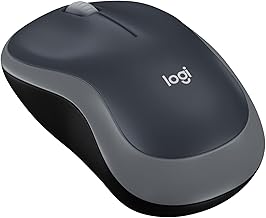
Logitech M185 Compact Wireless
The Logitech M185 sets the benchmark for affordable compact wireless mice. Its 2.4 GHz nano receiver delivers a rock-solid connection, the ambidextrous shell suits left- and right-handed users alike, and the 12-month battery life means you will rarely think about maintenance. Optical tracking is reliable across most surfaces, making this the safest default pick for anyone who just wants a dependable small mouse that works.
Mini Silent Portable Travel Mouse (Blue)
For buyers seeking a genuinely tiny, budget-friendly mouse — especially for kids, small hands, or occasional travel — this compact cordless model checks the boxes. The silent clicks are a thoughtful touch for classrooms and shared offices, and the 1000 DPI sensor handles everyday browsing without issue, though serious users may find the build quality and precision limited compared to premium alternatives.
Verbatim Wired Optical Mini
The Verbatim mini wired mouse solves the battery problem entirely with its plug-and-play USB-A connection and retractable cable design. It is an excellent travel companion for users who want zero latency, no charging anxiety, and a cable that self-stows neatly. The compact shell is best suited for smaller hands and lighter workloads rather than extended gaming sessions.
Logitech Signature M550 Wireless
Logitech positions the M550 for small to medium hands, and it delivers a noticeable step up in comfort and build over entry-level models. Silent clicks, a two-year battery, and multi-device switching make this the pick for productivity-focused users who want a small mouse with genuinely useful premium features without paying flagship prices.
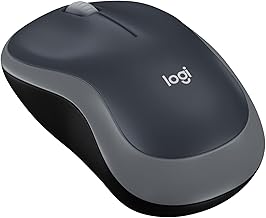
Logitech M317 Compact Wireless
The M317 offers 1000 DPI optical tracking in a compact, ambidextrous shell with the same reliable 2.4 GHz nano receiver Logitech is known for. It is a dependable everyday mouse that trades some of the M550’s premium features for a lower price, making it a strong choice for students and commuters who need portability and consistency in equal measure.
Frequently Asked Questions
Is a small mouse bad for your hand over long sessions?
Not inherently, but if your hand is significantly larger than the mouse, you risk cramping and fatigue. If you plan extended gaming or work sessions, choose a small-to-medium model like the Logitech M550, which balances compact dimensions with a more accommodating shape.
Do small wireless mice have noticeable input lag?
Modern 2.4 GHz wireless mice — especially Logitech models with nano receivers — have input latency low enough that most users will not notice it for browsing, productivity, or casual gaming. Competitive esports players may still prefer wired alternatives for absolute minimum latency.
Can I use a small mouse for PC gaming?
Yes, for casual and many mid-level gaming scenarios. A small mouse can work well if it fits your grip style — fingertip grippers in particular often prefer lighter, more compact mice. However, for fast-paced competitive shooters, you may want a dedicated gaming mouse with a higher-end sensor.
Will a small mouse work with a desktop PC and a laptop?
Yes. All the mice in this roundup support standard Windows and macOS systems and connect via USB-A or wireless nano receivers. As long as your machine has a free USB-A port — or an adapter for newer USB-C-only laptops — any model here will work interchangeably across devices.
Final Thoughts
For most buyers, the Logitech M185 and Logitech M317 represent the sweet spot of reliability, battery life, and value among small computer mice. If you want a step up in comfort and features, the Logitech Signature M550 is our top recommendation for small to medium hands, thanks to its silent clicks, two-year battery, and multi-device support. Whatever your priority — portability, price, or ergonomics — this guide covers a proven option that will serve you well into 2026.