Key takeaways
- Interface Type: Prioritize NVMe M.2 drives with PCIe 4.0 support for maximum throughput if your motherboard supports it. SATA III drives are perfectly adequate for older systems, but they cap out at 560MB/s, which may bottleneck next-gen titles.
- Storage Capacity: A 1TB drive is the modern minimum for dedicated gaming storage. High-end NVMe drives at 2TB offer better long-term value if you frequently play massive open-world titles or want room for future releases.
- Random Read/Write Speeds: Sequential speeds look impressive on paper, but random read speeds dictate how quickly a game loads its individual assets. Look for NVMe drives with high IOPS ratings for snappy texture loading and seamless world traversal.
- Thermal Management: High-performance PCIe 4.0 drives run exceptionally hot under sustained loads. Drives with integrated heatsinks or advanced controllers prevent thermal throttling, which is crucial for maintaining consistent performance during long gaming sessions.
- System Compatibility: Verify your motherboard’s M.2 slot configuration and PCIe lane allocation before buying. For older laptops or PS4 consoles, a 2.5-inch SATA SSD remains the most practical and compatible upgrade path available.
Choosing between an SSD and an HDD for your gaming rig is no longer a simple decision, and the storage landscape has become genuinely complicated. Modern AAA titles demand lightning-fast load times, but sprawling game libraries eat through terabytes faster than ever. Buyers are caught between spending a premium on high-speed NVMe M.2 drives that eliminate texture pop-in and load screens, or banking on traditional hard disk technology to cheaply store hundreds of older or less demanding titles. The nuances of PCIe generations, SATA bottlenecks, and specialized console storage formats only make the purchasing process harder to navigate.
Our top picks



As an Amazon Associate we earn from qualifying purchases at no extra cost to you. Ratings are shown as listed on Amazon.
This guide breaks down exactly what PC gamers and console players need to know before expanding their storage. We cover the vital differences between NVMe M.2 drives, SATA solid-state technology, and traditional hard drives, helping you determine which technology fits your specific setup and budget. Whether you need a high-end PCIe 4.0 drive for maximum frame consistency, a budget-friendly SATA SSD for a legacy laptop upgrade, or reliable mass storage, we have identified the top hardware on the market to elevate your gaming experience.
🛒 Best Price Today on Amazon
Prime members get fast, free shipping on everything above, plus member-only deals. New members get a 30-day free trial — cancel anytime.
Watch: SSD vs HDD for Gaming: Which Do You Need? — Video Review
How to Choose a/an SSD vs HDD for Gaming
- Interface Type: Prioritize NVMe M.2 drives with PCIe 4.0 support for maximum throughput if your motherboard supports it. SATA III drives are perfectly adequate for older systems, but they cap out at 560MB/s, which may bottleneck next-gen titles.
- Storage Capacity: A 1TB drive is the modern minimum for dedicated gaming storage. High-end NVMe drives at 2TB offer better long-term value if you frequently play massive open-world titles or want room for future releases.
- Random Read/Write Speeds: Sequential speeds look impressive on paper, but random read speeds dictate how quickly a game loads its individual assets. Look for NVMe drives with high IOPS ratings for snappy texture loading and seamless world traversal.
- Thermal Management: High-performance PCIe 4.0 drives run exceptionally hot under sustained loads. Drives with integrated heatsinks or advanced controllers prevent thermal throttling, which is crucial for maintaining consistent performance during long gaming sessions.
- System Compatibility: Verify your motherboard’s M.2 slot configuration and PCIe lane allocation before buying. For older laptops or PS4 consoles, a 2.5-inch SATA SSD remains the most practical and compatible upgrade path available.
The Best SSD vs HDD for Gamings Reviewed
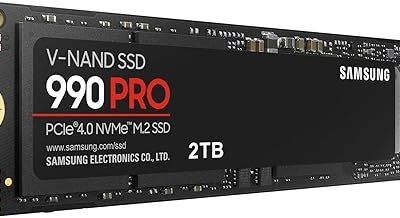
Samsung 990 PRO 2TB
This PCIe 4.0 NVMe powerhouse delivers staggering sequential read speeds up to 7,450MB/s, making it the ultimate choice for hardcore gamers and heavy-duty workstations. Its advanced controller and power efficiency ensure your most demanding open-world titles load instantly and run flawlessly.
SIX NVMe M.2 SSD PCIe 4.0 1TB
Offering blistering read speeds up to 7350MB/s and a pre-installed heatsink, this drive is optimized for both high-end PC gaming and PS5 memory expansion. It provides a remarkably smooth, thermally stable experience at a highly competitive price point for PCIe 4×4 technology.
Samsung 870 EVO SATA III 1TB
As the gold standard for SATA solid-state storage, the 870 EVO provides consistent 560MB/s read speeds that drastically cut load times for older PC games. It is an exceptionally reliable, universal upgrade for everyday users and IT professionals looking to breathe life into legacy hardware.
KingSpec 1TB SATA III Championship Edition
This budget-friendly 2.5-inch SSD utilizes 3D NAND flash with SLC caching to achieve 560MB/s reads, making it ideal for upgrading older laptops, desktops, or PS4 and Xbox consoles. It is a cost-effective way to eliminate the severe bottlenecks of mechanical hard drives without breaking the bank.
Fikwot FX815 512GB SATA SSD
Compact and highly compatible, this 2.5-inch SATA drive delivers solid everyday performance for budget-conscious gamers building a secondary rig. Its 3D NAND architecture and 560MB/s read capability make it a sensible, no-frills storage solution for standard laptop and desktop PC applications.
Frequently Asked Questions
Does an SSD actually improve gaming performance?
Yes, an SSD dramatically reduces load times, texture pop-in, and world-streaming stutter. While it will not increase your maximum frame rate, it ensures your frames remain consistent during fast traversal by feeding data to the CPU and GPU much faster than a mechanical drive.
Is an HDD still worth using for gaming in 2024?
A mechanical hard drive is only worth using as secondary mass storage for games you rarely play, or for storing your operating system backups. Modern games now require solid-state storage to function properly, meaning an HDD will lead to agonizing load screens and severe asset streaming issues.
What is the difference between NVMe M.2 and SATA SSDs?
NVMe M.2 drives connect directly to the PCIe lanes on your motherboard, allowing for speeds exceeding 7,000MB/s on PCIe 4.0 models. SATA III SSDs use an older interface protocol that bottlenecks performance at roughly 600MB/s, making them better suited for older systems and budget upgrades.
Do I need a heatsink for my gaming SSD?
If you are using a high-speed PCIe 4.0 NVMe drive, a heatsink is strongly recommended for intensive gaming sessions. High-speed drives generate significant heat that can cause thermal throttling, which temporarily slows your drive down and results in unexpected frame drops and longer load times.
Final Thoughts
Ultimately, the right storage choice comes down to balancing your motherboard capabilities with your library size and budget. For uncompromising speed and future-proofing, the Samsung 990 PRO 2TB stands as the absolute pinnacle of gaming storage. The SIX NVMe M.2 SSD PCIe 4.0 offers incredible value with its built-in heatsink for PS5 and PC gamers, while the Samsung 870 EVO 1TB remains the most reliable SATA upgrade for breathing new life into older systems. Choose the drive that aligns with your specific hardware, and enjoy a seamlessly smooth gaming experience.