Key takeaways
- Panel Size and Weight: If you plan to travel with your setup, prioritize 14 to 15.6-inch portable monitors under three pounds. Larger panels like 32-inch QHD displays are excellent for a permanent desk but defeat the purpose of a mobile dual-screen config.
- Resolution and Color Accuracy: Look for at least 1080p FHD with solid sRGB coverage, ideally above 100%. If you value color-critical work or vibrant AAA gaming, a 1440p QHD IPS panel will deliver the sharpness and gamut you need.
- Connectivity Options: USB-C with power delivery is essential for a clean one-cable setup. Also verify the monitor includes HDMI, as some gaming laptops and consoles require it for full-bandwidth video output.
- Mounting Mechanism: Decide between a built-in kickstand, a clamp-on frame, or a VESA-compatible desk mount. The right choice depends on whether you need a mobile travel solution or a fixed workstation with an ergonomic height adjustment.
- Laptop Compatibility: Clip-on extenders and mounting arms have strict size and weight limits. Always check that the product supports your notebook’s screen size, thickness, and weight before committing to a purchase.
What's inside
Whether you’re managing a streaming setup, monitoring GPU temperatures while gaming, or juggling Discord with your main session, a dual monitor notebook configuration is one of the most practical upgrades a PC gamer can make. The problem is that not everyone has the desk space or budget for a pair of desktop monitors, and standard laptops only give you one screen to work with. Buyers are often stuck choosing between bulky portable monitors that require awkward stands, flimsy clip-on screens that stress hinge mechanisms, and mounting arms that claim universal compatibility but fail to hold heavier gaming laptops securely.
As an Amazon Associate we earn from qualifying purchases.




This guide cuts through the noise and covers the best solutions for turning your notebook into a dual-screen powerhouse. We’ve selected products across several categories, including foldable travel monitors, lightweight clip-on extenders, and a versatile desk mount that pairs a laptop with a full-size display. Each option balances portability, panel quality, and build construction so you can game or work without compromise.
🛒 Best Price Today on Amazon
Prime members get fast, free shipping on everything above, plus member-only deals. New members get a 30-day free trial — cancel anytime.
Watch: Dual Monitor Notebook: Review & Buyer’s Guide — Video Review
How to Choose a Dual Monitor Notebook
- Panel Size and Weight: If you plan to travel with your setup, prioritize 14 to 15.6-inch portable monitors under three pounds. Larger panels like 32-inch QHD displays are excellent for a permanent desk but defeat the purpose of a mobile dual-screen config.
- Resolution and Color Accuracy: Look for at least 1080p FHD with solid sRGB coverage, ideally above 100%. If you value color-critical work or vibrant AAA gaming, a 1440p QHD IPS panel will deliver the sharpness and gamut you need.
- Connectivity Options: USB-C with power delivery is essential for a clean one-cable setup. Also verify the monitor includes HDMI, as some gaming laptops and consoles require it for full-bandwidth video output.
- Mounting Mechanism: Decide between a built-in kickstand, a clamp-on frame, or a VESA-compatible desk mount. The right choice depends on whether you need a mobile travel solution or a fixed workstation with an ergonomic height adjustment.
- Laptop Compatibility: Clip-on extenders and mounting arms have strict size and weight limits. Always check that the product supports your notebook’s screen size, thickness, and weight before committing to a purchase.
The Best Dual Monitor Notebooks Reviewed
VisionOwl 15.6″ Foldable Dual Monitor
This foldable dual 15.6-inch FHD panel stands out for its 107% sRGB coverage and built-in kickstand, making it a strong pick for gamers who want vivid color and a self-supporting travel display that works equally well with a PS5 or Xbox.
15.6″ Detachable Laptop Screen Extender
Designed to fit laptops from 13 to 17.3 inches, this detachable FHD IPS extender offers true plug-and-play simplicity with a single-cable connection, though compatibility varies on certain macOS Thunderbolt configurations.
MOUNTUP Dual Monitor and Laptop Stand
For a permanent desk setup, this 3-in-1 adjustable mount holds two 27-inch screens or swaps one arm for a laptop tray, giving you full ergonomic control with sturdy support up to 17.6 pounds per arm.
14.2″ Ultra-Portable Laptop Screen Extender
Weighing just 1.87 pounds, this slim 14.2-inch FHD extender is the lightest option here and an ideal match for gamers who need a secondary screen for telemetry, chat, or guides without adding noticeable bulk to their bag.
ViewSonic VS3225-2K 32″ QHD Monitor
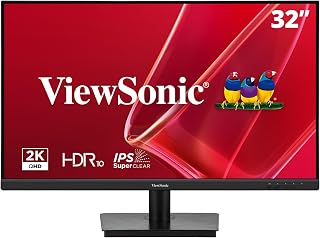
While not a portable panel, this 32-inch 1440p IPS monitor is the perfect desktop companion to a gaming notebook, offering HDR10, variable refresh rate support, and a frameless design that maximizes screen real estate for immersive single-display sessions.
Frequently Asked Questions
Can I run two external monitors from a single gaming laptop?
Yes, most modern gaming laptops support at least two external displays through a combination of HDMI, USB-C with DisplayPort Alt Mode, or a Thunderbolt dock. Check your GPU’s maximum simultaneous output count before buying.
Do clip-on laptop screen extenders drain battery quickly?
They draw power directly from your notebook’s USB-C port, which will reduce battery life during unplugged gaming sessions. For extended play, keep your laptop connected to a charger to maintain stable performance on both screens.
Will a portable monitor work with a PS5 or Xbox?
Yes, as long as the portable monitor supports HDMI input and the resolution and refresh rate match your console output. Many gaming-optimized portable displays support 1080p at 60Hz, which covers most console gaming scenarios perfectly.
Is 1440p QHD worth it for a dual monitor setup?
If your GPU can handle it, 1440p provides significantly sharper image quality and more usable screen space than 1080p. It is especially valuable for desktop monitors in the 27 to 32-inch range, where pixel density otherwise becomes noticeable.
Final Thoughts
For gamers who want maximum portability, the VisionOwl 15.6″ Foldable Dual Monitor and the 14.2″ Ultra-Portable Laptop Screen Extender are standout picks that balance weight, color quality, and connectivity. If you prefer a permanent desk setup with full ergonomics, pair your notebook with the MOUNTUP Dual Monitor Stand and the ViewSonic VS3225-2K 32″ QHD Monitor for a flexible and visually impressive workstation.