Key takeaways
- A headset asks more of a graphics card than a monitor does. The card has to draw two slightly different views every frame.
A headset asks more of a graphics card than a monitor does. The card has to draw two slightly different views every frame, hold a steady refresh rate for each eye, and keep doing it while your head moves. A dropped frame on a flat screen is a small stutter; inside a headset it can feel like the room is lurching sideways. That is why a search for graphics cards for VR is really a search for headroom, not for the biggest number on a box.
This guide covers six cards whose listings carry VR Ready wording or a modern 16GB memory pool, ranging from a current-generation Radeon to older 6GB and 8GB models that suit a tight budget in 2026. It is written for people who already own a headset or are about to buy one and want to choose without guessing. One rule runs through every pick: judge the memory size, the output connectors and the cooling first, then decide how much risk you accept on renewed hardware.
Quick Picks
Our top picks

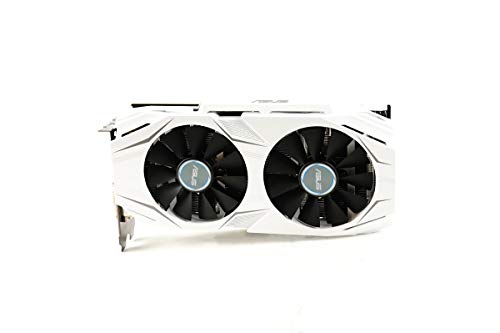
 ASUS Dual Radeon RX 9060 XT 16GB
- Axial-tech fans now feature a smaller fan hub…
- 2.5-slot design allows for greater build compatibility while…
- 0dB technology lets you enjoy light gaming in…

As an Amazon Associate we earn from qualifying purchases at no extra cost to you.
| Product | Best for | Key spec from the title |
|---|---|---|
| ASUS Radeon RX 9060 XT 16GB | Longest runway for a new VR build | 16GB GDDR6, PCIe 5.0, HDMI 2.1b, DisplayPort 2.1a |
| XFX Radeon RX 580 GTS XXX | Most memory for the smallest budget | 8GB GDDR5, 1386MHz OC+, Dual BIOS, VR Ready |
| ASUS GeForce GTX 1060 6GB Dual (Renewed) | Entry-level headset on a small budget | 6GB, dual-fan OC Edition, DP 1.4, VR Ready |
| MSI GeForce GTX 1660 Ventus XS 6G OC | Compact-minded mid-range builds | 6GB GDDR5, 192-bit, dual fan, VR Ready OC |
| MSI GeForce RTX 2060 Ventus GP | Newer feature set on a 6GB card | 6GB GDDR6, 1710MHz boost, ray tracing, Turing |
| MSI GeForce GTX 1660 Super Gaming X | Balanced older 6GB card | 6GB GDDR6, 192-bit, dual fan, VR Ready OC |
The 6 Best Options
ASUS Radeon RX 9060 XT 16GB
This is the only card in the group from the current generation, and its title makes the case in a handful of specs: 16GB of GDDR6, a PCIe 5.0 interface, HDMI 2.1b, DisplayPort 2.1a, a 2.5-slot design, Axial-tech fans and 0dB Technology. For a buyer who wants one card to carry a headset for several years, the memory figure is the headline. High-resolution panels and sharper texture settings consume video memory quickly, and sixteen gigabytes leaves room that six or eight does not.
It suits someone assembling a new VR-first PC or replacing a card that has already hit its memory ceiling. It also fits the person who wants a headset and a flat monitor on the same card without adapters, since both modern connector types are listed. Because the listing says nothing about power draw, treat the power supply as something to verify rather than assume.
- 16GB of GDDR6 is the most memory of the six cards
- HDMI 2.1b and DisplayPort 2.1a cover current headsets, monitors and docks
- 0dB Technology and Axial-tech fans point to quiet behavior at light loads
- The 2.5-slot design needs a case with real clearance, which small cabinets may lack
- It sits in the premium tier of this group, so it only makes sense if you will use the memory
Skip it if your headset is an older, modest model that already runs smoothly on a 6GB card, or if your power supply is aging and unlabeled. Next to the XFX RX 580 that follows, it trades the old card’s budget appeal for a very large step up in memory and connectors.
XFX Radeon RX 580 GTS XXX Edition 8GB
The title reads like a checklist for a VR shopper: 1386MHz OC+, 8GB GDDR5, VR Ready, Dual BIOS and three DisplayPort outputs plus HDMI and DVI. Eight gigabytes was generous when this design launched, and it still matters because texture-heavy VR titles punish cards that run out of memory. The Dual BIOS switch is a small safety net: if a firmware change goes wrong, a second profile can bring the card back to life.
This model fits a headset owner who wants maximum memory per unit of budget and is comfortable with an older architecture. It also suits a desktop with a strong power supply, since cards of this class generally draw more than the newer 6GB options. A renewed twin of this exact model exists, but it is the same card, so only the new listing is covered here.
- 8GB of GDDR5 beats the 6GB cards on memory capacity
- Three DisplayPort outputs make it easy to connect a headset and monitors together
- Dual BIOS adds a recovery option that budget cards often skip
- GDDR5 memory and an older design mean it trails the newer cards in efficiency
- The listing names no modern ray tracing features and no PCIe 4.0 or 5.0 interface
Skip it if your case has weak airflow or your power supply is small, because older high-draw cards tend to run warmer and louder than newer ones. Compared with the GTX 1060 that follows, it offers more memory and a fresh-box purchase, but a hungrier profile.
ASUS GeForce GTX 1060 6GB Dual-Fan OC (Renewed)
The listing calls this a Dual-Fan OC Edition with VR Ready branding, 6GB of memory, dual HDMI and DisplayPort 1.4. It is also a renewed unit, which changes the buying logic: you are accepting a previously used card in exchange for a lower entry cost, and the return and warranty terms matter more than any spec line. For a first headset on a modest budget, that trade can be reasonable, provided the seller’s terms are clear and the return window is long enough to try the card properly.
It fits someone who wants to find out whether VR is for them before committing real money, or a parent building a family PC where a headset will be an occasional guest rather than a daily device.
- 6GB of memory clears the usual floor for entry-level VR use
- Dual HDMI and DisplayPort 1.4 give flexible ways to connect a headset
- The dual-fan cooler is typically easier to live with than a single small fan
- Renewed status brings uncertainty about wear and a shorter protection window
- It is the oldest design in the group, so expect the least headroom for newer titles
Skip it if you plan to run a high-resolution headset at its top settings, or if you want long driver support. It sits just below the MSI GTX 1660 Ventus, which adds a newer design and a new-in-box purchase for a modest step up in cost tier.
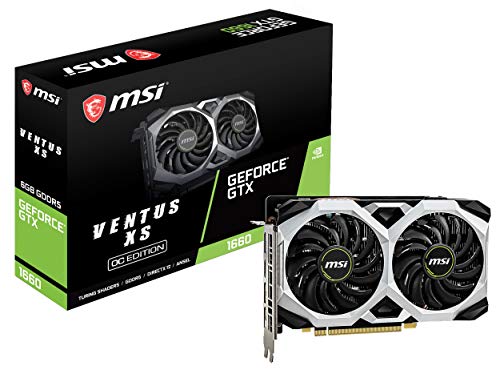
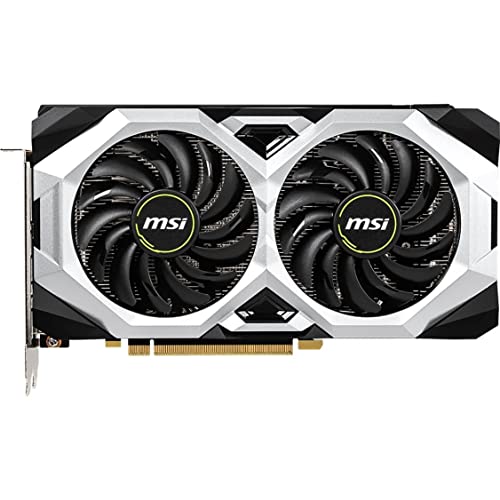
MSI GeForce GTX 1660 Ventus XS 6G OC
MSI lists this as a 6GB card with a 192-bit memory interface, HDMI and DisplayPort outputs, DirectX 12 support, dual fans and VR Ready OC branding. The memory type in the title is GDDR5, which is the slower generation compared with the GDDR6 on the Super variant covered below. The practical reading: it is a competent entry point that can drive a headset, but it is not the card you would hold up as future-proof.
It suits builders who want a new, boxed card at a mid-range cost tier and a short, easy installation. The XS in the name hints at a compact form, though the listing gives no dimensions, so measure your case before you buy rather than trusting the name.
- A new card avoids the uncertainty that comes with renewed hardware
- The 192-bit memory bus is listed, which is a healthy width for this class
- HDMI and DisplayPort outputs cover most wired headset setups
- GDDR5 is a step behind the GDDR6 on the Super model
- 6GB of memory limits comfort in demanding titles at high render resolutions
Skip it if the Super variant is available at a similar cost, since the memory type is the easiest upgrade in this tier. It sits between the renewed GTX 1060 and the RTX 2060 in capability, and the next pick adds ray tracing support to the same 6GB capacity.
MSI GeForce RTX 2060 Ventus GP 6GB
The title packs in a lot: 6GB of GDDR6, a 192-bit bus, a 1710MHz boost clock, ray tracing support, the Turing architecture and VR Ready labeling. Of the older cards here, this is the one that carries the most modern feature set. Ray tracing is not the reason most people pick a VR card, but a newer architecture generally keeps driver support and software features current for longer than designs that predate it.
It is aimed at players who want a bridge between the budget older cards and the 16GB Radeon: newer-generation features, GDDR6 speed, and a memory size that works for most mainstream VR titles without stretching the budget into premium territory.
- GDDR6 memory is faster than the GDDR5 on the other 6GB options
- Turing architecture and ray tracing support extend the feature set
- A 1710MHz boost clock is stated right in the title
- 6GB is the same capacity as cheaper cards, so memory headroom is not improved
- The title is cut off, so confirm the exact model and cooler on the product page
Skip it if your goal is maximum memory per unit of spend, because the XFX RX 580 gives more capacity. If you want to stay in the same tier but prefer the GTX line, the Super card below is the closest alternative and drops the ray tracing label.
MSI GeForce GTX 1660 Super Gaming X 6GB
This listing shows 6GB of GDDR6 on a 192-bit interface, DirectX 12, HDCP support, a dual-fan cooler and VR Ready OC branding. The Gaming X name usually signals the better-cooled tier of MSI’s lineup, though the title itself describes nothing beyond two fans. What it clearly offers is the combination older VR shoppers keep chasing: GDDR6 speed, a wide bus and a new-in-box purchase at a mid-range cost tier.
It is a good fit for someone moving from integrated graphics or a very old card into a first headset, who wants no surprises and accepts that the memory pool is modest.
- GDDR6 memory is the faster type among the 6GB cards without ray tracing
- Dual fans and the Gaming X line suggest a more capable cooler than entry models
- HDMI and DisplayPort outputs are listed for headset and monitor connections
- It lacks the ray tracing support that the RTX 2060 lists
- 6GB limits comfort for high-resolution headsets at maximum quality
Skip it if you want long-term headroom, because the 16GB Radeon is a different class. If you simply want a dependable entry card and the budget is tight, this is the practical last stop in the list, and it works as a comparison point for every other pick above it.
Who Needs a Card Built Around VR
First-time headset owners with an older PC
Many people buy a headset first and discover afterward that their graphics card is the weak link. If your current card has less than 6GB of memory, or lacks a modern DisplayPort or HDMI output, the headset will either refuse to run or run poorly. A VR Ready card with 6GB is the practical floor for a smooth first experience, and any of the older cards here can clear that bar without much fuss.
Players who keep upgrading their headset
Headset resolutions have climbed with each generation, and the card that handled your first model may struggle with the next one. Buyers who expect to change headsets every couple of years should weight memory capacity and connector standards heavily, which points toward the 16GB Radeon or the 8GB RX 580 as the more forward-looking options.
Builders who also play flat-screen games
A VR card is rarely only a VR card. The same hardware drives a monitor the rest of the week, so features such as ray tracing or HDMI 2.1b may matter for your desktop gaming even if they do nothing inside the headset. If most of your hours are on a monitor, let that decide between the RTX 2060 and the GTX options.
A headset in a family room means the PC is switched on, moved and plugged around by several people. For that situation, a new card with a standard warranty and plain connectors is kinder than a clever bargain, because a fault during a birthday weekend is a bigger problem than a lower frame ceiling.
How to Choose
Video memory: set the floor at 6GB
As a rule of thumb, 6GB is the minimum for comfortable mainstream VR, 8GB is a safer middle, and 12GB to 16GB is where you stop worrying. Memory shortages show up as sudden hitches rather than a gradual slowdown, and they often appear only in the busiest scene of a game, which is the worst possible symptom inside a headset. If you plan to raise render resolution above the headset’s default, aim higher than the floor, and treat a 3GB card as a stopgap at best.
Output connectors and the headset link
Wired headsets connect through DisplayPort or HDMI, and wireless kits still need a solid wired connection between the router and the PC. Check which port your headset or its link box uses, then confirm the card has that port natively. Adapters add cost and sometimes introduce signal trouble, so a native match is better. Count outputs too: a headset plus two monitors needs three free ports. If a card offers several DisplayPort outputs, keep one free for the headset and put the monitors on the others, so you never have to unplug a screen to play.
Power supply and connectors
Older mid-range cards generally fit a 450W to 550W supply, while current 16GB cards usually ask for a larger unit with the matching cable. The titles here do not state requirements, so read the manufacturer sheet and count the PCIe power connectors on your supply before ordering. A supply with 80 Plus certification and a clean label is a better foundation than an unbranded unit with a big number. As a working threshold, leave at least 100W of margin above the card maker’s stated minimum, and avoid daisy-chaining a single cable to feed multiple power sockets on one card.
Cooling and case fit
A dual-fan cooler is the common standard, but thickness varies. Cards described as 2.5-slot designs need a full ATX-style case and open adjacent slots. Measure the clearance between the rear panel and your front fans, because listings rarely give length. Long headset sessions keep the card loaded for hours, so airflow matters more here than in short gaming bursts.
New versus renewed, and warranty length
Renewed cards save money, but warranty windows are usually shorter and wear is invisible. Look for a clear return period, a stated seller warranty, and photos that show the real unit. Where the difference in cost tier is small, a new card is usually the calmer choice. Budget models commonly cut corners on the cooler, the backplate and the warranty length, so inspect those three areas before you decide.
CPU, RAM and storage balance
VR is also a CPU workload. A six-core processor and 16GB of system memory are a reasonable baseline, and a solid-state drive helps with load times and shader caching. Ignore boost-clock marketing, RGB lighting and overclock badges when ranking cards; they rarely change the headset experience. A balanced older system with a mid-range card usually feels better than a lopsided one with a premium card and a tired processor. Because the headset renders two views and the processor must prepare each frame on time, a weak CPU can cap a strong card. Look for at least 6 cores and 12 threads in the CPU, 16GB of dual-channel memory, and a drive with room for several large VR titles, since many of them are bigger than flat-screen games.
Ignore the “OC” in a name unless the clock speed is shown in the title, since factory overclocks on this class of card tend to be small. Ignore RGB. Pay attention instead to the cooler (two fans beat one), the presence of a metal backplate, the warranty length, and whether the card’s output list matches your headset. Cheap listings from unfamiliar brands often hide shorter warranties and thinner cooling, which is exactly the part of a card that gets stressed by a two-hour headset session.
New Card or Renewed Card for a Headset
Most buyers in this price conversation face the same fork: a new mid-range card with a clean warranty, or a renewed older card that costs less. The table sets out how the two paths differ for a headset specifically.
| Factor | New card | Renewed card |
|---|---|---|
| Warranty | Full manufacturer coverage in most cases | Seller-defined and often shorter |
| Wear and age | No prior use | Unknown history |
| Driver support | Depends on generation | Older cards may be near the end of active updates |
| Return flexibility | Usually standard retail terms | Check the seller’s window carefully |
| Cost tier | Mid-range to premium | Budget |
| Fit for VR | Best for long-term use | Best for trying VR cheaply |
When a renewed card makes sense
Buying renewed is defensible when you are not sure VR will stick. The loss from a card that disappoints is smaller, and you can resell it. Choose a seller with a clear return policy, and run the card at stock settings for the first week so any fault appears inside the return window. The renewed GTX 1060 in this guide is the obvious candidate for this path. A sensible checklist: ask for the seller’s return window in days, confirm the cooler fans spin freely when you first boot, and keep the original packaging until the trial period closes.
When a new card earns its place
If the headset will be a daily device, or you want the card to last through a future headset upgrade, buy new. You also get a cleaner warranty path, and you avoid the quiet risk of fan wear or dried thermal paste on an older unit. The GTX 1660 Super, RTX 2060 and RX 9060 XT all fall on this side of the line.
Setup, Compatibility and Upgrade Tips
What to check before buying
Write down four things: your headset’s required port, the free PCIe slot type on your motherboard, the spare power connectors on your supply, and the clearance inside your case. Most failed installs trace back to one of these, not to the card itself. Also note your monitor’s input, because a card with fewer ports may force an adapter on the screen you already own. If you are replacing a card, photograph the existing cable layout first; it saves ten minutes of guesswork later.
What to upgrade first
If your system has 8GB of memory, a hard drive as the main disk, or a processor with four slow cores, the graphics card will not fix everything. Upgrade the card first only when its memory is under 6GB; otherwise, check memory capacity and drive type before spending on a larger card. Case airflow is another cheap first fix: a single extra intake fan can lower the temperature of a card that will sit under load for an hour at a time. Moving to 16GB of system memory and a solid-state drive often delivers a quicker lift than a mid-tier card swap.
Common compatibility traps
A card with a DVI port does not help a headset that needs DisplayPort. Older power supplies may only offer a six-pin connector, which rules out some models. Some boards need a BIOS update before a newer card shows an image. And a PCIe 5.0 card still runs in an older slot, but the physical slot must be a full-length x16 to seat it properly. Finally, uninstall old graphics drivers cleanly when switching between Radeon and GeForce cards, or leftover files can cause black screens at the first boot.
Which One Fits Your Situation
You are buying your first headset for a family PC
Choose the MSI GeForce GTX 1660 Super Gaming X. It is new, uses GDDR6 and has a dual-fan cooler, which makes it the least fussy option for a household machine that other people also use for homework and streaming.
You want the longest runway for future headsets
Choose the ASUS Radeon RX 9060 XT 16GB. Its memory and connector standards leave the most room for sharper panels, wireless streaming setups and heavier texture packs, which is exactly where older cards run out of road first.
You want newer features without moving to the premium tier
Choose the MSI GeForce RTX 2060 Ventus GP. Ray tracing and GDDR6 give it the most modern feature set among the 6GB cards, and it doubles as a capable card for flat-screen games between VR sessions.
You need the most memory for the smallest budget
Choose the XFX Radeon RX 580 GTS XXX Edition. Eight gigabytes and three DisplayPort outputs make it flexible for tight budgets, provided your power supply and case can support it and you accept an older design.
Common Mistakes
- Buying on memory type alone and ignoring total capacity, when a 6GB GDDR6 card can still run out of room before an 8GB card does
- Skipping the case-clearance measurement and finding that a 2.5-slot card will not fit beside your other components
- Assuming a VR Ready badge guarantees smooth play at the highest render resolution of every headset
- Ordering a renewed card from a seller with no clear return policy or a very short protection window
- Forgetting that a headset needs a specific port, then discovering the card has only DVI where it matters
- Pairing a modern card with a very old processor or 8GB of system memory and blaming the card for the stutter
Related guides
- Gaming Headsets For Competitive Fps Directional Audio
- Threadripper Vs Xeon Vs Core I9 For Workstations
- Compact Mini Itx Gaming Pcs For Small Desks
Frequently Asked Questions
How much video memory do I need for VR?
Six gigabytes is a practical floor for mainstream titles, and eight gigabytes gives a more comfortable margin. If you plan to raise render resolution or use high-resolution texture packs, look at 12GB or more.
Is a VR Ready label enough?
It indicates that the card met a basic bar when the label was created, but it says little about newer headsets. Treat it as a minimum, not as a promise of smooth play at every setting.
Do I need ray tracing for VR?
No. Most VR titles do not rely on it, and many players turn it off to protect frame consistency. It is a bonus if you also game on a flat screen, which is why the RTX 2060 is listed.
Can a renewed card handle VR?
It can, if the hardware is in good shape and the seller offers a clear return window. Run it at stock settings for the first few days so any weakness shows up early, while returning it is still easy.
Which port should my headset use?
Most wired headsets use DisplayPort or HDMI. Check the headset manual, then pick a card with that port natively rather than relying on an adapter that might limit the signal.
Will a larger power supply help performance?
Not directly. A bigger supply simply ensures stable power, so choose wattage to meet the card’s requirement with some margin rather than to chase speed.
Final Words
The right card for VR depends on how long you want it to last. The 16GB Radeon is the choice for buyers who want years of headroom, the RTX 2060 and GTX 1660 Super cover mainstream use with a modest budget, and the RX 580 and renewed GTX 1060 serve people trying VR on a shoestring. Measure your case, read the power requirements, and confirm your headset’s port before you order. With those three checks done, any of these six can give you a smooth, low-drama first step into virtual reality, and a clear path to upgrade again when your next headset arrives.