
Key takeaways
- Skipping the check that the card is seated and screwed in before blaming sag.
- Putting the post in the middle where it blocks airflow.
- Over-tightening the bracket.
- Buying a magnetic stand for a non-metal floor.
- Working inside the PC while it is plugged in.
The fastest fix for a sagging graphics card is a support bracket: a small adjustable post that touches the underside of the cooler near the far end, lightly, without lifting the card. If you do not want to buy one, a cord from the top of the case or building the PC in a different orientation can do the same job.
Our top picks
 acer GPU Support Bracket
- [Esports-grade Materials] Constructed from high-quality aluminum alloy, the…
- [Ajustment Freely] The detachable design features precise 0.5mm…
- [Powerful Magnetic Design] The top and bottom are…
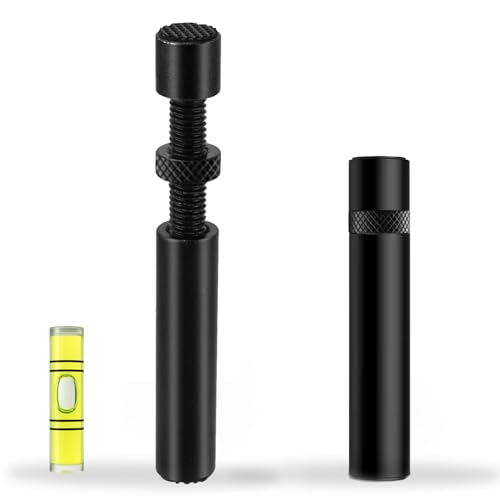 California JOS GPU Support Bracket Graphics Card
- ✅ Package Includes: 1 PCS Large Black GPU…
- ✅Prevents GPU Sag and Damage
- ✅Durable All-Aluminum Build
| Product | Key specs | |
|---|---|---|
| acer GPU Support Bracket | [Esports-grade Materials] Constructed from high-quality aluminum alloy, the… [Ajustment Freely] The detachable design features precise 0.5mm… [Powerful Magnetic Design] The top and bottom are… | Check price |
| California JOS GPU Support Bracket Graphics Card | ✅ Package Includes: 1 PCS Large Black GPU… ✅Prevents GPU Sag and Damage ✅Durable All-Aluminum Build | Check price |
 GPU Support Bracket | Check price | |
 nkomax Graphics Card GPU Brace Support | All-aluminum metal material - Provides strong and long-lasting… Screw adjustment design - The graphics card bracket… Bottom hidden mag.net design - The mag.net hidden… | Check price |
As an Amazon Associate we earn from qualifying purchases at no extra cost to you.
What GPU sag is
Modern graphics cards are long, thick and heavy, but they are held in place only by the PCIe slot and the metal bracket at the rear. Gravity pulls the free end of the card downward, so it droops. Guides from retail and review sites describe this as the cause of the tilted look many builders notice, and some describe slot wear or solder stress over years. Those long-term claims are not backed by maker data, so treat them as precautionary advice.
How much sag needs action
One guide suggests that a gap of about 2 to 5 mm is worth watching, and anything beyond roughly 5 mm warrants support. Another suggests heavier cards, around 1.2 to 1.5 kg and up, deserve a bracket. These are rules of thumb from guide writers, not manufacturer specifications. Your card maker may include its own advice or a bracket in the box, so check the packaging first.
Fix options at a glance
| Fix | Best for | How it works | Limits |
|---|---|---|---|
| Adjustable support bracket | Most builds | Post rests on the case floor or power supply cover and props the cooler | Needs vertical space; must be set to light contact only |
| Cord or braided line | Zero-cost option | Loop under the heatsink shroud, suspend from the case top | Needs a safe anchor point; looks improvised |
| Slot-anchored bracket | Cases with metal floor issues | Bolts to the expansion slots, supports from the rear side | Works only in compatible cases |
| Vertical mount with riser | Display builds | Removes the cantilever by standing the card up | Needs case support and a good riser cable |
| Horizontal board orientation | Open-frame or bench builds | Card hangs differently under gravity | Only works in special cases |
Step-by-step: fitting a support bracket
- Shut down, switch off the power supply and unplug the PC.
- Measure the gap between the underside of the card and the surface below it.
- Set the bracket height slightly short, then extend it until it just touches the cooler.
- Place the post near the free end of the card, not the middle, and keep it clear of fans and cable paths.
- Confirm the surface beneath is rigid. If it flexes, you have only moved the problem.
- Check that the card sits level and the rear bracket is still screwed in without strain.
The most common bracket mistake
Raising the card past level. Guides warn that over-tightening pushes the card upward and stresses the slot in the opposite direction. The bracket should support the weight, not act like a jack. Magnetic bases only work on steel surfaces, so confirm the material of your case floor before buying one.
Cord or braided line fix
A thin, strong cord looped around a solid part of the cooler shroud and hung from a top mounting point can hold the far end up. Choose a point that does not block fans, avoid sharp edges that could cut the cord, and keep cords away from moving fan blades and cables. This is an improvised solution; if the card has a delicate plastic shroud, a bracket may be safer.
Is sag dangerous?
Retail guides link long-term sag to PCIe slot or solder strain but no maker data is cited, so the honest answer is that it is a precaution rather than a proven failure cause. Reasons to fix it still include appearance, reducing stress on the slot, and moving the PC safely. If you see cracked plastic, a loose card, or display dropouts, power the PC down, reseat the card, and contact the card or motherboard maker if the problem remains.
Moving or shipping a PC
Before transporting a PC, many builders remove or secure heavy cards, and case makers often include a brace or foam for shipping. Follow the case manual. A bracket that works while the PC sits still may not protect the card during movement.
Pick X if…
| Pick | If |
|---|---|
| Standard adjustable bracket | Your case has space beneath the card |
| Cord | You need a free fix and have a safe anchor point |
| Slot-mounted support | The floor is plastic or uneven |
| Vertical mount | You also want a display look and your case supports it |
| Do nothing | The card is light and the sag is tiny, with the rear bracket secure |
Common mistakes
- Skipping the check that the card is seated and screwed in before blaming sag.
- Putting the post in the middle where it blocks airflow.
- Over-tightening the bracket.
- Buying a magnetic stand for a non-metal floor.
- Working inside the PC while it is plugged in.
Alternatives
- Check whether your card shipped with a stand or support clip.
- Choose a case that includes a GPU support feature.
- If shopping for a card, compare weight and thickness listed by the maker, as lighter coolers sag less.
Why cards sag more now
Recent high-end cards use large heatsinks and thick, multi-fan coolers, often occupying three or more expansion slots. More metal and more fins mean more weight hanging from the slot and the rear bracket. Case makers have responded with built-in supports, adjustable arms and vertical-mount brackets. If you are choosing a case for a large card, look at what the maker lists for card length, thickness and any included support, and check whether the power supply shroud sits at a height that suits a standard bracket.
Checking whether your setup is okay
- Look at the card from the side with the case open. A visible tilt away from the slot line is the main sign.
- Check that the rear bracket screws are present and snug, since missing screws let the card pivot.
- Make sure the card clicks fully into the slot and the retention latch, if your board has one, is engaged.
- Look at the power cable. A heavy cable pulling sideways can add to the droop, so route it with a gentle curve and no strain.
If the card is in a PC you move often, treat support as a necessity rather than a cosmetic fix, and follow the case maker’s transport advice.
Frequently Asked Questions
Do I need a GPU support bracket?
Not always. Lighter cards with a secure rear bracket may show only slight droop. Heavier, thicker cards benefit most, and a bracket is a low-cost way to reduce strain.
Where should a GPU bracket go?
Near the free end of the card, away from fans. It should touch the cooler lightly so the card stays level.
Can GPU sag damage the PCIe slot?
Some guides say long-term sag may strain the slot or solder joints, but this is a precaution rather than something makers have documented in detail. Supporting the card is inexpensive insurance.
Is a cord a safe way to support a graphics card?
It can work if the cord is strong, anchored well, and kept away from fans. A purpose-made bracket is usually tidier and more predictable.
Will a vertical mount fix sag?
It removes the sideways cantilever, but it needs a compatible case and a good riser cable matched to the card’s PCIe generation.
FAQ
Is sag dangerous?
Do I need a GPU support bracket?
Where should a GPU bracket go?
Can GPU sag damage the PCIe slot?
Is a cord a safe way to support a graphics card?
Will a vertical mount fix sag?
More from Amazon
Programs that pair well with the guide above. Offers and eligibility are set by Amazon and may change.
Free shipping on eligible items, Prime Video and more. Eligible new members can start with a free trial.
Start a Prime free trialAd-free music streaming. Eligible new subscribers can start with a free trial.
Try Music Unlimited freeA Prime membership for ages 18-24 with a trial period. Eligibility is set by Amazon.
See Prime for Young AdultsAudiobooks and podcasts to listen to on the go. Eligible new members can start with a free trial.
Try Audible freeAs an Amazon Associate we earn from qualifying purchases.




