
Key takeaways
- GPU with a hardware encoder: NVIDIA says NVENC is an independent section of a GeForce GPU used to encode video, which lifts the strain from the CPU. AMD and Intel offer their own equivalents (AMF and Quick Sync).
- CPU with 8 or more cores: useful for the game, the capture app, chat overlays and background tasks.
- 32 GB of RAM: 16 GB can work, but a game, OBS, a browser and a chat window add up quickly.
- NVMe SSD: keeps game loading and local recordings from stalling.
- Stable upload connection: a wired Ethernet link matters as much as any component.
A good gaming PC for streaming is one with a modern GeForce RTX or Radeon RX graphics card that has a hardware video encoder, a CPU with at least 8 cores, 32 GB of DDR5 memory, and a fast NVMe drive. The graphics card matters most because its dedicated encoder handles the stream so the game keeps its frame rate. Everything else is about leaving headroom for the game, the capture software and a browser running side by side.
Our top picks
 ZYNEEX Prebuilt Gaming Desktop PC
- 【POWERFUL PERFORMANCE】
- 【SMOOTH GAMING】
- 【FAST & AMPLE STORAGE】
 KOTIN Gaming PC Desktop
- High-FPS Gaming PC Performance: AMD Ryzen 7 8700F…
- 16GB DDR5 + 1TB Gen4 NVMe SSD: 16GB…
- Cool, Clean Gaming Tower Build: A CPU air…
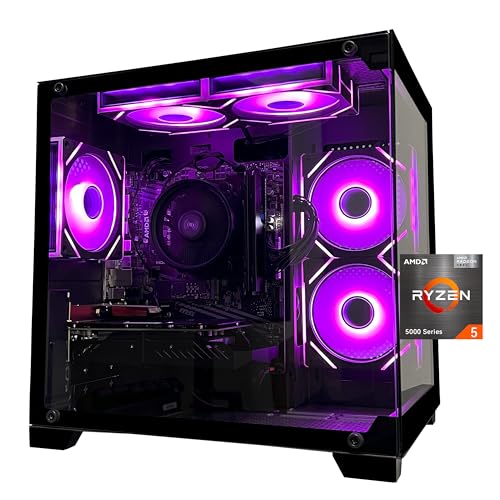 SKYESEV Prebuilt Gaming Desktop PC
- Processor specifications: Adopting AMD Ryzen 5 5600 processor,…
- Graphics Card: Features GeForce RTX 3050 graphics card…
- Memory configuration: Equipped with 32GB DDR4 RAM (16GB…
| Product | Key specs | |
|---|---|---|
| ZYNEEX Prebuilt Gaming Desktop PC | 【POWERFUL PERFORMANCE】 【SMOOTH GAMING】 【FAST & AMPLE STORAGE】 | Check price |
| KOTIN Gaming PC Desktop | High-FPS Gaming PC Performance: AMD Ryzen 7 8700F… 16GB DDR5 + 1TB Gen4 NVMe SSD: 16GB… Cool, Clean Gaming Tower Build: A CPU air… | Check price |
| SKYESEV Prebuilt Gaming Desktop PC | Processor specifications: Adopting AMD Ryzen 5 5600 processor,… Graphics Card: Features GeForce RTX 3050 graphics card… Memory configuration: Equipped with 32GB DDR4 RAM (16GB… | Check price |
 FIFINE AmpliGame AM8T XLR/USB Gaming Microphone Set | USB/XLR Connectivity-AM8T comes with a dynamic microphone and… Vibrant RGB Light-The streaming microphone RGB illuminates your… Enhanced Features-Featured -50dB sensitivity and cardioid polar pattern,… | Check price |
As an Amazon Associate we earn from qualifying purchases at no extra cost to you.
The short version
Think of streaming as running two heavy jobs at once: rendering the game, and compressing the picture into a video feed that goes out over your internet connection. A PC that is only just good enough for the game will struggle once the second job starts. The parts below are listed in order of how much they affect a stream.
- GPU with a hardware encoder: NVIDIA says NVENC is an independent section of a GeForce GPU used to encode video, which lifts the strain from the CPU. AMD and Intel offer their own equivalents (AMF and Quick Sync).
- CPU with 8 or more cores: useful for the game, the capture app, chat overlays and background tasks.
- 32 GB of RAM: 16 GB can work, but a game, OBS, a browser and a chat window add up quickly.
- NVMe SSD: keeps game loading and local recordings from stalling.
- Stable upload connection: a wired Ethernet link matters as much as any component.
Why the GPU encoder is the key part
OBS Studio, one of the most common streaming apps, documents several encoding paths. Its hardware encoding page lists NVIDIA NVENC, AMD AMF and Intel Quick Sync Video, and keeps x264 software encoding as the fallback when no hardware option is available. The OBS documentation notes that software encoding uses more CPU, and that early hardware encoders produced lower quality than x264 at its veryfast preset. That is why older advice said to stream with the CPU. On recent hardware the situation has changed, and the OBS page recommends NVENC on Turing-generation or newer GPUs for best results.
NVIDIA lists the RTX 50 series (5090, 5080, 5070, 5060 and 5050) on its broadcasting page and highlights AV1 encoding for streaming to services such as YouTube and Discord, describing AV1 streams as clearer and lighter on bandwidth. Whether your chosen platform accepts AV1 is a separate question, so read the platform’s own streaming settings before building around it. H.264 remains the widest-supported option.
Streaming PC tiers by performance class
| Tier | Typical graphics card class | CPU class | RAM / storage | Good for |
|---|---|---|---|---|
| Entry | RTX 5060 class or Radeon RX 9060 class | 6 to 8 core Ryzen 5 or Core Ultra 5 | 16 to 32 GB DDR5, 1 TB NVMe | 1080p gaming with a 1080p stream, esports and lighter titles |
| Mid-range | RTX 5070 class or Radeon RX 9070 class | 8 core Ryzen 7 or Core Ultra 7 | 32 GB DDR5, 1 to 2 TB NVMe | 1440p gaming with a 1080p stream and local recording |
| High-end | RTX 5080 or RTX 5090 class | Ryzen 7 9800X3D or better, Core Ultra 9 | 32 to 64 GB DDR5, 2 TB or more NVMe | 4K gaming, high-bitrate recording, editing clips on the same PC |
These are performance classes, not guarantees. Exact frame rates depend on the game, the settings and the stream resolution, so read reviews of the specific game you play most.
Processor: how many cores do you need?
With a hardware encoder doing the video work, the CPU no longer has to carry the stream, but it still runs the game logic, the capture software, audio mixing, overlays and chat tools. Eight cores is a sensible target for a mixed gaming and streaming machine. Chips with large cache, such as the Ryzen 7 9800X3D, are popular among gamers for frame rate, while higher core counts help if you also want to encode on the CPU or edit video. If you plan to use x264 software encoding, a higher core count helps considerably, and reviewers generally suggest it only when no suitable GPU encoder is available.
Memory and storage
32 GB of DDR5 is the comfortable amount in 2026 for gaming plus streaming. A modern game can use a large share of 16 GB by itself, and OBS, a browser with a chat dock and a voice app all compete for the rest. If the system runs out of memory, it starts using the drive as overflow, which causes stutter in both the game and the stream.
For storage, an NVMe SSD of 1 TB is the practical minimum because games are large and local recordings take space quickly. Many streamers record to a second drive so the game drive is not busy writing video while the game loads textures.
Video memory matters more than people expect
Capture software and the game share the GPU’s video memory. NVIDIA lists 16 GB of GDDR7 on the RTX 5080 and 32 GB on the RTX 5090. Cards in the mid-range often carry less, and modern games at high texture settings can fill it, leaving little room for the encoder and scene composition. If you play at 1440p or 4K with high textures, favor a card with more video memory over a slightly faster card with less.
Decision table: pick this if
| Your situation | Pick this approach |
|---|---|
| Streaming esports or older games at 1080p | Entry tier with a hardware encoder; spend the savings on a good microphone and camera |
| Streaming new releases at 1440p | Mid-range GPU, 8 core CPU, 32 GB RAM |
| Recording long sessions and editing clips locally | High-end tier with 2 TB NVMe plus a second drive |
| Streaming and gaming at 4K | RTX 5080 or 5090 class GPU, strong power supply and cooling |
| Tight budget but need a stable stream | Prioritize GPU encoder, 32 GB RAM and wired Ethernet over a fancy case |
Single PC or dual PC?
Dual-PC setups use one machine for the game and a second one with a capture card for encoding. They were popular when CPU encoding was the standard. With current GPU encoders, a single well-specified PC is enough for most streamers, and a second PC is mainly worthwhile for large productions, very high bitrates or when the game PC must never share its resources.
Common mistakes
- Buying for the game alone. A PC that barely reaches target frame rates has nothing left for the encoder.
- Ignoring the internet connection. A powerful PC cannot fix a weak or unstable upload. Use wired Ethernet and check your platform’s recommended bitrate.
- Choosing only 16 GB of RAM. It leads to stutter once overlays and a browser are open.
- Skipping the power supply. High-end graphics cards need a quality supply; follow the card maker’s stated requirement.
- Overheating. Streaming keeps the machine under load for hours, so case airflow matters.
- Assuming AV1 works everywhere. Confirm your platform and viewers support the codec you pick.
Frequently Asked Questions
Can I stream with an integrated graphics PC?
Light games can run on integrated graphics, and Intel Quick Sync can encode video on supported Intel processors. Demanding games will not reach smooth frame rates with integrated graphics alone, so a dedicated graphics card is the realistic choice for most streamers.
Is NVIDIA or AMD better for streaming?
NVIDIA’s NVENC has long been the most widely supported hardware encoder in streaming software, and the maker promotes optimization for OBS, XSplit and Streamlabs. AMD cards also include a hardware encoder. Reviewers compare the quality of each generation, so read current reviews of the exact card before deciding.
How much RAM do I need to game and stream?
32 GB is the comfortable amount. 16 GB can work for lighter games with few background apps, but it leaves little margin once streaming tools, a browser and chat are running.
Do I need a capture card?
Not on a single-PC setup, because OBS captures the game directly. A capture card is mainly needed to bring in a console or a second PC.
Should I use CPU or GPU encoding?
Use the GPU encoder first. OBS documentation keeps x264 as the fallback when no suitable hardware encoder exists, because it uses much more CPU and can reduce game performance on a single machine.
Does a streaming PC need a special power supply?
No special type, but it should meet the graphics card maker’s wattage guidance and come from a reputable brand, since the machine will run under heavy load for long sessions.
FAQ
Processor: how many cores do you need?
Single PC or dual PC?
Can I stream with an integrated graphics PC?
Is NVIDIA or AMD better for streaming?
How much RAM do I need to game and stream?
Do I need a capture card?
Should I use CPU or GPU encoding?
Does a streaming PC need a special power supply?
More from Amazon
Programs that pair well with the guide above. Offers and eligibility are set by Amazon and may change.
Free shipping on eligible items, Prime Video and more. Eligible new members can start with a free trial.
Start a Prime free trialAd-free music streaming. Eligible new subscribers can start with a free trial.
Try Music Unlimited freeA Prime membership for ages 18-24 with a trial period. Eligibility is set by Amazon.
See Prime for Young AdultsAudiobooks and podcasts to listen to on the go. Eligible new members can start with a free trial.
Try Audible freeAs an Amazon Associate we earn from qualifying purchases.




