Key takeaways
- Find the best console controllers for PC, from Xbox and PlayStation to Switch Pro, with Bluetooth, wired USB, comfort and compatibility compared.
A console controller can be one of the simplest upgrades for a Windows PC. Many players already own one, the layout is familiar, and most modern console pads connect over Bluetooth or wired USB without a separate receiver. This guide covers first-party Xbox, PlayStation and Nintendo controllers designed for a console that also work with Windows PC, rather than PC-only gamepads with no console origin.
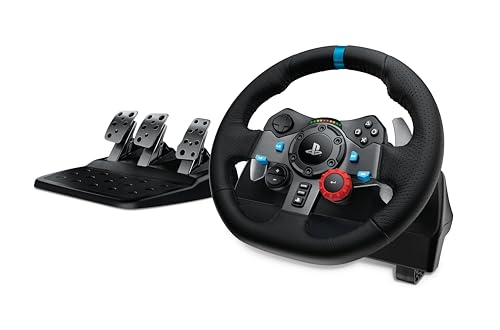
That distinction matters. A separate article on this site looks specifically at racing gamepads, a narrower subset built around driving games. This roundup is broader, covering general-purpose console controllers for everyday PC play. Each pick states its connection type and PC compatibility.
As an Amazon Associate, we earn from qualifying purchases.
Quick answer
For most PC players, the standard Xbox Wireless Controller is the simplest choice because Windows recognises it readily and it works over Bluetooth, Xbox Wireless and wired USB-C. Players who want haptic feedback and adaptive triggers should look at the DualSense, while competitive players who want remapping and replaceable parts should consider the Elite Series 2 Core or the DualSense Edge.
How to choose
Start with compatibility. Xbox controllers have the clearest path on Windows, and many PC games show Xbox button prompts by default. DualSense controllers also work over Bluetooth and wired USB, with Steam support in many games, although some PlayStation features are available only in supported titles or over a wired connection. The Switch Pro Controller connects over Bluetooth or wired USB, but Windows games may not show Nintendo button prompts.
Connection type is next. Wired USB-C is usually the most reliable option, because it removes Bluetooth pairing and battery concerns. Bluetooth is convenient for a living-room setup or a laptop, although pairing can vary with the Bluetooth adapter. Xbox Wireless is available on Windows with the Xbox Wireless Adapter for Windows or a compatible built-in receiver.
Layout and battery arrangements also matter. Xbox controllers use an asymmetrical layout, with the left stick high and the right stick low. PlayStation and Switch Pro controllers use a symmetrical layout, but the Switch Pro follows Nintendo button labelling, with A on the right and B below it. Match the tier to your use: budget for occasional play, mid-range for comfort or haptics, premium for frequent players who want customisation.
1. Xbox Wireless Gaming Controller (2025) – Carbon Black
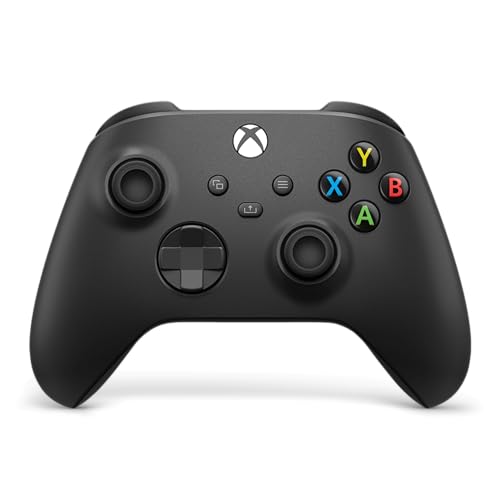
The Xbox Wireless Gaming Controller in Carbon Black is the most straightforward console controller for PC, and the default recommendation for most Windows players. It connects over Bluetooth, Xbox Wireless and wired USB-C, and Windows support is built in. Many PC games display Xbox button prompts without extra configuration.
Published specifications list textured grips and a hybrid D-pad that supports directional presses and diagonal movement. Power comes from two AA batteries, with battery life of up to 40 hours in published specifications for this controller family. A rechargeable battery pack is available separately, and the controller includes a 3.5mm headset jack. Its main limitation is the absence of pro features: no back buttons, adjustable trigger stops or interchangeable sticks.
- Tier: Budget
- Connection: Bluetooth, Xbox Wireless, wired USB-C
- PC compatibility: Windows 10 and Windows 11
- Power: Two AA batteries, up to 40 hours in published specifications
- ASIN: B0F1HX3WXX
2. PlayStation DualSense Wireless Controller – White
The PlayStation DualSense Wireless Controller in White brings the PlayStation 5 pad to PC, and its main appeal is feel rather than familiarity. It uses a symmetrical stick layout, and it adds haptic feedback and adaptive triggers that can change resistance during play. In supported games, those features can convey surface texture and weapon tension, although support varies by title and by launcher on PC.
Connection options are Bluetooth and wired USB-C. PlayStation lists the DualSense for PS5, PC, Mac and mobile use, and Steam provides DualSense support in many games. Over a wired connection, more features are available in supported titles than over Bluetooth.
The controller uses a built-in rechargeable battery charged over USB-C, and it includes a touch pad, motion sensor and light bar.
- Tier: Mid-range
- Connection: Bluetooth, wired USB-C
- PC compatibility: Windows PC over Bluetooth and wired USB-C, with feature support varying by game
- Power: Built-in rechargeable battery, charged over USB-C
- ASIN:
3. Nintendo Switch Pro Controller

The Nintendo Switch Pro Controller is the traditional-style pad for Nintendo Switch, and it also works on PC over Bluetooth and wired USB-C. It uses a symmetrical layout, and its published battery life is up to 40 hours on a single charge from its built-in rechargeable battery. That makes it useful for long PC sessions and for local multiplayer.
Published specifications list motion controls, HD rumble and a built-in amiibo reader for Nintendo Switch. Their availability on PC is limited: Windows games do not generally use amiibo, and motion and HD rumble support depends on the game.
On PC, the main trade-off is button labelling. The Switch Pro Controller follows Nintendo labelling, so the button on the right is A and the button below it is B, the opposite of the Xbox layout. Some games allow remapping, and Steam provides configuration options, but players should expect a learning curve if they move between Switch and PC.
- Tier: Mid-range
- Connection: Bluetooth, wired USB-C
- PC compatibility: Windows PC over Bluetooth and wired USB-C, with button prompts varying by game
- Power: Built-in rechargeable battery, up to 40 hours in published specifications
- ASIN: B01NAWKYZ0
4. Xbox Elite Series 2 Core Wireless Gaming Controller – Black

The Xbox Elite Series 2 Core Wireless Gaming Controller in Black is the premium Xbox option in this guide, aimed at players who want to tune the controller rather than simply use it as supplied. It shares the Xbox Wireless, Bluetooth and wired USB-C connections of the standard Xbox controller, and it works with Xbox Series X and S, Xbox One, Windows PC, Android and iOS. On Windows, button mapping is available through the Xbox Accessories app.
Published specifications list adjustable-tension thumbsticks, a wrap-around rubberised grip and shorter hair trigger locks. The hair trigger locks reduce trigger travel for faster input. The controller also includes a 3.5mm headset jack and a USB-C cable in the box.
The Core version is streamlined: it includes one interchangeable D-pad, two interchangeable thumbsticks, a USB-C cable and a thumbstick-adjustment tool, but not the full component pack, charging dock or carrying case. The built-in rechargeable battery is listed at up to 40 hours in published specifications.
- Tier: Premium
- Connection: Bluetooth, Xbox Wireless, wired USB-C
- PC compatibility: Windows PC, including button mapping through the Xbox Accessories app
- Power: Built-in rechargeable battery, up to 40 hours in published specifications
- ASIN: B07SFKTLZM
5. PlayStation DualSense Edge Wireless Controller

The PlayStation DualSense Edge Wireless Controller is the premium PlayStation option for PC, designed around customisation and repair rather than a single feature. It keeps the DualSense layout, haptic feedback and adaptive triggers, and it adds two sets of swappable back buttons, adjustable trigger stops, interchangeable stick caps and replaceable stick modules. The stick modules can be swapped if a stick wears or develops a fault.
Connection options are Bluetooth and wired USB-C, and PlayStation lists the controller for PS5 and PC use. As with the standard DualSense, feature support on PC varies by game, with wired USB-C generally providing the broadest support. Profiles can store button remapping, stick sensitivity and trigger dead zones. The box also includes a carrying case, a braided USB cable, spare stick caps and the two styles of back button.
The DualSense Edge uses a built-in rechargeable battery, and its battery life is shorter than that of the standard DualSense in published comparisons. Players who use it mainly on PC should plan to charge it regularly or use it wired for longer sessions.
- Tier: Premium
- Connection: Bluetooth, wired USB-C
- PC compatibility: Windows PC over Bluetooth and wired USB-C, with feature support varying by game
- Power: Built-in rechargeable battery, charged over USB-C
- ASIN: B0BSYFB99D
Who should skip
Not every PC player needs a console controller. If you play mainly keyboard-and-mouse games such as competitive shooters, strategy games or simulation titles, a controller may slow you down rather than help. If you play racing games that benefit from a wheel and pedals, or flight games that benefit from a stick and throttle, a general-purpose console pad is a compromise, and the racing-gamepad article on this site is a better starting point for driving games.
Players who need a specific feature should also check carefully before buying. If you want Hall effect sticks, a 2.4GHz dongle for PC, or a controller designed only for PC, none of the first-party picks above is built around those features. A premium controller is also a poor choice as a spare pad for occasional local multiplayer.
FAQ
Do console controllers work on PC without extra hardware?
In most cases, yes. The controllers in this guide connect over Bluetooth or wired USB-C, and Xbox controllers can also use Xbox Wireless with a compatible adapter. Some features, such as remapping, need companion software.
Which console controller is best for PC?
For most PC players, the standard Xbox Wireless Controller is the simplest choice, because Windows recognises it readily and many PC games use Xbox button prompts. The DualSense is a strong alternative for haptic feedback, while the Elite Series 2 Core and DualSense Edge suit competitive players who want remapping and customisation.
Can I use a Nintendo Switch Pro Controller on PC?
Yes. The Switch Pro Controller connects to a Windows PC over Bluetooth or wired USB-C, and Steam provides configuration options for it. Button prompts may follow the Xbox layout in some games, and Switch features such as amiibo reading do not generally carry over to PC.
Is wired or Bluetooth better for PC gaming?
Wired USB-C is usually the most reliable option, because it removes pairing and battery concerns. Bluetooth is more convenient for a living-room setup, although pairing can vary with the Bluetooth adapter in the PC.
Final verdict
The best console controller for PC depends on the platform you already use and the features you will actually use on Windows. For most players, the Xbox Wireless Controller is the safest starting point: it is simple to connect and widely supported. The DualSense is the best choice for haptic feedback and adaptive triggers, and the Switch Pro Controller is the best choice for players who already own a Switch and want one pad for both platforms.
Competitive players should look at the premium models. The Elite Series 2 Core suits players who prefer the Xbox layout and want adjustable sticks, trigger locks and profiles through the Xbox Accessories app. The DualSense Edge suits players who prefer the PlayStation layout and want back buttons, replaceable stick modules and profiles that travel between PS5 and PC. Choose the layout first, then check the connection type that suits your PC.
FAQ
Do console controllers work on PC without extra hardware?
Which console controller is best for PC?
Can I use a Nintendo Switch Pro Controller on PC?
Is wired or Bluetooth better for PC gaming?
More from Amazon
Programs that pair well with the guide above. Offers and eligibility are set by Amazon and may change.
Free shipping on eligible items, Prime Video and more. Eligible new members can start with a free trial.
Start a Prime free trialAd-free music streaming. Eligible new subscribers can start with a free trial.
Try Music Unlimited freeA Prime membership for ages 18-24 with a trial period. Eligibility is set by Amazon.
See Prime for Young AdultsAudiobooks and podcasts to listen to on the go. Eligible new members can start with a free trial.
Try Audible freeAs an Amazon Associate we earn from qualifying purchases.