Our Top Picks
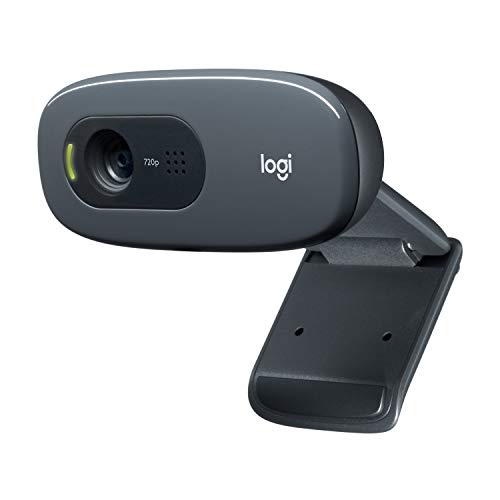 Logitech C270 720p Webcam Plug-and-Play Wide Screen Video1 Pack6 x 4 x 8 inches0.16 poundsCheck on Amazon
A 720p webcam is the sensible pick when video calls, classes, and streams matter more than cinema-grade footage. It keeps the image clear on a laptop screen, runs smoothly on modest internet connections, and costs far less than a 1080p or 4K camera. For most calls, the difference between 720p and higher resolutions is hard to spot, while the savings are easy to see. The three cameras in this guide all record in 720p and connect over USB with no extra software to buy.
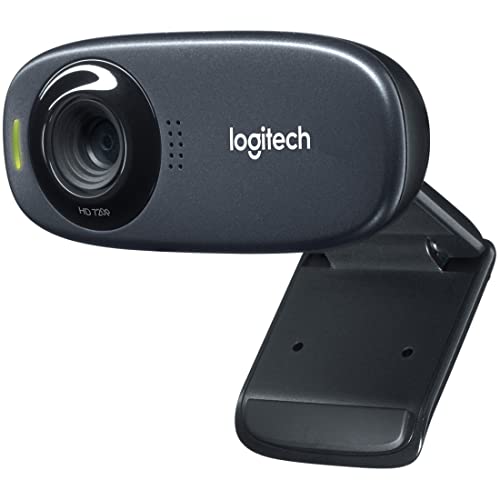
Each one covers a slightly different need. One is the long-running default for everyday calls, one adds a wider view for a small group, and one pairs a wider frame with higher-resolution still photos. All three work with the common video apps on Windows and Mac, and each one clips onto a monitor or sits on a desk stand. A 720p camera also uses less bandwidth than a higher-resolution model, which helps when several people share one connection.
Quick Picks
These three cameras cover everyday calls, group meetings, and photos in one budget-friendly set. Each one connects over USB and works with the video apps most people already use.
As an Amazon Associate we earn from qualifying purchases
| Product | Best for | Key spec from title |
|---|---|---|
| Logitech C270 HD | Everyday video calls | 720p at 30fps with 55-degree view |
| Microsoft LifeCam HD-3000 | Wider group calls | 720p with 68.5-degree view |
| Logitech C310 HD | Photos and video together | 720p video with 5MP photos |
How to Choose
Look at the viewing angle first
The viewing angle decides how much of the room the camera captures, and it matters more than most buyers expect. A narrow angle suits one person at a desk, since it frames the face and cuts out clutter behind. A wider angle fits two people side by side or a small group around a table. Check the listed diagonal field of view on the product page, and think about who needs to stay in frame before choosing between a 55-degree and a 68-degree lens. A camera with a tripod thread gives you another option when the monitor clip does not fit. Check the return policy before you buy.
Check the frame rate and light handling
A 720p camera should record at 30 frames per second for smooth motion, and most of the models in this guide do. Light handling matters just as much, since a camera facing a window can turn a face into a dark shape. Look for automatic light correction on the listing, such as Logitech RightLight or Microsoft TrueColor, which brighten the image in dim rooms. A camera with good light handling stays usable in a bedroom or a home office without extra lamps. Sit facing a lamp or a window, and the camera will reward you with a brighter, cleaner image. Good light beats a better sensor.
Listen to the microphone specs
The built-in microphone carries your voice on every call, so check what the listing says about it. A noise-reducing or noise-canceling microphone cuts background hum from fans and keyboards, which keeps speech clear for the other side. A mono microphone is fine for one speaker, while a wider pickup suits a small group. If you already own a headset or a desk microphone, the camera mic matters less, and you can pick on image quality alone. A microphone with a mute button or a privacy shutter adds control when the call pauses or the room gets noisy. Test the microphone before an important call.
Confirm the mount and the cable
A webcam needs to sit steady on top of a monitor or a laptop lid, and the mount decides whether it stays put. A universal clip fits most screens, while a tripod thread adds flexibility for a desk stand. Check the cable length too, since a short cable limits where the camera can sit relative to the computer. A six-foot cable reaches a monitor on a riser or a laptop on a side table without an extension. A clip with a firm grip stays put on a thin laptop lid, while a loose one slides down during the call. A longer cable gives you more options.
The 3 Best Options
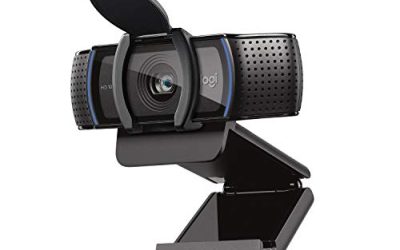
Logitech C270 HD
The Logitech C270 HD is the long-running default for everyday video calls, and its staying power comes from doing the basics well. The 720p sensor records at 30 frames per second, and RightLight 2 adjusts the image when the room light changes. The 55-degree view frames one person neatly without showing the whole room, and the noise-reducing microphone keeps speech clear over keyboard clicks. A six-foot cable gives the camera room to sit where it works best. The camera has been sold for years, so most video apps recognise it at once, and the clip fits monitors of many sizes without fuss. It just works.
Specs
- 720p HD video at 30fps
- 55-degree diagonal field of view
- RightLight 2 automatic light correction
- Noise-reducing microphone
- 6-foot USB cable
- 3MP still photos for snapshots between calls
- Widescreen 16:9 video format
- Universal monitor clip mount
- Works with Windows and Mac video apps
Best for: Everyday one-person video calls on a desktop or laptop.
Watch out for: The 55-degree view is tight for two people sharing one camera.
Microsoft LifeCam HD-3000
The Microsoft LifeCam HD-3000 trades a narrower frame for a wider one, which makes it the pick for calls with two people or a small group. Its 68.5-degree view fits a pair side by side without pushing the camera far back, and TrueColor technology adjusts exposure and white balance as the light changes. The noise-canceling microphone focuses on the speaker and cuts background hum, and the USB-A plug connects to almost any computer without an adapter. The wide frame also suits a teacher at a whiteboard or a pair sharing one screen, where a narrow lens would cut someone out. Setup takes minutes.
Specs
- 720p HD video at 30fps
- 16:9 widescreen format
- TrueColor automatic exposure and white balance
- Noise-canceling microphone
- 68.5-degree field of view
- USB-A connection that fits almost any computer
- Skype and Teams compatible
- Universal clip for monitors and laptops
- Works with common video calling apps
Best for: Two-person calls and small group meetings on a shared screen.
Watch out for: Some LifeCam models have left production, so confirm the listing shows a new unit before ordering.
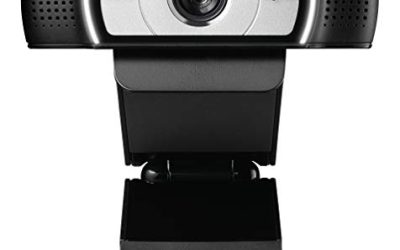
Logitech C310 HD
The Logitech C310 HD pairs 720p video with 5MP still photos, which makes it the pick for readers who want snapshots as well as calls. The 60-degree view sits between the other two cameras, framing one person with a little extra room around them. Fixed focus keeps the image sharp without hunting, and the mono microphone handles single-speaker calls cleanly. It clips onto a monitor or stands on a desk, and it works with the video apps most people already use. The higher-resolution stills give the camera a second job, from profile photos to quick document shots on the desk. It earns its keep.
Specs
- 720p HD video at 30fps
- 60-degree field of view
- Fixed focus lens
- Mono microphone
- 5MP still photos
- Universal monitor clip mount
- USB connection with plug-and-play setup
- Compatible with Skype, Zoom, and Teams
- Works with Windows and Mac video apps
Best for: Video calls plus still photos from the same camera.
Watch out for: Fixed focus means the camera cannot sharpen a close object on demand.
Which One Fits Your Situation
Daily calls from a home desk
Choose the Logitech C270 HD. Its 55-degree frame and light correction suit one person at a desk, and the long cable reaches a monitor on a riser. It is the simplest choice when the camera stays in one place and the calls keep coming. Keep the lens clean with a soft cloth, since dust on a small lens softens the whole image.
Calls with a partner or a small group
Choose the Microsoft LifeCam HD-3000. The 68.5-degree view fits two people without a second camera, and the noise-canceling mic keeps both voices clear. Sit the pair close together and keep the camera at eye level for the best framing. A small stack of books under a laptop lifts the camera to eye level when no monitor stand is handy.
Video plus photos for a profile
Choose the Logitech C310 HD. The 5MP stills beat a phone screenshot for a profile picture or a document scan, while the 720p video handles calls. Use good room light for the photos, since the small sensor needs it. Take the photos near a window in daylight, and the stills will look far sharper than under a ceiling lamp.
A spare camera for a second computer
Choose whichever of the three matches the screen it will sit on. All three connect over USB and work with the same apps, so the deciding factor is the viewing angle for that desk. Keep the spare boxed with its cable so it is ready when needed. A spare that works with the same apps means no setup scramble when the main camera fails.
Common Mistakes
- Sitting with a bright window behind you, which turns your face into a dark silhouette on every call.
- Placing the camera below eye level, which gives an unflattering upward angle and shows the ceiling.
- Ignoring the viewing angle, then finding a second person cut out of frame on an important call.
- Using a noisy room microphone when a headset would keep the call clear for everyone.
- Buying a camera with a short cable for a monitor that sits far from the computer on a large desk.
Frequently Asked Questions
Is 720p good enough for video calls?
Yes, 720p is clear enough for video calls on a laptop or desktop screen, and it runs smoothly on modest internet connections. Higher resolutions help on large displays, but for one-to-one calls and small meetings the difference is small. A stable connection matters more than resolution, since a frozen 1080p image helps nobody. Bandwidth matters more than pixels.
What does field of view mean on a webcam?
Field of view is the width of the scene the camera captures, measured in degrees. A wider angle fits more people or more of the room, while a narrower angle frames one person tightly and hides background clutter. Check the diagonal figure on the listing, since makers measure the angle in different ways. Wider is not always better.
Do 720p webcams work with Zoom and Teams?
Yes, the cameras in this guide work with Zoom, Teams, Meet, and other common video apps on Windows and Mac. They connect over USB and appear as a standard camera, so no extra software is needed to start a call. If the app cannot find the camera, close other programs that may already be using it. Restart the app if it stalls.
Should I use the built-in microphone or a headset?
A built-in microphone with noise reduction works well in a quiet room, while a headset wins in a noisy space or a shared office. If your calls happen near other people, a headset keeps your voice clear and your audio private. A headset also blocks room echo, which makes long meetings easier on everyone. Your listeners will thank you.
FAQ
Is 720p good enough for video calls?
What does field of view mean on a webcam?
Do 720p webcams work with Zoom and Teams?
Should I use the built-in microphone or a headset?
More from Amazon
Programs that pair well with the guide above. Offers and eligibility are set by Amazon and may change.
Free shipping on eligible items, Prime Video and more. Eligible new members can start with a free trial.
Start a Prime free trialAd-free music streaming. Eligible new subscribers can start with a free trial.
Try Music Unlimited freeA Prime membership for ages 18-24 with a trial period. Eligibility is set by Amazon.
See Prime for Young AdultsAudiobooks and podcasts to listen to on the go. Eligible new members can start with a free trial.
Try Audible freeAs an Amazon Associate we earn from qualifying purchases.