Our Short List of 3
All 4 Picks at a Glance
| Product | Specs | Action |
|---|---|---|
 MOTU M4 | Check price on Amazon | |
 Focusrite Scarlett 4i4 (4th Generation) | Check price on Amazon | |
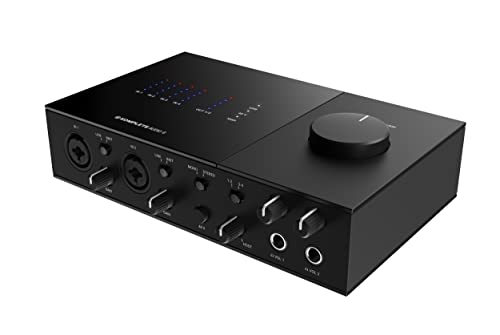 Native Instruments Komplete Audio 6 Mk2 | Check price on Amazon | |
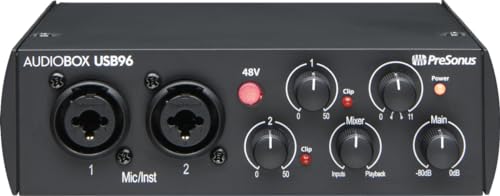 PreSonus AudioBox USB 96 (25th Anniversary Edition) | Check price on Amazon |
Key takeaways
- Four USB audio interfaces that record a keyboard in stereo, each with documented line inputs and 5-pin MIDI in and out, compared on published specs for players.
As an Amazon Associate, we earn from qualifying purchases made through links on this page.
A musical keyboard, whether it is a digital piano, a synthesizer, a stage piano or a workstation, produces a line-level stereo signal. An audio interface is the box that converts that signal to digital audio and sends it to a computer over USB, with each input recorded on its own track so the left and right sides of the keyboard can be edited, balanced and processed separately in recording software. That job is different from the job of a mixer, which blends several sources into one combined feed for live sound, and different again from a keyboard amplifier or personal PA, which exists to make the instrument louder in a room. This guide covers dedicated USB audio interfaces only, picked for one purpose: getting a keyboard into a computer cleanly, in stereo, with its MIDI connection carried by the same box.
Every model below had to meet two conditions taken from the manufacturer’s own published specification. First, a line-level input path that can accept a stereo keyboard: either dedicated balanced line inputs, or combination inputs the maker documents for line and instrument signals. A stereo keyboard uses two inputs, so the input layout decides whether anything else can be recorded at the same time. Second, 5-pin MIDI in and out published in the specification, so a keyboard with DIN MIDI sockets can send note data to the computer and receive data back without a separate MIDI adapter. Plenty of well-known two-input interfaces fail the second condition and were left out, and interfaces with no line-capable input path failed the first. Within those two conditions, the four models below differ in input count, converter specification, monitoring design and power arrangements, and those differences are what the rest of this guide compares.
What to look for
Count line inputs, not just total inputs. A stereo keyboard occupies two inputs. On a two-input interface, one keyboard fills the box and nothing else can be connected until a cable moves. On a four-input interface, the keyboard can sit on the rear line pair while the two front combination inputs stay free for a microphone, a guitar or a second instrument. Players with two keyboards need four inputs as a minimum, one stereo pair per instrument.
Check how the line inputs handle level. Keyboards output line level, which is far stronger than a microphone signal. Dedicated line inputs skip the microphone preamp stage, and their published maximum input level, given in dBu, shows how much headroom the input has before distortion. Some four-input models fix the gain of the rear line pair, which means the recording level is set by the keyboard’s own volume control instead of a knob on the box. That is workable, but it is worth knowing before the first session.
Confirm the MIDI sockets match the keyboard. Newer keyboards often carry USB MIDI, which a computer reads directly. Older stage pianos, workstations and many synthesizers carry only 5-pin DIN MIDI. An interface with DIN in and out covers both generations, lets the computer record note data alongside the audio, and can send MIDI back out to play the hardware keyboard from the recording software. If every keyboard in the room is USB-only, the DIN sockets simply stay unused; if one older instrument joins the setup later, they become the reason the box was bought.
Look at monitoring. Monitoring is how the player hears the keyboard while recording. Hardware direct monitoring passes the input signal to the headphones and speakers inside the interface, with no computer delay. Software monitoring routes the signal through the recording program, which adds a delay that grows with buffer size and can make fast passages feel disconnected. A blend knob between input and playback is the practical middle ground, and the finer points differ by model: on some boxes the direct path covers only the front inputs, so a keyboard on the rear line pair is heard through the software instead.
Match outputs to the rest of the desk. Balanced quarter-inch outputs feed studio monitors without the hum that unbalanced runs can pick up. A headphone output with its own volume control is close to essential for late practice. Extra line outputs matter to synthesizer players: outputs documented as DC-coupled can carry control voltage to modular and semi-modular hardware, a published detail on two of the models below and absent from the other two.
Note the power arrangement. Some interfaces run from the computer’s USB bus alone. Others ship with their own power supply and expect it. On a laptop rig that travels, bus power is one less cable and one less socket to find; on a fixed desk, a supplied adapter is a non-issue. The specification sheet states which arrangement each model uses.
MOTU M4
The MOTU M4 is a 4-in, 4-out USB-C interface built around two front combination inputs and a dedicated rear line pair. Each front input accepts XLR or quarter-inch plugs and is documented by MOTU for microphone, line and high-impedance guitar signals, with its own gain control and switchable 48V phantom power. Inputs 3 and 4 are balanced quarter-inch line inputs, which is where a stereo keyboard belongs: the keyboard takes the line pair, and both preamp channels remain free. MIDI in and out are full-size 5-pin sockets, documented by MOTU at 16 channels in each direction.
MOTU publishes unusually complete numbers for this class. The main outputs use ESS Sabre32 Ultra converter technology with a published dynamic range of 120 dB, the line inputs are published at 115 dB dynamic range with a maximum level of +18 dBu, and a full-color LCD on the front panel meters every input and output at once. The four balanced outputs are DC-coupled, so they can send control voltage to synthesizer hardware as well as audio. Loopback channels are included for capturing computer audio alongside the inputs, the unit runs on USB bus power, and MOTU publishes a round-trip latency figure of 2.5 ms at a 96 kHz sample rate with a 32-sample buffer for its drivers.
Who it is for: the keyboard player who wants the strongest published converter figures in this group, a dedicated line pair for the keyboard, and metering that shows every channel at a glance. Synthesizer players gain the most from the DC-coupled outputs.
Limitations from the spec: there are only two microphone preamps, so two microphones plus a stereo keyboard cannot be recorded together. The RCA output pair mirrors the main outputs rather than forming an independent mix, and there is no digital input or output of any kind.
Focusrite Scarlett 4i4 (4th Generation)
The Focusrite Scarlett 4i4 4th Gen is a 4-in, 4-out USB-C interface whose two front combination inputs carry Focusrite’s fourth-generation preamps, with a published gain range of 69 dB and switchable mic, line and instrument modes. The rear panel adds two further line inputs at fixed gain, and Focusrite counts four line inputs across the unit, which gives a keyboard player two ways to work: the keyboard on the rear pair with both preamps free, or the keyboard through the front pair with the rear pair open for another line-level source. MIDI in and out are 5-pin sockets on the rear panel.
The fourth-generation preamps add two published features aimed at uncontrolled input levels. Auto Gain sets the preamp level from a few seconds of playing, and Clip Safe watches the converter and trims the level before a loud passage can clip, which suits a piano whose dynamics swing from soft practice to full fortissimo. Air mode, with Presence and Harmonic Drive settings, shapes the preamp channels. Conversion runs to 24-bit and 192 kHz, Focusrite publishes a 120 dB dynamic range figure for its fourth-generation converters, and loopback is included for capturing playback. A USB-C power supply is included in the box and the 4i4 runs from it, so a power source near the desk is part of the setup.
Who it is for: the singing keyboard player. The keyboard lives on the rear line inputs, a vocal microphone takes a front preamp, and Auto Gain plus Clip Safe manage the vocal level while both hands are busy at the keys.
Limitations from the spec: the rear line inputs are fixed-gain, so the keyboard’s recording level is set on the keyboard itself. Auto Gain and Clip Safe apply to the two preamp channels, not to the rear line pair. The unit also depends on its bundled power supply rather than running from the computer bus alone.
Native Instruments Komplete Audio 6 Mk2
The Native Instruments Komplete Audio 6 Mk2 counts six inputs and six outputs by including its digital connections. The analogue side gives four inputs: two front combination inputs documented for microphone, line and instrument signals with 48V phantom power, and two balanced line inputs on the rear panel that form the natural home for a stereo keyboard. Four balanced quarter-inch outputs are DC-coupled, S/PDIF in and out handle the digital pair, and MIDI in and out are 5-pin sockets. Conversion is 24-bit at up to 192 kHz and the unit is bus-powered over USB.
Two details separate this model from the rest of the group. It carries two headphone outputs, each with its own volume control, which fits lessons, duets and any session where a second listener needs to hear the take at a comfortable level. Its outputs being DC-coupled, like the MOTU’s, lets it drive control-voltage inputs on modular and semi-modular synthesizers from suitable software. A front-panel blend control mixes direct input monitoring against computer playback, and the software bundle leans toward production, with a machine-based groove environment and a selection of instruments and effects included on registration.
Who it is for: the keyboard player who records with a partner or teacher, and synthesizer owners who want one box covering stereo audio, DIN MIDI and control-voltage output. The S/PDIF pair also suits players adding a digital source later.
Limitations from the spec: the direct monitoring blend covers inputs 1 and 2, so a keyboard connected to the rear line inputs 3 and 4 is monitored through the recording software, with the delay that implies. The rear line inputs are fixed level with no gain control of their own, and the host connection is USB 2.0 rather than a newer standard.
PreSonus AudioBox USB 96 (25th Anniversary Edition)
The PreSonus AudioBox USB 96 is the compact two-channel entry in this group, in its 25th Anniversary Edition finish. Its two front combination inputs carry PreSonus XMAX-L Class A preamps, and the quarter-inch section of each jack is documented by PreSonus for instrument and line-level sources, so a stereo keyboard connects directly with two cables. MIDI in and out are 5-pin sockets on the rear, which is the feature that keeps this small box inside the frame of this guide when many two-input rivals are excluded for lacking them. Conversion is 24-bit at up to 96 kHz.
The rest of the specification is deliberately simple. The unit is bus-powered over USB 2.0, a Mixer knob on the front blends the live inputs against computer playback for hardware monitoring, two balanced quarter-inch outputs feed monitors, a headphone output has its own level control, and 48V phantom power is available for a condenser microphone. Registration adds the Studio One Artist recording program and the Studio Magic plug-in collection, so the box arrives with a complete path from connection to a finished recording for a player who owns no software yet.
Who it is for: the player with one keyboard and a laptop, who wants stereo recording and DIN MIDI in the smallest footprint here, with nothing in the signal path that needs configuring before the first take.
Limitations from the spec: the stereo keyboard fills both inputs, so no channel remains for a microphone at the same time. Conversion stops at 96 kHz where the other three models reach 192 kHz, and there are no line inputs separate from the preamps, so the keyboard signal passes through the preamp gain stage rather than a fixed line path.
Comparison table
| Model | Analogue inputs | Where the stereo keyboard connects | MIDI | Highest sample rate | Analogue outputs |
|---|---|---|---|---|---|
| MOTU M4 | 4 | Dedicated balanced line pair, inputs 3-4 | 5-pin in and out | 192 kHz | 4 balanced TRS, plus mirrored RCA pair |
| Focusrite Scarlett 4i4 (4th Gen) | 4 | Fixed-gain line pair on the rear, or the front combination pair | 5-pin in and out | 192 kHz | 4 balanced TRS |
| Native Instruments Komplete Audio 6 Mk2 | 4, plus S/PDIF | Balanced line pair on the rear, inputs 3-4 | 5-pin in and out | 192 kHz | 4 balanced TRS, DC-coupled |
| PreSonus AudioBox USB 96 | 2 | The combination pair, line mode | 5-pin in and out | 96 kHz | 2 balanced TRS |
FAQ
Can a keyboard be connected to a computer without an interface?
Some computers accept a line-level signal through a combined headphone and microphone socket, but the input is mono, unbalanced and built for headsets rather than instruments. An interface gives the keyboard a matched stereo line input with published headroom, balanced monitor outputs and a MIDI connection in the same box, which is why it is the standard route for recording.
Is 5-pin MIDI still needed when a keyboard has USB?
USB MIDI carries note data between one keyboard and one computer, and for a single modern keyboard it is enough. The 5-pin sockets matter for older stage pianos and workstations that predate USB, for sending MIDI back out of the computer into hardware, and for connecting several hardware instruments through one setup. Every model in this guide includes them, so both generations of keyboard are covered.
How is an interface different from a USB mixer for recording?
A typical USB mixer sends one combined stereo feed of everything connected to it, so the keyboard, microphone and backing track arrive on a single track and cannot be separated afterwards. An interface records each input on its own track. For blending sources live in a room, a mixer is the right tool; for recording a keyboard so it can be edited and mixed later, the interface is.
How many inputs do two keyboards need?
Four, two per stereo instrument. The three four-input models above take both keyboards at once, one on the combination pair and one on the line pair, though only the models with gain on all relevant channels let both levels be set from the box. The two-input AudioBox records one keyboard at a time.
Which cables connect a keyboard to these inputs?
Most keyboards output on unbalanced quarter-inch jacks, so two standard instrument cables, one per side, are the usual connection. Short unbalanced runs into balanced line inputs are normal in home setups. The keyboard’s own manual states its output type and level, and that page is worth checking before ordering cables.
Conclusion
The right choice follows the shape of the setup around the keyboard. The MOTU M4 pairs a dedicated line pair with the strongest published converter and metering specification here, and its DC-coupled outputs reach furthest into synthesizer territory. The Scarlett 4i4 suits the player who also sings, holding the keyboard on fixed-gain rear inputs while its preamps, Auto Gain and Clip Safe look after a microphone. The Komplete Audio 6 Mk2 adds a second headphone output, S/PDIF and DC-coupled outputs for shared sessions and modular rigs. The AudioBox USB 96 strips the idea to its essentials: one stereo keyboard, DIN MIDI, bus power and a monitoring blend knob, in the smallest box of the four. All four record a keyboard in stereo and carry its 5-pin MIDI through the same unit; the differences that matter are how many inputs remain once the keyboard is connected, and how the monitoring and outputs fit the room.
More from Amazon
Programs that pair well with the guide above. Offers and eligibility are set by Amazon and may change.
Free shipping on eligible items, Prime Video and more. Eligible new members can start with a free trial.
Start a Prime free trialAd-free music streaming. Eligible new subscribers can start with a free trial.
Try Music Unlimited freeA Prime membership for ages 18-24 with a trial period. Eligibility is set by Amazon.
See Prime for Young AdultsAudiobooks and podcasts to listen to on the go. Eligible new members can start with a free trial.
Try Audible freeAs an Amazon Associate we earn from qualifying purchases.