Our Short List of 3

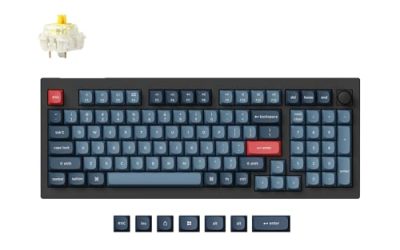
- Best for: Gamers who want a wired TKL board with brown switches and full key remapping.
- Switch: Keychron Brown, hot-swappable variant named in the listing
- Layout: 87 keys, tenkeyless
- Connectivity: Wired
- Mounting: Gasket mount
- Best for: Full-size players who want brown tactility, a metal frame, and switch swapping later.
- Switch: Tactile Brown mechanical switches, hot-swappable
- Layout: 104 keys, full size with number pad
- Connectivity: Wired USB
- Chassis: Aluminum base with noise-absorbing foam

- Best for: Players who want wireless freedom without giving up the number pad.
- Switch: Pre-lubed Brown switches, hot-swappable, tactile
- Layout: 100 keys, 98 percent layout with number pad
- Connectivity: Bluetooth 5.1, 2.4 GHz wireless, and USB-C wired
- Battery: 3750mAh, per the listing
All 4 Picks at a Glance
| Product | Specs | Action |
|---|---|---|
| Keychron C3 Pro |
| Check price on Amazon |
| Redragon K556 |
| Check price on Amazon |
| RK Royal Kludge RK98 |
| Check price on Amazon |
 MageGee MK-Box |
| Check price on Amazon |
Key takeaways
- Four brown-switch mechanical keyboards compared on the switch variant named in each listing: TKL, full-size, 96 percent wireless and 60 percent layouts.
Buying a brown-switch keyboard is really a decision about confirmation without noise. You want a small tactile bump that tells your fingers a press has registered, so you can stop bottoming out every key, but you do not want a click bar announcing each keystroke to the whole room. The trap is that many listings sell several switch colors under one page, and the brown variant is not always the one pictured or stocked, so the switch named in the listing matters more than the keyboard’s headline.
This shortlist suits PC players who split their desk time between games and long typing stretches, plus first-time mechanical buyers who want that middle-ground feel. Every board below was chosen because its Amazon listing names a brown switch for the exact variant listed, whether that is a Keychron, Gateron-style, or house-brand tactile switch rather than a genuine Cherry MX part. Layouts run from a compact 60 percent board to a full-size frame with a number pad.
Quick Picks
As an Amazon Associate we earn from qualifying purchases.
| Product | Best for | Key spec from title |
|---|---|---|
| Keychron C3 Pro | Wired TKL desk for gaming and typing | 87 keys, Keychron Brown switches, QMK/VIA |
| Redragon K556 | Full-size aluminum board with number pad | 104 keys, tactile Brown switches, hot-swappable |
| RK Royal Kludge RK98 | Wireless board that keeps the number pad | 100 keys, Brown switches, tri-mode connection |
| MageGee MK-Box | Small desks that still need arrow keys | 68 keys, Brown switch, blue LED backlight |
How to Choose
Confirm the Brown Variant Inside the Listing
The single most important check happens before you look at layouts or lighting. Many mechanical keyboards are sold from one listing with red, blue, and brown options sharing the same page, and the switch shown in the headline image may belong to a different variant than the one in your cart. Open the variant selector and confirm the selected option actually reads Brown or Tactile Brown, then check that the product title or specification table repeats it. A listing that only says mechanical switches, without naming a color for your variant, is a listing to skip, because linear reds and clicky blues feel nothing alike.
Decide How Much Bump You Actually Want
Brown switches share a family resemblance rather than an identical feel, because each maker tunes its own stem, spring, and housing. Keychron and Gateron-style browns tend to give a light, rounded bump suited to fast game inputs and long typing sessions, while some house-brand browns press with a slightly scratchier, more pronounced step. None of them clicks, which is the point: the feedback travels through your fingertip, not the room. If you share a space or play late, browns are the safe tactile choice, but if you want a strong, snappy step you can clearly feel at speed, expect variation between brands and read the switch name carefully.
Match the Layout to Your Mouse Room and Number Work
Layout decides how a brown board behaves on a gaming desk long after the switch feel is settled. A 60 percent board such as the MK-Box frees the most mouse room but hides the function row behind a layer, which some games and work apps make awkward. Tenkeyless designs keep dedicated arrows and function keys while dropping the number pad, a balance many players prefer. The 96 percent layout squeezes a number pad into a narrower frame, and a true full-size board keeps everything in its familiar place at the cost of width. Count your spreadsheet and keypad habits honestly before choosing the smallest frame.
Weigh Hot-Swap Sockets and Connection Type
Hot-swappable sockets change what a brown keyboard can become later. Boards like the K556, RK98, and the hot-swappable C3 Pro variant let you pull the stock browns and press in a different switch without soldering, which is useful if one key feels off or your taste changes. Soldered boards lock the decision in, so the variant check matters even more there. Connection draws a second line: wired boards keep things simple and consistent for a fixed gaming desk, while a tri-mode board like the RK98 adds Bluetooth and 2.4 GHz links for swapping between a PC, a laptop, and a tablet without re-cabling the desk.
The 4 Best Options
Keychron C3 Pro
- Best for: Gamers who want a wired TKL board with brown switches and full key remapping.
- Switch: Keychron Brown, hot-swappable variant named in the listing
- Layout: 87 keys, tenkeyless
- Connectivity: Wired
- Mounting: Gasket mount
Gamers who want a wired TKL board with brown switches and full key remapping.
The listing family also sells a red-switch version, so confirm the Brown variant is selected before ordering.
The C3 Pro is the wired tenkeyless pick for a player who wants brown tactility with proper remapping behind it. Its listing names hot-swappable Keychron Brown switches on an 87-key gasket-mounted frame, and QMK/VIA support means layers, macros, and key assignments live on the board rather than in a background app. The gasket structure softens the typing sound that a hard-mounted plate would pass through, which suits shared rooms. Because it is wired only, it fits a desk that stays put, and Mac, Windows, and Linux support is stated in the listing title itself.
Redragon K556
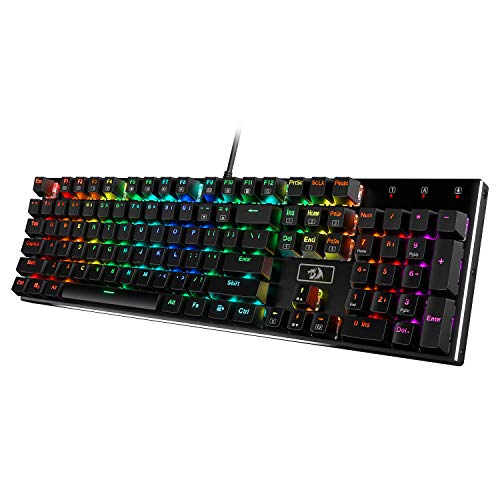
- Best for: Full-size players who want brown tactility, a metal frame, and switch swapping later.
- Switch: Tactile Brown mechanical switches, hot-swappable
- Layout: 104 keys, full size with number pad
- Connectivity: Wired USB
- Chassis: Aluminum base with noise-absorbing foam
Full-size players who want brown tactility, a metal frame, and switch swapping later.
Redragon sells a red-switch version of this board under a separate listing, so match the ASIN and the brown variant.
The K556 takes the opposite approach: a full-size 104-key board on an aluminum base, built for players who still want a number pad and a frame that does not shift during heavy sessions. Its listing uses tactile brown switches in hot-swappable sockets, so the stock feel can be changed later without tools beyond a switch puller. RGB backlighting with preset modes, N-key rollover, and noise-absorbing foam inside the case round out a board aimed at a permanent gaming desk. It stays wired, which keeps the setup simple, and the metal construction gives it a planted feel that lighter plastic boards do not match.
RK Royal Kludge RK98
- Best for: Players who want wireless freedom without giving up the number pad.
- Switch: Pre-lubed Brown switches, hot-swappable, tactile
- Layout: 100 keys, 98 percent layout with number pad
- Connectivity: Bluetooth 5.1, 2.4 GHz wireless, and USB-C wired
- Battery: 3750mAh, per the listing
Players who want wireless freedom without giving up the number pad.
The RK98 is also sold with red switches, so check the variant name on the listing before buying.
The RK98 answers a common complaint about wireless boards: most of them drop the number pad. This 96 percent layout keeps 100 keys, including the pad, in a frame narrower than a traditional full-size board, and its listing names hot-swappable pre-lubed brown switches as the fitted variant. Tri-mode connection covers Bluetooth 5.1, 2.4 GHz wireless, and USB-C wired use, so one board can move between a gaming PC and a work laptop during the day. The listing states a 3750mAh battery and RGB backlighting, and the hot-swap sockets mean the brown switches can be exchanged when tastes change.
MageGee MK-Box
- Best for: Small desks and first-time buyers who want brown switches in a compact wired board.
- Switch: Mechanical Brown switch, per the listing title
- Layout: 68 keys, 60 percent with separate arrow keys
- Backlight: Blue LED with multiple lighting modes
- Connectivity: USB 2.0 wired, detachable cable
Small desks and first-time buyers who want brown switches in a compact wired board.
The function row is accessed through Fn combinations, and other switch colors share this model line, so verify the Brown variant.
The MK-Box is the compact option for a small desk or a first mechanical keyboard, and unlike many 60 percent boards it keeps separate arrow keys alongside its 68-key layout. The listing names a mechanical brown switch for this variant, with blue LED backlighting and full anti-ghosting across all keys, so fast game inputs register together without conflict. A detachable USB cable makes it easy to pack or re-route, and the listing states compatibility with Windows, Linux, and Mac. Function-row commands sit behind the Fn key, the normal trade at this size, and the small footprint leaves generous room for wide mouse movements.
Which One Fits Your Situation
You Play and Type at One Fixed Desk
Choose the Keychron C3 Pro. Its wired connection never needs charging, the tenkeyless frame leaves sensible mouse room, and the brown switches give feedback you can feel during long typing stretches without adding click noise. QMK/VIA remapping also means game layers and work shortcuts can live on separate layers of the same board, so one keyboard covers the whole day at a single desk.
You Need a Number Pad and Hate Cable Clutter
Choose the RK Royal Kludge RK98. The 98 percent layout keeps the pad that spreadsheets, calculators, and some game keybinds rely on, while Bluetooth and 2.4 GHz modes remove the cable from the desk. You still get the brown tactile bump for typing, and the wired USB-C mode is there when you want a direct link for a long session or a flat battery.
You Want a Heavy Full-Size Board That Stays Put
Choose the Redragon K556. The aluminum base and full 104-key layout suit a permanent setup where the keyboard never travels, and the brown switches keep shared-space noise down while hot-swap sockets leave the door open to different switches later. It is the pick for players who use every key, including the pad, and prefer a wired link with nothing to configure.
Your Desk Is Small or Shared With a Laptop
Choose the MageGee MK-Box. The 68-key frame leaves the most room for mouse movement and packs away easily, the detachable cable suits a desk that gets cleared often, and the separate arrow keys mean you are not reaching for a layer every time you navigate a document. Brown switches keep it quiet enough for a shared room or a late-night session.
Common Mistakes
- Ordering from a multi-switch listing without checking the selected variant, then receiving linear red or clicky blue switches instead of browns.
- Assuming every brown switch feels identical, when Keychron, Gateron-style, and house-brand browns differ in bump shape and spring weight.
- Choosing a 60 percent board for games or work that lean on a dedicated function row, then fighting the Fn layer daily.
- Expecting brown switches to be silent; they avoid the click, but bottoming out still makes sound on any mechanical board.
- Ignoring hot-swap support when buying, then discovering a soldered board cannot change switches when your preference shifts.
Frequently Asked Questions
Are brown switches good for gaming?
Yes, for players who want feedback they can feel without a click. The tactile bump confirms the press, which helps in games where you rest fingers on movement keys and want to avoid accidental inputs. Browns register like other mechanical switches, so the practical difference is feel and sound, not speed, and many players use one brown board for both gaming and typing at the same desk.
How are brown switches different from red and blue switches?
Red switches are linear, travelling straight down with no bump, which some players prefer for rapid repeated presses. Blue switches add a click mechanism, producing both a bump and an audible snap that carries across a room. Brown switches sit between them: a noticeable tactile bump with no click bar, so you get confirmation through your fingertip while keeping the sound level closer to a linear board.
Does a brown keyboard have to use Cherry MX switches?
No. Cherry MX Brown is the original, but Keychron, Gateron, and several house brands make their own brown tactile switches, and the boards in this guide use those alternatives. What matters is that the listing names a brown switch for the exact variant you are buying. Feel varies slightly between makers, so treat the switch brand printed in the listing as part of the specification, not a footnote.
Can I change the switches later if I stop liking browns?
Only if the board has hot-swappable sockets. The K556, RK98, and the hot-swappable C3 Pro variant let you pull switches out and press new ones in without soldering, as long as the replacement switches match the socket pin type the listing states. A soldered board keeps its original switches for life, which is why confirming both the brown variant and the socket type before ordering saves regret later.
FAQ
Are brown switches good for gaming?
How are brown switches different from red and blue switches?
Does a brown keyboard have to use Cherry MX switches?
Can I change the switches later if I stop liking browns?
More from Amazon
Programs that pair well with the guide above. Offers and eligibility are set by Amazon and may change.
Free shipping on eligible items, Prime Video and more. Eligible new members can start with a free trial.
Start a Prime free trialAd-free music streaming. Eligible new subscribers can start with a free trial.
Try Music Unlimited freeA Prime membership for ages 18-24 with a trial period. Eligibility is set by Amazon.
See Prime for Young AdultsAudiobooks and podcasts to listen to on the go. Eligible new members can start with a free trial.
Try Audible freeAs an Amazon Associate we earn from qualifying purchases.