Key takeaways
- Choosing a brand for its logo or its lighting instead of its switch range, then discovering the switch feel you want is not offered.
- Buying into a proprietary switch ecosystem without checking whether spare switches and keycaps are sold separately.
- Ignoring the software: a board whose remapping app does not run on your operating system leaves you with a fixed layout.
- Assuming every board from a good brand is well built: check the keycaps, stabilisers, and case of the specific range, because quality varies within a brand.
- Forgetting support and parts: a cheap board from a brand with no local warranty or spare parts costs more the first time a key fails.
As an Amazon Associate we earn from qualifying purchases.
A mechanical keyboard is a long-term purchase, and the company behind it matters as much as any single model. The brand decides which switches you can choose from, whether the keycaps will shine after a year of typing, how the software behaves, and what happens when a key stops working. Two boards with the same layout can feel completely different in daily use, because one maker invests in stabilisers and thick keycaps while another spends its effort on lighting and marketing. Picking the right company first narrows hundreds of models down to a short list you can actually compare.
This guide compares seven established mechanical keyboard companies on the things that truly separate them: switch choice, build quality, keycaps, software, and support. It is written for buyers who have not settled on a brand yet: gamers choosing a first serious board, typists replacing a worn-out keyboard, and anyone who wants to know which company deserves their desk space before they start comparing individual models.
How to Choose
Start with the switch ecosystem, not the logo
Every mechanical keyboard brand is built around a switch ecosystem, and that ecosystem decides what your fingers will feel for years. Some use standard Cherry MX switches or Cherry-compatible clones, so you can swap in switches from other makers later. Others design their own switches, tuned for gaming speed or a particular sound, which can feel excellent but locks you into one catalogue. Before you commit, ask whether it offers linear, tactile, and clicky options, whether the switches are soldered or hot-swappable, and whether spare switches are easy to buy. A wide range with hot-swap sockets lets you change your mind, while a narrow, soldered range means the switch you pick on day one is the one you keep.
Judge the build and the keycaps you will touch every day
The case and keycaps are the parts you feel with every keystroke, so they reveal more about a brand than any feature list. A heavy metal case stays planted and gives the board a solid, dense feel, while a light plastic case is easier to move but can flex and creak under hard typing. Keycap material matters just as much: thick double-shot PBT keycaps resist shine and keep their legends readable after months of use, while thin ABS keycaps can turn glossy where your fingers rest. Stabilisers are the quiet detail that separates good brands from average ones, because rattling spacebars and shift keys spoil an otherwise fine board. Compare the case, the keycaps, and the stabilisers, not the lighting.
Check the software before you fall for the hardware
A keyboard you cannot program is a fixed layout with nice switches, so the software is a real part of the buying decision. Gaming-focused brands ship their own suites for remapping keys, building macros, and syncing lighting across a desk full of gear, which suits players who want one app for everything. Enthusiast brands lean on open firmware such as QMK and VIA, which lets you remap any key and build layers without proprietary software. Some makers keep it simple with onboard shortcuts and no software at all, which suits buyers who want to plug in and type. Before you choose, confirm the software runs on your operating system and covers the remapping you plan to do.
Weigh support, warranty, and spare parts
A mechanical keyboard should last for years, so the company behind it needs to still be there when something goes wrong. Established brands have clear warranty terms, local service centres, and support teams that know their boards, while smaller makers can be harder to reach when a key fails. Spare parts are the other half of long-term value: a brand that sells replacement keycap sets, switches, stabilisers, and cables lets you repair a board instead of replacing it. Check whether the company publishes its warranty terms in plain language, sells parts on its own store, and has its boards stocked by authorised sellers in your country. Support after the sale is worth more than a good first impression.
The Brands Compared
Logitech
Logitech is the safe, mainstream choice, and that is exactly why it leads so many shortlists. The company covers the full range, from quiet office boards to dedicated gaming keyboards under its G brand, and its boards are sold almost everywhere, which makes returns and warranty claims straightforward. Logitech designs its own switches alongside standard mechanical options, and its gaming software ties the keyboard into a wider ecosystem of mice and headsets with shared lighting and profiles. Build quality is consistent rather than flashy, with sturdy cases and comfortable layouts aimed at long sessions. Logitech suits buyers who want a reliable board from a company they already trust, with easy availability and support, rather than the deepest customisation.
Razer
Razer is the gaming-first brand, and every part of its keyboards shows it. The company builds its own optical and mechanical switches tuned for fast actuation, pairs them with bright per-key lighting, and wraps them in software that controls macros, profiles, and lighting across the whole Razer setup. Razer boards are widely available in full-size, tenkeyless, and compact layouts, and the brand refreshes its range often, so there is usually a current model for any desk size. The trade-off is focus: Razer boards are built for players first, so typists who want a quiet, understated board may find the gaming styling and software-heavy approach more than they need. Choose Razer when gaming performance and a unified gaming setup matter most.
Corsair
Corsair sits between the mainstream and the gaming worlds, with keyboards that pair Cherry MX switches with heavy aluminium frames and extensive lighting. The brand is known for full-size boards with dedicated macro keys, media controls, and palm rests, built for players who want a permanent desk centrepiece rather than a portable board. Corsair software manages lighting, macros, and profiles across keyboards, mice, and other desk gear, and its boards are sold through the same mainstream retailers as its memory and power supplies. Build quality is solid and consistent, with thick keycaps on many models and frames that feel planted. Corsair suits buyers who want a substantial, well-supported gaming board from a large PC hardware company.
Keychron
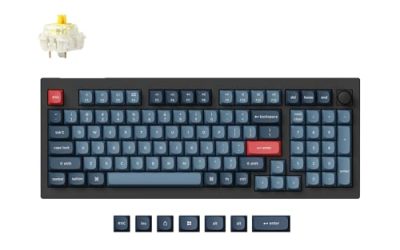
Keychron is the enthusiast favourite, and the brand earned that reputation by giving buyers the customisation that bigger companies often skip. Its boards commonly offer hot-swappable switches, a choice of layouts from compact to full-size, and open QMK and VIA firmware for remapping keys and building layers. Keychron covers both Mac and Windows users, with switchable layouts and keycaps for both systems, which makes it a natural pick for people who move between a MacBook and a PC. The company sells a wide range of its own switches, keycap sets, and accessories, so a board can evolve over time. Keychron suits buyers who want to tinker, remap, and swap parts, and who value open firmware over a single proprietary app.
Ducky
Ducky is the quiet specialist that enthusiasts recommend and mainstream buyers often discover late. The Taiwanese company focuses on a narrow range of well-built boards with genuine Cherry MX switches, thick double-shot PBT keycaps, and careful stabiliser tuning, with minimal software and no gimmicks. Ducky boards are known for a clean, solid typing feel and for lasting for years, and the brand offers a wide choice of switch colours and layouts within its small catalogue. The trade-off is availability and flash: Ducky boards can be harder to find than the big gaming brands, and they offer little in the way of wireless connectivity or flashy lighting. Choose Ducky when typing feel and build quality matter more than software features or brand visibility.
Leopold
Leopold is the typist’s brand, built around the idea that a keyboard should feel superb and then get out of the way. The South Korean company pairs Cherry MX switches with thick PBT keycaps, sturdy cases, and excellent stabilisers, and its boards are famous for a firm, precise feel with almost no rattle. Leopold keeps its designs deliberately plain, with no RGB lighting show and minimal software, which suits offices, writers, and anyone who types for hours and wants nothing to distract them. The range is focused rather than broad, and wireless options are limited, so buyers choose Leopold for feel rather than features. If you type all day and judge a keyboard by how it feels under your fingers, Leopold deserves a place at the top of the list.
SteelSeries
SteelSeries is the esports-oriented brand, known for keyboards built around competitive play. The company designs its own switches for fast, consistent actuation, offers compact layouts favoured by competitive players, and pairs its boards with software for profiles, macros, and lighting across its mice and headsets. SteelSeries boards are widely stocked by gaming retailers, and the brand has a long history of sponsoring competitive teams, which shows in the focus on responsiveness and durability. The range is gaming-led, so buyers who want a quiet office board or deep customisation may find better fits elsewhere. Choose SteelSeries when competitive gaming is the priority and you want a board from a company that builds for that scene first.
Which One Fits Your Situation
You play competitive games most nights
Pick Razer or SteelSeries when fast, consistent keystrokes and gaming software matter most. Both companies design their own switches for competitive play, offer compact layouts that free up mouse space, and provide software for profiles and macros that follow you between games. Corsair is the alternative when you want the same gaming focus in a heavier, full-size board with macro keys and media controls for a fixed desk.
You type all day for work or study
Pick Leopold or Ducky when typing feel is the priority. Both companies focus on thick keycaps, well-tuned stabilisers, and solid cases, with Cherry MX switches in a range of feels, and neither distracts you with gaming software or lighting shows. Logitech is the practical alternative when you want a quiet, comfortable board that is easy to buy locally and simple to return if the feel is wrong.
You want to change switches and keycaps later
Pick Keychron when customisation matters. Hot-swappable sockets, open QMK and VIA firmware, and a wide catalogue of switches and keycap sets mean the board can change as your taste changes, without soldering or a new purchase. Ducky is the second choice here, with standard Cherry-compatible switches and thick keycaps that invite later upgrades, though its software is far simpler.
You want a first board with no fuss
Pick Logitech or Corsair when you want a first mechanical keyboard that simply works. Both companies sell widely through mainstream retailers, offer clear warranty and support, and ship boards that are ready to use without research into firmware or switch compatibility. You give up some enthusiast customisation, but you gain easy availability, straightforward returns, and a company that will still be there if a key fails.
Common Mistakes
- Choosing a brand for its logo or its lighting instead of its switch range, then discovering the switch feel you want is not offered.
- Buying into a proprietary switch ecosystem without checking whether spare switches and keycaps are sold separately.
- Ignoring the software: a board whose remapping app does not run on your operating system leaves you with a fixed layout.
- Assuming every board from a good brand is well built: check the keycaps, stabilisers, and case of the specific range, because quality varies within a brand.
- Forgetting support and parts: a cheap board from a brand with no local warranty or spare parts costs more the first time a key fails.
Frequently Asked Questions
Which company makes the best mechanical keyboards overall?
There is no single best company, because the right brand depends on how you use the board. Razer and SteelSeries lead for competitive gaming, Leopold and Ducky lead for typing feel, Keychron leads for customisation, and Logitech and Corsair lead for easy buying and support. Start from your main use, then compare the two or three brands that fit it, rather than searching for one winner for everyone.
Are Cherry MX switches better than a brand’s own switches?
Neither is always better. Cherry MX switches are a known standard with a wide choice of feels and easy replacement, which suits buyers who may swap switches later. A brand’s own switches can be tuned for gaming, but they lock you into that brand’s catalogue. Pick Cherry-compatible switches for flexibility, and a maker’s own switches when you have tried them and prefer the feel.
Do I need software to use a mechanical keyboard?
No, every mechanical keyboard types normally without software, and many boards store basic settings on the board itself. Software matters when you want to remap keys, build macros, or program lighting profiles. If you only need to type and play, onboard shortcuts may be enough; if you remap keys often, check that the brand’s app runs on your operating system first.
Should I buy from a big brand or a small enthusiast brand?
Buy from a big brand when easy availability, local warranty, and simple returns matter most, especially for a first board. Buy from a smaller enthusiast brand when typing feel, keycap quality, and customisation matter more, and you are comfortable ordering from a specialist seller. Both routes can produce a board that lasts for years, so decide by what you value after the purchase, not the size of the company.
FAQ
Which company makes the best mechanical keyboards overall?
Are Cherry MX switches better than a brand’s own switches?
Do I need software to use a mechanical keyboard?
Should I buy from a big brand or a small enthusiast brand?
More from Amazon
Programs that pair well with the guide above. Offers and eligibility are set by Amazon and may change.
Free shipping on eligible items, Prime Video and more. Eligible new members can start with a free trial.
Start a Prime free trialAd-free music streaming. Eligible new subscribers can start with a free trial.
Try Music Unlimited freeA Prime membership for ages 18-24 with a trial period. Eligibility is set by Amazon.
See Prime for Young AdultsAudiobooks and podcasts to listen to on the go. Eligible new members can start with a free trial.
Try Audible freeAs an Amazon Associate we earn from qualifying purchases.