
Key takeaways
- The best Cisco home routers for a reliable home network — compare dual-WAN VPN models, wired ports and wireless coverage for home use.
The best Cisco home routers bring business-grade reliability into a home network. Cisco built its name on networking hardware for offices and enterprises, and its small-business RV series carries that heritage into homes that need more than a basic consumer router: a home office with a VPN connection to work, a household with many wired devices, or a network that simply must stay up without weekly reboots.
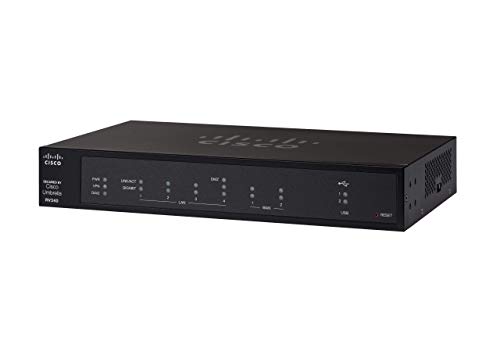

That heritage comes with a trade-off worth understanding before buying. Cisco home routers are wired-first devices with a focus on security, VPN tunnels, and dual internet connections, rather than the fastest Wi-Fi or the slickest app. The wireless models in the range use Wi-Fi 5 rather than the newer standards, and setup happens through a web interface rather than a phone app. For a home that values stability, VPN access, and wired performance over cutting-edge wireless speed, that is a fair exchange.
This guide covers the two Cisco models whose Amazon listings could be confirmed in this round: the RV340 and the RV345P. Both are dual-WAN VPN routers from the same RV series, and both are wired routers with optional wireless variants. The guide also names the neighbouring models in the range that could not be confirmed, so the picture of the Cisco home lineup is complete and honest. If the household needs the fastest Wi-Fi 6 or Wi-Fi 7 speeds, a consumer mesh system will serve better; if it needs a rock-steady wired network with VPN, Cisco is worth a close look.
How to Choose
1. Wired or wireless
Most Cisco RV routers are wired devices, with wireless variants marked by a W in the model name. The RV340 is wired-only, while the RV340W adds Wi-Fi. Before buying, decide whether the router itself needs to broadcast Wi-Fi or whether a separate access point will handle wireless. Many homes pair a wired Cisco router with a dedicated access point or a mesh node, which gives the best of both: Cisco reliability on the wired side and modern Wi-Fi from a specialist wireless device.
2. Dual WAN
Both picks in this guide have dual WAN ports, which means two internet connections can be plugged in at once. The second connection can act as a backup that takes over if the first line drops, or the router can balance traffic across both lines. For a home office where a dropped connection means a dropped call or a lost hour of work, dual WAN is the single most valuable feature a Cisco router offers. Check that the internet plan and the modem support the second connection before relying on it.
3. VPN support
Cisco RV routers are built for VPN. They support IPsec site-to-site tunnels, which connect a home office to a company network, and SSL VPN for remote access from a laptop. The number of tunnels a model supports matters: a household with one remote worker needs only a few, while a small home business with several staff working remotely needs more. Confirm the tunnel count on the exact model, and check that the VPN type matches what the workplace requires.
4. Number of wired ports
A home network accumulates wired devices quickly: a desktop PC, a console, a smart TV, a network drive, and a printer can fill four ports before the list is finished. The RV340 and RV345P both include a four-port Gigabit switch, which covers a typical home. If the household has more wired devices, add a separate Gigabit switch rather than choosing a router by port count alone, since switches are inexpensive and a router should be chosen for its routing and security features.
5. Power over Ethernet
The RV345P includes Power over Ethernet on some of its ports, which sends power down the same cable that carries data. That matters when the home has devices that sit far from a power socket, such as ceiling access points or security cameras. If the network includes PoE cameras or access points, the RV345P removes the need for separate power injectors. If every device has its own power supply, PoE adds nothing and the RV340 is the simpler choice.
6. Wireless standard
The wireless RV models use Wi-Fi 5, which is older than the Wi-Fi 6 and Wi-Fi 7 found in current consumer routers. Wi-Fi 5 is still fast enough for most home use, including 4K streaming and video calls, but it lacks the capacity improvements of newer standards in crowded device households. If the home has dozens of wireless devices, pair a wired Cisco router with a modern access point rather than relying on the built-in Wi-Fi of an older model.
7. Support and lifecycle
Cisco publishes lifecycle dates for its routers, and several older RV models have already been withdrawn from the current catalogue. That does not make a confirmed listing unusable, but it does mean firmware updates may stop sooner and replacement units may become harder to find. Before buying, check the model against Cisco’s current documentation, confirm that firmware is still available, and confirm the exact model number on the listing, since the RV range has many closely named variants.
Top Picks
1. Cisco RV340 Dual WAN Gigabit VPN Router — Best Overall Cisco Home Router
The Cisco RV340 is the core model of the RV range and the best Cisco home router for most households. It is a wired dual-WAN Gigabit VPN router with four Gigabit LAN ports, IPsec and SSL VPN support, and the straightforward reliability that defines the Cisco small-business line. There is no Wi-Fi built in, which is a deliberate design choice: the RV340 is meant to sit at the centre of a wired network, with wireless handled by a separate access point.
Dual WAN is the headline feature. Two internet connections can be connected at once, with the second acting as a failover backup or sharing the load. For a home office, that redundancy is worth more than any wireless speed figure, since a dropped connection during a video call or a file transfer is the most expensive failure a home network can have. The VPN support covers site-to-site IPsec tunnels for connecting to a workplace network and SSL VPN for remote access from a laptop.
Specs
- dual WAN Gigabit Ethernet ports, four Gigabit LAN ports, IPsec and SSL VPN support, wired-only design with no built-in Wi-Fi, web-based management interface, compact desktop form factor.
Who it is for: home offices that need VPN access to a workplace and a second internet connection as backup, and households with many wired devices that value stability over wireless speed.
Caveats: there is no Wi-Fi, so a separate access point is needed for wireless devices. The web interface is functional rather than friendly, and setup takes longer than a consumer router app. Confirm the RV340-K9-NA model on the listing, since the wireless RV340W is a different model. This listing rests on an older verification, so confirm the exact model and current availability on the live listing before buying.
2. Cisco RV345P Dual WAN Gigabit PoE VPN Router — Best Cisco Home Router With PoE
The Cisco RV345P is the larger sibling of the RV340, adding Power over Ethernet and more VPN capacity to the same dual-WAN foundation. It is a wired dual-WAN Gigabit VPN router with sixteen Gigabit LAN ports, eight of which support PoE, which makes it the pick for homes with PoE cameras, ceiling access points, or a large collection of wired devices.
The PoE ports send power and data down a single Ethernet cable, which simplifies installation for cameras and access points mounted away from power sockets. The higher VPN tunnel count suits a household where several people work remotely at once, and the sixteen LAN ports cover a large wired network without an extra switch. Like the RV340, it is wired-only, so wireless devices need a separate access point.
Specs
- dual WAN Gigabit Ethernet ports, sixteen Gigabit LAN ports with PoE on eight ports, IPsec and SSL VPN support with higher tunnel capacity than the RV340, wired-only design with no built-in Wi-Fi, web-based management interface.
Who it is for: larger homes with PoE cameras or access points, households with many wired devices, and home offices where several people need VPN access at the same time.
Caveats: the RV345P is a bigger, more expensive device than the RV340, and its extra ports and PoE are wasted in a home with few wired devices. Cisco lists the RV345P among models withdrawn from its current catalogue, so confirm firmware availability and the exact model on the live listing before buying. This listing rests on an older verification, so a live check is essential.
Other Cisco Models to Know
Three neighbouring models in the RV range are worth knowing about, even though no Amazon listing could be confirmed for them in this round, and they are named here without links rather than guessed at.
The Cisco RV160W is the wireless entry model of the range, a compact Wi-Fi 5 VPN router for small homes. The Cisco RV260W is a step up with stronger wireless and more VPN capacity. The Cisco RV340W adds Wi-Fi 5 to the RV340 in this guide. Cisco lists all three among models withdrawn from its current catalogue, which is consistent with the difficulty of confirming a current listing for them. If one of these models appears in a listing, confirm the exact part number and check that firmware is still available before buying.
Comparison Table
| Router | WAN | LAN Ports | PoE | Wi-Fi | Best For |
|---|---|---|---|---|---|
| Cisco RV340 | Dual WAN | 4 Gigabit | No | None, wired only | Home office VPN and failover |
| Cisco RV345P | Dual WAN | 16 Gigabit | Yes, 8 ports | None, wired only | Large wired networks, PoE devices |
Which One Is Right for You?
For most homes, the RV340 is the answer. It covers the two features that matter most in a Cisco home router, dual WAN and VPN, in a compact device with enough wired ports for a typical household. Add a separate access point for Wi-Fi and the combination is hard to beat for reliability.
Choose the RV345P when the network itself is large. Sixteen wired ports, PoE for cameras and access points, and higher VPN capacity justify the bigger device when the home has a dozen or more wired devices or several remote workers. In a smaller home, the RV345P is simply more router than the network needs, and the RV340 leaves budget for a better access point.
If neither model fits, the honest answer is that Cisco may not be the right brand for the household. A home that needs fast modern Wi-Fi above all else, simple app-based setup, and no VPN will be happier with a consumer mesh system. Cisco earns its place when VPN, dual WAN, and wired stability are the priorities.
Frequently Asked Questions
Do Cisco home routers have Wi-Fi?
Some do and some do not. The RV340 and RV345P in this guide are wired-only routers with no built-in Wi-Fi, and wireless models in the range carry a W in the model name, such as the RV340W. Many homes pair a wired Cisco router with a separate access point, which gives modern Wi-Fi alongside Cisco routing.
What is dual WAN and do I need it?
Dual WAN means the router accepts two internet connections at once. The second connection can take over automatically if the first line fails, or share traffic across both lines. It matters most for home offices, where a dropped connection interrupts work, and matters least for casual browsing households with a single reliable line.
Can a Cisco router connect to my workplace VPN?
The RV340 and RV345P support IPsec site-to-site VPN tunnels and SSL VPN remote access, which cover the common ways a home office connects to a company network. Confirm the exact VPN type the workplace requires before buying, since some employers use a specific VPN client or protocol that should be checked against the router specifications.
Is a Cisco router hard to set up?
It takes longer than a consumer router. Setup happens through a web interface rather than a phone app, and the options assume some networking knowledge. The reward is control: every setting from VPN tunnels to failover rules is adjustable. Homes that want a five-minute setup should choose a consumer router instead.
Disclosure: As an Amazon Associate, we may earn from qualifying purchases.
FAQ
Which One Is Right for You?
Do Cisco home routers have Wi-Fi?
What is dual WAN and do I need it?
Can a Cisco router connect to my workplace VPN?
Is a Cisco router hard to set up?
More from Amazon
Programs that pair well with the guide above. Offers and eligibility are set by Amazon and may change.
Free shipping on eligible items, Prime Video and more. Eligible new members can start with a free trial.
Start a Prime free trialAd-free music streaming. Eligible new subscribers can start with a free trial.
Try Music Unlimited freeA Prime membership for ages 18-24 with a trial period. Eligibility is set by Amazon.
See Prime for Young AdultsAudiobooks and podcasts to listen to on the go. Eligible new members can start with a free trial.
Try Audible freeAs an Amazon Associate we earn from qualifying purchases.









