Our Short List of 3

- Best for: Players who want the closest DeathAdder-style shape with a better sensor, more buttons, and a versatile scroll wheel.

- Best for: Players who want the most buttons, a heavy planted feel, tunable weight, and a mouse that covers shooters, MMOs, and everyday work in one shell.

- Best for: Players who want a lighter mid-size ergonomic mouse that works across shooters, MOBAs, and battle royale games without specializing in one genre.
All 4 Picks at a Glance
| Product | Specs | Action |
|---|---|---|
| Razer Basilisk V3 |
| Check price on Amazon |
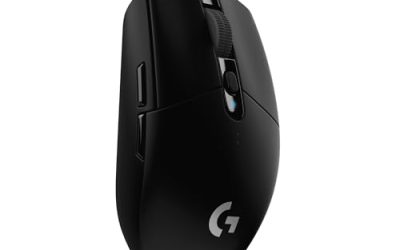
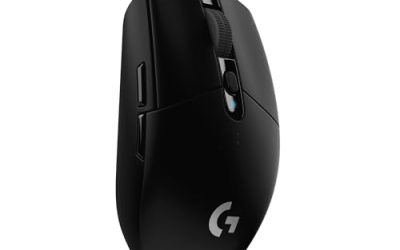
| Logitech G502 HERO |
| Check price on Amazon |
| SteelSeries Rival 5 |
| Check price on Amazon |
 Glorious Model D |
| Check price on Amazon |
Our Top Picks
- Razer Basilisk V3 Customizable RGB Wired Ergonomic GamingMouse2.96 x 5.12 x 1.67 inches0.2 poundsCheck on Amazon
Pros & cons
- 11 programmable buttons add extensive control customization
- Adjustable weights let you fine-tune balance and feel
- LIGHTSYNC RGB syncs lighting with other Logitech gear
- Wired connection limits cable-free desk setups
- Heavier than typical lightweight esports mice at 0.27 pounds

The Razer DeathAdder earned its reputation by fitting a huge number of hands and staying out of the way during long sessions. Its tall, right-handed ergonomic shell became the shape many players measure every other mouse against. When it is time to move on, the reasons are usually practical: the weight feels heavy next to newer lightweight mice, the clicks feel different after years of use, or a player simply wants a change of pace without giving up the comfort they are used to.
A good DeathAdder alternative keeps the parts that matter. It should feel natural in a palm or relaxed claw grip, place the side buttons where the thumb already rests, and track cleanly at the sensitivity a player already uses. The four mice below all clear that bar in different ways. One leans into extra buttons and a heavy, planted feel. One trims the weight dramatically while keeping the same ergonomic idea. One splits the difference with a mid-weight body and a strong all-round sensor. And one comes from the same design family as the DeathAdder itself.
Disclosure: As an Amazon Associate, we earn from qualifying purchases.
At a glance
| Product | Key spec | Best for |
|---|---|---|
| Razer Basilisk V3 | Focus Pro 26K sensor, 11 programmable buttons, 101 g | Players who want the closest DeathAdder-style shape with more controls |
| Logitech G502 HERO | HERO 25K sensor, 11 programmable buttons, 121 g with tunable weights | Players who want maximum buttons and a heavy, planted feel |
| SteelSeries Rival 5 | TrueMove Air sensor, 9 programmable buttons, 85 g | Players who want a lighter mid-size ergonomic mouse for many genres |
| Glorious Model D | Pixart PMW3360 sensor, 6 buttons, 68 g | Players who want the lightest ergonomic option for fast flicks |
How to choose
1. Ergonomic shape and hump placement
The DeathAdder shape works because the hump sits toward the middle of the shell and supports the palm without forcing the wrist into an awkward angle. When comparing alternatives, look at where the highest point of the shell sits and how wide the rear flares. The Basilisk V3 is the closest match here, with a tall palm area and a thumb rest that mirrors the DeathAdder layout. The G502 HERO has a broader shell, while the Rival 5 and Model D are slightly lower and narrower.
2. Size and hand fit
Hand size decides more than any specification sheet. Players with hands around 18 cm or longer from wrist to middle fingertip usually find full-size ergonomic mice comfortable, while shorter hands often do better with a mid-size shell. The G502 HERO and Basilisk V3 suit medium to large hands. The Rival 5 sits in the middle, and the Model D suits medium hands that want an ergonomic shape without extra bulk.
3. Sensor quality
Every mouse in this guide uses a modern optical sensor with clean tracking, no smoothing, and no acceleration at normal sensitivity settings. The differences show up at the edges. A higher maximum DPI ceiling, such as the 26,000 DPI of the Basilisk V3 or the 25,600 DPI of the G502 HERO, matters mostly to players who run very high sensitivity or use large high-resolution monitors. The Rival 5 tops out at 18,000 CPI and the Model D at 12,000 DPI, which is still far above what most players use in practice. All four mice hold up during fast flicks.
4. Weight and balance
Weight changes how a mouse feels more than almost anything else, and it is the area where DeathAdder alternatives differ most. The Model D weighs 68 grams and suits low-sensitivity players who move the mouse across a large pad. The Rival 5 at 85 grams is the balanced middle ground, light enough for quick flicks but heavy enough to feel stable during slow tracking. The Basilisk V3 at 101 grams feels solid and deliberate, close to the classic DeathAdder heft. The G502 HERO starts at 121 grams and can be tuned heavier with five removable 3.6-gram weights, which suits players who like a planted mouse.
5. Switches and click feel
Click feel is personal, and it changes with the switch design. Optical switches, like the Gen-3 switches in the Basilisk V3, register clicks with a light beam instead of a metal contact, which gives a crisp snap and removes the risk of double-click faults that can appear in older mechanical switches over time. The Rival 5 uses Golden Micro IP54 switches rated for 80 million clicks, with a firm and tactile press. The Model D uses Omron mechanical switches with a light, familiar click. The G502 HERO uses mechanical switches with a slightly heavier press that many players prefer for deliberate shooting. If you have ever had a mouse start double-clicking, optical switches are worth prioritizing.
6. Grip style compatibility
Grip style and shape have to agree. Palm grip players rest the whole hand on the shell and need a tall hump with a wide rear, which is exactly what the Basilisk V3 and G502 HERO provide. Claw grip players arch the fingers and need a hump that supports the palm while leaving the fingertips free to pivot, which is where the Rival 5 and Model D shine. Fingertip grip players will usually prefer a lighter and narrower mouse, and the Model D is the best fit of the four for that style. Match the shell height to how much of your palm stays in contact with the mouse.
7. Side buttons, scroll wheel, and software
Extra buttons are only useful if they sit where the thumb can reach them without shifting grip. The Basilisk V3 and G502 HERO each carry 11 programmable buttons, including a sniper button near the thumb and a tilting scroll wheel, which makes them strong picks for MMO and battle royale players who bind many actions. The Rival 5 carries 9 programmable buttons, including a quick-toggle switch on the side that flips sensitivity on the fly. The Model D keeps it simple with 6 buttons, which suits players who want a clean layout and use the keyboard for most bindings. Check that the companion software lets you save profiles to the mouse itself.
Top picks
Razer Basilisk V3
- Best for: Players who want the closest DeathAdder-style shape with a better sensor, more buttons, and a versatile scroll wheel.
Players who want the closest DeathAdder-style shape with a better sensor, more buttons, and a versatile scroll wheel.
The Basilisk V3 is the most direct DeathAdder alternative on this list, and it comes from the same design lineage. It keeps the tall ergonomic shell, the thumb rest, and the relaxed right-handed curve, then adds a stronger sensor and a more versatile scroll wheel. The Focus Pro 26K optical sensor tracks up to 26,000 DPI, and the Gen-3 optical switches give each click a crisp feel with no double-click risk from metal contact wear. The HyperScroll tilt wheel is the standout feature: it spins freely for fast scrolling through long pages and inventories, then locks into a notched mode for precise weapon switching.
Eleven programmable buttons cover the main clicks, two thumb buttons, a sniper button, a profile button, and the tilt directions of the wheel. At 101 grams with a braided cable, the Basilisk V3 feels substantial without dragging, and the textured side grips keep the thumb planted during long sessions.
Key specs
– Sensor: Razer Focus Pro 26K optical sensor, up to 26,000 DPI
– Weight: 101 grams
– Buttons: 11 programmable buttons, including HyperScroll tilt wheel and sniper button
– Switches: Razer Gen-3 optical mouse switches
– Connection: Wired USB with braided cable
– Lighting: Razer Chroma RGB with underglow
– Grip: Right-handed ergonomic, palm and claw
Considerations: The wired cable and 101-gram weight will feel heavy to players moving from an ultralight mouse. The thumb rest and sniper button add width, so very small hands may find the shell too broad. Razer Synapse is needed for full customization.
Logitech G502 HERO
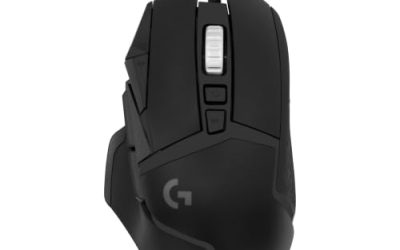
- Best for: Players who want the most buttons, a heavy planted feel, tunable weight, and a mouse that covers shooters, MMOs, and everyday work in one shell.
Players who want the most buttons, a heavy planted feel, tunable weight, and a mouse that covers shooters, MMOs, and everyday work in one shell.
The G502 HERO is the button-heavy alternative, and it has stayed popular for years because it does so many jobs at once. Its right-handed ergonomic shell is broad and deeply sculpted, with a thumb rest and a sniper button that drops sensitivity while held. The HERO 25K sensor tracks up to 25,600 DPI with no smoothing, filtering, or acceleration, Eleven programmable buttons, a dual-mode hyper-fast scroll wheel with tilt, and onboard memory for up to five profiles make it a strong pick for players who bind abilities, items, and push-to-talk across many games.
Weight is the defining trait. The G502 HERO starts at 121 grams and ships with five removable 3.6-gram weights, so the balance can be tuned toward the front, the rear, or the center. That heft makes the mouse feel planted during slow, precise tracking, and the wide shell fills a large palm comfortably.
Key specs
– Sensor: HERO 25K optical sensor, 100 to 25,600 DPI
– Weight: 121 grams, plus five removable 3.6-gram tuning weights
– Buttons: 11 programmable buttons with dual-mode hyper-fast scroll wheel and tilt
– Switches: Mechanical switches with onboard memory for five profiles
– Connection: Wired USB
– Lighting: LIGHTSYNC RGB
– Grip: Right-handed ergonomic, palm and claw, medium to large hands
Considerations: At 121 grams before weights, it is the heaviest pick here and the least suited to low-sensitivity flick aiming. The broad shell can feel large for smaller hands. The mechanical switches have a heavier press than the optical switches in the Basilisk V3.
SteelSeries Rival 5
- Best for: Players who want a lighter mid-size ergonomic mouse that works across shooters, MOBAs, and battle royale games without specializing in one genre.
Players who want a lighter mid-size ergonomic mouse that works across shooters, MOBAs, and battle royale games without specializing in one genre.
The Rival 5 is the balanced pick, and it earns its place by being good at many genres instead of specializing in one. Its ergonomic right-handed shell is a touch lower and narrower than the DeathAdder, which makes it comfortable for palm and claw grips across medium and large hands. The TrueMove Air optical sensor tracks up to 18,000 CPI with true 1-to-1 movement, Nine programmable buttons include a quick-toggle switch on the side that flips between saved sensitivity settings without opening software.
At 85 grams, the Rival 5 sits between the ultralight Model D and the heavier Basilisk V3 and G502 HERO. That middle weight keeps flicks quick while preserving enough stability for tracking moving targets. Golden Micro IP54 switches are rated for 80 million clicks and resist dust and moisture, and the PrismSync RGB lighting runs through ten zones along the sides and logo. The braided cable is light and flexible.
Key specs
– Sensor: TrueMove Air optical sensor, up to 18,000 CPI
– Weight: 85 grams
– Buttons: 9 programmable buttons, including a side quick-toggle switch
– Switches: Golden Micro IP54 mechanical switches, rated for 80 million clicks
– Connection: Wired USB with braided cable
– Lighting: PrismSync RGB across ten zones
– Grip: Right-handed ergonomic, palm and claw, medium to large hands
Considerations: The 18,000 CPI ceiling is lower than the Basilisk V3 and G502 HERO, though it exceeds what most players use. The side toggle switch takes a session or two to learn. The shell is slightly narrower than the DeathAdder, so players with very large hands may want the Basilisk V3 instead.
Glorious Model D
- Best for: Players who want the lightest ergonomic DeathAdder-style mouse for fast flicks, low-sensitivity aiming, and long sessions without hand fatigue.
Players who want the lightest ergonomic DeathAdder-style mouse for fast flicks, low-sensitivity aiming, and long sessions without hand fatigue.
The Model D is the lightweight alternative, and it takes the ergonomic idea in the opposite direction from the G502 HERO. Its honeycomb shell cuts the weight to 68 grams while keeping a right-handed ergonomic shape with a raised palm area and a gentle curve for the thumb. The Pixart PMW3360 optical sensor tracks up to 12,000 DPI with clean, predictable movement, Six buttons cover the essentials: two main clicks, two thumb buttons, a DPI button, and the scroll wheel click.
The light weight is the reason to choose it. Low-sensitivity players who sweep the mouse across a large pad will feel the difference within minutes, and the flexible Ascended cord drags less than a stiff braided cable. Omron switches give a light, familiar click, and the 100 percent PTFE feet glide smoothly across cloth pads.
Key specs
– Sensor: Pixart PMW3360 optical sensor, up to 12,000 DPI
– Weight: 68 grams
– Buttons: 6 buttons with macro support
– Switches: Omron mechanical switches
– Connection: Wired USB with flexible Ascended cord
– Lighting: RGB through the honeycomb shell and side strips
– Grip: Right-handed ergonomic, palm, claw, and fingertip, medium to large hands
Considerations: The honeycomb shell will not suit players who dislike perforated designs or want a solid shell. The 12,000 DPI ceiling is the lowest here, though it covers normal play. Six buttons is the fewest of the four picks, so heavy MMO binders should look at the Basilisk V3 or G502 HERO instead.
Which one fits
Start with your grip and hand size, then let weight and buttons narrow the list. Palm grip players with medium to large hands should look at the Basilisk V3 first: it matches the DeathAdder shape most closely, adds a better sensor and a versatile scroll wheel. Players with large hands who want the most controls and a heavy, planted mouse should take the G502 HERO, especially if they bind many abilities or use the sniper button often.
Claw grip players and anyone who splits time between shooters and MOBAs should look at the Rival 5. Its 85-gram weight and mid-size shell make it the most flexible pick, Low-sensitivity players, fingertip players, and anyone whose wrist tires during long sessions should take the Model D. Its 68-gram shell and flexible cord make fast repositioning easy, and the simple six-button layout keeps the shape clean.
If you play one genre almost exclusively, let that decide. Shooter players who flick and track will be happiest with the Model D or Rival 5. MMO and battle royale players who bind many actions will get more from the Basilisk V3 or G502 HERO. If you are unsure, the Basilisk V3 is the safest middle choice.
FAQ
Is the Basilisk V3 the closest DeathAdder alternative?
Yes, in shape and feel. The Basilisk V3 shares the tall ergonomic shell, the thumb rest, and the relaxed right-handed curve that made the DeathAdder popular, and it adds a stronger sensor, optical switches, and a HyperScroll tilt wheel.
Can a lightweight mouse still suit a palm grip?
Yes, if the shell is tall enough to support the palm. The Model D weighs 68 grams but keeps a raised palm area, so palm grip players with medium to large hands can use it comfortably. The key is the hump height and rear width, not the weight.
How many buttons do I need for a DeathAdder alternative?
It depends on the games you play. Shooter players usually need only the two thumb buttons plus the main clicks and wheel, so the six buttons of the Model D are enough. MMO and battle royale players who bind abilities, items, and push-to-talk benefit from the 11 buttons of the Basilisk V3 and G502 HERO.
Does a higher DPI sensor make a mouse better?
Not on its own. Every mouse here tracks cleanly at the sensitivity most players use, and the differences between 12,000 DPI and 26,000 DPI matter only at very high sensitivity settings. Sensor quality, polling rate, lift-off distance, and shape affect everyday aiming far more than the maximum DPI number.
Should I choose wired or wireless when replacing a DeathAdder?
All four picks here are wired, which removes battery and connection worries entirely and keeps the weight low. A wired mouse also avoids the need to charge or swap batteries during long sessions. Wireless versions of the same shapes exist, but the wired versions here keep things simpler.
Bottom line
The best DeathAdder alternative is the one that keeps the ergonomic comfort you already like and fixes the one thing you want to change. The Razer Basilisk V3 is the closest match in shape, with a better sensor, optical switches, and a scroll wheel that does more. The Logitech G502 HERO is the pick for players who want the most buttons and a heavy, planted feel with tunable weight. The SteelSeries Rival 5 is the balanced all-rounder for players who switch between genres. The Glorious Model D is the lightest option for fast flicks and low-sensitivity play. Match the shape to your grip, the weight to your sensitivity, and the button count to your games.
FAQ
Is the Basilisk V3 the closest DeathAdder alternative?
Can a lightweight mouse still suit a palm grip?
How many buttons do I need for a DeathAdder alternative?
Does a higher DPI sensor make a mouse better?
Should I choose wired or wireless when replacing a DeathAdder?
More from Amazon
Programs that pair well with the guide above. Offers and eligibility are set by Amazon and may change.
Free shipping on eligible items, Prime Video and more. Eligible new members can start with a free trial.
Start a Prime free trialAd-free music streaming. Eligible new subscribers can start with a free trial.
Try Music Unlimited freeA Prime membership for ages 18-24 with a trial period. Eligibility is set by Amazon.
See Prime for Young AdultsAudiobooks and podcasts to listen to on the go. Eligible new members can start with a free trial.
Try Audible freeAs an Amazon Associate we earn from qualifying purchases.