Our Short List of 3

- Best for: Chromebook players who want wireless freedom and months of battery life without charging cables.
- HERO 12K sensor with 200 to 12,000 DPI sensitivity
- LIGHTSPEED wireless with 1 ms report rate
- 6 programmable buttons with onboard memory
- Up to 250 hours of continuous play on one AA battery

- Best for: Players who play button-heavy games and want a full-size ergonomic mouse for long Chromebook sessions.
- HERO 25K sensor with 200 to 25,600 DPI
- 11 programmable buttons and dual-mode hyper-fast scroll wheel
- Adjustable weight system with five 3.6 g weights
- Onboard memory for up to five profiles

- Best for: Chromebook owners who want a comfortable wired gaming mouse with zero setup and no battery to manage.
- True 6,400 DPI optical sensor
- 5 programmable buttons with mechanical switches
- Wired USB connection with rubber side grips
- Ergonomic right-handed design
All 4 Picks at a Glance
| Product | Specs | Action |
|---|---|---|
| Logitech G305 LIGHTSPEED |
| Check price on Amazon |
| Logitech G502 HERO |
| Check price on Amazon |
| Razer DeathAdder Essential |
| Check price on Amazon |
 Logitech G309 LIGHTSPEED |
| Check price on Amazon |
Our Top Picks
Pros & cons
- Up to 250 hours of play on a single AA battery
- Lightweight 3.4-ounce body aids fast, precise movement
- Built-in receiver storage keeps the dongle from getting lost
- Relies on a AA battery rather than a built-in rechargeable cell
- Endurance mode trade-off needed to stretch battery life further
Pros & cons
- 11 programmable buttons add extensive control customization
- Adjustable weights let you fine-tune balance and feel
- LIGHTSYNC RGB syncs lighting with other Logitech gear
- Wired connection limits cable-free desk setups
- Heavier than typical lightweight esports mice at 0.27 pounds
- Razer DeathAdder Essential Ergonomic Wired Gaming Mouse5.01 x 2.86 x 1.69 inches0.3 poundsCheck on Amazon

A Chromebook can run cloud games and Android games well, but the mouse you pair with it decides how good that feels. ChromeOS has no version of the configuration apps that gaming mice usually rely on, so a mouse that needs Windows-only software to change its sensitivity or reassign its buttons will spend its life stuck on factory defaults. The real decision is not which sensor is fastest on paper, but which mouse still does its job when the only thing between it and your Chromebook is a cable or a wireless link.
This guide is for Chromebook owners who play through cloud services, Android games, or browser games, and for students and travelers who want one mouse for classwork and play. Every mouse below was chosen from its name and specifications on its Amazon product page, with a focus on plug-and-play operation, onboard memory, and connection types that suit Chromebooks with USB-C ports.
Quick Picks
As an Amazon Associate we earn from qualifying purchases
| Product | Best for | Key spec from title |
|---|---|---|
| Logitech G305 LIGHTSPEED | Wireless play without a cable | Hero 12K Sensor, 12,000 DPI |
| Logitech G502 HERO | Button-heavy games and MMO play | HERO 25K Sensor, 25,600 DPI |
| Razer DeathAdder Essential | Simple wired plug-and-play comfort | 6400 DPI Optical Sensor |
| SteelSeries Rival 3 | Light competitive play with saved settings | 8,500 CPI TrueMove Core Sensor |
| Logitech G309 LIGHTSPEED | Bluetooth and dongle flexibility | Hero 25K Sensor, 300+ hr Battery |
How to Choose
Connection First: USB-A, USB-C, or Bluetooth
Most Chromebooks have USB-C ports and some have one USB-A port, so the connection decides whether a mouse works at all. A wired mouse needs a USB-A port or a small adapter, and a 2.4 GHz dongle has the same requirement. Bluetooth mice skip the adapter entirely and pair straight from ChromeOS settings, which matters on thin Chromebooks with only USB-C ports. Before buying, count the ports on your Chromebook and check whether you already carry a hub. A mouse with both Bluetooth and a dongle gives you a backup when one path is busy or missing.
Onboard Memory Beats Software on ChromeOS
Gaming mouse apps such as Logitech G HUB, Razer Synapse, and SteelSeries Engine do not run on ChromeOS, so any setting that lives only in software is out of reach on a Chromebook. Onboard memory changes that: you set the sensitivity, button assignments, and lighting once on a Windows or Mac computer, and the mouse carries those settings to the Chromebook. Mice without onboard memory still work, but they run at factory defaults and their extra buttons keep their original jobs. If you play games that need custom bindings, onboard memory is the feature to look for.
Sensitivity Range and the DPI Button
ChromeOS lets you adjust pointer speed in settings, but a mouse with its own sensitivity steps gives you finer control in games. A DPI button on the mouse lets you switch between a slow setting for careful aiming and a fast setting for turning quickly, without opening any menu. Look for a sensor range that covers at least 400 to 8,000 DPI, which suits both desktop work and fast games. Very high maximum DPI figures matter less than clean tracking at the low and middle settings most players actually use every day.
Shape, Weight, and Battery Life for Daily Use
A mouse that feels good for an hour of homework may feel wrong after three hours of gaming, so shape matters as much as the sensor. Palm grip players usually want a taller, fuller body, while claw and fingertip players do better with a lower, lighter shell. Lighter mice reduce wrist strain during fast movement, and a mouse under 100 grams is a good target for long sessions. For wireless models, check the battery type: a replaceable AA battery keeps you playing with a spare in a drawer, while a rechargeable mouse needs a cable and a charging habit.
The 5 Best Options
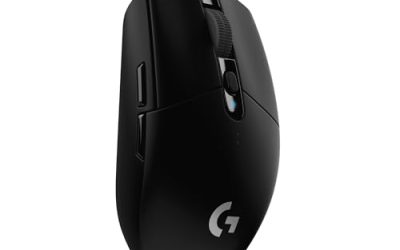
Logitech G305 LIGHTSPEED
- Best for: Chromebook players who want wireless freedom and months of battery life without charging cables.
- HERO 12K sensor with 200 to 12,000 DPI sensitivity
- LIGHTSPEED wireless with 1 ms report rate
- 6 programmable buttons with onboard memory
- Up to 250 hours of continuous play on one AA battery
Chromebook players who want wireless freedom and months of battery life without charging cables.
It has no Bluetooth, so a Chromebook with only USB-C ports needs an adapter or hub for the USB-A receiver.
The G305 is the simplest way to cut the cable on a Chromebook, because it pairs a proven sensor with a tiny receiver and a battery that lasts for months. Its LIGHTSPEED wireless link reports at 1 millisecond, so the cursor feels wired even in fast games, and the compact symmetrical shape suits claw and fingertip grips. The six programmable buttons and onboard memory let you store your setup from another computer, then use it on a Chromebook without any software. At 99 grams with its battery fitted, it stays light enough for long sessions without feeling flimsy.
Watch out for: It has no Bluetooth, so a Chromebook with only USB-C ports needs an adapter or hub for the USB-A receiver.
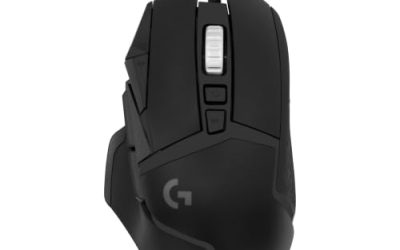
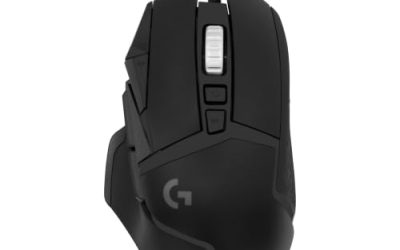
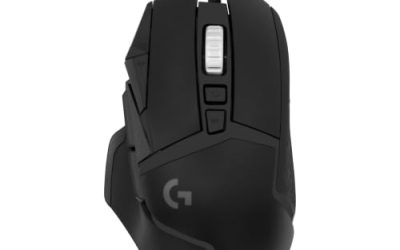
Logitech G502 HERO
- Best for: Players who play button-heavy games and want a full-size ergonomic mouse for long Chromebook sessions.
- HERO 25K sensor with 200 to 25,600 DPI
- 11 programmable buttons and dual-mode hyper-fast scroll wheel
- Adjustable weight system with five 3.6 g weights
- Onboard memory for up to five profiles
Players who play button-heavy games and want a full-size ergonomic mouse for long Chromebook sessions.
It is the heaviest mouse here, and its wired USB-A cable needs a port or adapter on USB-C-only Chromebooks.
The G502 HERO is the pick for players who want a lot of buttons within thumb reach, and it works on a Chromebook the moment you plug it in. Its HERO 25K sensor tracks up to 25,600 DPI with no smoothing or acceleration, and the dual-mode scroll wheel switches between a notched step and a free spin for long documents or inventory lists. Five small weights let you tune the balance from 121 grams upward, and the onboard memory holds up to five profiles set on another computer. The right-handed ergonomic shape supports the palm during long sessions.
Watch out for: It is the heaviest mouse here, and its wired USB-A cable needs a port or adapter on USB-C-only Chromebooks.
Razer DeathAdder Essential
- Best for: Chromebook owners who want a comfortable wired gaming mouse with zero setup and no battery to manage.
- True 6,400 DPI optical sensor
- 5 programmable buttons with mechanical switches
- Wired USB connection with rubber side grips
- Ergonomic right-handed design
Chromebook owners who want a comfortable wired gaming mouse with zero setup and no battery to manage.
It has no onboard memory, so button remapping needs Razer Synapse on Windows or Mac and will not carry over to ChromeOS.
The DeathAdder Essential is the most straightforward mouse in this guide: plug the cable in and it works, with no software, no battery, and no setup step on the Chromebook. Its classic right-handed ergonomic shape has kept players comfortable through long sessions for years, and the rubber side grips help the hand stay steady during fast movement. The optical sensor reaches 6,400 DPI, which is plenty for cloud games and Android titles, and the five buttons cover the basics plus two thumb buttons. It is the cheapest way to get a proper gaming shape onto a Chromebook desk.
Watch out for: It has no onboard memory, so button remapping needs Razer Synapse on Windows or Mac and will not carry over to ChromeOS.
SteelSeries Rival 3
The Rival 3 is the lightest wired mouse in this guide and the best choice for competitive play on a Chromebook, thanks to a sensor and memory combination that works without any software on the machine. Its TrueMove Core sensor tracks at 8,500 CPI with true one-to-one movement, and the onboard memory saves your polling rate, key assignments, and five sensitivity levels directly on the mouse. The 60-million-click mechanical switches stay crisp over years of use, and three RGB zones give the matte black shell a clean look. At 77 grams it moves fast without tiring the wrist.
Specs
- TrueMove Core optical sensor, 100 to 8,500 CPI
- 1,000 Hz polling rate with 300 IPS tracking and 35 G acceleration
- 6 programmable buttons with split-trigger design
- Onboard memory for polling rate, keybinds, and 5 CPI levels
- 60-million-click mechanical switches
- 77 grams without cable, 1.8 m rubber cable
Best for: Competitive players who want a light mouse whose saved settings travel with it to any Chromebook.
Watch out for: It is wired only, and its right-handed ergonomic shape suits claw or fingertip grips better than a full palm grip.
Logitech G309 LIGHTSPEED
- Best for: Chromebook owners who want Bluetooth pairing with no dongle, plus a low-latency wireless mode for gaming.
- HERO 25K sensor with sub-micron tracking
- LIGHTSPEED wireless and Bluetooth connectivity
- LIGHTFORCE hybrid optical-mechanical switches
- 6 programmable buttons
Chromebook owners who want Bluetooth pairing with no dongle, plus a low-latency wireless mode for gaming.
Button remapping needs Logitech G HUB, which does not run on ChromeOS, so the mouse runs at its defaults on a Chromebook.
The G309 is the most flexible mouse here because it connects two ways: a low-latency LIGHTSPEED dongle for games and plain Bluetooth for everything else. Bluetooth is the key for Chromebooks, since it pairs straight from ChromeOS settings with no dongle and no adapter, which suits thin laptops with only USB-C ports. The HERO 25K sensor gives it the same tracking ceiling as the flagship wired mice, and a single AA battery runs it for over 300 hours. At 86 grams with the battery fitted, it stays light in a bag and comfortable across a full day of classes and games.
Watch out for: Button remapping needs Logitech G HUB, which does not run on ChromeOS, so the mouse runs at its defaults on a Chromebook.
Which One Fits Your Situation
You Play Cloud Games on a Chromebook With Only USB-C Ports
Pick the Logitech G309 LIGHTSPEED, because its Bluetooth connection pairs straight from ChromeOS settings with no dongle and no adapter. The HERO 25K sensor keeps aiming sharp in cloud games, and the 300-hour battery means you will not hunt for a charger mid-week. Keep the LIGHTSPEED receiver in the box for a Windows desktop, and use Bluetooth whenever you are on the Chromebook.
You Want Wireless Play and Never Want to Charge a Mouse
Pick the Logitech G305 LIGHTSPEED, because one AA battery runs it for up to 250 hours and a spare battery costs almost nothing. Its 1 ms wireless link feels wired in fast games, and the onboard memory keeps your button setup when you move between computers. Just remember that the USB-A receiver needs an adapter on Chromebooks without a full-size USB port.
You Play Button-Heavy Games for Hours at a Desk
Pick the Logitech G502 HERO, because its 11 buttons put more commands under your thumb than any other mouse here, and the weight system lets you tune how it feels. The onboard memory stores up to five profiles, so your setup follows the mouse to the Chromebook. Its wired connection also means there is no battery to think about during long sessions.
You Want the Lightest Competitive Mouse With Saved Settings
Pick the SteelSeries Rival 3, because at 77 grams it is the lightest mouse in this guide and its onboard memory saves your sensitivity levels and key assignments directly on the mouse. The TrueMove Core sensor tracks cleanly at 8,500 CPI, and the wired connection keeps latency at 1 ms. It is the best fit for fast games where every gram and every saved setting counts.
Common Mistakes
- Buying a mouse whose best features live in Windows-only software, then finding the settings locked on ChromeOS.
- Choosing a 2.4 GHz dongle mouse for a Chromebook with only USB-C ports and no adapter or hub.
- Assuming a high maximum DPI number means better aiming, instead of checking tracking quality at the low and middle settings you actually use.
- Picking a heavy mouse for a small hand or a fingertip grip, which causes wrist strain over long sessions.
- Forgetting that a mouse without onboard memory runs at factory defaults on a Chromebook, so its extra buttons keep their original jobs.
Frequently Asked Questions
Do gaming mice work on Chromebooks?
Yes, most gaming mice work on a Chromebook, because ChromeOS supports USB and Bluetooth mice without extra drivers. Plug in a wired mouse or pair a Bluetooth mouse from settings and the cursor, clicks, and scroll wheel work at once. The limits come from configuration software, which does not run on ChromeOS, so sensitivity changes and button remapping need onboard memory or a Windows or Mac computer.
Can I change DPI on a Chromebook?
You can change pointer speed in ChromeOS settings, which adjusts how far the cursor moves for the same hand movement. Mice with a DPI button let you switch sensitivity, which is faster during a game. Mice with onboard memory keep custom sensitivity levels set on another computer, so the DPI button works with your saved steps on the Chromebook. Mice without either option stay at their factory sensitivity.
Is Bluetooth or a wireless dongle better for Chromebook gaming?
Bluetooth is more convenient because it needs no port and no adapter, which matters on thin Chromebooks with only USB-C ports. A 2.4 GHz dongle usually gives lower latency and a steadier link, which helps in fast competitive games. If your Chromebook has a spare USB port, a dongle is the safer pick for serious play. If it does not, a dual-mode mouse like the G309 gives you both options.
Do I need gaming mouse software on a Chromebook?
No, the mouse works without it, and the configuration apps from the major brands do not run on ChromeOS at all. The mouse works with its default buttons and sensitivity. Software only matters if you want to remap buttons, tune lighting, or set sensitivity steps. For those changes, use a Windows or Mac computer once and save the result to the mouse if it has onboard memory.
FAQ
Do gaming mice work on Chromebooks?
Can I change DPI on a Chromebook?
Is Bluetooth or a wireless dongle better for Chromebook gaming?
Do I need gaming mouse software on a Chromebook?
More from Amazon
Programs that pair well with the guide above. Offers and eligibility are set by Amazon and may change.
Free shipping on eligible items, Prime Video and more. Eligible new members can start with a free trial.
Start a Prime free trialAd-free music streaming. Eligible new subscribers can start with a free trial.
Try Music Unlimited freeA Prime membership for ages 18-24 with a trial period. Eligibility is set by Amazon.
See Prime for Young AdultsAudiobooks and podcasts to listen to on the go. Eligible new members can start with a free trial.
Try Audible freeAs an Amazon Associate we earn from qualifying purchases.