Our Top Picks
Pros & cons
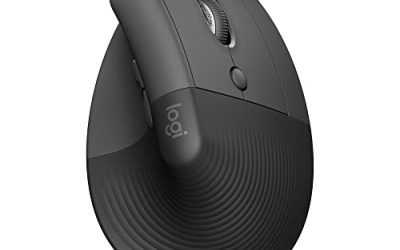
- 11 programmable buttons add extensive control customization
- Adjustable weights let you fine-tune balance and feel
- LIGHTSYNC RGB syncs lighting with other Logitech gear
- Wired connection limits cable-free desk setups
- Heavier than typical lightweight esports mice at 0.27 pounds
 Razer Orochi V2 Wireless Gaming Mouse4.26 x 1.52 inch (Pack of 1)4.26 x 1.52 x 2.47 inches0.13 poundsCheck on Amazon

Your grip decides how a mouse should feel long before sensor numbers matter. A palm player rests the whole hand on the shell and steers from the wrist, a claw player arches the fingers and pivots on the fingertips, and a fingertip player holds the mouse with just the finger pads and moves it in quick, small flicks. When the shape fights that habit, aim suffers and the hand tires, which is why grip comes first in this guide and hardware comes second.

Below you will find mice matched to each of the three grips, aimed at palm players who want full-hand support, claw players who want an arched middle ground, and fingertip players who want the lightest touch. Every mouse was chosen from its Amazon listing title and specifications, with shape, size, and weight taken from the listing itself, so the match between hand and hardware stays grounded in real product details.
Quick Picks
As an Amazon Associate we earn from qualifying purchases
| Product | Best for | Key spec from title |
|---|---|---|
| Logitech G502 HERO | Palm players who want a full-size ergonomic shell | Ergonomic shape with HERO 25K sensor and 11 buttons |
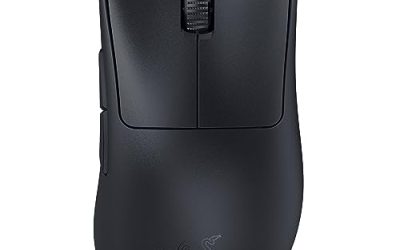
| Razer Viper V3 Pro | Claw players who want an ultralight symmetrical shell | 35K DPI sensor with 8K polling at 54 grams |
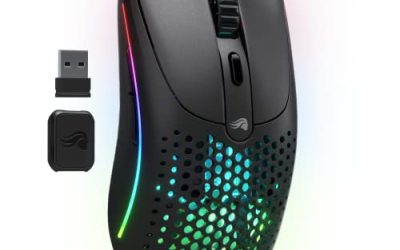
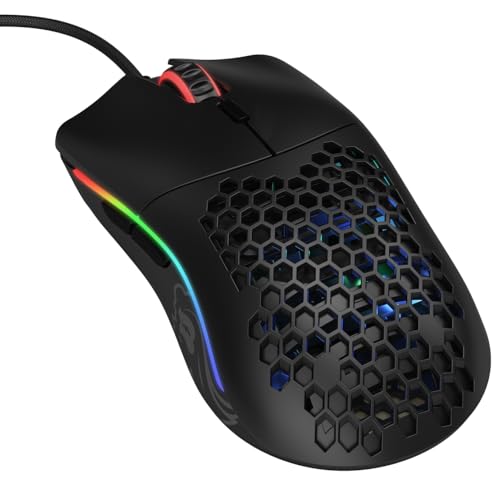
| Glorious Model O Wired | Claw players who want a light honeycomb ambidextrous shape | Honeycomb shell with Pixart 3360 sensor at 67 grams |
| Glorious Model O- Wired | Fingertip players who want a smaller, lighter honeycomb body | Honeycomb shell with Pixart 3360 sensor at 58 grams |
| Razer Orochi V2 | Fingertip players who want long wireless battery life | 5G Advanced 18K DPI sensor with up to 950 hours of battery life |
How to Choose
Work Out Which Grip You Actually Use
Most players guess their grip wrong, so watch your hand during a real match instead of deciding from memory. Palm grip means the base of your palm stays in contact with the shell while the fingers lie flat along the buttons. Claw grip means the palm touches the back of the mouse while the fingers arch up and the fingertips press the buttons. Fingertip grip means only the finger pads touch the mouse and the palm floats above the shell entirely. Play for ten minutes, glance down mid-game, and note which contact points your hand keeps returning to.
Match the Shell Shape to Your Hand Length
Shell shape matters as much as length, because a tall hump supports a resting palm while a low, flat profile leaves room for arched fingers. Long hands suit longer shells that fill the palm without forcing the fingers past the front edge, while shorter hands suit compact shells that keep the buttons within easy reach. Measure your hand from wrist crease to middle fingertip, then compare that number with the listed dimensions, such as the 132 by 75 by 40 millimetre body of the G502 HERO. A shell that matches your hand length keeps the wrist neutral during long sessions.
Let Weight Follow the Grip, Not the Other Way Round
Fingertip players move the mouse with small finger motions, so every extra gram shows up in the wrist by the end of a session. Claw players split the work between fingers and palm, so a middleweight shell often feels best. Palm players rest the hand on the mouse and push from the wrist, so a heavier shell can feel planted and steady rather than slow. The mice in this guide run from 54 grams to 121 grams, which is a wide enough spread to feel the difference. Pick the lightest shell your grip allows, then stop chasing lower numbers.
Test Comfort Before You Commit to a Shape
A mouse that looks right on a product page can still feel wrong after an hour, so give any new shape a proper trial across several sessions. Play your usual games, note any hot spots on the palm or cramping in the fingers, and check whether your aim stays steady late in a session. Many players find that a shape feels strange for the first two days and natural by the end of the week, so avoid judging a grip match on the first match alone. When a shape keeps causing discomfort after a week, the grip match is wrong rather than your hand.
The 5 Best Options
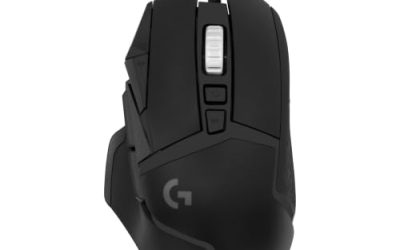
Logitech G502 HERO
Palm grip players get a full-size home here. The ergonomic shape fills the hand from wrist to fingertips, and the listed dimensions of 132 by 75 by 40 millimetres show a body built for hands that rest flat on the shell. Eleven buttons give palm players plenty of binds without crowding the thumb, and the HERO 25K sensor tracks wrist-driven movement cleanly. At 121 grams the mouse feels planted under a resting palm, which suits players who steer from the wrist and make small, controlled adjustments rather than lifting constantly.
Specs
- Ergonomic shape
- HERO 25K sensor
- 11 buttons
- Dimensions of 132 by 75 by 40 millimetres
- Weight of 121 grams
Best for: Palm grip players who want a full-size ergonomic shell that supports the whole hand.
Watch out for: Smaller hands may find the 132-millimetre length stretches the fingers, so compare the dimensions with your hand before buying.
Razer Viper V3 Pro
Claw grip players who like a light, symmetrical shell will find the Viper V3 Pro easy to control. The arched finger position of a claw grip pairs well with a low-profile body, and at 54 grams the mouse responds to small finger adjustments without resistance. Its 35K DPI sensor handles fast flicks, the 8K polling rate keeps movement updates frequent, and Gen-3 switches give the main buttons a crisp, consistent click. This mouse suits claw players who want speed without giving up a shape that works for either hand.
Specs
- Weight of 54 grams
- 35K DPI sensor
- 8K polling rate
- Gen-3 switches
Best for: Claw grip players who want an ultralight symmetrical mouse for fast finger-driven aim.
Watch out for: The light weight can feel too loose at first for players moving from a heavier mouse, so allow a few sessions to adjust.
Glorious Model O Wired
Claw grip players on a budget get a proven honeycomb shape in the Model O. The ambidextrous body suits claw players who arch their fingers over a symmetrical shell, and the honeycomb cutouts keep the weight down to 67 grams without shrinking the mouse. A Pixart 3360 sensor tracks reliably across fast movements, Omron switches handle the main clicks, and six buttons cover the essentials without clutter. Wired play removes battery worries entirely, which keeps the focus on grip and aim during long sessions.
Specs
- Weight of 67 grams
- Honeycomb shell
- Pixart 3360 sensor
- Omron switches
- Ambidextrous shape
- 6 buttons
Best for: Claw grip players who want a light ambidextrous honeycomb mouse with a simple button layout.
Watch out for: The honeycomb holes collect dust over time, so keep a cloth nearby if you eat at your desk.
Glorious Model O- Wired
Fingertip grip players need a small, light body they can steer with the finger pads alone, and the Model O- delivers exactly that. This is the smaller Minus version of the Model O, built around the same honeycomb design at just 58 grams, so fingertip players can flick and lift with minimal effort. The Pixart 3360 sensor and Omron switches carry over from the larger model, giving the same tracking and click feel in a more compact frame. Six buttons keep the layout simple, which suits fingertip players who bind most actions to the keyboard.
Specs
- Weight of 58 grams
- Honeycomb shell
- Pixart 3360 sensor
- Omron switches
Best for: Fingertip grip players who want a compact, featherweight honeycomb mouse.
Watch out for: Larger hands may find the smaller shell cramped, so check the size against your hand before choosing the Minus version.
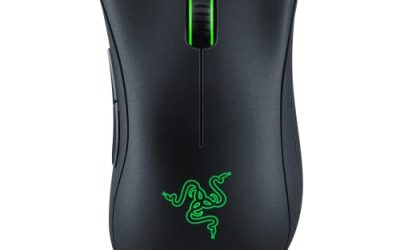
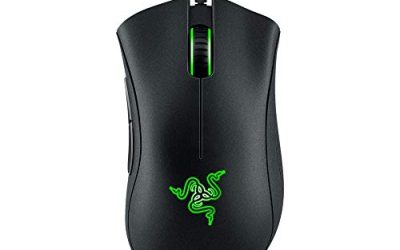
Razer Orochi V2
Fingertip grip players who play wireless will appreciate how long the Orochi V2 runs between charges. Two wireless modes let you switch between a low-latency gaming link and a portable Bluetooth link, and battery life rated up to 950 hours means charging rarely interrupts play. The 5G Advanced 18K DPI sensor tracks the small, precise flicks that fingertip players rely on, while the compact body stays easy to lift and reposition with the finger pads. This mouse suits fingertip players who travel with their setup or play away from a charging cable.
Specs
- 2 wireless modes
- Battery life rated up to 950 hours
- 5G Advanced 18K DPI sensor
Best for: Fingertip grip players who want a compact wireless mouse with very long battery life.
Watch out for: Confirm which wireless mode you plan to use for gaming, since the two modes serve different purposes.
Which One Fits Your Situation
You Rest Your Whole Palm on the Mouse
Pick the Logitech G502 HERO when your palm stays flat on the shell and your fingers lie along the buttons. Its ergonomic shape and 132-millimetre length support the full hand, eleven buttons cover your binds, and the 121-gram weight feels planted under a wrist-driven style. This is the natural home for palm players who value comfort over ultralight speed.
You Arch Your Fingers and Want a Light Claw Mouse
Pick the Razer Viper V3 Pro when your palm touches the back of the mouse and your fingers arch over the buttons. At 54 grams it answers small finger adjustments instantly, the 35K DPI sensor tracks fast flicks, and the symmetrical shape works for either hand. It is the fastest-feeling claw option in this guide.
You Want a Claw Mouse With a Simple Layout
Pick the Glorious Model O Wired when your claw grip suits a symmetrical honeycomb shell and you prefer fewer buttons. Six buttons keep the layout clean, the Pixart 3360 sensor tracks reliably, and the 67-gram weight stays light without feeling insubstantial. Wired play means no battery to manage during long sessions.
You Steer With Your Fingertips Alone
Pick the Glorious Model O- Wired when only your finger pads touch the mouse and you want the lightest possible control. At 58 grams the compact honeycomb body flicks and lifts with minimal effort, and the Pixart 3360 sensor keeps tracking precise. Choose the Razer Orochi V2 instead when you need the same fingertip control without a cable, plus battery life rated up to 950 hours.
Common Mistakes
- Choosing a mouse because a favourite player uses it, without checking whether your grip matches theirs.
- Picking the lightest mouse available when your palm grip actually needs a heavier, planted shell for steady aim.
- Judging a new shape after one match instead of giving your hand a week to adjust to it.
- Buying a large mouse for small hands, or a compact mouse for large hands, without comparing the listed dimensions.
- Ignoring weight entirely and wondering why the wrist aches after long fingertip sessions.
Frequently Asked Questions
What is the best mouse grip style for gaming?
No single grip wins for everyone, because hand size and play style decide the match. Palm grip suits players who want comfort and stability, claw grip suits players who want a balance of control and speed, and fingertip grip suits players who want the fastest small flicks. Identify your natural grip first, then choose a mouse shaped for it.
Can I change my grip style?
Yes, although it takes deliberate practice over several weeks. Start with short sessions in casual matches, focus on keeping the new hand position, and expect your aim to dip while the muscles adjust. Many players find a hybrid between two grips rather than a clean switch, and that middle ground often works well.
Is a lighter mouse always better for fingertip grip?
Lighter usually helps, since fingertip players move the mouse with small finger motions and feel every gram. The mice in this guide run from 54 to 58 grams for fingertip-friendly options, which shows how light this category goes. Balance still matters, so a well-shaped 58-gram mouse can beat a poorly shaped lighter one.
How do I know my hand size for choosing a mouse?
Measure from your wrist crease to the tip of your middle finger, then compare that length with the dimensions in the listing. Hands under that comparison suit compact shells such as the Model O-, while longer hands suit full-size shells such as the G502 HERO. When your hand falls between sizes, the lighter and more symmetrical option is usually the safer trial.
FAQ
What is the best mouse grip style for gaming?
Can I change my grip style?
Is a lighter mouse always better for fingertip grip?
How do I know my hand size for choosing a mouse?
More from Amazon
Programs that pair well with the guide above. Offers and eligibility are set by Amazon and may change.
Free shipping on eligible items, Prime Video and more. Eligible new members can start with a free trial.
Start a Prime free trialAd-free music streaming. Eligible new subscribers can start with a free trial.
Try Music Unlimited freeA Prime membership for ages 18-24 with a trial period. Eligibility is set by Amazon.
See Prime for Young AdultsAudiobooks and podcasts to listen to on the go. Eligible new members can start with a free trial.
Try Audible freeAs an Amazon Associate we earn from qualifying purchases.