Our Top Picks
Pros & cons
- Up to 250 hours of play on a single AA battery
- Lightweight 3.4-ounce body aids fast, precise movement
- Built-in receiver storage keeps the dongle from getting lost
- Relies on a AA battery rather than a built-in rechargeable cell
- Endurance mode trade-off needed to stretch battery life further
Pros & cons
- 11 programmable buttons add extensive control customization
- Adjustable weights let you fine-tune balance and feel
- LIGHTSYNC RGB syncs lighting with other Logitech gear
- Wired connection limits cable-free desk setups
- Heavier than typical lightweight esports mice at 0.27 pounds


The real decision here is not sensor speed. It is whether the mouse on your desk keeps every setting when the companion app is not installed, not running, or not allowed. Many gaming mice quietly depend on software for DPI steps, polling rate, or button assignments, which breaks down on a work laptop, a borrowed PC, a tournament machine, or a Linux setup where the app does not exist.


This guide is for players who plug into different computers, people who cannot install programs on a managed machine, and anyone who simply refuses another background app. Every pick below was chosen from its Amazon listing: what the listing says about onboard DPI switching, onboard memory, and driverless operation decides its place, and each entry notes plainly where an optional app still exists.
Quick Picks
As an Amazon Associate we earn from qualifying purchases
| Product | Best for | Key spec from title |
|---|---|---|
| BenQ Zowie EC2-C | Players who want zero software, ever | Driverless, paracord cable |
| Logitech G305 LIGHTSPEED | Wireless play on any PC you touch | HERO 12K sensor, on-board memory |
| Logitech G502 HERO | Many buttons that travel with the mouse | HERO 25K sensor, on-board memory |
| SteelSeries Rival 3 | A light wired mouse with hardware CPI steps | 8,500 CPI TrueMove Core sensor |
| Logitech G203 LIGHTSYNC | A simple wired starter that keeps its settings | 8,000 DPI, on-board memory |
How to Choose
Check whether DPI changes live on a physical button
The setting you will touch most is sensitivity, so it has to be reachable without opening an app. Look for a dedicated DPI or CPI button on the shell and a listing that names the steps it cycles through. The Zowie EC2-C goes further and puts polling rate on the mouse too, with both adjusted on the hardware itself. If a listing only says the DPI is adjustable and names software as the way to change it, the mouse fails this test even if the sensor is excellent.
Separate onboard memory from software profiles
Onboard memory is what makes a mouse portable between computers. Settings written to the mouse itself, such as the DPI levels on the G305 and G502 HERO, survive a move to a PC that has never seen the brand app. Settings that live only in a software profile vanish the moment you plug into another machine. Read the listing wording carefully: on-board memory in the title is the signal that your setup travels with the hardware instead of staying behind on one hard drive.
Decide how much optional software you can tolerate
There are two honest categories in this guide. The EC2-C is driverless by design, with no companion app in the picture at all. The Logitech and SteelSeries picks work fully for everyday play out of the box, but their makers offer an optional app for extras such as button remapping, macros, or lighting control. Neither approach is wrong, but they suit different people: choose the driverless route if an app is impossible, and the optional-app route if you might configure once and then never open it again.
Match the connection and shape to where you actually play
A software-free mouse still has to fit your hand and your desk. Wired models such as the Rival 3 and G203 never need charging and suit a fixed setup, while the G305 runs on a single AA battery for up to 250 hours and stores its receiver inside the shell for travel. Shape matters just as much: the EC2-C is a right-handed ergonomic shell for palm and claw grips, while the G305 uses a symmetrical body that packs easily into a laptop bag.
The 5 Best Options
BenQ Zowie EC2-C
This is the only pick designed from the start to need nothing installed. The listing uses the word driverless in the title and states that its four DPI levels and three polling rates adjust with no additional software, so the mouse behaves identically on a home rig, an office PC, or a competition machine. The medium right-handed shell supports palm and claw grips, the paracord cable keeps drag low, and the 24-step scroll wheel gives clear, deliberate notches for weapon switching.
Specs
- Sensor: 3360 optical sensor
- DPI levels: 400, 800, 1600, and 3200, switched on the mouse
- Polling rate: 125, 500, or 1000 Hz, adjustable with no additional software
- Connection: wired USB with paracord cable
- Scroll wheel: 24-step wheel with clear indents
- Shape: right-handed ergonomic, medium size, matte black
- Extras in the box: additional mouse feet, 1-year limited warranty
Best for: players who move between PCs and want identical behavior everywhere with no app at all.
Watch out for: the four fixed DPI steps cannot be fine-tuned, so players who play at an in-between value such as 600 DPI have no way to set it.
ASIN: B09JRZZ4RV
Logitech G305 LIGHTSPEED
The G305 answers the wireless version of the same problem. Its LIGHTSPEED connection runs through a USB receiver that stores inside the shell, the HERO sensor and DPI button work the moment the receiver is plugged in, and on-board memory keeps your settings on the mouse rather than in a profile on one computer. At 99 grams with up to 250 hours on a single AA battery, it is an easy mouse to carry between a desk, a couch setup, and a second machine.
Specs
- Sensor: HERO optical sensor, 200 to 12,000 DPI
- Tracking: 400 IPS maximum speed, zero smoothing or acceleration per the listing
- Connection: LIGHTSPEED wireless, 1 ms report rate, receiver storage in the shell
- Buttons: 6 buttons, including a DPI button and two side buttons
- Battery: up to 250 hours of continuous gameplay on one AA battery
- Weight: 99 grams
- Memory: on-board memory
Best for: wireless players who switch between computers and want their DPI to follow the mouse.
Watch out for: Logitech G Hub is optional rather than required, but button remapping and macros are handled there, so skip it only if the default layout suits you.
ASIN: B07CMS5Q6P
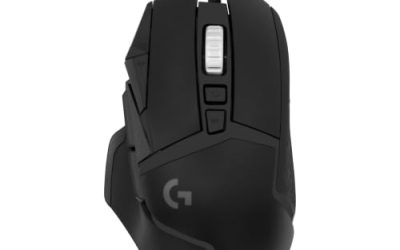
Logitech G502 HERO

Where the G305 keeps things minimal, the G502 HERO is the pick for players who use a lot of buttons and still want those assignments to travel. Eleven programmable buttons, a dual-mode scroll wheel, and on-board memory mean a profile saved to the mouse keeps working on a PC without the app running. The HERO 25K sensor covers a wide 200 to 25,600 DPI range, hardware buttons cycle DPI during play, and the tunable weight system with five 3.6 gram weights lets you set the balance physically instead of digitally.
Specs
- Sensor: HERO 25K optical sensor, 200 to 25,600 DPI
- Buttons: 11 programmable buttons
- Memory: on-board memory for custom game profiles
- Weight system: up to five 3.6 gram weights for tuning and balance
- Scroll wheel: dual-mode hyper-fast scroll wheel
- Lighting: customizable RGB lighting
- Connection: wired, PC and Mac
Best for: MMO and MOBA players who rely on many buttons and move between two or more computers.
Watch out for: creating or editing profiles happens in the Logitech app before they are stored onboard, so the first setup is not software-free even though daily use is.
ASIN: B07GBZ4Q68
SteelSeries Rival 3
The wired Rival 3 keeps the formula simple and light. Its TrueMove Core sensor tracks at true 1-to-1 with CPI adjustable from 100 to 8,500, the top button cycles sensitivity during a match, and the 1000 Hz polling rate is the hardware default rather than a software unlock. At 77 grams without the cable, with mechanical switches rated for 60 million clicks and an ergonomic right-handed shape listed for claw and fingertip grips, it suits players who want a dependable wired mouse that asks for nothing after plugging in.
Specs
- Sensor: SteelSeries TrueMove Core optical sensor, 100 to 8,500 CPI
- Tracking: 300 IPS, 35G acceleration, no hardware acceleration
- Polling rate: 1000 Hz, 1 ms
- Buttons: 6 buttons with split-trigger main clicks
- Switches: mechanical switches rated for 60 million clicks
- Weight: 77 grams without cable
- Cable: 1.8 m rubber cable
- Lighting: 3 independently controlled RGB zones
Best for: FPS players who want a light wired mouse with sensitivity steps handled on the shell.
Watch out for: SteelSeries software is optional, but fine CPI adjustments in 100-step increments and per-zone lighting control live there rather than on the mouse.
ASIN: B08176SM7C
Logitech G203 LIGHTSYNC
The G203 LIGHTSYNC is the straightforward wired option for a single desk that still benefits from settings stored on the mouse. Its 8,000 DPI sensor and six buttons cover everyday competitive play, on-board memory holds the configuration so it persists without an app running in the background, and the classic symmetrical shape works for a wide range of hand sizes and grips. It is also the easiest pick here to share: plug it into a family or second PC and it behaves the way you left it.
Specs
- Sensor: 8,000 DPI gaming sensor
- Buttons: 6 programmable buttons
- Memory: on-board memory
- Lighting: LIGHTSYNC RGB with rainbow optical effect
- Connection: wired USB
- Compatibility: PC and Mac
Best for: players who want one inexpensive wired mouse that keeps its setup on any computer.
Watch out for: button programming and detailed lighting effects are handled in the optional Logitech app, and there is no wireless option in this model.
ASIN: B07YN82X3B
Which One Fits Your Situation
You play on a work or school computer where installs are blocked
Choose the BenQ Zowie EC2-C. It is the one mouse here with no companion software in its design at all: DPI and polling rate change on the hardware, and nothing needs administrator rights or a background service. It also behaves the same on a locked-down machine as it does at home, which is exactly the point for this situation.
You bounce between a desktop and a laptop every day
Take the Logitech G305 LIGHTSPEED. The receiver lives inside the mouse, on-board memory carries your DPI with it, and the 250-hour battery life means you are not managing a charging cable between locations. It works the moment the receiver lands in a USB port, on either machine, with nothing installed on the second one.
You rely on macros and extra buttons in one main game
The Logitech G502 HERO fits best. Its eleven buttons and onboard profiles hold a full layout that keeps working when the app is closed or absent. Be honest about the trade: you will spend a few minutes in the app once to build the profile, and after that the mouse runs on its own memory.
You want the lightest, simplest wired setup for shooters
Pick the SteelSeries Rival 3. At 77 grams with a hardware CPI button and a 1000 Hz default polling rate, it covers what a shooter player actually changes mid-match without asking for an account, a download, or a settings sync. The EC2-C is the alternative if you also want polling rate control on the mouse itself.
Common Mistakes
- Assuming plug and play means fully configurable. Basic tracking always works, but remapping and macros on many models still live in an optional app, so check the listing before buying.
- Ignoring where profiles are stored. Settings saved only in software disappear on a second PC; onboard memory is the feature that makes a setup portable.
- Overlooking fixed DPI steps. A driverless mouse with four preset levels is simple and predictable, but it cannot hit an in-between sensitivity you may already be used to.
- Forgetting polling rate. Some mice set report rate in software only; if that matters to you, choose a model whose listing shows it adjusting on the hardware.
- Buying a wireless mouse without checking battery type. An AA-powered mouse like the G305 is easy to feed anywhere, while a rechargeable model ties you to its cable when it runs flat.
Frequently Asked Questions
Does a gaming mouse actually work without any software installed?
Yes, for everything that decides how it tracks and clicks. Every mouse here connects as a standard USB or receiver device, so movement, clicking, scrolling, and hardware DPI switching work immediately. What software usually adds is customization on top of that working base, such as remapping buttons, recording macros, or syncing lighting effects across devices.
What is the difference between driverless and onboard memory?
A driverless mouse such as the Zowie EC2-C has no companion app at all and exposes its settings through buttons and switches on the device. Onboard memory is different: you may use an app once to configure the mouse, but the settings are stored in the hardware, so they keep working on computers where that app is not installed.
Can I change DPI without software on these mice?
On the picks in this guide, yes. The EC2-C cycles four fixed steps and the Rival 3 cycles its CPI from a top button, while the G305 and G502 HERO use dedicated DPI buttons with steps stored on the mouse. What you generally cannot do without an app is type in an exact custom value between the preset steps.
Will a software-free mouse work on Linux or a games console?
Wired USB and receiver-based mice are recognized as standard input devices, so basic play works on systems the listing names, which across these picks include Windows, Mac, and Linux. The companion apps are the part that often lacks Linux support, which is precisely why choosing hardware controls and onboard memory matters if you play outside Windows.
FAQ
Does a gaming mouse actually work without any software installed?
What is the difference between driverless and onboard memory?
Can I change DPI without software on these mice?
Will a software-free mouse work on Linux or a games console?
More from Amazon
Programs that pair well with the guide above. Offers and eligibility are set by Amazon and may change.
Free shipping on eligible items, Prime Video and more. Eligible new members can start with a free trial.
Start a Prime free trialAd-free music streaming. Eligible new subscribers can start with a free trial.
Try Music Unlimited freeA Prime membership for ages 18-24 with a trial period. Eligibility is set by Amazon.
See Prime for Young AdultsAudiobooks and podcasts to listen to on the go. Eligible new members can start with a free trial.
Try Audible freeAs an Amazon Associate we earn from qualifying purchases.