Our Short List of 3

- Best for: Long evening sessions on a living-room PC where comfort and programmable buttons matter most.
- Brand: Logitech
- Model name: MX Ergo S
- Model number: 910-007259
- Connectivity: Bluetooth and USB via the included Logi Bolt receiver

- Best for: Players who want a set-and-forget couch mouse for a TV PC and rarely want to think about power.
- Brand: Logitech
- Model name: ERGO M575S
- Model number: 910-007027
- Connectivity: Bluetooth Low Energy and included Logi Bolt USB receiver

- Best for: Shared living rooms and left-handed players who want finger control instead of a thumb ball.
- Brand: Kensington
- Model name: Expert Mouse
- Model number: K72359WW
- Connectivity: Dual wireless via Bluetooth and USB nano receiver as described for this model
All 4 Picks at a Glance
| Product | Specs | Action |
|---|---|---|
| Logitech MX Ergo S Advanced Wireless Trackball Mouse |
| Check price on Amazon |
| Logitech Ergo M575S Wireless Trackball Mouse |
| Check price on Amazon |
| Kensington Expert Mouse Wireless Trackball |
| Check price on Amazon |
 Kensington Expert Mouse TB800 EQ Wireless Trackball |
| Check price on Amazon |
Our Top Picks
- Logitech Ergo M575S Wireless Bluetooth Trackball MouseOne Size4.13 x 3.94 x 5.28 inchesCheck on Amazon
Gaming from the sofa fails on one simple point: a normal mouse needs a flat, firm surface, and a couch cushion is neither. Dragging a sensor across fabric, a leg, or an armrest gives you skipped movement just when a menu, a strategy map, or an aim adjustment needs to be steady. The real decision is not which mouse is fastest on a desk pad, but which control style still works when there is no desk at all.
This guide is for PC gamers who play from a couch, recliner, or armchair, whether on a living-room PC or a laptop connected to a TV. Every pick below is wireless and was chosen from the names and specifications on its Amazon page: trackball models that stay in one place while a thumb or fingers move the cursor, and one handheld trackball that needs no surface underneath it at all.
Quick Picks
As an Amazon Associate we earn from qualifying purchases
| Product | Best for | Key spec from title |
|---|---|---|
| Logitech MX Ergo S Advanced Wireless Trackball Mouse | Long couch sessions where hand comfort comes first | USB-C rechargeable wireless trackball with Bluetooth and encrypted dongle |
| Logitech Ergo M575S Wireless Trackball Mouse | Players who want to forget about charging for months | Wireless trackball with Bluetooth and encrypted dongle and comfortable thumb control |
| Kensington Expert Mouse Wireless Trackball | Left-handed players and anyone sharing one mouse | Wireless trackball with finger control and DiamondEye optical tracking |
| ELECOM Relacon Handheld Trackball Mouse | Playing reclined with nothing flat beside you | Handheld trackball with thumb control and 2.4GHz wireless |
| Kensington Expert Mouse TB800 EQ Wireless Trackball | Players who want extra scroll controls on the couch | Wireless trackball with Bluetooth and 2.4GHz connections and side scrolls |
How to Choose
Start With a Ball, Not a Sliding Sensor
A couch gives a conventional optical mouse nothing reliable to read. Cushion fabric moves, seams interrupt the sensor, and a trouser leg changes height every time you shift position. A trackball removes the surface from the equation entirely, because the ball is read inside the housing while the body of the mouse stays still on an armrest, a cushion, or your leg. That is why every pick in this guide is a trackball of some form. If a listing describes an ordinary sliding mouse with no trackball and no stated multi-surface tracking, it is a desk product, however good its sensor sounds.
Thumb Ball, Finger Ball, or Handheld
Thumb-operated models such as the Logitech M575S and MX Ergo S keep the ball under your thumb and the buttons under your fingers, which feels closest to a normal mouse and suits most right-handed players. Finger-operated models such as the Kensington Expert designs put a large central ball under your fingertips, spread the work across several fingers, and are usually ambidextrous. A handheld model such as the ELECOM Relacon is held in the air or against your body, so it works fully reclined. Decide which hand position you can hold comfortably for a full session before comparing anything else.
Check the Wireless Link Across the Room
Couch gaming usually means the PC or its receiver sits near the TV, several metres from where you sit, with your own body and furniture in between. Look for a listing that states Bluetooth, a 2.4GHz receiver, or both, and note any stated range, such as the 10 metres listed for the MX Ergo S. A receiver plugged into the front of a living-room PC or into a laptop beside the TV shortens that distance. Bluetooth avoids using a USB port, which matters on compact living-room PCs and handheld docks with few free ports.
Match Battery Style to Your Habits
A forgotten flat battery ends a couch session faster than any other problem, because the charging cable and spare batteries are usually in another room. The picks here split into two camps. The MX Ergo S and the Kensington TB800 EQ are rechargeable, so a cable tops them up between sessions. The M575S and the Kensington Expert Mouse Wireless run far longer between changes on replaceable cells, and the M575S listing states up to 18 months of battery life. Choose rechargeable if you already charge controllers in the living room, and long-life replaceable cells if you would rather never think about it.
The 5 Best Options
Logitech MX Ergo S Advanced Wireless Trackball Mouse
- Best for: Long evening sessions on a living-room PC where comfort and programmable buttons matter most.
- Brand: Logitech
- Model name: MX Ergo S
- Model number: 910-007259
- Connectivity: Bluetooth and USB via the included Logi Bolt receiver
Long evening sessions on a living-room PC where comfort and programmable buttons matter most.
The shape is right-handed only and is sculpted for medium to large hands, and the USB-C charging cable is not included, so check your hand size and your cable drawer first.
This is the pick for right-handed couch players who sit for long sessions and want the most desk-like control without a desk. Its listing describes a sculpted body with a 20-degree tilt angle and precise thumb control, so the hand rests on the armrest or cushion while the thumb does the travelling. Six customizable buttons and a DPI button for switching cursor speed suit games where you move between fast camera turns and slower menu or inventory work. The rechargeable battery and quieter clicks also fit a shared living room in the evening.
Logitech Ergo M575S Wireless Trackball Mouse
- Best for: Players who want a set-and-forget couch mouse for a TV PC and rarely want to think about power.
- Brand: Logitech
- Model name: ERGO M575S
- Model number: 910-007027
- Connectivity: Bluetooth Low Energy and included Logi Bolt USB receiver
Players who want a set-and-forget couch mouse for a TV PC and rarely want to think about power.
It is a right-handed shape only, and the customisable buttons depend on the Logi Options+ app, so confirm your system can run that app before relying on remapping.
Choose this one if you want a thumb trackball that asks almost nothing of you once it is paired. The listing states comfortable thumb control with precise and smooth tracking, Bluetooth or Logi Bolt connection, and up to 18 months of battery life from its included cell, which removes charging from the couch routine entirely. Logitech also states that using the thumb to move the ball lets it track on any surface, because the body never has to slide. Three customizable buttons cover the extra commands most couch players actually map, such as push-to-talk or a quick inventory key.
Kensington Expert Mouse Wireless Trackball
- Best for: Shared living rooms and left-handed players who want finger control instead of a thumb ball.
- Brand: Kensington
- Model name: Expert Mouse
- Model number: K72359WW
- Connectivity: Dual wireless via Bluetooth and USB nano receiver as described for this model
Shared living rooms and left-handed players who want finger control instead of a thumb ball.
The body is large and flat rather than sculpted, so check the listed dimensions against your armrest or side-table space, and note that the wrist rest adds footprint on a narrow cushion.
This is the long-running finger-operated option for players who do not get on with a thumb ball, and for households where one couch mouse gets passed between people. The listing describes easy finger control, DiamondEye optical tracking, and an ergonomic, ambidextrous comfort design, so left-handed and right-handed players can use the same device resting on a cushion or side table. The large central ball is worked by several fingers rather than one thumb, which spreads effort during long strategy, simulation, or menu-heavy sessions. Dual wireless connection gives a choice between Bluetooth and the included receiver on a living-room PC.
ELECOM Relacon Handheld Trackball Mouse
The Relacon solves the couch problem differently from everything else here: you hold it. The listing describes a handheld trackball with thumb control, so there is no need for an armrest, tray, or any flat area beside you, which makes it the natural fit for a recliner, a deep sofa corner, or playing while stretched out. Ten buttons give plenty of inputs to assign through the ELECOM software described for the range, and the shape is listed for both left and right hands. Because the whole unit sits in your palm, cursor movement comes only from your thumb rolling the ball.
Specs
- Brand: ELECOM
- Model name: Relacon
- Model number: M-RT1DRBK
- Connectivity: 2.4GHz wireless via receiver, as listed for this version
- Movement detection: Trackball with thumb control, handheld design
- Maximum sensitivity: 1500 DPI as listed, with switchable DPI settings described for this model
- Buttons: 10-button function as stated in the listing title
- Hand orientation: Left and right handed as listed
- Compatible systems: Windows 11 and macOS as stated in the listing title
Best for: Fully reclined play, and sofas with no usable armrest or side surface at all.
Watch out for: This M-RT1DRBK version is the 2.4GHz receiver model, so confirm your PC or dock has a free USB port for the receiver, and do not assume Bluetooth from listings for the separate Bluetooth version.
ASIN: B07ZKL66GY
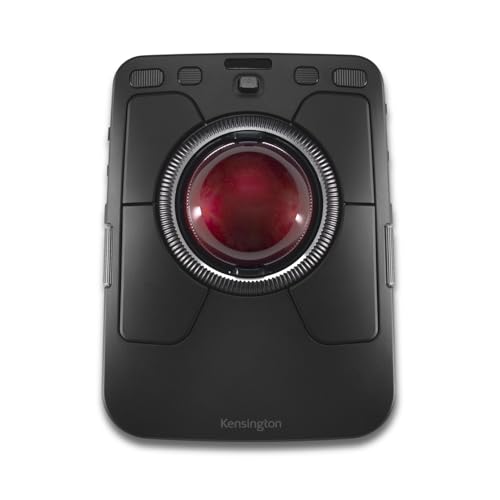
Kensington Expert Mouse TB800 EQ Wireless Trackball
- Best for: Players who switch one couch mouse between several devices and want scroll controls for browsing and strategy games.
- Brand: Kensington
- Series: TB800
- Model number: K72458WW
- Connectivity: Bluetooth, 2.4GHz USB-C receiver, and wired connection, connecting up to four devices as described on the listing
Players who switch one couch mouse between several devices and want scroll controls for browsing and strategy games.
It is a large, heavier unit at just over a pound as listed, so check that your armrest or lap can support it comfortably, and confirm you want the red-ball K72458WW version before ordering.
Pick the TB800 EQ if you like the finger-ball layout of the Expert line but want more control hardware around the ball for couch play. Its listing title states Bluetooth and 2.4GHz connections, a rechargeable battery, customizable keys, and side scrolls, and the product description adds a large 55mm ball, an adjustable scroll ring, and connection to up to four devices. That device switching suits a couch setup where the same mouse moves between a living-room PC, a laptop, and a tablet. The ambidextrous, finger-operated design also means either hand can take over without changing the setup.
Which One Fits Your Situation
You Play Reclined With No Surface Beside You
Choose the ELECOM Relacon Handheld Trackball Mouse. It is the only pick here that is held rather than rested, so a deep recliner, a beanbag corner, or a sofa with soft, sloping arms stops being a problem. Your thumb rolls the ball while the unit stays in your palm, and the 2.4GHz receiver keeps the link to a PC across the room. The ten buttons also help when a keyboard is out of reach.
You Want One Mouse the Whole Household Can Use
Choose the Kensington Expert Mouse Wireless Trackball, or the TB800 EQ if you also want rechargeable power and device switching. Both are finger-operated and ambidextrous as listed, so the mouse does not have to change hands or settings when someone else picks it up. The large central ball is easy for a first-time trackball user to understand, because pushing the ball toward where the cursor should go is the whole technique.
You Play Long Sessions and Hate Charging Breaks
Choose the Logitech Ergo M575S Wireless Trackball Mouse. Its listing states up to 18 months of battery life, the longest power claim in this guide, and the thumb-ball layout keeps the body still on an armrest or cushion for hours. There is no charging cable to trail across the sofa and no routine to remember between sessions. Keep a spare cell in the living room and a flat battery becomes a brief pause instead of the end of the evening.
You Switch Between a TV PC, a Laptop, and a Tablet
Choose the Kensington Expert Mouse TB800 EQ Wireless Trackball. The listing describes connection to up to four devices across Bluetooth, the 2.4GHz receiver, and a wired option, so one mouse can follow you from the living-room PC to a laptop without re-pairing. The Logitech MX Ergo S is the alternative if you prefer a thumb ball, since its listing states connection to two devices with an Easy-Switch button. Pick by ball style first, then by device count.
Common Mistakes
- Buying a fast desk gaming mouse for the couch, then fighting skipped tracking on fabric because the listing never stated trackball control or multi-surface use.
- Ignoring hand orientation, then discovering a sculpted right-handed thumb ball cannot be used comfortably by the left-handed player in the house.
- Mixing up the two ELECOM Relacon versions and ordering the 2.4GHz receiver model while expecting the Bluetooth connection described for the other version.
- Placing the receiver in the back of a TV PC, behind the cabinet and far from the sofa, then blaming the mouse for dropouts that a front port or shorter distance would fix.
- Forgetting that a trackball ball and its bearings collect dust and skin oil, so cursor feel slowly worsens until the ball is popped out and the contact points are cleaned.
Frequently Asked Questions
Can a trackball really keep up with gaming from the couch?
For the games most people play from a sofa, yes. Menus, strategy and simulation games, RPGs, and slower-paced adventure titles all work well once your thumb or fingers learn the ball. The listings here state optical tracking and switchable sensitivity on several models, which helps with large TV screens. Very fast competitive shooters reward a sliding mouse on a pad, and no couch setup changes that.
How long does it take to get used to a thumb trackball?
Most players need a few sessions of ordinary use before the movement feels automatic. Start with desktop browsing, launchers, and menus, where mistakes cost nothing, then move into a familiar game. Lowering or raising the sensitivity setting, where the listing states one, changes how far a small thumb movement carries the cursor. Finger-operated balls often feel easier on day one, because several fingers share the work.
Will Bluetooth or a 2.4GHz receiver work better across a living room?
Both connection types appear across these listings, and either can cover a normal sofa-to-TV distance when the receiver or PC is not hidden behind metal or inside a closed cabinet. A 2.4GHz receiver gives a dedicated link on a living-room PC. Bluetooth frees a USB port, which matters on compact PCs. If your setup offers both, as the Kensington TB800 EQ listing describes, you can keep one device on each.
Do I still need a lapboard or tray with one of these mice?
No, and that is the point of choosing from this list. A thumb or finger trackball rests on an armrest, a cushion, or your leg because only the ball moves, and the ELECOM Relacon is held in the hand with no surface involved. A small firm board can still make a finger-operated model feel steadier on a very soft sofa, but it is an optional extra, not a requirement.
FAQ
Can a trackball really keep up with gaming from the couch?
How long does it take to get used to a thumb trackball?
Will Bluetooth or a 2.4GHz receiver work better across a living room?
Do I still need a lapboard or tray with one of these mice?
More from Amazon
Programs that pair well with the guide above. Offers and eligibility are set by Amazon and may change.
Free shipping on eligible items, Prime Video and more. Eligible new members can start with a free trial.
Start a Prime free trialAd-free music streaming. Eligible new subscribers can start with a free trial.
Try Music Unlimited freeA Prime membership for ages 18-24 with a trial period. Eligibility is set by Amazon.
See Prime for Young AdultsAudiobooks and podcasts to listen to on the go. Eligible new members can start with a free trial.
Try Audible freeAs an Amazon Associate we earn from qualifying purchases.