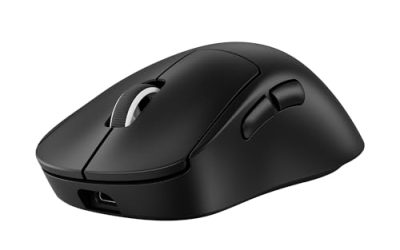
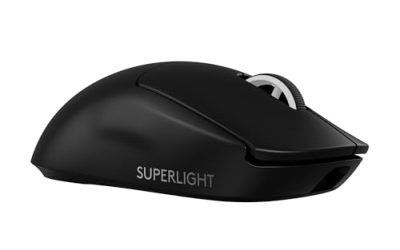
Our Top Picks
Pros & cons
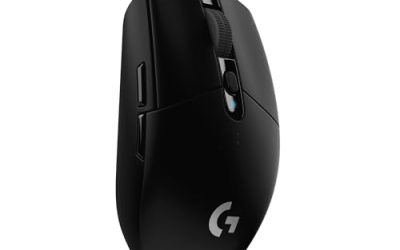
- 11 programmable buttons add extensive control customization
- Adjustable weights let you fine-tune balance and feel
- LIGHTSYNC RGB syncs lighting with other Logitech gear
- Wired connection limits cable-free desk setups
- Heavier than typical lightweight esports mice at 0.27 pounds
Pros & cons
- Up to 250 hours of play on a single AA battery
- Lightweight 3.4-ounce body aids fast, precise movement
- Built-in receiver storage keeps the dongle from getting lost
- Relies on a AA battery rather than a built-in rechargeable cell
- Endurance mode trade-off needed to stretch battery life further

A gaming mouse shapes every match, yet the real decision is rarely about chasing the highest sensor number on a box. The choice comes down to grip, weight, button layout, and whether a wired or wireless design fits the way you actually play. A mouse that feels awkward after an hour will hold you back far more than a sensor ceiling you never reach, so comfort and control deserve the first look.


This guide is for first-time buyers, players upgrading from an office mouse, and anyone building a capable setup without waste. It covers five mice chosen from their names and specifications on Amazon, spanning light wireless designs, button-rich wired options, and simple ergonomic shapes. Each pick below explains who it suits, what it offers, and what to check before you commit.
Quick Picks
As an Amazon Associate we earn from qualifying purchases
| Product | Best for | Key spec from title |
|---|---|---|
| Logitech G502 HERO | Button-heavy games and multitasking | HERO 25K sensor, 25,600 DPI |
| Logitech G305 LIGHTSPEED | Wireless play without a cable | HERO sensor, 12,000 DPI, 250-hour battery |
| Razer DeathAdder Essential | Comfortable right-handed palm grip | 6,400 DPI optical sensor |
| Logitech G203 LIGHTSYNC | Small hands and claw or fingertip grips | 8,000 DPI sensor, 85 grams |
| Razer Basilisk V3 | Feature-rich wired play with many controls | Focus+ 26K sensor, 26,000 DPI |
How to Choose
Match the Shape to Your Grip
Grip decides comfort more than any sensor figure, so start by thinking about how your hand rests on a mouse. Palm players need length and a raised back that supports the whole hand, while claw players want a shorter shell with a firm hump under the palm. Fingertip players need a light, compact body they can lift and reposition quickly. A right-handed ergonomic shape suits many players, yet it can feel wrong for left-handed users or anyone who switches hands. Compare length, width, and height with your current mouse before choosing, and favour a shape that lets your fingers rest naturally on the main buttons without stretching or curling.
Weigh Sensor Numbers Against Real Play
High DPI figures look impressive, yet most players settle on a sensitivity far below the maximum a modern sensor offers. What matters more is clean tracking at your chosen setting, with no smoothing, filtering, or acceleration changing the feel of a flick. A sensor rated for 8,000 DPI already covers everyday and competitive play for most people, while higher ceilings mainly give headroom for very high sensitivity styles. Check the tracking speed and acceleration figures too, because they show how the sensor behaves during fast swipes. Choose a mouse whose sensor stays steady at your normal sensitivity rather than one that simply lists the largest number.
Decide Between Wired and Wireless
Wired mice remove battery care entirely and keep the connection simple, which suits a fixed desk where the cable can be routed neatly. Wireless mice free the desk and make travel easier, yet they add battery or charging habits to your routine. A wireless model with a long battery life on a single AA cell can run for months of regular play, while a rechargeable design needs a cable or dock nearby. Check whether the receiver stores inside the body, because a tiny dongle is easy to lose in a bag. Think about your desk layout, your travel habits, and how much cable or battery management you are willing to accept.
Count the Buttons You Will Actually Use
Extra buttons help only when they match the games you play and the commands you want close at hand. Shooter players often need just two side buttons for reloading or melee, while MMO and strategy players benefit from a wider cluster for abilities and macros. A mouse with eleven programmable buttons can replace several keyboard reaches, yet it can also feel crowded for a player who wants a clean, simple layout. Look at the placement of side buttons and the scroll wheel, because a thumb button that sits too far forward will slow you down. Pick a layout that matches your hand size and your game library, not the largest button count available.
The 5 Best Options
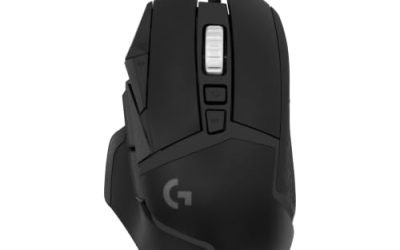
Logitech G502 HERO
The Logitech G502 HERO suits players who want one mouse to cover shooters, MMO games, and everyday work without switching devices. Its right-handed shape gives the thumb a clear rest, while the wide button layout puts abilities, macros, and system commands within easy reach. The tunable weight system lets you add heft for a planted feel or keep the mouse light for faster movement. A dual-mode scroll wheel switches between precise steps and free spinning, which helps when browsing long pages or cycling weapons. This is a strong choice for a player who values control and flexibility over an ultralight shell.
Specs
- HERO 25K sensor with 200 to 25,600 DPI
- 11 programmable buttons
- Five 3.6-gram tuning weights
- Weight of 121 grams before adding weights
- Dual-mode hyper-fast scroll wheel with tilt
- On-board memory for five profiles
- LIGHTSYNC RGB lighting
- Right-handed shape, 132 x 75 x 40 mm
Best for: Players who want many buttons, adjustable weight, and one mouse for several game types.
Watch out for: The right-handed shape rules out left-handed use, and the 121-gram body feels heavy for players who prefer a light, fast mouse.
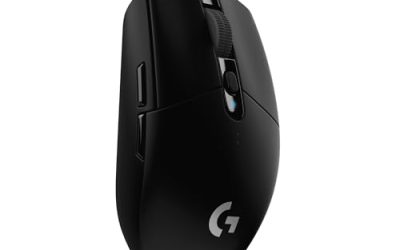
Logitech G305 LIGHTSPEED
The Logitech G305 LIGHTSPEED suits players who want wireless freedom in a compact, dependable mouse that needs little upkeep. Its symmetrical shape works for claw and palm grips, and the light body moves quickly across a pad without dragging a cable behind it. The HERO sensor tracks cleanly up to 12,000 DPI, which covers most competitive and casual play with room to spare. A single AA battery delivers a long run of play, so you can leave the mouse on a desk or pack it for travel without carrying a charger. The receiver stores inside the body, which keeps the whole setup tidy between sessions.
Specs
- HERO sensor with 200 to 12,000 DPI
- LIGHTSPEED wireless with a 1 ms report rate
- Weight of 99 grams
- Up to 250 hours of play on one AA battery
- 6 programmable buttons
- On-board memory
- Built-in storage for the USB wireless receiver
- Tracking speed above 400 IPS
Best for: Players who want a light wireless mouse with long battery life and a simple, portable design.
Watch out for: There is no Bluetooth fallback, so losing the USB receiver leaves the mouse unusable until a replacement is found.
Razer DeathAdder Essential
The Razer DeathAdder Essential suits right-handed players who want a familiar, comfortable shape without a long setup process. Its ergonomic shell supports the palm through long sessions, while rubber side grips keep the hand steady during quick turns. Five programmable buttons cover the essentials, from remapping a key to setting a macro, without crowding the thumb area. The optical sensor offers on-the-fly sensitivity adjustment, so you can shift between desktop work and a match with a quick press. This is a calm, straightforward pick for a first gaming mouse or a reliable backup for a main setup.
Specs
- 6,400 DPI optical sensor
- 5 programmable buttons
- Mechanical switches rated for up to 10 million clicks
- Rubber side grips
- Right-handed ergonomic shape
- Wired USB connection
- On-the-fly sensitivity adjustment
Best for: Right-handed players who want a comfortable wired mouse with a simple layout and dependable tracking.
Watch out for: The wired-only design limits movement, and five buttons may feel sparse for MMO players who need many commands at hand.
Logitech G203 LIGHTSYNC
The Logitech G203 LIGHTSYNC suits players with smaller hands who use claw or fingertip grips and want a light wired mouse. Its compact shell measures 116.6 x 62.15 x 38.2 mm, so the hand stays relaxed instead of stretching across a wide body. The gaming-grade optical sensor adjusts from 200 to 8,000 DPI, which gives enough range for precise aiming and fast turns alike. Six programmable buttons cover the main commands, while LIGHTSYNC RGB lighting adds a personal touch to the desk. A 1,000 Hz polling rate keeps the response quick, and the 85-gram body lifts easily for repositioning during play.
Specs
- Gaming-grade optical sensor, 200 to 8,000 DPI
- 6 programmable buttons
- Weight of 85 grams
- Dimensions of 116.6 x 62.15 x 38.2 mm
- LIGHTSYNC RGB lighting
- 1,000 Hz polling rate
- Mechanical spring button tensioning
- Wired USB connection
Best for: Small-handed players who want a light, compact wired mouse with colourful lighting and quick response.
Watch out for: The 8,000 DPI ceiling is lower than newer sensors, and the compact shell may feel cramped for players with large hands.
Razer Basilisk V3
The Razer Basilisk V3 suits players who want a full-featured wired mouse with a strong sensor, many controls, and a standout scroll wheel. Its right-handed ergonomic shape includes a thumb rest that steadies the hand during long sessions, while eleven programmable buttons handle abilities, macros, and shortcuts. The HyperScroll tilt wheel switches between notched steps and free spinning, which helps with weapon selection and fast scrolling alike. Gen-2 optical switches give a crisp click, and five on-board profiles store your settings for different games. Chroma lighting across eleven zones lets you match the mouse to the rest of your setup.
Specs
- Focus+ 26K optical sensor, up to 26,000 DPI
- Tracking up to 650 IPS with 50 G acceleration
- 11 programmable buttons
- Gen-2 optical switches rated for 70 million clicks
- Weight of 101 grams
- HyperScroll tilt wheel with notched and free-spinning modes
- On-board memory for five profiles
- 11 Chroma RGB lighting zones
- SpeedFlex braided cable
Best for: Players who want a feature-rich wired mouse with a versatile scroll wheel and plenty of programmable controls.
Watch out for: The 101-gram body feels heavy next to ultralight mice, and the full feature set needs Razer Synapse software.
Which One Fits Your Situation
You Want Wireless Freedom on a Modest Setup
Choose the Logitech G305 LIGHTSPEED when a cable-free desk matters more than extra buttons or lighting. Its light body and long battery life suit everyday play, study, and travel, while the stored receiver keeps the kit together. The sensor covers most games cleanly, and the compact shape fits a wide range of hands.
You Play MMO or Strategy Games With Many Commands
Choose the Logitech G502 HERO or the Razer Basilisk V3 when your games demand a large set of abilities close at hand. Both offer eleven programmable buttons, on-board profiles, and ergonomic shapes that support long sessions. Pick the G502 HERO for adjustable weight, or the Basilisk V3 for its versatile HyperScroll wheel and brighter lighting.
You Need a First Gaming Mouse That Feels Familiar
Choose the Razer DeathAdder Essential when comfort and simplicity matter more than a long feature list. Its right-handed ergonomic shape suits palm players, the five-button layout stays uncluttered, and the wired connection needs no battery care. It works well as a first mouse or as a dependable spare.
You Have Small Hands or Prefer a Light Wired Mouse
Choose the Logitech G203 LIGHTSYNC when a compact shell and a light body suit your grip. Its 85-gram weight and small dimensions favour claw and fingertip players, while the 8,000 DPI sensor and quick polling rate keep aiming responsive. The colourful lighting adds character without adding bulk or complexity.
Common Mistakes
- Choosing a mouse by its maximum DPI alone, instead of checking grip, weight, and button placement first.
- Picking a large ergonomic shell for small hands, or a tiny mouse for a full palm grip, then blaming the sensor for the discomfort.
- Ignoring battery and receiver habits on a wireless mouse, then losing the dongle or running out of power mid-session.
- Adding more buttons than you will use, which crowds the thumb area and slows down the commands that matter.
- Skipping the software check, so a mouse that needs its companion app for profiles and lighting never gets set up properly.
Frequently Asked Questions
What makes a gaming mouse good value?
A good value mouse pairs clean, steady tracking with a shape that fits your grip and a button layout that matches your games. Weight, cable or battery habits, and build quality matter just as much as the sensor figure. The best choice feels comfortable after an hour of play and covers the commands you actually use, without features that add bulk or confusion.
Is a wireless gaming mouse as responsive as a wired one?
Modern wireless mice with a fast report rate can feel as responsive as wired mice during normal play, because the connection updates quickly enough for most games. The difference shows up in battery care and receiver management rather than in everyday aiming. A wired mouse removes those habits entirely, while a wireless mouse trades them for freedom of movement and a cleaner desk.
How many DPI do I really need?
Most players settle on a sensitivity well below the maximum a modern sensor offers, so a ceiling of 8,000 DPI already covers a wide range of styles. Higher figures give headroom for very high sensitivity play, yet they do not improve aim on their own. Choose a sensor that tracks cleanly at your normal setting, with no smoothing or acceleration, rather than chasing the largest number on the box.
Should I choose a light mouse or a heavier one?
Light mice suit fast flicks, fingertip grips, and players who lift the mouse often to reposition it. Heavier mice suit palm players who want a planted, steady feel and a rest for the hand. Neither choice is better for everyone, so compare the weight with your current mouse and think about how your hand moves during a match before deciding.
FAQ
What makes a gaming mouse good value?
Is a wireless gaming mouse as responsive as a wired one?
How many DPI do I really need?
Should I choose a light mouse or a heavier one?
More from Amazon
Programs that pair well with the guide above. Offers and eligibility are set by Amazon and may change.
Free shipping on eligible items, Prime Video and more. Eligible new members can start with a free trial.
Start a Prime free trialAd-free music streaming. Eligible new subscribers can start with a free trial.
Try Music Unlimited freeA Prime membership for ages 18-24 with a trial period. Eligibility is set by Amazon.
See Prime for Young AdultsAudiobooks and podcasts to listen to on the go. Eligible new members can start with a free trial.
Try Audible freeAs an Amazon Associate we earn from qualifying purchases.