Key takeaways
- Find the best high polling rate gaming mouse for smoother aim and faster response, with 8000 Hz wireless and wired picks compared for competitive play.
Polling rate is how often your mouse reports its position to your computer each second. A mouse at 1000 Hz sends an update every millisecond. A mouse at 8000 Hz sends an update every 0.125 milliseconds. In fast competitive games, where flicks and tracking decide rounds, smoother and more frequent updates can make aiming feel more connected to your hand.


The best high polling rate gaming mouse is not automatically the one with the biggest number on the box. An 8000 Hz mouse on a slow system or a low refresh rate monitor may feel no different from a well tuned 1000 Hz mouse. The right choice depends on your games, your computer, your grip, and whether you want wireless freedom or the simplicity of a cable.
Disclosure: As an Amazon Associate, we earn from qualifying purchases.
At a Glance
| Product | Key Spec | Best For |
|---|---|---|
| Razer Viper V3 Pro | 8000 Hz wireless, 54 g, Focus Pro 35K sensor | Competitive wireless play |
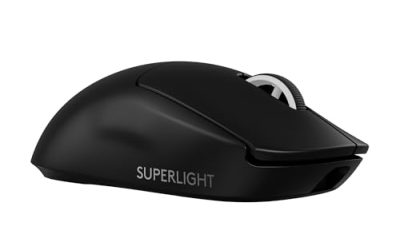
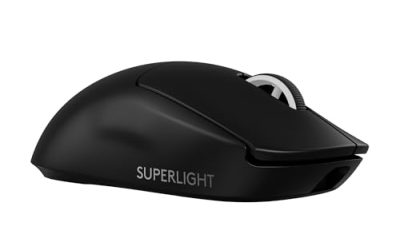
| Logitech G PRO X Superlight 2 | 8000 Hz wireless, 60 g, HERO 2 sensor, 44,000 DPI | Lightweight wireless all-rounders |
| Razer Viper 8KHz | 8000 Hz wired, 71 g, Focus Plus 20K sensor | Wired players who want maximum polling |
| Razer DeathAdder V3 Pro with HyperPolling Wireless Dongle | 8000 Hz wireless, 63 g, Focus Pro 30K sensor | Ergonomic right-handed grip |
How to Choose
1. Understand 1000 Hz, 4000 Hz, and 8000 Hz
For many years, 1000 Hz was the standard for gaming mice, and it remains a solid baseline. At 1000 Hz, the mouse reports once every millisecond, which is fast enough for most players. Moving to 4000 Hz cuts the interval to 0.25 milliseconds, and moving to 8000 Hz cuts it to 0.125 milliseconds. The result is smoother cursor motion, especially on high refresh rate monitors.
Players with a 240 Hz or 360 Hz monitor, a fast processor, and a steady high frame rate are the most likely to notice the extra smoothness. Players on a 60 Hz monitor may notice little change, because the display becomes the limiting factor.
2. Wired or Wireless
Wired high polling rate mice do not need a battery, and they do not need to manage wireless bandwidth. A wired 8000 Hz mouse draws power from the cable, so it can hold its top polling rate for as long as you play. The trade off is cable drag. A stiff cable can pull against fast flicks, so look for a light, flexible cable, a mouse bungee, or a desk layout that keeps the cable out of the way.
Wireless high polling rate mice have closed the gap. Modern models use a dedicated 2.4 GHz receiver and a separate high polling dongle to reach 8000 Hz without a cable. The trade off is battery life, because reporting eight times as often uses more power. A mouse that lasts around 90 hours at 1000 Hz may last for a much shorter period at 8000 Hz.
3. Sensor Quality Matters as Much as Polling Rate
Polling rate decides how often the mouse talks to the computer. The sensor decides how accurately it tracks each movement. A high polling rate cannot fix a sensor that spins out during fast flicks, loses tracking on a lift, or adds smoothing at high speeds. Look for a modern flagship optical sensor with a high maximum DPI, a high tracking speed measured in inches per second, and a high maximum acceleration figure.
A mouse with adjustable lift-off distance is useful, because it lets you set how far the mouse can be raised before tracking stops.
4. Weight and Balance
High polling rate mice are often built light, because the players who care about polling rate also care about fast flicks and long sessions. Most flagship models in this guide weigh between 54 g and 71 g, which is light enough for quick direction changes without feeling hollow. Weight alone does not tell the whole story. Balance matters just as much. A rear heavy mouse will feel different from a mouse with its weight centred, even if both weigh the same.
Think about your grip and your sensitivity. Palm grip players often prefer a slightly larger and more filled shape. Claw grip players often prefer a medium shape with a defined hump. Fingertip players often prefer a smaller and lighter shell.
5. Battery Life at High Polling Rates
Battery life is the hidden cost of wireless 8000 Hz polling. Every extra report uses power, and the wireless receiver must stay active to receive those reports. Manufacturers usually quote battery life at 1000 Hz, because that figure looks best, so read the fine print before you buy. A mouse rated for around 90 to 95 hours at 1000 Hz may run for a far shorter time at 8000 Hz.
Practical habits help. Many players use 8000 Hz for competitive sessions and drop to 1000 Hz or 2000 Hz for desktop work and single player games. If you hate charging, a wired 8000 Hz mouse removes the question entirely.
6. CPU and System Demands
An 8000 Hz mouse sends eight times as many reports as a 1000 Hz mouse, and your computer has to process every one of them. On a modern gaming processor, that load is usually small, but on an older or heavily loaded system it can show up as higher CPU usage, occasional stutter, or uneven frame times. The effect is most visible when the processor is already close to its limit, for example while streaming or recording.
Before you commit to 8000 Hz, make sure your system is ready. A modern multi-core processor, a clean USB port, and up to date chipset drivers help. If you notice stutter after switching to 8000 Hz, try 4000 Hz or 2000 Hz first. A stable 4000 Hz setting will feel better than an 8000 Hz setting that your system struggles to keep up with.
7. Shape, Grip, and Buttons
Polling rate gets the attention, but shape decides whether you will still like the mouse after a month. The mice in this guide cover the two main shapes in competitive play: symmetrical mice that suit left and right handed players and a wide range of grips, and ergonomic right handed mice that fill the palm and support the thumb. Neither shape is better in general. The better shape is the one that matches your hand size and grip style.
Buttons deserve the same attention. Look for crisp primary clicks with no double clicking, side buttons that are easy to reach without shifting your grip, and a scroll wheel that is precise for weapon switching. Optical switches are common in this class, because they actuate quickly and avoid the mechanical bounce that can cause double clicks.
8. Software, Firmware, and Setup
High polling rate mice are not plug and play at their top speed in every case. Some need a companion app to change the polling rate, update firmware, adjust DPI steps, set lift-off distance, and save profiles. Others include a separate HyperPolling dongle that must be paired and updated before 8000 Hz becomes available. That setup is usually a one time task, but it is worth knowing about before you buy.
Check the basics too. Make sure the mouse works with your operating system, that its cable or receiver fits your desk layout, and that its onboard memory can store at least one profile if you play on more than one computer.
Top Picks
Razer Viper V3 Pro
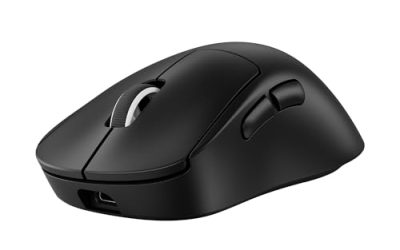
The Razer Viper V3 Pro is a symmetrical wireless gaming mouse built for competitive play, and it is the most complete 8000 Hz wireless package in this guide. Its polling rate reaches up to 8000 Hz wirelessly with the included HyperPolling Wireless Dongle, which pairs Razer HyperPolling with HyperSpeed Wireless for a low latency connection. That combination is aimed at players who want wired style responsiveness without a cable.
Key specs include a Focus Pro 35K Optical Sensor Gen-2 with up to 35,000 DPI, a lightweight 54 g shell in black, Gen-3 optical switches, eight programmable controls, and a battery life of up to 95 hours at 1000 Hz. The sensor supports 1-DPI step adjustments and tracks across different surfaces, including glass.
Best for: competitive wireless play, fast shooters, and players who want a light symmetrical mouse with true 8000 Hz wireless polling.
Considerations: battery life falls sharply at 8000 Hz compared with the headline figure at 1000 Hz, so plan to charge more often if you run the top rate all day. The HyperPolling dongle needs a spare USB port and a short setup step, and the mouse benefits from Razer Synapse for full polling, DPI, and button customisation.
Logitech G PRO X Superlight 2
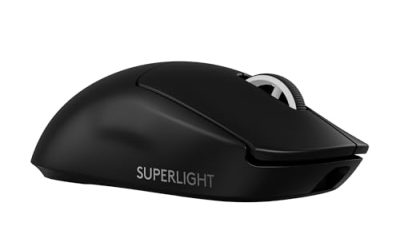
The Logitech G PRO X Superlight 2 is a wireless gaming mouse built around the HERO 2 sensor and LIGHTSPEED wireless. Its polling rate reaches up to 8000 Hz wirelessly, which is eight times the data flow of a standard 1000 Hz mouse. That high report rate pairs with a sensor that tracks at up to 44,000 DPI, with tracking over 888 IPS and up to 88 G acceleration, so fast flicks stay accurate and smooth.
Key specs include a 60 g shell, five programmable buttons, LIGHTFORCE hybrid optical-mechanical switches, USB-C charging, and a battery life of up to 95 hours at 1000 Hz. Its zero-additive PTFE feet glide smoothly on cloth and hard pads.
Best for: lightweight wireless all-rounders, players who switch between competitive shooters and everyday use, and Logitech G HUB users who want deep DPI and polling control.
Considerations: the top 8000 Hz polling rate and advanced sensor settings need Logitech G HUB, so plan to install the software. Battery life is shorter at 8000 Hz than at 1000 Hz, and the mouse has only five buttons, which is fewer than some rivals.
Razer Viper 8KHz
The Razer Viper 8KHz is the wired pick in this guide, and it is the simplest way to get true 8000 Hz polling without thinking about batteries, dongles, or wireless interference. It is an ambidextrous wired gaming mouse with Razer 8000 Hz HyperPolling Technology, which lets the mouse communicate its position and clicks to the computer up to 8000 times per second.
Key specs include a Focus Plus 20K Optical Sensor with up to 20,000 DPI, second generation Razer optical mouse switches, eight programmable buttons, Chroma RGB lighting, and a lightweight 71 g design. The cable is a flexible Speedflex cable, designed to reduce drag during fast movements. The mouse supports six polling rate stages from 125 Hz up to 8000 Hz, so you can step down to 1000 Hz or 4000 Hz if your system runs more smoothly at a lower rate.
Best for: wired players who want maximum polling, players who dislike charging, and anyone who wants a proven 8000 Hz mouse at a simpler setup.
Considerations: the cable needs management, and a mouse bungee or a tidy desk layout helps keep it out of the way. At 71 g it is heavier than the wireless flagships in this guide.
Razer DeathAdder V3 Pro with HyperPolling Wireless Dongle
The Razer DeathAdder V3 Pro with HyperPolling Wireless Dongle is the ergonomic pick in this guide, and it is the best fit for players who want high polling in a right handed shape that fills the palm. This bundle includes the HyperPolling Wireless Dongle, so the mouse can reach up to 8000 Hz wirelessly without a separate accessory purchase. The ergonomic shell is a long running DeathAdder shape, refined for comfort during long sessions, with a raised hump that supports the palm.
Key specs include a Focus Pro 30K Optical Sensor with up to 30,000 DPI, Gen-3 optical switches, six programmable buttons, a 63 g lightweight design, and a battery life of up to 90 hours at 1000 Hz. The mouse uses HyperSpeed Wireless for a low latency connection, and the sensor tracks cleanly on a wide range of surfaces.
Best for: ergonomic right-handed grip, palm grip players, and anyone who finds symmetrical mice too flat or too narrow.
Considerations: the ergonomic shape is right handed only, so left handed players should choose a symmetrical model instead. Battery life drops at 8000 Hz, and the full setup needs Razer Synapse and a firmware update for the dongle. Check that the bundle you select includes the HyperPolling Wireless Dongle.
Which One Fits
Start with connection type. If you want zero charging and the most direct link, the Razer Viper 8KHz is the clear wired choice, with true 8000 Hz polling, a flexible cable, and eight programmable buttons. If you want wireless freedom, the other three mice in this guide all reach 8000 Hz wirelessly, so the decision turns on shape and weight.
For a light symmetrical wireless mouse, the Razer Viper V3 Pro leads on weight at 54 g and on sensor ceiling at 35,000 DPI, with eight programmable controls. For a clean wireless all-rounder, the Logitech G PRO X Superlight 2 is a strong alternative at 60 g, with the HERO 2 sensor at up to 44,000 DPI. For a right handed ergonomic grip, the Razer DeathAdder V3 Pro with HyperPolling Wireless Dongle is the natural fit at 63 g.
If your computer is modern and your monitor runs at a high refresh rate, run your chosen mouse at 8000 Hz for competitive play. If your system is older, try 4000 Hz first and keep the setting that feels smooth and stable.
FAQ
Is 8000 Hz polling worth it over 1000 Hz?
It can be worth it if your system and monitor can use it. On a high refresh rate monitor with a fast processor and a high frame rate, 8000 Hz polling makes cursor motion smoother and reduces the delay between hand movement and screen movement. On a 60 Hz monitor or a system that struggles to hold a high frame rate, the difference is much smaller, and 1000 Hz or 4000 Hz may feel just as good.
Does a high polling rate drain the battery faster?
Yes, especially on wireless mice. Reporting position eight times as often uses more power, so a mouse rated for around 90 to 95 hours at 1000 Hz will run for a much shorter time at 8000 Hz. Many players use 8000 Hz for competitive sessions and a lower rate for desktop work to extend battery life. Wired mice do not have this trade off, because they draw power from the cable.
Do I need a special dongle for 8000 Hz wireless polling?
Many wireless mice need a dedicated HyperPolling dongle to reach 8000 Hz, because a standard receiver is designed for 1000 Hz. Some models include that dongle in the box, while others sell it separately or as part of a bundle. Check the listing carefully before you buy, and confirm whether the version you are choosing includes the dongle. The DeathAdder V3 Pro bundle listed here includes the dongle.
Will an 8000 Hz mouse work on any computer?
Most modern gaming computers can handle 8000 Hz polling, but older or heavily loaded systems may show higher CPU usage or occasional stutter. The mouse will still work, and you can lower the polling rate to 4000 Hz, 2000 Hz, or 1000 Hz in the companion software if needed. Make sure your operating system is supported, your chipset drivers are current, and you have a spare USB port for the receiver or dongle.
What DPI should I use with a high polling rate mouse?
Polling rate and DPI are separate settings. Polling rate controls how often the mouse reports, while DPI controls how far the cursor moves for a given physical movement. Many competitive players use 800 or 1600 DPI with a low in-game sensitivity, because that combination gives precise control and smooth tracking. Start at 800 or 1600 DPI, set your in-game sensitivity to taste, and adjust in small steps.
Bottom Line
The best high polling rate gaming mouse is the one that matches your hand, your system, and your way of playing, not just the one with the highest number on the box. The Razer Viper V3 Pro is the strongest all-round wireless pick for competitive players who want a light symmetrical shell and true 8000 Hz wireless polling. The Logitech G PRO X Superlight 2 is a close alternative with a superb sensor and a clean, focused design. The Razer Viper 8KHz is the simplest wired route to 8000 Hz, with no battery to manage. The Razer DeathAdder V3 Pro with HyperPolling Wireless Dongle is the best ergonomic option for right handed palm grip players.
Set it up properly, update its firmware, and pick a polling rate your system handles cleanly.
FAQ
Is 8000 Hz polling worth it over 1000 Hz?
Does a high polling rate drain the battery faster?
Do I need a special dongle for 8000 Hz wireless polling?
Will an 8000 Hz mouse work on any computer?
What DPI should I use with a high polling rate mouse?
More from Amazon
Programs that pair well with the guide above. Offers and eligibility are set by Amazon and may change.
Free shipping on eligible items, Prime Video and more. Eligible new members can start with a free trial.
Start a Prime free trialAd-free music streaming. Eligible new subscribers can start with a free trial.
Try Music Unlimited freeA Prime membership for ages 18-24 with a trial period. Eligibility is set by Amazon.
See Prime for Young AdultsAudiobooks and podcasts to listen to on the go. Eligible new members can start with a free trial.
Try Audible freeAs an Amazon Associate we earn from qualifying purchases.