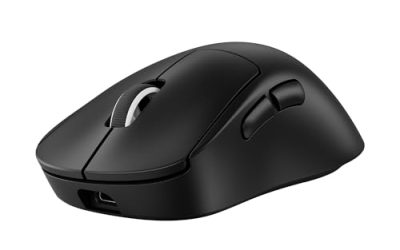
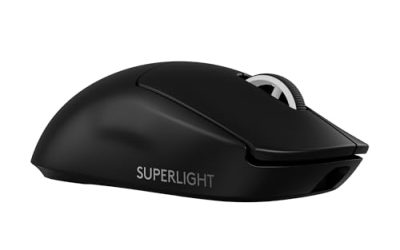
Our Short List of 3

- Variant: Classic Black, wired, style listed as New Model
- Model number: RZ01-03850100-R3U1
- Sensor: 6,400 DPI optical sensor
- Buttons: 5 programmable buttons

- Sensor: 20K DPI optical sensor
- Buttons: 8 programmable buttons
- Switches: Razer optical switches, per listing wording
- Lighting: Chroma RGB lighting

- Weight: 59g, described as ultra lightweight in the listing title
- Sensor: Focus Pro 30K optical sensor
- Switches: Optical switches, Gen-3, per listing title
- Polling: 8K Hz HyperPolling
All 3 Picks at a Glance
| Product | Specs | Action |
|---|---|---|
| Razer DeathAdder Essential — Classic Black, Wired |
| Check price on Amazon |
| Alternative: Razer DeathAdder V2 |
| Check price on Amazon |
| Alternative: Razer DeathAdder V3 |
| Check price on Amazon |
Our Top Picks
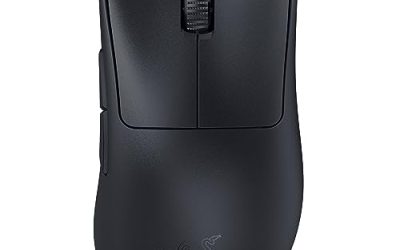
- Razer DeathAdder Essential Ergonomic Wired Gaming Mouse5.01 x 2.86 x 1.69 inches0.3 poundsCheck on Amazon
Pros & cons
- 59-gram ultra-lightweight build aids fast, precise flicks
- 8000Hz polling rate reduces input latency
- Optical switches rated for 90 million clicks add longevity
- Wired-only design limits cable-free setups
- Glass-surface tracking still depends on sensor compatibility
The Razer DeathAdder Essential is a wired, right-handed ergonomic gaming mouse built around a 6,400 DPI optical sensor, five programmable buttons and mechanical switches in the long-running DeathAdder shape. It suits players who want that familiar contoured shell and a simple wired connection without wireless hardware, extra buttons or multi-zone lighting to configure. Buyers who need higher sensitivity ceilings, a much lighter shell or wireless freedom should look at the DeathAdder V2 or V3 alternatives covered below instead.
As an Amazon Associate we earn from qualifying purchases
What Matters Most About This Mouse
The Shape Is the Main Reason to Choose It
The Essential keeps the classic DeathAdder ergonomic form that earlier generations of the line established. That means a right-handed shell with a raised palm area, flared main buttons and a body that fills the hand rather than sitting flat under the fingers. The listing gives dimensions of 5.01 x 2.86 x 1.69 inches for the Classic Black version, which places it firmly in the medium-to-large category rather than the compact travel category. If your hand is small, or if you prefer a low, symmetrical shell you can steer mainly with your fingertips, this contour is working against you from the start. If you rest a relaxed palm or a loose claw grip on the mouse and let the shell support your hand, the shape is the whole point of the product, and the sensor and button count are secondary to whether that contour matches your grip.
The 6,400 DPI Ceiling Defines Its Lane
The optical sensor in the Essential tops out at 6,400 DPI, and the listing highlights on-the-fly sensitivity adjustment through dedicated DPI buttons that can themselves be reprogrammed. For everyday play that range covers the sensitivities most people actually settle on, because in-game sensitivity multipliers do much of the fine adjustment once a comfortable DPI step is chosen. Where the ceiling matters is comparison: the DeathAdder V2 listed below reaches 20,000 DPI and the DeathAdder V3 reaches 30,000 DPI, so anyone who deliberately plays at very high DPI, or who wants a newer sensor generation with headroom to experiment, is outside the Essential brief. Treat the number as a boundary marker rather than a quality score. A player who already knows their preferred setting sits well inside 6,400 DPI loses nothing here, while a player still exploring extreme settings should start with a sibling model instead of buying the Essential and replacing it later.
Five Buttons, and No More
Five programmable buttons is the complete inventory: the two main clicks, the clickable scroll wheel and two side buttons positioned for the thumb. The listing states that button remapping and assignment of macro functions run through Razer Synapse, so customisation is software-led rather than handled on the mouse itself. That count is enough for a push-to-talk key, a melee action, a ping or a single favourite ability on the thumb, plus whatever you assign to the wheel click. It is not enough for a player who maps a full ability rotation, item slots and communication commands to the mouse hand. The ridged, rubberised scroll wheel named in the listing adds tactile steps when cycling weapons or scrolling loadouts, which helps you feel each notch instead of spinning freely past the item you wanted. Count the commands you genuinely bind to a mouse in your main games before deciding, because that count, more than the sensor, separates happy Essential owners from frustrated ones.
Wired Power Removes a Whole Checklist
The Essential is listed as corded electric with wired connectivity, so there is no battery to charge, no receiver to keep track of and no pairing step when you move between machines. You plug it in and it works, and it keeps working for exactly as long as the cable stays connected. The trade is desk management: a cable can catch on a monitor stand, a desk edge or other peripherals, and it limits how far the mouse can sit from the computer. The listing also names rubber side grips, which matter more on a wired mouse than they might first appear to, because a secure hold helps you reposition the mouse without the cable tug changing your aim mid-movement. Players who move a setup between rooms, or who strongly dislike cable drag, should weigh the wireless members of the wider family, none of which are covered as main alternatives here because the closest listed siblings, the V2 and V3, are wired models too.
Product Coverage
Razer DeathAdder Essential — Classic Black, Wired
- Variant: Classic Black, wired, style listed as New Model
- Model number: RZ01-03850100-R3U1
- Sensor: 6,400 DPI optical sensor
- Buttons: 5 programmable buttons
This is the standard version to picture when the name comes up: the Classic Black wired Essential, model number RZ01-03850100-R3U1 on its Amazon listing, in the style the listing labels New Model. Everything about it is deliberately pared back. There is a single-colour approach rather than the Chroma RGB lighting named on the V2 listing, a mechanical switch design rather than the optical switches named on the V2 and V3 listings, and a five-button layout rather than the eight buttons of the V2 or the six of the V3. None of that makes it a compromised DeathAdder in shape terms, because the ergonomic form is retained in full. It makes it the entry point to that shape, aimed at a buyer whose checklist ends at a dependable sensor, two thumb buttons and a shell that supports the palm.
Durability is framed on the listing around mechanical switches built to last up to 10 million clicks. That figure is worth reading alongside the siblings, where the V2 listing describes optical switches with a far higher click lifespan in its product copy. In practical buying terms, the Essential figure tells you the switches are rated for sustained daily play, while also signalling that longevity leadership sits higher up the line. The rubber side grips and the textured scroll wheel are the other physical details the listing calls out, and both serve control rather than decoration: grip panels keep the thumb and ring finger planted during lifts, and wheel ridges give each step a defined stop.
Compatibility on the listing names personal computers and laptops, with the mouse running over its wired connection. Setup through Razer Synapse is where DPI steps, button assignments and macros are handled. Without any software work, you still have a functioning five-button mouse with adjustable sensitivity from its DPI buttons, part of its appeal as a spare or a straightforward replacement for a worn-out unit of the same shape.
Alternative: Razer DeathAdder Essential — Mercury White
The Mercury White version carries the same headline specification as the black mouse: a 6,400 DPI optical sensor, five programmable buttons, mechanical switches and rubber side grips, presented in a white finish for lighter desk setups. Choose it on colour alone, after confirming the listing variant at checkout, because the functional checklist does not change with the shell colour. It is labelled here as an alternative variant of the same product rather than a step up, and it suits a buyer building a pale setup who would otherwise have bought the black Essential without hesitation.
Specs
- Variant: Mercury White, wired
- Sensor: 6,400 DPI optical sensor
- Buttons: 5 programmable buttons
- Switches: Mechanical switches
- Side grips: Rubber side grips
Alternative: Razer DeathAdder V2
- Sensor: 20K DPI optical sensor
- Buttons: 8 programmable buttons
- Switches: Razer optical switches, per listing wording
- Lighting: Chroma RGB lighting
The V2 is the natural step up for a buyer who likes the DeathAdder idea but finds the Essential specification too tight. Its listing leads with a 20K DPI optical sensor, eight programmable buttons, Chroma RGB lighting and a Speedflex cable, with rubberised side grips retained. The switch type changes too, from mechanical on the Essential to the fastest gaming mouse switch language used on the V2 listing, describing Razer optical switches. Pick the V2 if you want on-mouse scope for more bindings, a higher sensitivity ceiling and lighting that can match other Chroma gear, while staying with a wired connection and the same basic ergonomic direction.
Alternative: Razer DeathAdder V3
- Weight: 59g, described as ultra lightweight in the listing title
- Sensor: Focus Pro 30K optical sensor
- Switches: Optical switches, Gen-3, per listing title
- Polling: 8K Hz HyperPolling
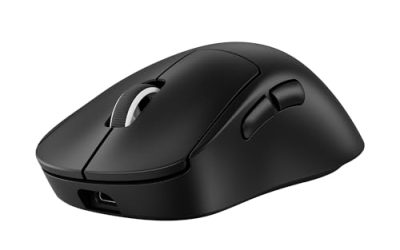
The V3 wired model moves the line in a different direction, towards low weight and polling performance. Its listing title states a 59g ultra-lightweight build, a Focus Pro 30K optical sensor, fast optical switches in their third generation, 8K Hz HyperPolling, six programmable buttons and a Speedflex cable, all in an ergonomic black shell. That is a materially different mouse from the Essential despite the shared family name: much lighter, far higher on sensor ceiling, and built around high polling rather than simplicity. Choose it if weight and polling rate sit at the top of your checklist, and skip it if you prefer a heavier, palm-filling feel, because 59g changes how the shape behaves under your hand even where the outline looks familiar.
Comparison Table
| Product | Connection | Max DPI | Programmable buttons | Switch type | Standout listing feature |
|---|---|---|---|---|---|
| Razer DeathAdder Essential, Classic Black | Wired | 6,400 DPI | 5 | Mechanical | Rubber side grips |
| Razer DeathAdder Essential, Mercury White | Wired | 6,400 DPI | 5 | Mechanical | White finish, same core spec |
| Razer DeathAdder V2 | Wired | 20,000 DPI | 8 | Optical | Chroma RGB and Speedflex cable |
| Razer DeathAdder V3 | Wired | 30,000 DPI | 6 | Optical, Gen-3 | 59g build and 8K Hz HyperPolling |
Read the table by your own priority rather than by the biggest number. If buttons matter most, the V2 leads this group. If weight and polling matter most, the V3 leads. If simplicity matters most, the Essential leads, because every feature it omits is a feature you never have to configure, charge for or work around. The two Essential rows are functionally tied, so colour and listing availability should decide between them, not specification hunting.
Who It Is For and Who Should Skip It
The Essential is for a right-handed player with a medium-to-large hand who uses a palm or relaxed claw grip, plays titles that need only a couple of thumb commands, and wants a wired mouse that can be plugged in and forgotten. It also fits as a like-for-like replacement for anyone whose hand already knows the DeathAdder contour and who has no complaint with their current sensitivity range, and as a household spare that works on any desk without receivers or charging cables entering the picture.
Skip it if you are left-handed, because the ergonomic form and thumb buttons are built for the right hand. Skip it if your games demand many mouse-side bindings, if you play at sensitivity settings beyond its ceiling, if you want a very light mouse for fast flick-heavy play, or if a cable on the desk genuinely bothers you. In each of those cases a sibling in the table, or a different shape of mouse altogether, answers the actual need instead of asking you to adapt to the Essential limitations. Also skip the Mercury White variant if your desk setup shows marks easily and you would rather not clean a pale shell, since that choice is cosmetic from the start.
Before ordering either Essential variant, confirm the colour name in the variant selector, because this product circulates in more than one colour and under more than one listing code. Confirm the button count shown is five, which distinguishes the Essential from the V2 and V3, and check you have a free port and enough cable reach for your desk layout.
Frequently Asked Questions
Does the DeathAdder Essential work without a cable?
No. The Essential covered here is a wired mouse with corded electric power, so it connects by cable and has no battery to charge and no receiver to pair. If wireless operation is essential to your setup, this model does not provide it, and you would need to look beyond both Essential variants listed in this article.
How many programmable buttons are on the Essential?
It has five programmable buttons, including the two main clicks, the scroll wheel click and two side buttons for the thumb. Those buttons can be remapped, and macro functions can be assigned, through Razer Synapse according to the listing. Players who need more than two thumb commands should consider the eight-button DeathAdder V2 instead.
What is the difference between the Essential and the DeathAdder V2?
The headline differences are sensor ceiling, button count, switches and lighting. The Essential lists a 6,400 DPI optical sensor, five buttons and mechanical switches, while the V2 lists a 20K DPI optical sensor, eight programmable buttons, optical switches, Chroma RGB lighting and a Speedflex cable. Both are wired and keep rubberised side grip treatment, so the choice is about specification headroom rather than connection type.
Which Essential colour should you choose, black or white?
Choose on appearance and upkeep, not performance. The Classic Black and Mercury White listings share the same core specification of a 6,400 DPI optical sensor, five programmable buttons, mechanical switches and rubber side grips. Check the variant name carefully at checkout, because the two colours circulate under different listing codes and it is easy to leave the wrong one selected.
Is 6,400 DPI enough for gaming?
For many players, yes, provided your preferred in-game settings fall within that range, which they do for a large share of common sensitivity choices once the in-game multiplier is set. The ceiling only becomes a problem if you already know you play beyond it or want to experiment at very high DPI values. In that case the V2 at 20,000 DPI or the V3 at 30,000 DPI gives you the headroom the Essential deliberately does not.
FAQ
Does the DeathAdder Essential work without a cable?
How many programmable buttons are on the Essential?
What is the difference between the Essential and the DeathAdder V2?
Which Essential colour should you choose, black or white?
Is 6,400 DPI enough for gaming?
More from Amazon
Programs that pair well with the guide above. Offers and eligibility are set by Amazon and may change.
Free shipping on eligible items, Prime Video and more. Eligible new members can start with a free trial.
Start a Prime free trialAd-free music streaming. Eligible new subscribers can start with a free trial.
Try Music Unlimited freeA Prime membership for ages 18-24 with a trial period. Eligibility is set by Amazon.
See Prime for Young AdultsAudiobooks and podcasts to listen to on the go. Eligible new members can start with a free trial.
Try Audible freeAs an Amazon Associate we earn from qualifying purchases.