Our Short List of 3

- Best for: Home-desk photographers building one large, always-connected archive.
- 8 TB capacity, desktop external HDD
- USB 3.0 interface
- Password protection and backup software included
- Model number: WDBBGB0080HBK-NESN

- Best for: Desk-based photographers who want recovery services bundled with a big archive.
- 8 TB (8000 GB) capacity; 3.5-inch desktop form factor
- USB 3.0 interface; read speed 120 MB/s
- Rescue Data Recovery Services included
- Ships with an 18-inch USB 3.0 cable and an 18W power adapter

- Best for: Location and travel photographers backing up cards in the field.
- 5 TB portable HDD
- USB-C connection (USB 3.1 Type C)
- Drop, shock, dust and rain resistant
- For Mac & PC
All 5 Picks at a Glance
| Product | Specs | Action |
|---|---|---|
| WD My Book 8TB Desktop External Hard Drive |
| Check price on Amazon |
| Seagate Expansion 8TB Desktop External Hard Drive |
| Check price on Amazon |
| LaCie Rugged USB-C 5TB Portable External Hard Drive |
| Check price on Amazon |
 WD Elements 5TB Portable External Hard Drive |
| Check price on Amazon |
 Toshiba Canvio Basics 4TB Portable External Hard Drive |
| Check price on Amazon |
Our Top Picks
- Western Digital WD 5TB Elements Portable External Hard5TB4.35 x 3.23 x 0.82 inches0.52 poundsCheck on Amazon
A year of enthusiastic shooting fills drives faster than most photographers expect. A single wedding or travel shoot can produce tens of gigabytes of RAW files, and a working archive grows by terabytes once edited exports and backups join the originals. The real decision is not which drive is fastest, but which combination of capacity, power setup and protection matches how you shoot and where the drive will live day to day.
This roundup splits into two camps. Desk-based photographers who archive at home get two 8TB desktop drives from WD and Seagate, both mains-powered and built to stay put. Photographers who back up on location or carry a library between machines get three bus-powered portables: a rugged LaCie 5TB, a WD Elements 5TB and a Toshiba Canvio Basics 4TB. Every pick below was chosen from its Amazon listing details, including capacity, interface and model number.
Quick Picks
As an Amazon Associate we earn from qualifying purchases.
| Product | Best for | Key spec |
|---|---|---|
| WD My Book 8TB Desktop External Hard Drive | Home-desk archive that stays plugged in | 8TB capacity, USB 3.0 |
| Seagate Expansion 8TB Desktop External Hard Drive | Archive with recovery services included | 8TB capacity, Rescue Data Recovery |
| LaCie Rugged USB-C 5TB Portable Hard Drive | Backing up cards on location | 5TB, drop and rain resistant |
| WD Elements 5TB Portable External Hard Drive | Simple plug-and-play second copy | 5TB, USB 3.2 Gen 1 |
| Toshiba Canvio Basics 4TB Portable Hard Drive | Rotating off-site spare copy | 4TB, USB 3.0 |
How to Choose
Capacity, counted in RAW files
Think in files, not terabytes. A modern mirrorless RAW file often lands between 25 and 45 megabytes, so an 8TB desktop drive holds roughly 180,000 to 300,000 originals before edits, while a 4TB portable fills after a few years of steady shooting. Count your current library, add your yearly growth, then double it: the second copy in a 3-2-1 backup plan needs room too. Buying one size up is almost always cheaper than migrating a full drive mid-season, and running any drive near full slows copies and invites mistakes.
Desktop power or portable freedom
The two 8TB drives here are desktop units that draw mains power through an adapter, so they belong on a desk near a free outlet. The three portables are compact drives powered over the USB cable itself, which makes them the sensible choice for a camera bag or a laptop-only workflow. Match the drive to the place it will actually live: a desktop archive that travels gets knocked around, and a portable pressed into service as a sole archive runs out of room exactly when a big shoot lands.
Interface and formatting before you buy
Every drive in this roundup connects over USB, but the details differ. The LaCie uses a USB-C connector, the WD Elements lists USB 3.2 Gen 1, and the rest run USB 3.0, so check which ports your computer actually has and keep a suitable cable in the bag. Formatting matters just as much: the WD Elements arrives formatted for Windows, and the Seagate must be reformatted before it works with Apple Time Machine. Decide your file system before the first big copy, because changing it later means erasing the drive.
Protection: armour, recovery and the second copy
A photo archive fails in two ways: the drive breaks, or the only copy disappears with a stolen bag. Physical protection answers the first risk — the LaCie’s listing rates it resistant to drops, shock, dust and rain, and Seagate bundles Rescue Data Recovery Services with the Expansion for professional recovery attempts. The second risk is on you. Follow the 3-2-1 habit: three copies, two different media, one off-site. However large a single drive is, it should be one leg of that plan, never the whole plan on its own.
The 5 Best Options
WD My Book 8TB Desktop External Hard Drive
- Best for: Home-desk photographers building one large, always-connected archive.
- 8 TB capacity, desktop external HDD
- USB 3.0 interface
- Password protection and backup software included
- Model number: WDBBGB0080HBK-NESN
Home-desk photographers building one large, always-connected archive.
This is a mains-powered desktop drive that needs its own outlet, so it anchors one desk rather than travelling between locations.
The My Book is the set-and-forget archive for a home desk. Its 8TB of space swallows years of RAW originals plus edited exports, and the listing’s password protection and included backup software suit photographers who want the archive to look after itself between shoots. Because it is a desktop unit, it stays plugged in where your main computer lives, quietly becoming the library everything else copies from. If your workflow is shoot, come home, ingest and back up in one place, this is the natural centre of that routine.
Seagate Expansion 8TB Desktop External Hard Drive
- Best for: Desk-based photographers who want recovery services bundled with a big archive.
- 8 TB (8000 GB) capacity; 3.5-inch desktop form factor
- USB 3.0 interface; read speed 120 MB/s
- Rescue Data Recovery Services included
- Ships with an 18-inch USB 3.0 cable and an 18W power adapter
Desk-based photographers who want recovery services bundled with a big archive.
It is mains-powered through the included 18W adapter, and it must be reformatted before use with Apple Time Machine.
The Expansion matches the WD on capacity but adds two practical extras from its listing: Rescue Data Recovery Services for the day a drive fails, and a stated 120 MB/s read speed that keeps big preview folders responsive. It ships with an 18-inch USB 3.0 cable and its own 18W power adapter, so it is ready for a permanent desk setup out of the box. Photographers who want a large archive with a recovery safety net, and who are comfortable with a one-time format decision, will find it an easy fit.
LaCie Rugged USB-C 5TB Portable External Hard Drive
- Best for: Location and travel photographers backing up cards in the field.
- 5 TB portable HDD
- USB-C connection (USB 3.1 Type C)
- Drop, shock, dust and rain resistant
- For Mac & PC
Location and travel photographers backing up cards in the field.
Availability signals for this model conflict, because a separate listing reproduction ties model STFR5000800 to a different product code — confirm a live featured offer for the exact ASIN above and check the model number on the listing before ordering.
The Rugged is the drive you throw in the camera bag without a second thought. Its listing rates the orange enclosure resistant to drops, shock, dust and rain, which makes it the natural backup target on location shoots, weddings and travel days when a bare drive would live dangerously. The USB-C connection suits modern laptops, and 5TB is enough for a working trip library plus a safety copy of the cards you have already shot. For photographers whose archive starts in the field, nothing else here is built for that job.
WD Elements 5TB Portable External Hard Drive
- Best for: A no-fuss portable second copy for a Windows-first workflow.
- 5 TB portable external hard drive
- USB 3.2 Gen 1 / USB 3.0 interface
- Plug-and-play ready; formatted for Windows, works with PC & Mac
- Model number: WDBU6Y0050BBK-WESN
A no-fuss portable second copy for a Windows-first workflow.
It arrives formatted for Windows, so Mac users should plan a reformat before the first copy; as a bus-powered portable it suits travel better than a permanent desk stack.
The Elements is the straightforward portable: plug it in and it works, with no software layer between you and your folders. Its listing confirms plug-and-play operation formatted for Windows while still working with Mac, and the USB 3.2 Gen 1 connection keeps card offloads moving at hard-drive pace. At 5TB it holds a serious working library, making it a sensible second copy that lives in a drawer or travels with the laptop. Photographers who manage their own folder structure and backup routine will appreciate how little there is to configure.
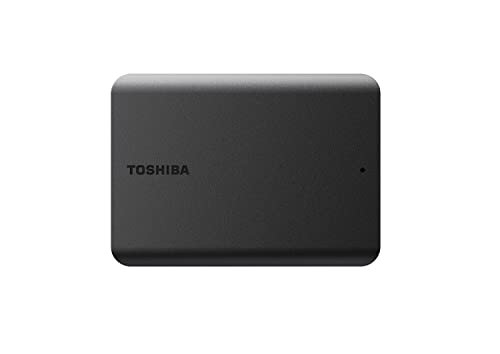
Toshiba Canvio Basics 4TB Portable External Hard Drive
- Best for: A plain spare copy in a rotating backup routine.
- 4 TB mechanical hard disk, portable
- USB 3.0 interface
- Model number: HDTB540XK3CA
- Colour: Black
A plain spare copy in a rotating backup routine.
Availability information for this listing is dated, with no current stock signal pinned down, so confirm a live featured offer for the exact ASIN before ordering.
The Canvio Basics is the simple end of the portable range: a 4TB mechanical drive on USB 3.0 with nothing extra to set up. That minimalism suits photographers who want a plain overflow drive for finished projects, delivered client work kept offline, or a rotating backup swapped with a copy stored somewhere else. It is neither the largest nor the toughest drive here, and it is not meant to be: it is the honest spare that keeps another copy of the archive within arm’s reach.
Which One Fits Your Situation
You archive everything at one home desk
If every shoot comes home to the same workstation, start with an 8TB desktop. The WD My Book suits a hands-off routine with its password protection and backup software, while the Seagate Expansion adds Rescue Data Recovery Services for extra peace of mind. Either way, keep a portable as the second copy rather than trusting one big drive with the whole library.
You back up on location before cards are reused
Wedding and travel shooters who format cards during a trip need a drive that survives the bag. The LaCie Rugged USB-C 5TB is the pick: its listing rates it resistant to drops, shock, dust and rain, and the USB-C connection matches modern laptops. Offload each evening, keep the drive in a different bag from the cards, and the shoot exists twice before you travel home.
You shuttle a working library between home and studio
If the same catalogue lives on two machines, a bus-powered portable is the shuttle. The WD Elements 5TB offers plug-and-play simplicity and enough room for a working library plus recent shoots, with no power brick to pack. Keep the desktop archive at home as the master copy, and treat the Elements as the travelling edition rather than the only one.
You rotate spare drives for off-site copies
A rotating pair of modest drives beats one hero drive for disaster protection. The Toshiba Canvio Basics 4TB works well as the swap drive: back up, take it to another location, bring the previous one back. Its plain 4TB capacity covers finished work comfortably, and because it carries no special software, swapping it into the routine takes minutes.
Common Mistakes
- Keeping the only copy of a shoot on the same drive you edit from, so a failure or theft takes the originals and the edits together.
- Buying a desktop archive drive for a travelling workflow, then leaving it unplugged at home while memory cards fill up on the road.
- Reformatting a drive after copying files onto it — the Seagate needs its Time Machine reformat before the first backup, not after.
- Judging capacity by the headline number alone and forgetting that the second and third copies in a 3-2-1 plan need the same room.
- Ordering a similar-looking model instead of the exact listing — check the model number, especially on the LaCie Rugged, where the same model is tied to more than one product code.
Frequently Asked Questions
How much capacity do I need for a photo library?
Add up your current archive, then estimate a year of shooting. A RAW file commonly runs 25 to 45 megabytes, so 100,000 originals need roughly 2.5 to 4.5 terabytes before edits and exports. Then double the figure for your backup copy. Most photographers in steady work land on an 8TB desktop archive plus at least one portable, which is exactly the split this roundup is built around.
Is a portable drive safe enough for my only backup?
A portable is a fine backup, but no single drive should be the only backup. Portables travel, get dropped and occasionally get left behind, which is why the 3-2-1 habit matters: three copies, two different media, one stored off-site. Use a portable like the Elements or Canvio Basics as one leg of that plan, paired with a desktop archive or cloud copy.
Do these drives work with both Mac and PC?
Mostly, with formatting caveats. The LaCie Rugged is listed for Mac and PC, and the WD Elements works with both but arrives formatted for Windows. The Seagate Expansion must be reformatted before use with Apple Time Machine. If you move between systems, choose a file system both can read and write before your first big copy, because switching later erases the drive.
Why choose a hard drive over an SSD for photo storage?
For bulk archive duty, spinning hard drives still give the most terabytes in the 4TB to 8TB sizes photographers actually fill, and archive work rarely needs SSD speed once files are copied. The sensible pattern is an SSD for active editing if you already own one, and hard drives like these for the archive and its backups, where capacity matters more than transfer pace.
FAQ
How much capacity do I need for a photo library?
Is a portable drive safe enough for my only backup?
Do these drives work with both Mac and PC?
Why choose a hard drive over an SSD for photo storage?
More from Amazon
Programs that pair well with the guide above. Offers and eligibility are set by Amazon and may change.
Free shipping on eligible items, Prime Video and more. Eligible new members can start with a free trial.
Start a Prime free trialAd-free music streaming. Eligible new subscribers can start with a free trial.
Try Music Unlimited freeA Prime membership for ages 18-24 with a trial period. Eligibility is set by Amazon.
See Prime for Young AdultsAudiobooks and podcasts to listen to on the go. Eligible new members can start with a free trial.
Try Audible freeAs an Amazon Associate we earn from qualifying purchases.