Our Short List of 3
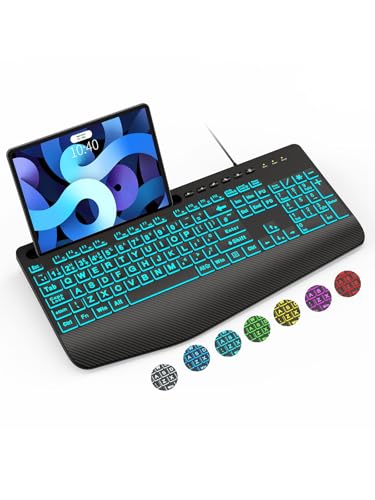
- Best for: Adults and older learners who want the largest, clearest key legends available.
- Specs:
- 104-key full-size layout with oversized letters
- 7-color backlight with 4 modes
- Built-in wrist rest and phone holder

- Best for: Evening learners who need a backlight they can tune to the room.
- Specs:
- 104-key full-size layout with oversized letters
- 7-color backlight with 3 brightness levels
- Foldable rear stands for typing angle
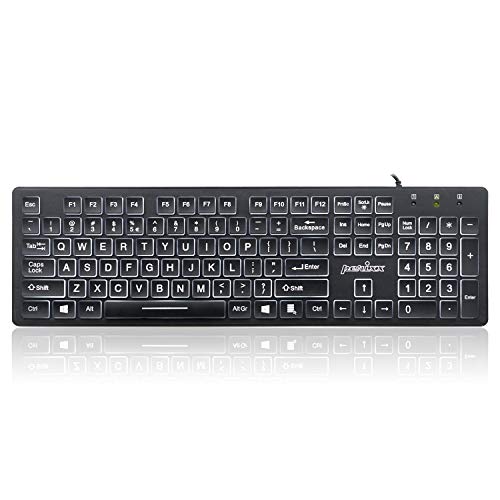
- Best for: Learners in shared or quiet rooms who want a calm, distraction-free board.
- Specs:
- White LED backlight with big-print letters
- 104-key US English layout
- Low-profile keys with short travel
All 4 Picks at a Glance
| Product | Specs | Action |
|---|---|---|
| SABLUTE Large Print Backlit Keyboard |
| Check price on Amazon |
| KOPJIPPOM Large Print Backlit Keyboard |
| Check price on Amazon |
| Perixx PERIBOARD-317 |
| Check price on Amazon |
 X9 Performance Large Print Backlit Keyboard |
| Check price on Amazon |
Key takeaways
- Find the best keyboards for learning typing, with large-print keys, bright backlighting and comfortable layouts for faster, more confident practice every day.
Learning to type well comes down to seeing each key clearly and building steady finger habits, and the wrong keyboard makes both jobs harder. Small legends force you to squint and guess, flat keys give your fingers nothing to aim for, and a layout that fights your hands turns every practice session into a chore. A keyboard built for learners removes those obstacles: oversized letters you can read at a glance, a backlight that keeps the legends visible in dim rooms, and keys that respond the same way every time you press them. The best learner keyboards share traits: readable print, lighting that keeps keys visible after dark, and a layout that matches standard lessons.
This guide is for adults picking up touch typing for the first time, older learners who want larger print, and anyone returning to a keyboard after years away. Every keyboard below was chosen from the name and specifications shown on its Amazon page, with large-print legends and beginner-friendly layouts as the deciding factors.
Quick Picks
As an Amazon Associate we earn from qualifying purchases
| Product | Best for | Key spec from title |
|---|---|---|
| SABLUTE Large Print Backlit Keyboard | Learners who want the biggest letters | 104-key layout with oversized letters |
| KOPJIPPOM Large Print Backlit Keyboard | Evening practice sessions | 7-color backlight with 3 brightness levels |
| Perixx PERIBOARD-317 | Quiet shared rooms | White LED backlight with big-print letters |
| X9 Performance Large Print Backlit Keyboard | Fast learners who want shortcuts | 107 keys with 12 shortcut keys |
How to Choose
Start With Letter Size and Contrast
The single most useful feature on a learning keyboard is print you can read without leaning in. Look for oversized letters in a bold font, printed in a colour that stands out against the keycap, so each key is recognisable at a glance. White or pale legends on black keys usually read best, and a matte keycap surface cuts glare that can wash out the print under a desk lamp. Avoid keyboards with small, grey legends, or print only on the front edge of the key, because you will spend practice time hunting for keys instead of building muscle memory. Letter size matters more than any other feature at the start.
Pick a Backlight That Helps, Not Distracts
A backlit keyboard keeps the legends readable in the evening and in rooms with weak lighting, when many people practise. Choose a backlight with several brightness levels so you can turn it down to a gentle glow rather than a harsh glare, and pick a model that switches between one steady colour and a multi-colour mode. Learners usually do best with one calm colour, such as white or soft blue, because rainbow cycling pulls the eye around the board. Make sure the backlight shines through the letters themselves, not just around the edges of the keys, so the print stays readable.
Check the Key Feel and Layout
Keys should travel smoothly and land with a clear, quiet click or thud that tells your fingers the press registered. Membrane and rubber-dome keys suit most learners because they are forgiving, quiet, and need only a light touch, while very stiff keys tire the hands quickly during long practice runs. A full-size 104-key layout is the safest choice, because it matches the standard layout used in typing courses and keeps the number row, function keys, and navigation cluster where your lessons expect them. A built-in wrist rest helps during longer sessions, and foldable rear stands let you set a slight tilt that keeps wrists straighter.
Think About Noise, Size, and Connection
A keyboard for learning usually sits in a shared home, so noise matters more than it does on a gaming desk. Quiet membrane keys let you practise late without disturbing the household, and a wired USB connection removes batteries and pairing from the equation entirely. Check that the keyboard is a standard full-size board that fits your desk, with a cable long enough to reach your computer without pulling the board toward you. If you plan to practise on a laptop, confirm the keyboard works with your operating system and that the layout matches the language you type in, because a mismatched layout will teach your fingers the wrong positions.
The 4 Best Options
SABLUTE Large Print Backlit Keyboard
- Best for: Adults and older learners who want the largest, clearest key legends available.
- Specs:
- 104-key full-size layout with oversized letters
- 7-color backlight with 4 modes
- Built-in wrist rest and phone holder
Adults and older learners who want the largest, clearest key legends available.
The bright backlight can feel strong in a dark room, so start on the lowest setting.
The SABLUTE is the most forgiving starting point in this guide, built around oversized letters that stay readable from a normal sitting distance. Its 104-key layout matches the standard arrangement used in typing courses, so the skills you build transfer directly to any other full-size keyboard. The seven-colour backlight runs through four modes, and the built-in wrist rest plus phone holder keep your hands and your lesson screen in comfortable positions during longer practice runs. It is a straightforward wired board with no software to install, which suits learners who want to plug in and start typing. The keys are spaced so fingers land where lessons expect them to.
Watch out for: The bright backlight can feel strong in a dark room, so start on the lowest setting.
KOPJIPPOM Large Print Backlit Keyboard
- Best for: Evening learners who need a backlight they can tune to the room.
- Specs:
- 104-key full-size layout with oversized letters
- 7-color backlight with 3 brightness levels
- Foldable rear stands for typing angle
Evening learners who need a backlight they can tune to the room.
The multi-colour mode cycles through colours, which can distract beginners, so pick one steady colour for practice.
The KOPJIPPOM suits learners who practise in the evening, when a clear backlight matters most. Its seven-colour backlight offers three brightness levels, so you can set a soft glow for night sessions or a brighter wash for dim afternoons, and the oversized legends stay readable at every setting. The 104-key layout covers the full standard arrangement, and foldable rear stands let you raise the back of the board to a comfortable typing angle. Membrane keys keep the sound low, which helps when someone else is working or resting in the same room. The board feels solid on a desk, and the keys stay quiet enough for shared rooms.
Watch out for: The multi-colour mode cycles through colours, which can distract beginners, so pick one steady colour for practice.
Perixx PERIBOARD-317
- Best for: Learners in shared or quiet rooms who want a calm, distraction-free board.
- Specs:
- White LED backlight with big-print letters
- 104-key US English layout
- Low-profile keys with short travel
Learners in shared or quiet rooms who want a calm, distraction-free board.
The single white backlight has no colour options, so buyers who want a coloured glow should look elsewhere.
The Perixx PERIBOARD-317 is the quiet choice, built for learners who practise in shared rooms, libraries, or late at night. Its white LED backlight gives the big-print letters a clean, even glow without the colour cycling found on other boards, and the low-profile keys travel a short distance with a soft landing. The 104-key US English layout keeps every key where a typing course expects it, and the wired USB connection works as soon as you plug it in. It is the least flashy board here, and that restraint is exactly what makes it easy to live with. The low-profile keys suit shorter practice sessions and tired hands alike.
Watch out for: The single white backlight has no colour options, so buyers who want a coloured glow should look elsewhere.
X9 Performance Large Print Backlit Keyboard
- Best for: Learners who are ready for shortcut keys and want a board that grows with them.
- Specs:
- 107-key layout with 12 shortcut keys
- 7-color backlight with 4 brightness levels
- Oversized letters on every key
Learners who are ready for shortcut keys and want a board that grows with them.
The extra shortcut keys add width, so measure your desk space before ordering.
The X9 Performance board is the pick for learners who are moving past the basics and want a few extra tools at their fingertips. Its 107-key layout adds twelve shortcut keys for common actions, so you can open mail, adjust volume, or launch a browser without reaching for the mouse. The seven-colour backlight runs through four brightness levels, and the oversized legends stay easy to read under every setting. The wired USB connection keeps the response steady, and the full-size layout means nothing you learned on a standard board needs relearning here. The shortcut keys sit above the main rows, where they are easy to reach without looking down.
Watch out for: The extra shortcut keys add width, so measure your desk space before ordering.
Which One Fits Your Situation
You Are Learning Touch Typing From Scratch
Start with the SABLUTE, because the oversized letters and standard 104-key layout remove the two biggest early frustrations: hunting for keys and relearning positions later. Keep the backlight on one steady colour and a low brightness, practise in short daily sessions, and let your fingers learn the home row before you worry about speed. The wrist rest helps during those first long sessions when your hands tire quickly.
You Practise Mostly in the Evening
Pick the KOPJIPPOM, since its three brightness levels let you match the backlight to a dim room without glare. Set the stands to a slight tilt, choose a single calm colour, and keep the room light low enough that the legends glow clearly. The quiet membrane keys mean you can run through drills after the household has settled without drawing complaints from the next room.
You Share a Room or Practise Late at Night
Choose the Perixx PERIBOARD-317, because its soft white backlight and low-profile keys are the quietest combination here. The big-print letters stay readable under the gentle glow, and the lack of colour cycling keeps your attention on the keys rather than the lighting. It is the board least likely to disturb anyone nearby, and its simple wired setup means there is nothing to configure before a late session.
You Want Shortcuts as Well as Big Letters
Go with the X9 Performance board, which keeps the oversized legends and adds twelve shortcut keys for the actions you use most. The extra keys are genuinely useful once you know the home row and want to move faster through everyday tasks, and the four brightness levels give you plenty of control over the backlight. Just confirm your desk has room for the wider frame before you commit.
Common Mistakes
- Choosing a compact or laptop-style layout that moves keys away from the positions typing courses teach and slows every lesson.
- Practising with the backlight on a cycling rainbow mode, which pulls the eyes around the board instead of letting them settle.
- Staring at the keys during every drill, which slows the move from looking to feeling where keys sit.
- Picking stiff or noisy keys that tire the hands and make long practice sessions unpleasant.
- Skipping the wrist rest and a proper typing angle, which leads to sore wrists before the lesson is over and shortens practice.
Frequently Asked Questions
What makes a keyboard good for learning to type?
A good learning keyboard has oversized, high-contrast legends you can read at a glance, a standard full-size layout that matches typing courses, and keys that respond consistently with a light touch. A backlight with adjustable brightness helps in dim rooms, while a wrist rest and a slight tilt keep your hands comfortable during practice.
Should I learn on a backlit keyboard or a plain one?
A backlit keyboard helps when you practise in the evening or in a dim room, because the legends stay visible without a desk lamp. Use one steady colour at a low brightness, which keeps the print readable without distracting you. A plain keyboard works just as well in a bright room.
How long does it take to learn touch typing on a large-print keyboard?
Most learners see clear progress within a few weeks of short daily practice, usually fifteen to twenty minutes a day. Large-print keys help at the start because you spend less time hunting for letters and more time building finger habits. Focus on accuracy first, since speed comes later once the keys feel familiar.
Do I need a wired keyboard for learning to type?
A wired keyboard is the simplest choice for learning, because it works the moment you plug it in, with no batteries to charge and no pairing to manage. The connection is steady, so every keystroke registers the same way. Wireless boards work well too, but they add charging and connection steps that can interrupt a practice routine.
FAQ
What makes a keyboard good for learning to type?
Should I learn on a backlit keyboard or a plain one?
How long does it take to learn touch typing on a large-print keyboard?
Do I need a wired keyboard for learning to type?
More from Amazon
Programs that pair well with the guide above. Offers and eligibility are set by Amazon and may change.
Free shipping on eligible items, Prime Video and more. Eligible new members can start with a free trial.
Start a Prime free trialAd-free music streaming. Eligible new subscribers can start with a free trial.
Try Music Unlimited freeA Prime membership for ages 18-24 with a trial period. Eligibility is set by Amazon.
See Prime for Young AdultsAudiobooks and podcasts to listen to on the go. Eligible new members can start with a free trial.
Try Audible freeAs an Amazon Associate we earn from qualifying purchases.