Our Short List of 3

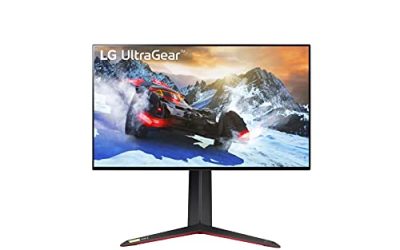
- Best Overall: LG UltraGear 27GP850-B — 27-inch QHD Nano IPS, 165Hz refresh rate, 1ms response time, FreeSync Premium, G-SYNC Compatible, DisplayHDR 400.
- Best OLED: LG UltraGear 27GS95QE-B — 27-inch QHD OLED, 240Hz refresh rate, 0.03ms response time, DisplayHDR True Black 400, FreeSync Premium Pro, HDMI 2.1.
- Best 4K Dual-Mode: LG UltraGear 27G850A-B — 27-inch 4K Nano IPS Black, dual-mode 240Hz at 4K or 480Hz at Full HD, 1ms response time, DisplayHDR 600, DisplayPort 2.1.
- Best 4K 144Hz: LG UltraGear 27GR93U-B — 27-inch 4K IPS, 144Hz refresh rate, 1ms response time, HDMI 2.1, DisplayHDR 400, G-SYNC Compatible.
All 5 Picks at a Glance
| Product | Specs | Action |
|---|---|---|
| Our Top Picks |
| Check price on Amazon |
 2. LG UltraGear 27GS95QE-B — Best OLED | Check price on Amazon | |
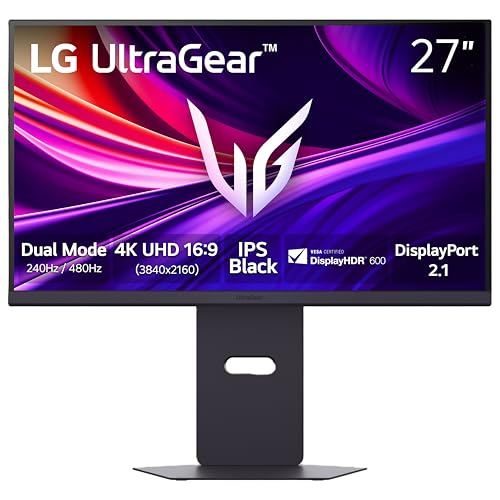 3. LG UltraGear 27G850A-B — Best 4K Dual-Mode | Check price on Amazon | |
 4. LG UltraGear 27GR93U-B — Best 4K 144Hz | Check price on Amazon | |
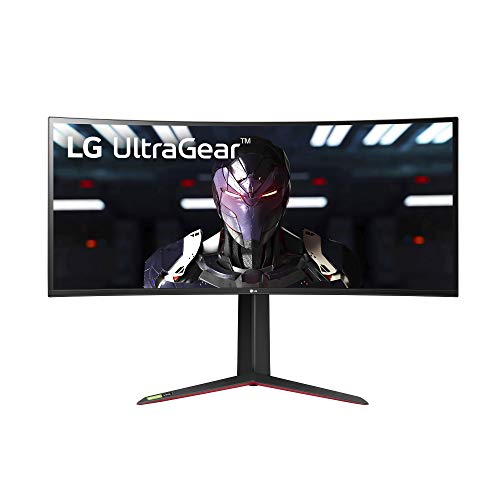 5. LG UltraGear 34GP83A-B — Best Ultrawide | Check price on Amazon |
Our Top Picks
As an Amazon Associate I earn from qualifying purchases.
The Short Answer
The best lg gaming monitors all come from the UltraGear line, and the right one depends on what you play and what your graphics card can drive. LG builds fast panels across every size and resolution, from sharp QHD screens for competitive play to OLED panels with near-instant response and ultrawide displays. Every pick here is an LG gaming monitor, so the choice is about panel type, resolution and refresh rate.
If you want one straightforward answer, the LG UltraGear 27GP850-B is the safe starting point. Its 27-inch QHD Nano IPS panel runs at 165Hz with a 1ms response time, covers a wide DCI-P3 colour gamut, and works with adaptive sync on both AMD and NVIDIA graphics cards. The OLED 27GS95QE-B has the deepest blacks and the fastest pixel response, the dual-mode 27G850A-B pairs 4K at 240Hz with a high-refresh Full HD mode, the 27GR93U-B brings 4K at 144Hz with HDMI 2.1, and the curved 34GP83A-B ultrawide is the immersive option for sim racing and open-world games.
Our Top Picks
- Best Overall: LG UltraGear 27GP850-B — 27-inch QHD Nano IPS, 165Hz refresh rate, 1ms response time, FreeSync Premium, G-SYNC Compatible, DisplayHDR 400.
- Best OLED: LG UltraGear 27GS95QE-B — 27-inch QHD OLED, 240Hz refresh rate, 0.03ms response time, DisplayHDR True Black 400, FreeSync Premium Pro, HDMI 2.1.
- Best 4K Dual-Mode: LG UltraGear 27G850A-B — 27-inch 4K Nano IPS Black, dual-mode 240Hz at 4K or 480Hz at Full HD, 1ms response time, DisplayHDR 600, DisplayPort 2.1.
- Best 4K 144Hz: LG UltraGear 27GR93U-B — 27-inch 4K IPS, 144Hz refresh rate, 1ms response time, HDMI 2.1, DisplayHDR 400, G-SYNC Compatible.
Quick Comparison
| Pick | Size and panel | Resolution | Refresh rate | Response time | Best for |
|---|---|---|---|---|---|
| LG 27GP850-B | 27-inch Nano IPS | 2560 x 1440 | 165Hz, overclock to 180Hz | 1ms | All-round PC gaming |
| LG 27GS95QE-B | 27-inch OLED | 2560 x 1440 | 240Hz | 0.03ms | Competitive play and deep blacks |
| LG 27G850A-B | 27-inch Nano IPS Black | 3840 x 2160 | 240Hz at 4K, 480Hz at Full HD | 1ms | 4K and competitive modes in one screen |
| LG 27GR93U-B | 27-inch IPS | 3840 x 2160 | 144Hz | 1ms | 4K PC and console gaming |
| LG 34GP83A-B | 34-inch curved Nano IPS | 3440 x 1440 | 144Hz (160Hz OC) | 1ms | Immersive ultrawide gaming |
How to Choose an LG Gaming Monitor
Resolution and graphics card go together
A monitor is only as fast as the graphics card driving it. A QHD screen at 165Hz or 240Hz is the sweet spot for most gaming PCs, because mid-range cards can push high frame rates at 2560 x 1440. A 4K screen at 144Hz or 240Hz needs a much stronger card, so the 27GR93U-B and the 27G850A-B make the most sense when the rest of the PC can keep up. If the graphics card is older, the QHD picks will feel faster and smoother than a 4K panel the card cannot fill.
Refresh rate matters more than resolution in fast games
In competitive shooters, a higher refresh rate makes motion clearer and tracking easier. The jump from 60Hz to 144Hz is large, and the step to 240Hz is still noticeable. The 27GS95QE-B pairs 240Hz with an OLED panel that changes pixels in 0.03ms, which is why it is the competitive pick here. The dual-mode 27G850A-B runs at 4K and 240Hz for cinematic games, then switches to Full HD at 480Hz for competitive titles. Story-driven players will notice resolution and colour more, so 144Hz or 165Hz is plenty for them.
Panel type sets the look of the image
Nano IPS panels, found in the 27GP850-B, the 27G850A-B and the 34GP83A-B, deliver wide viewing angles, accurate colour and a wide DCI-P3 gamut, which suits games with rich art direction. The IPS panel in the 27GR93U-B shares that colour strength at 4K. OLED, in the 27GS95QE-B, lights each pixel on its own, so blacks are truly black and contrast is far beyond what any backlit panel can produce. OLED also responds faster than IPS, but static images left on screen for long stretches need care.
Adaptive sync and ports are worth checking
Every pick supports adaptive sync, which matches the refresh rate of the screen to the frame rate of the graphics card and removes tearing without the input lag of traditional vertical sync. The picks cover both AMD FreeSync and NVIDIA G-SYNC Compatible certification. Ports matter too. HDMI 2.1 carries 4K at 120Hz to a console, and the 27GS95QE-B and the 27GR93U-B both include it. DisplayPort is the usual connection for high refresh rates on PC, and the 27G850A-B goes further with DisplayPort 2.1. Check the cable in the box and the ports on the graphics card before ordering.
Size, curve and desk fit
A 27-inch screen is the standard desk size: large enough for detail at arm’s length, small enough that the whole image sits inside the field of view. The 34-inch ultrawide 34GP83A-B is different. Its 21:9 aspect ratio adds peripheral vision in racing and flight games and gives extra width for streaming tools, but it needs a deeper desk and a wider viewing distance. Four of the five picks adjust for height, tilt and pivot; the 34GP83A-B adjusts for height and tilt only. All five are VESA mount compatible.
The Picks in Detail
1. LG UltraGear 27GP850-B — Best Overall
The 27GP850-B is the most balanced LG gaming monitor in this guide. Its 27-inch Nano IPS panel runs at 2560 x 1440 with a 165Hz refresh rate that overclocks to 180Hz, and the 1ms grey-to-grey response keeps fast motion clean. Colour is a strong point: the panel covers 98 percent of the DCI-P3 gamut, so games look vivid, and DisplayHDR 400 certification adds entry-level HDR support.
Adaptive sync is covered on both sides, with FreeSync Premium and G-SYNC Compatible certification. The stand adjusts for height, tilt and pivot, and a USB hub keeps a headset dongle close at hand. Connectivity is DisplayPort 1.4 and two HDMI 2.0 ports, enough for a PC and a console side by side. QHD is the easiest resolution here to drive.
Pros:
– Sharp QHD Nano IPS panel with wide DCI-P3 colour coverage
– 165Hz refresh rate with a 180Hz overclock and 1ms response time
– FreeSync Premium and G-SYNC Compatible adaptive sync
– Height, tilt and pivot stand adjustment with a built-in USB hub
– Easy resolution for most gaming PCs to drive at high frame rates
Cons:
– HDMI 2.0 ports rather than HDMI 2.1
– DisplayHDR 400 is entry-level HDR rather than the brighter HDR of the dual-mode pick
– No OLED-level contrast or near-instant pixel response
2. LG UltraGear 27GS95QE-B — Best OLED
The 27GS95QE-B is the fastest-feeling monitor in this guide, and the one with the best image quality in a dark room. Its 27-inch OLED panel runs at 2560 x 1440 and 240Hz, with a 0.03ms response time that makes motion blur all but disappear. Because every pixel produces its own light, blacks are truly black and contrast is far beyond what a backlit panel can show. DisplayHDR True Black 400 certification covers the HDR side, and the panel covers 98.5 percent of the DCI-P3 gamut.
HDMI 2.1 ports carry high refresh rates from a PC or a console, DisplayPort 1.4 handles 240Hz on PC, and FreeSync Premium Pro plus G-SYNC support keep the frame rate and the refresh rate in step. The anti-glare coating keeps reflections down in a bright room. The monitor includes panel care features that shift pixels and refresh the panel during idle time.
Pros:
– OLED panel with true blacks and exceptional contrast
– 240Hz refresh rate with a 0.03ms response time
– DisplayHDR True Black 400 and wide DCI-P3 colour coverage
– HDMI 2.1 and DisplayPort 1.4 with FreeSync Premium Pro and G-SYNC support
– Anti-glare coating for bright rooms
Cons:
– OLED brightness at full-screen white is lower than the IPS picks
– Static images left on screen for long periods need panel care attention
– No USB-C port for a single-cable laptop connection
3. LG UltraGear 27G850A-B — Best 4K Dual-Mode
The 27G850A-B is the most versatile monitor in this guide because it is two monitors in one. Its 27-inch Nano IPS Black panel runs at 4K and 240Hz for cinematic games, then switches to Full HD at 480Hz for competitive titles where frame rate matters more than resolution. DisplayHDR 600 certification gives it the brightest HDR of the five picks, and the Nano IPS Black panel improves contrast over standard IPS.
Connectivity is the most modern here, with DisplayPort 2.1 and two HDMI 2.1 ports. The 1ms response time keeps motion sharp at either resolution, and FreeSync Premium Pro plus G-SYNC Compatible certification cover adaptive sync on both AMD and NVIDIA hardware. The stand adjusts for height, swivel, pivot and tilt. This pick makes the most sense with a strong graphics card; with a weaker card, the QHD picks will feel smoother.
Pros:
– Dual-mode design: 4K at 240Hz or Full HD at 480Hz in one screen
– Nano IPS Black panel with DisplayHDR 600, the brightest HDR here
– DisplayPort 2.1 and two HDMI 2.1 ports for current and next-generation cards
– 1ms response time with FreeSync Premium Pro and G-SYNC Compatible support
– Full height, swivel, pivot and tilt stand adjustment
Cons:
– Needs a strong graphics card to make the most of 4K at 240Hz
– Full HD mode at 480Hz is less sharp than the native 4K mode
– More complex to set up than a single-mode QHD screen
4. LG UltraGear 27GR93U-B — Best 4K 144Hz
The 27GR93U-B is the straightforward 4K pick in this guide. Its 27-inch IPS panel runs at 3840 x 2160 with a 144Hz refresh rate and a 1ms response time, so 4K games look sharp and motion stays clean. HDMI 2.1 carries 4K at up to 120Hz to a console as well as 144Hz to a PC, which makes this the best pick for a player who splits time between a gaming PC and a current-generation console. DisplayHDR 400 certification adds HDR support, and the panel covers 95 percent of the DCI-P3 gamut.
Adaptive sync is covered with G-SYNC Compatible and FreeSync Premium support, and the stand adjusts for tilt, height and pivot. A 4-pole headphone output with DTS Headphone:X support is included for players who plug a headset straight into the monitor. The trade-off against the dual-mode 27G850A-B is refresh rate: 144Hz rather than 240Hz, and no Full HD 480Hz mode.
Pros:
– Sharp 4K IPS panel at 144Hz with a 1ms response time
– HDMI 2.1 for 4K console play at up to 120Hz as well as PC play
– G-SYNC Compatible and FreeSync Premium adaptive sync
– Height, tilt and pivot stand adjustment
– Headphone output with DTS Headphone:X support
Cons:
– 144Hz ceiling is lower than the 240Hz picks in this guide
– Needs a strong graphics card to reach high frame rates at 4K
– DisplayHDR 400 is entry-level HDR
5. LG UltraGear 34GP83A-B — Best Ultrawide
The 34GP83A-B is the immersive pick. Its 34-inch curved Nano IPS panel runs at 3440 x 1440 with a 144Hz refresh rate (160Hz overclock) and a 1ms response time, and the 21:9 aspect ratio adds peripheral vision that a 16:9 screen cannot match. Racing games, flight sims and open-world titles feel wider. The Nano IPS panel covers a wide DCI-P3 gamut, and G-SYNC Compatible certification plus FreeSync Premium support keep motion smooth.
Outside games, a streaming window, a chat panel or a guide can sit beside the game without a second monitor, and the extra width suits video editing timelines. The stand adjusts for height and tilt, and the screen is VESA mount compatible. Desk space is the main consideration: a 34-inch ultrawide needs a deeper desk and more viewing distance.
Pros:
– 34-inch curved ultrawide panel for a wider field of view
– 3440 x 1440 resolution at 144Hz (160Hz overclock) with a 1ms response time
– Nano IPS panel with wide DCI-P3 colour coverage
– G-SYNC Compatible and FreeSync Premium adaptive sync
– Extra width doubles as space for streaming tools and side windows
Cons:
– Needs a deeper and wider desk than the 27-inch picks
– Ultrawide resolution is harder to drive than QHD at the same frame rate
– Some older games do not support the 21:9 aspect ratio
Who Should Choose What
- The all-rounder: the 27GP850-B. QHD at 165Hz, wide colour, adaptive sync on both card brands, and the easiest resolution here for a gaming PC to drive.
- The competitive player: the 27GS95QE-B. OLED contrast and a 0.03ms response at 240Hz make motion clearer than any other pick here.
- The high-end PC owner: the 27G850A-B. Dual-mode 4K at 240Hz and Full HD at 480Hz in one screen, with DisplayPort 2.1 and the brightest HDR in the guide.
- The PC and console player: the 27GR93U-B. Sharp 4K at 144Hz with HDMI 2.1 for console play at up to 120Hz.
- The immersion seeker: the 34GP83A-B. A curved 34-inch ultrawide for racing, flight and open-world games.
Common Mistakes
Buying 4K before the graphics card is ready
The most common mistake with a 4K monitor is pairing it with a card that cannot fill it. Running a 4K screen at low frame rates feels worse than running a QHD screen at high frame rates. Check the frame rates the current card reaches at 4K in the games played most, and choose the QHD picks when the numbers do not add up.
Ignoring the cable and the port
A high-refresh monitor needs the right connection to reach its headline speed. HDMI 2.1 and DisplayPort 1.4 or 2.1 carry the bandwidth for 4K at high refresh rates, while older HDMI versions do not. Check the cable in the box and the ports on the graphics card, and confirm the monitor is set to its maximum refresh rate in the display settings after connecting it.
Choosing OLED without thinking about static images
OLED delivers the best contrast and the fastest response in this guide, but static content left on screen for long stretches needs care. A desktop, a browser window or a game HUD sitting unchanged for hours is the scenario to avoid. Use the panel care features built into the monitor and vary the content on screen. Players who leave the same screen up all day should consider one of the IPS picks instead.
Sitting too close to an ultrawide
A 34-inch ultrawide needs more viewing distance than a 27-inch screen. Sitting at the same distance as a standard monitor puts the edges of the image outside comfortable vision. Give the ultrawide a deeper desk and a little more distance, and use a monitor arm when the stand does not allow the right position.
FAQ
Are LG UltraGear monitors good for gaming?
Yes. The UltraGear line is LG’s gaming range, and every pick here has a high refresh rate, a low response time and adaptive sync support. The differences between the picks are panel type, resolution and size, not gaming readiness.
Which LG gaming monitor is best for competitive shooters?
The 27GS95QE-B is the strongest competitive pick here, with a 240Hz OLED panel and a 0.03ms response time. The dual-mode 27G850A-B is the alternative for players who want a Full HD 480Hz mode alongside 4K play in the same screen.
Is QHD or 4K better for an LG gaming monitor?
QHD is better when the graphics card cannot drive 4K at high frame rates, because a QHD screen at 165Hz or 240Hz feels smoother than a 4K screen at low frame rates. 4K is better when the card is strong enough and sharpness matters most.
Do LG gaming monitors work with NVIDIA and AMD graphics cards?
Yes. Every pick in this guide supports adaptive sync on both sides, with FreeSync support for AMD cards and G-SYNC Compatible certification for NVIDIA cards. Check the exact sync certification on the listing before ordering.
Is an OLED gaming monitor worth it over IPS?
OLED is worth it for players who value deep blacks, high contrast and the fastest pixel response, especially in dark games and competitive titles. IPS is better for players who leave static content on screen for long periods.
Conclusion
The best lg gaming monitors cover every kind of player without leaving the UltraGear line. The 27GP850-B is the safe all-round pick, with a sharp QHD Nano IPS panel at 165Hz. The 27GS95QE-B brings OLED contrast and a 0.03ms response at 240Hz for competitive play. The 27G850A-B is the most flexible screen here, switching between 4K at 240Hz and Full HD at 480Hz. The 27GR93U-B is the straightforward 4K choice for PC and console play over HDMI 2.1, and the curved 34GP83A-B ultrawide is the immersive option for racing and open-world games.
Match the resolution to the graphics card, check the cable and the port, and give an ultrawide the desk space it needs.
FAQ
Are LG UltraGear monitors good for gaming?
Which LG gaming monitor is best for competitive shooters?
Is QHD or 4K better for an LG gaming monitor?
Do LG gaming monitors work with NVIDIA and AMD graphics cards?
Is an OLED gaming monitor worth it over IPS?
More from Amazon
Programs that pair well with the guide above. Offers and eligibility are set by Amazon and may change.
Free shipping on eligible items, Prime Video and more. Eligible new members can start with a free trial.
Start a Prime free trialAd-free music streaming. Eligible new subscribers can start with a free trial.
Try Music Unlimited freeA Prime membership for ages 18-24 with a trial period. Eligibility is set by Amazon.
See Prime for Young AdultsAudiobooks and podcasts to listen to on the go. Eligible new members can start with a free trial.
Try Audible freeAs an Amazon Associate we earn from qualifying purchases.