Our Short List of 3
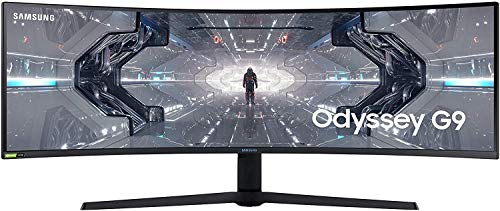
- Best for: Super-ultrawide immersion in a bright room, where brightness and value matter most.
- 49″ DQHD (5120×1440) panel
- 240Hz refresh rate
- 1000R curve
- QLED panel

- Best for: The best picture in the 49-inch class, where contrast and instant response matter most.
- 49″ DQHD QD-OLED panel
- 240Hz refresh rate
- 0.03ms response time

- Best for: QD-OLED gaming at 144Hz, where the picture matters more than the top refresh rate.
- 49″ DQHD QD-OLED panel
- 144Hz refresh rate
- 0.03ms response time
- G-Sync Compatible
All 5 Picks at a Glance
| Product | Specs | Action |
|---|---|---|
| Samsung Odyssey G9 |
| Check price on Amazon |
| Samsung Odyssey OLED G9 G95SC |
| Check price on Amazon |
| Samsung Odyssey OLED G9 G91SD |
| Check price on Amazon |
 Samsung Odyssey OLED G9 G93SC |
| Check price on Amazon |
 LG 38WN95C-W |
| Check price on Amazon |
Our Top Picks
An ultrawide monitor changes how a game feels. The extra width pulls the edges of the world into view, so a racing track bends around you and a strategy map stretches across the whole desk. It also changes how a desk works — one ultrawide replaces two monitors, with no bezel in the middle and no second cable to manage. The catch is that not all ultrawides are equal: a 34-inch panel and a 49-inch panel are different machines, and the choice between them decides the whole setup.
This guide covers five ultrawide gaming monitors across the full class, chosen from their Amazon listings for size, refresh rate, and panel technology. Four are 49-inch Samsung Odyssey models and one is a 38-inch LG, so the range covers the big formats that smaller guides leave out.
Quick Picks
As an Amazon Associate we earn from qualifying purchases.
| Product | Best for | Key spec from title |
|---|---|---|
| Samsung Odyssey G9 | Super-ultrawide immersion on a budget | 49″ DQHD, 240Hz, 1000R curve, QLED |
| Samsung Odyssey OLED G9 G95SC | QD-OLED contrast at 240Hz | 49″ DQHD, 240Hz QD-OLED, 0.03ms |
| Samsung Odyssey OLED G9 G91SD | QD-OLED gaming with a warranty | 49″ DQHD QD-OLED, 144Hz, 0.03ms |
| Samsung Odyssey OLED G9 G93SC | Fast QD-OLED with an adjustable stand | 49″ DQHD QD-OLED, 240Hz, 0.03ms |
| LG 38WN95C-W | A 38-inch ultrawide for gaming and work | 38″ 21:9 QHD+, Nano IPS, 144Hz |
How to Choose
Size decides the desk
A 49-inch 32:9 monitor is effectively two 27-inch screens joined together, and it needs a deep desk and a strong arm or stand. A 38-inch 21:9 monitor is the middle ground — wider than a standard screen, but still manageable on a normal desk. Measure the desk before buying, not after, and remember that a curved panel needs clearance at the edges. If the desk is shallow, the 38-inch LG is the safer choice; if the desk is deep, the 49-inch Samsungs reward the space.
Refresh rate and response time
Ultrawide gaming lives or dies on motion handling, because the wide field of view makes judder more obvious. A 240Hz panel is the top end here, and it suits fast shooters and racing games where the scenery moves quickly. A 144Hz panel is still a big step up from a standard 60Hz screen and suits most games well. Response time matters too — the 0.03ms OLED panels in this guide are effectively instant, while a QLED panel with a slower response can smear fast motion.
OLED versus QLED
OLED panels give perfect blacks and instant response, which suits dark games and cinematic titles, while QLED panels give higher brightness and no risk of burn-in from static images. The OLED models here are the choice for atmosphere and contrast, and the QLED G9 is the choice for bright rooms and long sessions with static HUD elements. Neither is better in every case — the room and the games decide which panel wins. A QLED panel also handles static HUD elements without worry, which suits long sessions in games with fixed interface elements.
Curve, sync, and warranty
A tight 1000R curve wraps the screen around the player, which suits the 49-inch format, while a gentler 1800R curve is less immersive but easier on the eyes for work. Adaptive sync — G-Sync Compatible and FreeSync Premium Pro — keeps the frame rate smooth when the GPU cannot hold a steady pace, so check that the monitor supports the GPU’s sync standard. A three-year warranty on the OLED models is worth noting, since it covers the panel for longer than most monitor warranties do.
The 5 Best Options
Samsung Odyssey G9
- Best for: Super-ultrawide immersion in a bright room, where brightness and value matter most.
- 49″ DQHD (5120×1440) panel
- 240Hz refresh rate
- 1000R curve
- QLED panel
Super-ultrawide immersion in a bright room, where brightness and value matter most.
QLED cannot match OLED blacks in dark scenes, so players who live in dark games should look at the OLED models instead.
The original Odyssey G9 is the QLED super-ultrawide in this guide. A 49-inch DQHD panel at 5120 by 1440 with a 240Hz refresh rate and a 1000R curve wraps the game around the player, and QLED gives the brightness to hold up in a well-lit room. G-Sync Compatible and FreeSync Premium Pro support keep the frame rate smooth, and the 1000R curve is the tightest here, which suits the 49-inch width best. It is the most affordable way into the 49-inch class. The 1000R curve is the tightest here, which suits the 49-inch width best and pulls the edges of the game into view.
Watch out for: QLED cannot match OLED blacks in dark scenes, so players who live in dark games should look at the OLED models instead.
Samsung Odyssey OLED G9 G95SC
- Best for: The best picture in the 49-inch class, where contrast and instant response matter most.
- 49″ DQHD QD-OLED panel
- 240Hz refresh rate
- 0.03ms response time
The best picture in the 49-inch class, where contrast and instant response matter most.
OLED panels need care with static images over long sessions, so vary the content and use the screen’s care features.
The G95SC is the QD-OLED flagship of the group. A 49-inch DQHD QD-OLED panel at 240Hz with a 0.03ms response gives perfect blacks and instant motion, which is the combination that makes dark games feel cinematic. The 240Hz refresh rate matches the QLED G9 for speed, while the OLED contrast is in a different league. It is the pick for players who want the best picture the 49-inch class can offer. The 240Hz refresh rate matches the QLED G9 for speed, while the OLED contrast is in a different league entirely.
Watch out for: OLED panels need care with static images over long sessions, so vary the content and use the screen’s care features.
Samsung Odyssey OLED G9 G91SD
- Best for: QD-OLED gaming at 144Hz, where the picture matters more than the top refresh rate.
- 49″ DQHD QD-OLED panel
- 144Hz refresh rate
- 0.03ms response time
- G-Sync Compatible
QD-OLED gaming at 144Hz, where the picture matters more than the top refresh rate.
The 144Hz refresh rate is slower than the 240Hz models, so competitive players who chase frame rates should look at the G95SC or G93SC instead.
The G91SD brings QD-OLED to a lower refresh rate and a lower tier, which makes it the most accessible OLED in this guide. A 49-inch DQHD QD-OLED panel at 144Hz with a 0.03ms response still gives perfect blacks and instant motion, and the G-Sync Compatible and FreeSync Premium Pro support keep the frame rate smooth. The ergonomic stand adjusts to the desk, and the three-year warranty covers the panel for longer than most. It is the OLED pick for players who do not need 240Hz.
Watch out for: The 144Hz refresh rate is slower than the 240Hz models, so competitive players who chase frame rates should look at the G95SC or G93SC instead.
Samsung Odyssey OLED G9 G93SC
- Best for: Fast QD-OLED gaming with a stand that adjusts to the desk.
- 49″ DQHD QD-OLED panel
- 240Hz refresh rate
- 0.03ms response time
- 1800R curve
Fast QD-OLED gaming with a stand that adjusts to the desk.
Confirm the model number LS49CG932SNXZA on the product page, since several similar G9 listings share the same family name.
The G93SC pairs QD-OLED with a 240Hz refresh rate and a practical stand. A 49-inch DQHD QD-OLED panel at 240Hz with a 0.03ms response gives the same instant, high-contrast picture as the G95SC, while the 1800R curve is gentler on the eyes and the height-adjustable stand makes desk setup easier. DisplayHDR True Black 400 support deepens dark scenes further, and the three-year warranty matches the G91SD. It is the pick for players who want top speed and a stand that actually adjusts.
Watch out for: Confirm the model number LS49CG932SNXZA on the product page, since several similar G9 listings share the same family name.
LG 38WN95C-W
- Best for: A 38-inch ultrawide for gaming and work on a normal desk.
- 38″ 21:9 Curved UltraWide QHD+ (3840×1600) Nano IPS panel
- Thunderbolt 3
- 1ms response time
- 144Hz refresh rate
A 38-inch ultrawide for gaming and work on a normal desk.
The listing carries a conflicting ASIN in some roundups — confirm B0892MHG9H on the product page before ordering.
The LG 38WN95C-W is the 38-inch pick, and it is the most practical ultrawide here. A 38-inch 21:9 curved UltraWide QHD+ panel at 3840 by 1600 with Nano IPS gives a sharp, colour-rich picture, and the 144Hz refresh rate with a 1ms response suits fast games. Thunderbolt 3 connects a laptop with a single cable, and NVIDIA G-SYNC and AMD FreeSync support cover both GPU camps. It is the monitor for players who also work at the same desk, because the 38-inch size fits a normal setup without a deep desk. The Nano IPS panel gives a sharp, colour-rich picture, and the 144Hz refresh rate suits fast games.
Watch out for: The listing carries a conflicting ASIN in some roundups — confirm B0892MHG9H on the product page before ordering.
Which One Fits Your Situation
You want the biggest screen for the least money
Take the Samsung Odyssey G9. The 49-inch QLED panel at 240Hz with a 1000R curve gives the full super-ultrawide experience, and the brightness holds up in a well-lit room. It is the most affordable route into the 49-inch class. The 1000R curve wraps the game around the player, and the QLED brightness holds up in a well-lit room.
You want the best picture, full stop
Take the Samsung Odyssey OLED G9 G95SC. QD-OLED at 240Hz with a 0.03ms response gives perfect blacks and instant motion, which is the best picture in this guide. It suits dark, cinematic games where contrast carries the atmosphere. The 0.03ms response keeps motion instant, and the perfect blacks make dark games feel cinematic.
You want OLED without the top refresh rate
Take the Samsung Odyssey OLED G9 G91SD. The 144Hz QD-OLED panel still gives perfect blacks and instant response, and the ergonomic stand and three-year warranty make it the most practical OLED here. It suits players who value the picture over the frame rate. The ergonomic stand adjusts to the desk, and the three-year warranty covers the panel for longer than most.
You want a 38-inch ultrawide for gaming and work
Take the LG 38WN95C-W. It fits a normal desk, connects a laptop over Thunderbolt 3, and the 144Hz Nano IPS panel suits both games and work. It is the only pick here that does not demand a deep desk or a heavy stand. Thunderbolt 3 connects a laptop with a single cable, and the 144Hz panel suits both games and work.
Common Mistakes
- Buying a 49-inch monitor for a shallow desk — measure first, because the panel needs depth and a strong stand.
- Ignoring the curve — a 1000R curve wraps the player, while an 1800R curve is gentler and better for mixed work.
- Expecting OLED blacks from QLED — QLED is brighter, but it cannot match OLED contrast in dark scenes.
- Forgetting adaptive sync — check that the monitor supports the GPU’s sync standard, or fast motion will tear.
- Confusing similar G9 models — several Samsung listings share the family name, so confirm the model number on the product page.
Frequently Asked Questions
Is a 49-inch monitor too big for gaming?
Not if the desk is deep enough. A 49-inch 32:9 panel replaces two 27-inch monitors, so it suits racing, strategy, and simulation games where the extra width shows more of the world. For a shallow desk, the 38-inch LG is the better choice.
Does OLED burn in during long gaming sessions?
Modern OLED monitors include care features to reduce the risk, but static HUD elements over very long sessions are still a consideration. Vary the content, use the screen’s care settings, and the three-year warranty on the Samsung OLED models covers the panel for longer than most.
Can one ultrawide replace two monitors?
Yes — a 49-inch 32:9 panel is effectively two 27-inch screens side by side, with no bezel in the middle. The 38-inch LG is closer to one and a half screens, which still replaces a dual setup for most work, with a single cable to manage.
Do I need a powerful GPU for a 49-inch monitor?
A 5120 by 1440 panel has fewer pixels than a 4K screen, so a mid-range GPU handles it well at high settings, and a strong GPU pushes the 240Hz models properly. The adaptive sync support in these monitors keeps the frame rate smooth even when the GPU cannot hold a steady pace.
FAQ
Is a 49-inch monitor too big for gaming?
Does OLED burn in during long gaming sessions?
Can one ultrawide replace two monitors?
Do I need a powerful GPU for a 49-inch monitor?
More from Amazon
Programs that pair well with the guide above. Offers and eligibility are set by Amazon and may change.
Free shipping on eligible items, Prime Video and more. Eligible new members can start with a free trial.
Start a Prime free trialAd-free music streaming. Eligible new subscribers can start with a free trial.
Try Music Unlimited freeA Prime membership for ages 18-24 with a trial period. Eligibility is set by Amazon.
See Prime for Young AdultsAudiobooks and podcasts to listen to on the go. Eligible new members can start with a free trial.
Try Audible freeAs an Amazon Associate we earn from qualifying purchases.