Our Short List of 3

- 5TB capacity, the largest in this guide
- Password protection with 256-bit AES hardware encryption
- Backup software with scheduled backups
- Slim, pocketable, bus-powered design

- Fastest transfers in this guide, up to 1,050 MB/s read
- Pocket-sized aluminum body at about 58 grams
- No moving parts and listed drop resistance up to 2 metres
- AES 256-bit password protection

- Simple plug-and-play setup with no software to learn
- Compact and light at about 0.29 pounds
- Bus-powered with a single cable
- 2TB covers most personal backup needs
All 5 Picks at a Glance
| Product | Specs | Action |
|---|---|---|
| 1. WD My Passport 5TB — Best Overall |
| Check price on Amazon |
| 2. Samsung T7 1TB — Best Portable SSD |
| Check price on Amazon |
| 3. WD Elements Portable 2TB — Best Simple Backup Drive |
| Check price on Amazon |
 4. Seagate Portable 2TB — Best for Consoles and Cross-Platform Use |
| Check price on Amazon |
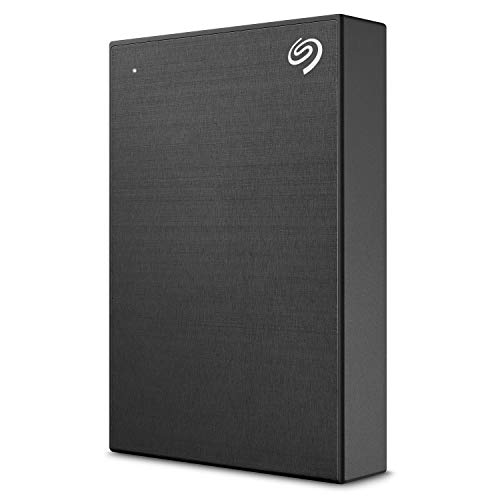 5. Seagate Backup Plus Portable 4TB — Best Large-Capacity Backup Drive |
| Check price on Amazon |
Our Top Picks
- WD 2TB Elements Portable External Hard Drive for2TB4.35 x 3.23 x 0.59 inches0.29 poundsCheck on Amazon
As an Amazon Associate I earn from qualifying purchases.
The Short Answer
The best portable hard drives balance capacity, connection type, and how much protection your files need while you carry them. For most people, the WD My Passport 5TB is the strongest all-around pick: 5TB in a pocketable, bus-powered enclosure, with password protection, 256-bit AES hardware encryption, and backup software for scheduled copies. If transfer speed matters more than capacity, the Samsung T7 1TB portable SSD moves files far faster than any spinning drive in this guide. If you want the simplest drive for everyday backups, the WD Elements Portable 2TB works with a single cable and no software to configure. The Seagate Portable 2TB covers PC, Mac, PlayStation, and Xbox, while the Seagate Backup Plus Portable 4TB adds a metal enclosure and backup software for larger libraries. Every drive in this guide is bus-powered, which means it runs from the USB port alone with no wall adapter to pack.
Our Top Picks
- Best Overall: WD My Passport 5TB — 5TB of bus-powered storage with password protection, hardware encryption, and backup software.
- Best Portable SSD: Samsung T7 1TB — the fastest drive here, with USB 3.2 Gen 2 and a slim aluminum body.
- Best Simple Backup Drive: WD Elements Portable 2TB — plug-and-play storage with no software to learn.
- Best for Consoles and Cross-Platform Use: Seagate Portable 2TB — one drive for PC, Mac, PlayStation, and Xbox.
- Best Large-Capacity Backup Drive: Seagate Backup Plus Portable 4TB — 4TB in a metal enclosure with backup software and data recovery coverage.
Quick Comparison
| Drive | Capacity | Type | Interface | Encryption | Warranty |
|---|---|---|---|---|---|
| WD My Passport 5TB | 5TB | HDD | USB 3.1 / USB 3.0 | 256-bit AES hardware | 3-year limited |
| Samsung T7 1TB | 1TB | SSD | USB 3.2 Gen 2 | AES 256-bit | 3-year limited |
| WD Elements Portable 2TB | 2TB | HDD | USB 3.2 Gen 1 | None listed | 2-year limited |
| Seagate Portable 2TB | 2TB | HDD | USB 3.0 | None listed | 2-year limited |
| Seagate Backup Plus Portable 4TB | 4TB | HDD | USB 3.0 | None listed | 2-year limited |
How to Choose
Capacity: match the drive to the job
Capacity is the first decision, and it depends on what you plan to store. A 1TB drive suits a working set of documents, photos, and a modest game library. A 2TB drive covers most personal backup needs. A 4TB or 5TB drive fits large video libraries, full-system backups, and game collections that keep growing.
HDD or SSD: capacity against speed
Portable hard drives come in two kinds. A portable HDD uses a spinning disk, which keeps the cost per terabyte low and makes 4TB and 5TB capacities affordable. A portable SSD uses flash memory with no moving parts, which makes it faster, lighter, and more resistant to bumps. An SSD is the better choice when you move large files often or carry the drive in a pocket every day. An HDD is the better choice when you need the most terabytes for the least money.
Connection: check the port on your computer
Most portable hard drives connect over USB, but the connector on the drive end and the port on your computer are not always the same. Many portable HDDs still use a Micro-B connector on the drive, with a USB-A cable in the box. If your laptop only has USB-C ports, you will need an adapter or a drive that ships with a USB-C cable. The Samsung T7 includes both USB-C and USB-A cables, which removes that problem. The WD My Passport and the Seagate drives in this guide ship with a USB-A cable, so confirm on the listing what cables are included before you order.
Bus power: no wall adapter needed
Every drive in this guide is bus-powered, which means it draws all the power it needs from the USB port. That is what makes a drive truly portable: one cable, no power brick, no wall socket. Desktop external drives need a separate power adapter and belong on a desk, not in a travel bag.
Encryption and backup software
If the drive will hold sensitive files, look for password protection and hardware encryption. The WD My Passport 5TB and the Samsung T7 both include AES 256-bit encryption with password protection, which locks the contents if the drive is lost. The simpler drives in this guide have no encryption, so anyone who finds the drive can read its files. Backup software is a separate question: the My Passport and the Backup Plus Portable include software for scheduled backups, while the Elements and the Seagate Portable rely on drag-and-drop copying or your operating system backup tool.
File system and compatibility
Most portable hard drives arrive formatted for Windows. Mac users may need to reformat the drive before writing to it, and the same applies when moving a drive between a PC and a game console. The Seagate Portable 2TB is listed as compatible with PC, Mac, PlayStation, and Xbox out of the box, which makes it the simplest choice for console storage.
The Picks in Detail
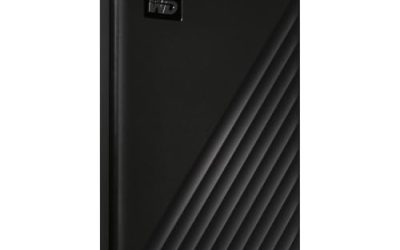
1. WD My Passport 5TB — Best Overall
- 5TB capacity, the largest in this guide
- Password protection with 256-bit AES hardware encryption
- Backup software with scheduled backups
- Slim, pocketable, bus-powered design
The WD My Passport 5TB is the most complete portable hard drive in this guide. It packs 5TB into a slim enclosure that measures 4.22 by 2.95 by 0.75 inches and weighs 0.46 pounds, so it slips into a laptop bag or jacket pocket without effort. It connects over USB 3.1 and USB 3.0, runs entirely on bus power, and works with Windows and Mac, with a reformat step needed for some Mac setups.
What sets it apart is the security and software package. The drive includes password protection with 256-bit AES hardware encryption, so the contents stay locked without the password. WD also includes backup software with scheduled backup options and ransomware defense features, which turns the drive into a set-and-forget backup target rather than a manual copy destination. WD backs the drive with a 3-year limited warranty, the longest in this guide.
Pros:
Cons:
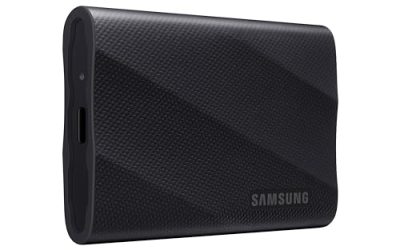
2. Samsung T7 1TB — Best Portable SSD
- Fastest transfers in this guide, up to 1,050 MB/s read
- Pocket-sized aluminum body at about 58 grams
- No moving parts and listed drop resistance up to 2 metres
- AES 256-bit password protection
The Samsung T7 1TB is the fastest drive in this guide by a wide margin. It connects over USB 3.2 Gen 2 and lists sequential read speeds up to 1,050 MB/s and write speeds up to 1,000 MB/s, which makes large file transfers finish in a fraction of the time a spinning drive needs. It is also the smallest and lightest pick here: the aluminum body measures about 85 by 57 by 8 mm and weighs about 58 grams, roughly the size of a credit card.
The T7 has no moving parts, a sturdy metal body, and Samsung lists drop resistance up to 2 metres. It includes optional password protection with AES 256-bit hardware encryption, ships with both USB-C and USB-A cables, and carries a 3-year limited warranty.
Pros:
Cons:
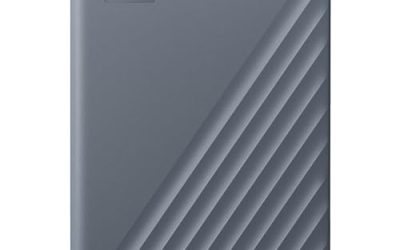
3. WD Elements Portable 2TB — Best Simple Backup Drive
- Simple plug-and-play setup with no software to learn
- Compact and light at about 0.29 pounds
- Bus-powered with a single cable
- 2TB covers most personal backup needs
The WD Elements Portable 2TB is the simplest drive in this guide, and that is its main strength. It is a compact, bus-powered mechanical hard drive with 2TB of capacity, a USB 3.2 Gen 1 connection, and plug-and-play setup for Windows and Mac. You connect the included USB cable, the computer recognizes the drive, and you can start moving files by drag and drop. There is no backup software to install and no password tool to configure.
The 2TB model measures 4.35 by 3.23 by 0.59 inches and weighs about 0.29 pounds, so it travels easily. The drive-side connector is Micro-B, and the included cable is USB-A, so USB-C-only laptops need an adapter. WD lists a 2-year limited warranty for this model family. The listing also notes a 5400 RPM rotational speed, which is standard for portable HDDs in this class.
The Elements line is the right pick when you want extra space without extra decisions. The trade-offs are the lack of encryption and the lack of bundled backup software, so you need to supply your own backup routine and your own security habits.
Pros:
Cons:
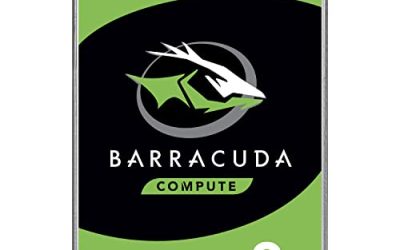
4. Seagate Portable 2TB — Best for Consoles and Cross-Platform Use
- Listed for PC, Mac, PlayStation, and Xbox
- Simple drag-and-drop use with no software to configure
- Bus-powered and pocketable
- Includes a 1-year Rescue Service plan
The Seagate Portable 2TB is the most flexible drive in this guide for moving between machines. Seagate lists it as compatible with PC, Mac, PlayStation, and Xbox, so one drive can back up a laptop, hold a game library, and move between a desk and a living room without reformatting. It is a bus-powered 2.5-inch drive with a USB 3.0 connection and 2TB of capacity, and it includes a 1-year Rescue Service plan for data recovery support.
Setup is drag and drop: connect the cable and copy files. There is no backup software to configure and no encryption to set up, which keeps the drive simple, but it also means you supply your own backup routine and your own file security. The drive is a mechanical unit, so transfer speeds are in line with other portable HDDs and well below an SSD.
This is the pick for households and gamers who need one drive that works everywhere. If you only use one computer and want encryption or scheduled backups, the WD My Passport 5TB is the stronger choice.
Pros:
Cons:
5. Seagate Backup Plus Portable 4TB — Best Large-Capacity Backup Drive
- 4TB capacity for large photo and video libraries
- Brushed metal enclosure
- Backup software for scheduled and mirrored copies
- 2-year Rescue Data Recovery Services plan
The Seagate Backup Plus Portable 4TB is the pick for large libraries that need more room than a 2TB drive can hold. It stores 4TB in a brushed metal enclosure that measures 4.51 by 3.07 by 0.81 inches and weighs 8.64 ounces, and it connects over USB 3.0 with bus power, so it still travels in a bag with a single cable. Seagate lists it for PC and Mac, and it includes backup software for scheduled and mirrored copies.
The Backup Plus Portable adds a 2-year Rescue Data Recovery Services plan, which covers mechanical and electrical failure support through Seagate. The listing also mentions bundled software subscriptions; confirm on the listing which subscriptions are currently included, since bundled extras can change. Seagate lists a 2-year limited warranty for this model.
The trade-off is size and weight: at 8.64 ounces it is the heaviest drive in this guide, and the metal enclosure adds bulk next to the slim WD drives. It is also a mechanical drive, so it will not match the T7 for transfer speed.
Pros:
Cons:
Seagate Backup Plus Portable 4TB
Who Should Choose What
- Most people backing up a laptop: WD My Passport 5TB. It has the most capacity, the strongest security, and backup software in one pocketable drive.
- Speed-first users and video editors: Samsung T7 1TB. It moves large files far faster than any spinning drive here, and it is the smallest and lightest pick.
- Simple extra storage: WD Elements Portable 2TB. Plug it in, drag files, done. No software, no setup, no decisions.
- Gamers and multi-device households: Seagate Portable 2TB. One drive listed for PC, Mac, PlayStation, and Xbox.
- Large libraries on a budget: Seagate Backup Plus Portable 4TB. Four terabytes in a metal enclosure with backup software and recovery coverage.
Common Mistakes
Buying a desktop drive for travel. Desktop external drives need a wall power adapter and are not portable, even when the enclosure looks small. Check the listing for bus power before you buy a drive you plan to carry.
Ignoring the connector. Many portable HDDs ship with a USB-A cable and a Micro-B drive connector. If your laptop only has USB-C ports, you need an adapter or a drive that includes a USB-C cable, like the Samsung T7.
Skipping the reformat step. Most portable drives arrive formatted for Windows. Mac users and console users should check whether the drive needs reformatting for their system before copying important files.
Treating a portable drive as a second backup. One external drive is one copy. If the files on it are the only copy of something important, a lost or damaged drive means the files are gone. Keep a second copy somewhere else, whether that is a second drive or cloud storage.
Expecting SSD speed from an HDD. Portable HDDs are built for capacity, not speed. Large transfers take time, and that is normal for a spinning drive. If speed matters, choose an SSD and accept the smaller capacity.
FAQ
What is the difference between a portable hard drive and a desktop external drive?
A portable hard drive is bus-powered, which means it runs from the USB port alone and needs no wall adapter. A desktop external drive needs a separate power adapter and is meant to stay on a desk. Every drive in this guide is bus-powered and pocketable.
Should I choose a portable HDD or a portable SSD?
Choose an HDD when you need the most terabytes for the least money and the drive mostly holds backups or archives. Choose an SSD when you move large files often, edit directly from the drive, or carry it in a pocket every day, since an SSD is faster, lighter, and has no moving parts.
How much capacity do I need in a portable hard drive?
A 1TB drive suits a working set of documents, photos, and a modest game library. A 2TB drive covers most personal backups. A 4TB or 5TB drive fits large video libraries, full-system backups, and growing game collections.
Do portable hard drives work with game consoles?
Some do. The Seagate Portable 2TB is listed as compatible with PlayStation and Xbox, which makes it the simplest choice for console storage. For other drives, confirm on the listing whether your console is supported and whether reformatting is needed.
Do I need to reformat a portable hard drive for a Mac?
Most portable hard drives arrive formatted for Windows, and Mac users may need to reformat before writing to the drive. Check the listing for your model, since some drives are listed as Mac-ready or include Mac setup instructions.
Is a portable hard drive safe to carry while it is running?
Portable SSDs have no moving parts and handle movement well. Portable HDDs have a spinning disk inside, so they should be handled gently while running and protected from drops and hard knocks. Let a mechanical drive finish its work and spin down before you put it in a bag.
Conclusion
The best portable hard drives are the ones that fit how you actually use them. The WD My Passport 5TB is the best overall pick, with 5TB of bus-powered storage, password protection with hardware encryption, and backup software in a pocketable enclosure. The Samsung T7 1TB is the best portable SSD, with far faster transfers and the smallest body in this guide. The WD Elements Portable 2TB is the simplest choice for everyday backups, the Seagate Portable 2TB is the most flexible for PC, Mac, PlayStation, and Xbox, and the Seagate Backup Plus Portable 4TB is the best pick for large libraries. Pick the capacity and connection that match your computer and your files, confirm the cable and format on the listing before you order, and keep a second copy of anything you cannot afford to lose.
FAQ
What is the difference between a portable hard drive and a desktop external drive?
Should I choose a portable HDD or a portable SSD?
How much capacity do I need in a portable hard drive?
Do portable hard drives work with game consoles?
Do I need to reformat a portable hard drive for a Mac?
Is a portable hard drive safe to carry while it is running?
More from Amazon
Programs that pair well with the guide above. Offers and eligibility are set by Amazon and may change.
Free shipping on eligible items, Prime Video and more. Eligible new members can start with a free trial.
Start a Prime free trialAd-free music streaming. Eligible new subscribers can start with a free trial.
Try Music Unlimited freeA Prime membership for ages 18-24 with a trial period. Eligibility is set by Amazon.
See Prime for Young AdultsAudiobooks and podcasts to listen to on the go. Eligible new members can start with a free trial.
Try Audible freeAs an Amazon Associate we earn from qualifying purchases.