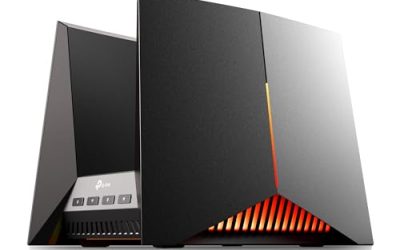
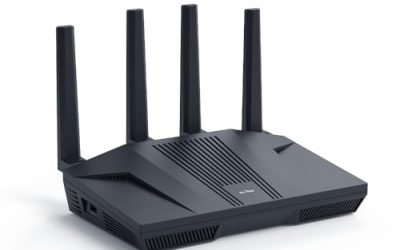
Our Short List of 3
All 5 Picks at a Glance
| Product | Specs | Action |
|---|---|---|
 1. TP-Link Archer AX21 — Balanced Pick for Most Apartments | Check price on Amazon | |
 2. TP-Link Archer AX55 — More Headroom for Busy Households | Check price on Amazon | |
 3. ASUS RT-AX3000 (RT-AX58U) — Strong Controls and Mesh Options | Check price on Amazon | |
 4. NETGEAR Nighthawk RAX43 — Higher Speed Class for Larger Flats | Check price on Amazon | |
 5. GL.iNet GL-MT3000 Beryl AX — Compact Pick for Studios | Check price on Amazon |
Our Top Picks
Apartment Wi-Fi fails for different reasons than Wi-Fi in a detached house. The rooms are closer together, so raw range is rarely the main problem. The bigger issues are crowded airwaves from neighboring networks, thick walls between the router and a bedroom or home office, building wiring that limits where a modem can sit, and a growing list of devices competing at the same time in the evening. A router that looks powerful on a box can still feel sluggish in a dense building if it handles congestion poorly or if its placement options are limited by a bulky design and a tangle of antennas.
This guide focuses on routers that suit that reality. Every pick below is a dual-band Wi-Fi 6 router, because Wi-Fi 6 features such as OFDMA and MU-MIMO are designed for environments with many devices and many nearby networks. The list ranges from a pocket-sized model for a studio to a higher-speed option for a larger apartment with wired gaming gear, so readers can match the router to floor space, internet plan, and device count instead of simply buying the highest speed class available.
As an Amazon Associate, we earn from qualifying purchases.
How to Choose a Router for an Apartment
Start with layout rather than headline speed. A studio or one-bedroom apartment usually needs one well-placed router, not a large mesh kit, and a compact dual-band model can cover the space when it sits in the open near the center of the home. A longer two- or three-bedroom apartment, especially one with concrete or brick interior walls, benefits from stronger antennas, beamforming, and, where supported, mesh expansion through systems such as EasyMesh, OneMesh, or AiMesh, so a compatible node can be added later instead of replacing the whole setup.
Next, look at congestion handling. In a building where a phone scan shows dozens of networks, the 5 GHz band does most of the heavy lifting for laptops, consoles, and streaming boxes because it offers wider channels and less interference than 2.4 GHz, even though its range is shorter. Wi-Fi 6 helps here by letting a router serve several devices in the same transmission window, which keeps latency steadier when roommates stream, download game updates, and join video calls at once. A model with a 160 MHz channel option on 5 GHz can also help supported laptops move large files faster at close range.
Wired ports still matter in small homes. A gaming PC, console, or smart TV placed near the router performs more consistently on Ethernet than on wireless, so four gigabit LAN ports remain useful even in a one-room home. One gigabit WAN port matches most cable and fiber plans sold to apartment buildings. Readers with a faster multi-gig plan or a network drive should check for a 2.5 gigabit port and a USB port, while readers on a standard gigabit plan gain little from paying for ports the connection cannot use.
Security and upkeep deserve a final check. WPA3 support, automatic firmware updates where available, a guest network for visitors and smart devices, and clear parental or device controls all reduce day-to-day friction. Renters should also confirm the lease and building rules before drilling or mounting anything, confirm that a personal router is allowed if the building bundles internet service, and keep the original provider gateway if the service requires it for activation, since many apartment connections work best with the provider device set to bridge or passthrough mode.
1. TP-Link Archer AX21 — Balanced Pick for Most Apartments
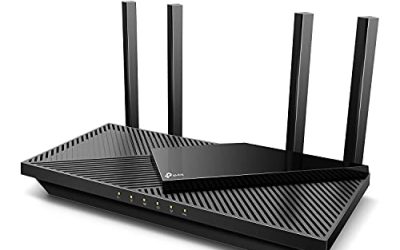
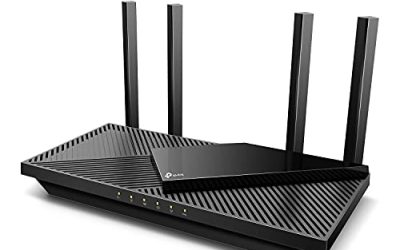
The Archer AX21 is the straightforward starting point for a studio or one- to two-bedroom apartment. Its AX1800 speed class is modest next to the faster models below, but it matches the plans most apartment buildings offer and puts its effort into dual-band Wi-Fi 6 efficiency rather than headline numbers. Four external antennas and beamforming help direct signal toward devices in other rooms, and the router supports mesh expansion, which gives renters a path to add coverage later if a new apartment has a worse layout.
For gaming and streaming households, the value is in steady handling of several devices at once. OFDMA and MU-MIMO reduce the stop-and-start feeling that older routers show when a console download, a 4K stream, and a video call overlap. Four gigabit LAN ports leave room for a PC, a console, and a TV box on wired connections, which is the simplest latency improvement available in a small home where the desk is often only a wall away from the router.
Who It Suits
The AX21 suits renters in small to mid-sized apartments on gigabit or slower plans who want a compact, uncomplicated upgrade from a provider router. Larger homes with many simultaneous high-bandwidth users should look at the AX3000 and AX4200 models below instead.
2. TP-Link Archer AX55 — More Headroom for Busy Households
The Archer AX55 steps up to the AX3000 speed class, roughly doubling the 5 GHz capacity of the AX21. That extra headroom matters in a shared apartment where several people use the network at the same time after work. A household with two remote workers, a gaming PC, and multiple phones and tablets will feel the difference less in a single speed check and more in how rarely the connection stutters when everything runs together.
TP-Link adds a USB 3.0 port for sharing storage on the local network, HomeShield basic network security features, and support for both VPN server and VPN client functions. Four high-gain antennas and beamforming aim for broader coverage across a longer floor plan, and EasyMesh compatibility keeps the option of a wired or wireless extension open. The improved cooling design noted by TP-Link is also relevant in apartments, where routers often sit inside low-ventilation media cabinets, although open placement remains the better choice.
Who It Suits
The AX55 suits two- and three-bedroom apartments, shared houses, and roommate setups with heavy evening use. A single occupant in a studio with a basic plan is unlikely to use its extra capacity and can save space and complexity with the AX21 or the GL.iNet model below.
3. ASUS RT-AX3000 (RT-AX58U) — Strong Controls and Mesh Options
The ASUS RT-AX3000, also sold under the RT-AX58U model name, is an AX3000 Wi-Fi 6 router aimed at users who want more control over the network. ASUS includes AiProtection Pro network security powered by Trend Micro, adaptive quality of service for prioritizing traffic such as gaming or streaming, and AiMesh support, so compatible ASUS routers can work together as the home grows. Those controls are useful in an apartment where one person games while another works, because traffic rules can be set once instead of negotiated every evening.
Performance specifications line up with the AX55 class, with the same headline split between the 2.4 GHz and 5 GHz bands, plus MU-MIMO and OFDMA for multi-device efficiency. Four LAN ports support a wired desk setup, and a USB port allows shared storage or other USB functions supported by the firmware. The ASUS Router app and web interface both provide setup and management, which suits readers who prefer a browser dashboard over an app-only system such as a typical mesh kit.
Who It Suits
This router suits apartment gamers and remote workers who want security features without a separate subscription decision at setup, plus a clear expansion path through AiMesh. Readers who want the simplest possible app-only experience may prefer a smaller set-and-forget model instead.
4. NETGEAR Nighthawk RAX43 — Higher Speed Class for Larger Flats
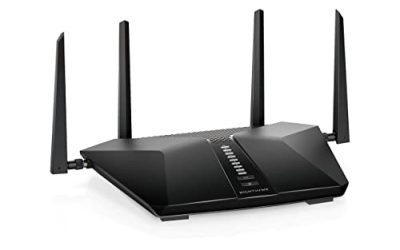
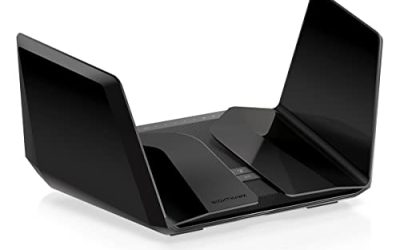
The Nighthawk RAX43 carries the highest speed class in this guide. Its AX4200 rating combines a standard 2.4 GHz band with a much wider 5 GHz output across five streams, and NETGEAR rates the router for coverage in homes larger than a typical apartment. In practice, that makes it the pick for a big multi-bedroom apartment, a shared student flat, or a home where the router must sit at one end of a long layout because the internet connection enters near the front door.
A triple-core processor helps the router keep up when many devices request data at once, and support for a 160 MHz channel on 5 GHz benefits supported laptops and phones at closer range. Four gigabit LAN ports and a USB 3.0 port cover a wired entertainment center and local file sharing. NETGEAR Armor adds a security suite, and the Nighthawk app handles setup and everyday management. The trade-off is size: with four external antennas and a wide body, the RAX43 needs more shelf space than the other routers here, which matters in a studio.
Who It Suits
The RAX43 suits larger apartments, gaming setups with several wired devices, and households that regularly move large downloads. Small studios gain little from its coverage rating, and its footprint can dominate a tiny media shelf.
5. GL.iNet GL-MT3000 Beryl AX — Compact Pick for Studios
The Beryl AX takes the opposite approach to the Nighthawk. It is a pocket-sized Wi-Fi 6 travel router that also works well as a permanent router for a very small apartment, a dorm-style room, or a rented space where the tenant cannot replace the building network outright. In repeater mode it can connect to an existing network and create a private network for personal devices, which is a practical pattern in buildings with shared Wi-Fi, and its VPN support helps keep traffic on that private network under the account holder’s own settings.
Despite its size, the specification is modern. The AX3000 speed class matches the mid-range routers above, a 2.5 gigabit WAN port exceeds what most apartment plans require, and a gigabit LAN port supports one wired device such as a desk PC or console. OpenVPN and WireGuard client and server functions are built in, along with USB 3.0 for storage or a tethered connection supported by the firmware. Coverage is the limit: a single small unit with two antennas is meant for one or two rooms, not a long apartment with several closed doors.
Who It Suits
The Beryl AX suits studio residents, frequent movers, and tenants on building-provided Wi-Fi who want a private, portable network. Families in larger apartments should choose one of the full-size routers above as the main router and treat this model as a travel or secondary option.
Frequently Asked Questions
Is one router enough for an apartment, or is mesh necessary?
One router is enough for most studios and one- to two-bedroom apartments when it can be placed near the center of the home and off the floor. Mesh becomes useful in longer apartments, units with concrete interior walls, or homes where the internet connection enters at the far end. Several routers in this guide support mesh expansion, so a reader can start with one unit and add a compatible node only if a dead zone remains.
Does Wi-Fi 6 make a real difference in a small apartment?
Yes, mainly through efficiency rather than range. Wi-Fi 6 features such as OFDMA and MU-MIMO let a router serve multiple devices with less waiting, which helps in dense buildings where phones, laptops, consoles, and smart devices share the air with dozens of neighboring networks. The benefit grows with device count, so a single occupant with a few devices will notice less change than a shared household.
Where should a router be placed in an apartment?
Place the router in the open, raised on a shelf where possible, and as close to the center of the living space as the modem connection allows. Keep it away from thick metal objects, aquariums, and the inside of closed cabinets, and avoid placing it directly beside a neighbor’s router on the other side of a shared wall if another spot is available. A long Ethernet cable often allows better placement without moving the modem outlet itself.
Can a personal router be used with building-provided internet?
Often yes, but the method depends on the building. If the unit has its own modem or Ethernet handoff, a personal router usually connects directly. If the building provides shared Wi-Fi only, a router with a repeater mode, such as the GL.iNet model in this guide, can create a private network from that connection. Tenants should check the lease and building policy first, because some managed networks restrict personal routers or require registration of the device.
Final Verdict
For most apartments, the TP-Link Archer AX21 covers the essentials at the right scale: dual-band Wi-Fi 6, four wired ports, and mesh expansion without an oversized design. Busier shared homes get more value from the Archer AX55 or the ASUS RT-AX3000, which add capacity and, in the ASUS case, stronger built-in security and traffic controls. The NETGEAR Nighthawk RAX43 is the choice for a larger apartment that needs the highest speed class here and has the shelf space to match, while the GL.iNet Beryl AX fills the studio and shared-building niche that full-size routers handle poorly. Match the pick to floor plan and device count first, and headline speed second, and any of these routers should feel like a clear step up from an aging provider gateway.
Product and ASIN Reference
| Product | ASIN |
|---|---|
| TP-Link Archer AX21 | B08H8ZLKKK |
| TP-Link Archer AX55 | B09G5W9R6R |
| ASUS RT-AX3000 (RT-AX58U) | B084BNH26P |
| NETGEAR Nighthawk RAX43 | B08JY6RMG9 |
| GL.iNet GL-MT3000 Beryl AX | B0BPSGJN7T |
FAQ
Is one router enough for an apartment, or is mesh necessary?
Does Wi-Fi 6 make a real difference in a small apartment?
Where should a router be placed in an apartment?
Can a personal router be used with building-provided internet?
More from Amazon
Programs that pair well with the guide above. Offers and eligibility are set by Amazon and may change.
Free shipping on eligible items, Prime Video and more. Eligible new members can start with a free trial.
Start a Prime free trialAd-free music streaming. Eligible new subscribers can start with a free trial.
Try Music Unlimited freeA Prime membership for ages 18-24 with a trial period. Eligibility is set by Amazon.
See Prime for Young AdultsAudiobooks and podcasts to listen to on the go. Eligible new members can start with a free trial.
Try Audible freeAs an Amazon Associate we earn from qualifying purchases.