Our Short List of 3
All 3 Picks at a Glance
| Product | Specs | Action |
|---|---|---|
 1. Logitech Brio 300 Full HD Webcam | Check price on Amazon | |
 2. NexiGo N60 Pro 4K Webcam | Check price on Amazon | |
 3. Anker PowerConf C200 2K Webcam | Check price on Amazon |
Key takeaways
- Find the best webcams for MacBook Air with macOS support stated for every pick, from a USB-C 1080p camera to a 4K model and a 2K camera with stereo mics.
As an Amazon Associate we earn from qualifying purchases.
The camera built into a MacBook Air is convenient, and for a quick family chat it is often enough. The limits show up in the situations that matter more: a job interview in a dim room, a client presentation where your face sits in shadow, a recorded lesson where fine detail disappears, or a call where the other side keeps asking you to repeat yourself because the built-in microphone picked up the whole room. An external webcam fixes those problems in one step, and it lets you position the camera at a better angle than the top of a thin laptop lid allows.
This guide is written specifically for MacBook Air owners, and that focus shaped the shortlist in an important way. Every webcam below has Mac or macOS compatibility stated on its Amazon product page. That was a hard rule for inclusion, not a nice extra, because a camera that works beautifully on a Windows machine but depends on Windows-only software for its basic settings is a poor match for a MacBook Air. Each pick below states its compatibility plainly, connects over USB, and works with the calling apps Mac owners actually use, including FaceTime, Zoom, Microsoft Teams and Google Meet.
The three picks cover three different needs. The Logitech Brio 300 is the straightforward upgrade: a Full HD camera with a USB-C connection that suits the ports on a recent MacBook Air without an adapter. The NexiGo N60 Pro 4K is the step up in resolution, with a 4K sensor, autofocus and a wider set of framing options for people who record or present. The Anker PowerConf C200 sits between them, with 2K resolution, stereo microphones and an adjustable field of view aimed squarely at meetings. None of them needs a separate power supply, and all three mount on top of the MacBook Air screen.
Disclosure: This article contains affiliate links. If you buy through these links, we may earn a commission at no additional cost to you.
How to Choose a Webcam for a MacBook Air
Confirm Mac compatibility on the product page first
Start with the operating system line, not the headline resolution. A webcam for a MacBook Air should state Mac or macOS support on its own product page, in the specifications or the compatibility section. All three cameras in this guide do. Plug-and-play USB video class support is what makes a camera appear in FaceTime and Zoom as soon as it is connected, with no driver hunt before a meeting. If a camera you are considering does not state Mac support anywhere on its page, treat that as a warning sign and keep looking, because basic functions such as field-of-view changes or firmware updates may live in software that never reaches macOS.
Match the connection to the ports you actually have
Recent MacBook Air models use USB-C ports, and older ones and many docking setups still involve USB-A. The Brio 300 connects over USB-C, which makes it the cleanest match for a current MacBook Air used on its own. The other two picks connect over USB as well, and if your exact cable and port combination needs an adapter or a hub you already own, factor that in before ordering. A camera that stays permanently connected through a hub at a desk has different needs from one that travels in a laptop sleeve, where a short, simple cable run matters more.
Choose resolution for the job, not the headline
Full HD 1080p is enough for the great majority of video calls, because calling apps compress the picture before the other side sees it. A 1080p camera with good light correction will usually look better on a real call than a higher-resolution camera struggling in a dark room. Stepping up to 2K adds detail that helps when you record locally or present to a larger audience. A 4K camera such as the NexiGo N60 Pro earns its place when you record lessons, demonstrations or videos for editing, crop into the frame afterwards, or want 1080p at a smoother frame rate for motion. Buy the resolution your actual work uses, and spend the rest of your attention on lighting and sound.
Think about field of view and framing
Field of view decides how much of the room appears behind you. A narrower view keeps attention on one person and hides a busy background, which suits a small home office or a shared living space. A wider view fits two people, a whiteboard, or a desk demonstration. The Anker PowerConf C200 lets you adjust its field of view, which is useful when the same MacBook Air moves between a solo call at a desk and a paired presentation in another room. The NexiGo model adds digital zoom for reframing without moving the camera. Think about where the laptop actually sits during your calls, because a camera cannot fix a framing problem created by a screen pushed far back on a deep desk.
Do not ignore the microphone and privacy
On most calls, the other side notices bad audio before they notice soft video. A noise-reducing or noise-cancelling microphone helps when the room contains a fan, a keyboard, traffic outside or other people talking nearby. Stereo microphones, as on the Anker pick, capture a voice more naturally when you sit a little further from the screen. A built-in privacy shutter or cover, which all three picks here include in some form, is a simple safeguard for a camera that stays mounted in a bedroom or shared space: closing it gives a clear, physical sign that the lens is covered between calls.
The 3 Best Webcams for a MacBook Air
1. Logitech Brio 300 Full HD Webcam
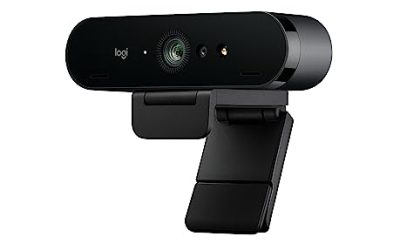
The Brio 300 is the pick for MacBook Air owners who want a clear, noticeable step up from the built-in camera without turning setup into a project. Its Amazon page lists the operating system support as Windows, macOS and ChromeOS, so Mac compatibility is stated on the page itself rather than assumed. It records in Full HD 1080p, connects over USB-C, and is certified for Zoom, Microsoft Teams and Google Meet, which covers the platforms most MacBook Air owners use for work and study.
The USB-C connection is the detail that matters most day to day. A recent MacBook Air has USB-C ports and nothing else, so a USB-C camera plugs straight in with no adapter to lose and no hub required when you work away from your desk. The camera includes automatic light correction, which balances a face against a brighter window or a dim lamp, and a noise reduction microphone for clearer speech on calls. A built-in privacy shutter closes over the lens when the call ends.
This is a camera for calls first. It will not give you the cropping headroom of a 4K sensor, and it is not aimed at creators recording footage for editing. For daily meetings, online lessons, interviews and family calls from a MacBook Air, its combination of stated macOS support, a direct USB-C connection and platform certification makes it the simplest recommendation in this guide.
2. NexiGo N60 Pro 4K Webcam
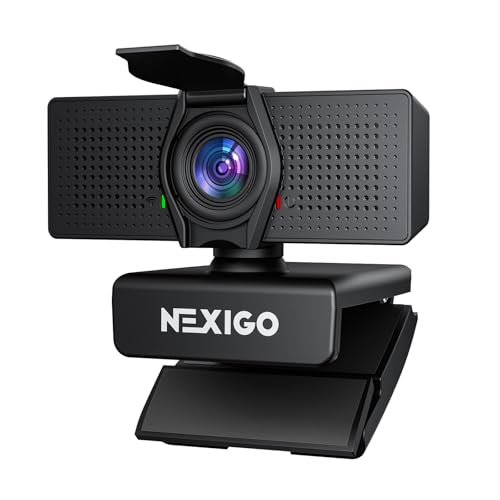
The NexiGo N60 Pro 4K is the pick for MacBook Air owners whose camera does more than carry meetings. Its Amazon page states compatibility with Windows, macOS 10.6 and later, and Chrome OS, so Mac support is explicit on the page. It uses a 4K UHD Sony sensor, records 1080p at 60 frames per second when smoother motion matters, and includes autofocus, noise-cancelling microphones, a privacy cover and a distortion-free lens with digital zoom.
That specification list maps onto real uses. The 4K sensor gives you room to crop a recording during editing while keeping the result sharp, which helps teachers, presenters and anyone recording tutorials on a MacBook Air. The 1080p mode at 60 frames per second keeps movement smooth for demonstrations and live sessions. Autofocus holds the picture steady when you lean in to make a point or step back to show something, and the distortion-free lens avoids the stretched edges that very wide lenses can produce at the sides of the frame.
The trade-off is that a 4K camera asks more of the laptop and the connection than a basic 1080p model, and most calling apps will still compress live video. Buy this one because you record, present or stream, not because a routine team call needs 4K. For MacBook Air owners who do that kind of work, it is the most capable camera in this guide, with its macOS compatibility stated right on its product page.
3. Anker PowerConf C200 2K Webcam
The Anker PowerConf C200 is the meeting-focused middle ground. Its Amazon listing presents it as a 2K webcam for PC, laptop and Mac, so Mac use is stated in the listing itself. It adds low-light correction, AI noise-cancelling microphones, an adjustable field of view, a built-in privacy cover and stereo microphones, a combination aimed at people whose MacBook Air spends its day in video meetings.
The 2K resolution sits usefully between the other two picks: sharper than 1080p for recorded segments and screen-side presentations, without the extra demands of a 4K sensor. The adjustable field of view is the practical highlight. You can frame a tighter solo shot at your desk, then widen the view when a colleague joins you in the frame, without moving the laptop. Stereo microphones capture speech from a natural seating position rather than forcing you to lean toward the screen, and the noise-cancelling processing works against the steady background sounds that fill home offices.
Low-light correction matters for the early and late calls that fall outside bright daylight, especially in winter or in a room lit by a single lamp. If your MacBook Air work is mostly meetings, with occasional recordings, and you want one camera that handles framing and sound thoughtfully, the C200 is the balanced choice of the three.
Comparison Table
| Product | ASIN | Resolution | Connection | Microphone | Mac support stated on page |
|---|---|---|---|---|---|
| Logitech Brio 300 | B0BX1JQ6LB | Full HD 1080p | USB-C | Noise reduction mic | Yes, macOS listed |
| NexiGo N60 Pro 4K | B0GLY56CR3 | 4K UHD, 1080p at 60 fps | USB | Noise-cancelling mics | Yes, macOS 10.6 and later |
| Anker PowerConf C200 | B09MFMTMPD | 2K | USB | Stereo mics, AI noise cancelling | Yes, listed for Mac |
Frequently Asked Questions
Will any USB webcam work with a MacBook Air?
Many will, but many is not the same as the specific one in your basket. The safe approach is the one used in this guide: choose a camera whose own product page states Mac or macOS compatibility. All three picks here state it, which removes the guesswork around drivers and settings software.
Do I need an adapter to connect a webcam to a MacBook Air?
It depends on the camera and the MacBook Air model. The Logitech Brio 300 connects over USB-C, which matches the ports on recent MacBook Air models directly. If a camera or your setup involves USB-A, you may need an adapter or a hub you already own. Check the connector on the camera page against your ports before ordering.
Is 4K worth it for video calls on a MacBook Air?
For live calls alone, usually not, because calling apps compress the video before the other side sees it. A 4K camera such as the NexiGo N60 Pro earns its place when you record locally, crop footage in editing, present in detail or use its smoother 1080p mode. For meetings only, the 1080p Brio 300 or the 2K Anker C200 will serve you well.
Can an external webcam improve how I sound as well as how I look?
Yes. Each pick here includes microphones with noise reduction or noise cancelling, and the Anker model uses stereo microphones. In a room with a fan, a keyboard or street noise, that improvement in speech clarity is often the first thing the other side notices.
How do I switch to the external webcam in my calling app?
Connect the camera, open the app you use, and choose the external camera in its video settings. FaceTime, Zoom, Microsoft Teams and Google Meet all let you select which camera to use, and the choice usually stays saved for the next call.
Conclusion
For most MacBook Air owners, the Logitech Brio 300 is the right first upgrade: macOS support stated on its page, a direct USB-C connection, platform certification and a privacy shutter in a camera built for daily calls. Choose the NexiGo N60 Pro 4K when you record, teach or present and want the headroom of a 4K sensor with autofocus. Choose the Anker PowerConf C200 when meetings dominate your day and an adjustable field of view, stereo microphones and 2K resolution fit how you work. Whichever you pick, every camera in this guide states its Mac compatibility on its own product page, which is exactly where that promise should be made.
FAQ
Will any USB webcam work with a MacBook Air?
Do I need an adapter to connect a webcam to a MacBook Air?
Is 4K worth it for video calls on a MacBook Air?
Can an external webcam improve how I sound as well as how I look?
How do I switch to the external webcam in my calling app?
More from Amazon
Programs that pair well with the guide above. Offers and eligibility are set by Amazon and may change.
Free shipping on eligible items, Prime Video and more. Eligible new members can start with a free trial.
Start a Prime free trialAd-free music streaming. Eligible new subscribers can start with a free trial.
Try Music Unlimited freeA Prime membership for ages 18-24 with a trial period. Eligibility is set by Amazon.
See Prime for Young AdultsAudiobooks and podcasts to listen to on the go. Eligible new members can start with a free trial.
Try Audible freeAs an Amazon Associate we earn from qualifying purchases.