
Finding the fastest gaming monitor for your build is harder than ever. Refresh rates have skyrocketed well beyond 240Hz, panels now hit 610Hz, and choosing between resolutions, response times, and sync technologies can overwhelm even experienced PC gamers. Whether you’re chasing every microsecond of latency in competitive Valorant or want a buttery-smooth 1440p experience in AAA titles, picking the wrong display can bottleneck even the best graphics card in your system.
Our top picks
 Dell 27 240Hz Gaming Monitor
- Smooth motion: 240Hz refresh rate and fast 0.5ms…
- Seamless gaming: FreeSync Premium and HDMI VRR eliminate…
- Fast IPS: Faster 0.5ms response with excellent color…
 ASUS TUF Gaming 27”1080P Monitor
- 27-inch Full HD Fast IPS Display: Features a…
- Ultra-Fast Response Time: ASUS Fast IPS technology enables…
- Adaptive Sync Technology: FreeSync Premium and G-Sync compatible…
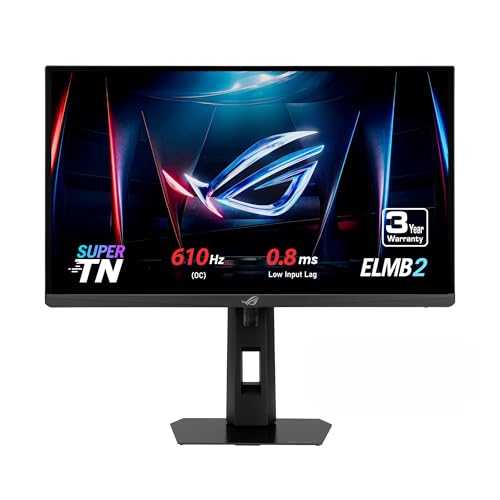 ASUS ROG XG248QSG 24 Inch 1080p 610Hz
- High-Performance Display: 24.1-inch FHD (1920 x 1080) Super…
- Ultra-Fast Response: World's fastest TN panel, with 0.8ms…
- Advanced Motion Blur Reduction: ASUS Extreme Low Motion…
| Product | Key specs | |
|---|---|---|
| Dell 27 240Hz Gaming Monitor | Smooth motion: 240Hz refresh rate and fast 0.5ms… Seamless gaming: FreeSync Premium and HDMI VRR eliminate… Fast IPS: Faster 0.5ms response with excellent color… | Check price |
| ASUS TUF Gaming 27”1080P Monitor | 27-inch Full HD Fast IPS Display: Features a… Ultra-Fast Response Time: ASUS Fast IPS technology enables… Adaptive Sync Technology: FreeSync Premium and G-Sync compatible… | Check price |
| ASUS ROG XG248QSG 24 Inch 1080p 610Hz | High-Performance Display: 24.1-inch FHD (1920 x 1080) Super… Ultra-Fast Response: World's fastest TN panel, with 0.8ms… Advanced Motion Blur Reduction: ASUS Extreme Low Motion… | Check price |
 ASUS ROG XG279CNS 27 Inch 1080p 380Hz ASUS ROG XG279CNS 27 Inch 1080p 380Hz | 27-inch Full HD Gaming Monitor: Features 1920x1080 HDR… ASUS Fast IPS Technology: Enables a 0.3ms response… ASUS Extreme Low Motion Blur Sync (ELMB SYNC):… | Check price |
 Samsung 27" Odyssey G5 Samsung 27" Odyssey G5 | QHD Resolution (2560 x 1440) has 1.7 times… HDR10 provides brighter highlights and nuanced shadow for… The 180Hz refresh rate minimizes lag for gameplay… | Check price |
 Acer Nitro 27in QHD 2560x1440 IPS 320Hz Acer Nitro 27in QHD 2560x1440 IPS 320Hz | Quality Visuals: The KG271U 27" IPS monitor with… AMD FreeSync Premium Technology: Say “goodbye” to stuttering… 320Hz Refresh Rate: The 320Hz refresh rate speeds… | Check price |
 SANSUI 32 Inch Curved 240Hz Gaming Monitor SANSUI 32 Inch Curved 240Hz Gaming Monitor | 32 Inch curved 1500R gaming monitor, 240Hz high… Performance: 240Hz refresh rate, Full HD 1920*1080P resolution,… Interfaces: HDMI up to 240Hz, DP 1.4 up… | Check price |
 New! Sceptre Curved 32 inch Prime Gaming New! Sceptre Curved 32 inch Prime Gaming | 【EASY ON THE EYES】 Protect your eyes and… 【SEAMLESS CONNECTIVITY & PERFORMANCE】 Seamlessly link your devices… 【INTEGRATED SPEAKERS】Whether you're at work or in the… | Check price |
As an Amazon Associate we earn from qualifying purchases at no extra cost to you.
This guide cuts through the noise. We’ve rounded up the fastest gaming monitors available right now, from sub-millisecond TN esports panels to high-refresh IPS and QHD screens that balance speed with image quality. Every display here is evaluated for real-world latency, motion clarity, and GPU pairing, so you can match your monitor to your rig and your competitive goals.
🛒 Best Price Today on Amazon
Prime members get fast, free shipping on everything above, plus member-only deals. New members get a 30-day free trial — cancel anytime.
Watch: Fastest Gaming Monitor: Review & Buyer’s Guide — Video Review
How to Choose a Fastest Gaming Monitor
- Refresh Rate: Higher is better for competitive play, but anything above 240Hz delivers diminishing returns unless you play fast-paced esports titles where every frame matters.
- Response Time: Look for 1ms or lower measured MPRT or GtG. TN panels still lead here, but modern Fast IPS is closing the gap significantly.
- Resolution: 1080p is ideal for maximizing frame rates and refresh rate headroom, while 1440p offers sharper visuals if your GPU can push high frames at that resolution.
- Panel Type: TN gives you the fastest response, IPS offers better colors and viewing angles, and Fast IPS is the sweet spot for gamers who want both speed and visual quality.
- Sync Technology: G-SYNC Compatible and FreeSync Premium both smooth out tearing. Make sure your monitor’s VRR range covers its high refresh rates for the best experience.
The Best Fastest Gaming Monitors Reviewed
ASUS ROG XG248QSG 24″ 610Hz
The absolute speed king for esports purists. With a blistering 610Hz refresh rate and 0.1ms response on a Super TN panel, this monitor delivers unparalleled motion clarity for competitive shooters where reaction time is everything.
ASUS ROG XG279CNS 27″ 380Hz
A remarkable blend of extreme speed and IPS color quality at 380Hz with 0.3ms response. The USB-C connectivity and tripod socket make it versatile for tournament setups and LAN environments.
Acer Nitro 27″ QHD 320Hz
The best balance of resolution and raw speed on this list. QHD at 320Hz with 0.5ms response means you get sharp visuals and competitive frame rates, provided your graphics card can keep up.
ASUS TUF Gaming 27″ VG279QM5A 240Hz
A superb value pick for gamers who want Fast IPS quality without paying flagship prices. The 240Hz refresh rate and 0.3ms response handle most competitive scenarios beautifully while maintaining 99% sRGB color accuracy.
Samsung Odyssey G5 27″ QHD 180Hz
Not the absolute fastest here, but the smartest pick for gamers who play a mix of competitive and single-player titles. QHD resolution at 180Hz with a height-adjustable stand delivers versatility for the price.
Frequently Asked Questions
Does a higher refresh rate actually improve my gameplay?
Yes, but mostly in fast-paced competitive games. Refresh rates above 240Hz reduce motion blur and input lag, helping you track moving targets more accurately. In slower or story-driven games, the difference is far less noticeable.
What GPU do I need to drive a 360Hz or 610Hz monitor?
To consistently hit 360-plus frames per second at 1080p, you’ll want a high-end GPU like an RTX 4070 or better. At 1440p with high refresh rates, expect to need an RTX 4070 Ti or RX 7800 XT or higher for modern titles.
Is TN still better than IPS for competitive gaming?
TN panels still offer the lowest measured response times, which is why many pros prefer them. However, modern Fast IPS panels are now close enough that most players won’t notice a meaningful difference outside of top-tier tournament play.
Is 1080p too low a resolution for a 27-inch monitor?
At 27 inches, 1080p has a lower pixel density than ideal, so text and fine details won’t look as crisp as 1440p. However, for purely competitive gaming where frame rates matter most, many players accept this trade-off willingly.
Final Thoughts
If pure speed is your priority, the ASUS ROG XG248QSG at 610Hz is the undeniable champion for competitive esports. For gamers who want extreme speed without sacrificing image quality, the ASUS ROG XG279CNS at 380Hz is the sweet spot. And if you want the best overall balance of resolution, speed, and value, the Acer Nitro 27″ QHD 320Hz stands out as the most well-rounded pick on this list.









