Key takeaways
- 1080p high: around 6-8 GB, sometimes more with ray tracing. The RX 6600 is at its limit.
- 1440p high: around 8-11 GB. The RX 7700 XT’s 12 GB covers this comfortably.
- Frame generation and RT: each adds memory overhead, pushing 8 GB cards into stutter territory first.
Moving from an RX 6600 to an RX 7700 XT is a genuine class jump, worth it mainly for 1440p gaming: expect very roughly 1.5x to 1.9x the frame rate in GPU-bound games, plus 12 GB of VRAM instead of 8 GB. At 1080p with a midrange CPU, or for esports-only players, the gain is smaller and harder to justify, and the upgrade also nearly doubles power draw, so the PSU often needs attention too.
The RX 6600 launched in October 2021 at $329 as AMD’s efficient 1080p card. The RX 7700 XT followed in August 2023 at $449 as an RDNA 3 card aimed at 1440p. Both are previous-generation Radeons now, which is important context: an RX 6600 owner shopping in 2026 also has the current RX 9060 XT and RX 9070 family to consider.
Our top picks
 ASRock AMD Radeon RX 6600 Challenger D
- ***Not compatible with all built-in computers or systems
- AMD Radeon RX 6600 GPU: Built on RDNA…
- 8GB GDDR6 Memory: Provides smooth gameplay and multitasking…
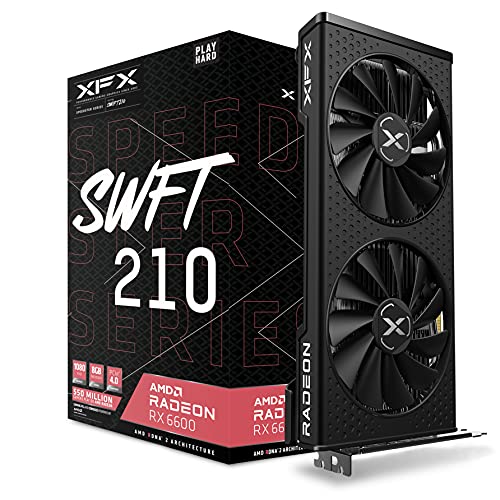 XFX Speedster SWFT 210 Radeon RX 6600
- Memory Speed:14 GBPS.Minimum Power Supply Requirement: 550 watt
- Chipset: AMD RX 6600
- Memory: 8GB GDDR6 AMD RDNA 2 architecture elevates…
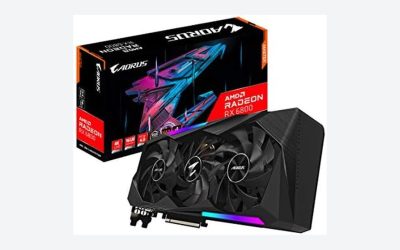
 ASRock Radeon RX 7700 XT Challenger 12GB
- High-Performance GPU: AMD Radeon RX 7700 XT with…
- Blazing Fast Clock Speeds: Boost Clock up to…
- Ample Memory Configuration: 12GB GDDR6 memory on a…
| Product | Key specs | |
|---|---|---|
| ASRock AMD Radeon RX 6600 Challenger D | ***Not compatible with all built-in computers or systems AMD Radeon RX 6600 GPU: Built on RDNA… 8GB GDDR6 Memory: Provides smooth gameplay and multitasking… | Check price |
| XFX Speedster SWFT 210 Radeon RX 6600 | Memory Speed:14 GBPS.Minimum Power Supply Requirement: 550 watt Chipset: AMD RX 6600 Memory: 8GB GDDR6 AMD RDNA 2 architecture elevates… | Check price |
| ASRock Radeon RX 7700 XT Challenger 12GB | High-Performance GPU: AMD Radeon RX 7700 XT with… Blazing Fast Clock Speeds: Boost Clock up to… Ample Memory Configuration: 12GB GDDR6 memory on a… | Check price |
 GIGABYTE Radeon RX 7700 XT Gaming OC GIGABYTE Radeon RX 7700 XT Gaming OC | Powered by Radeon RX 7700 XT Integrated with 12GB GDDR6 192-bit memory interface WINDFORCE cooling system, RGB Fusion, Protection metal backplate | Check price |
As an Amazon Associate we earn from qualifying purchases at no extra cost to you.
What Changes on Paper
| Specification | RX 6600 | RX 7700 XT | Change |
|---|---|---|---|
| Architecture | RDNA 2.0 | RDNA 3.0 | New generation |
| Release date | 13 October 2021 | 25 August 2023 | |
| Launch MSRP | $329 | $449 | +$120 |
| Stream processors | 1792 | 3456 | +93% |
| Boost clock | 2491 MHz | 2544 MHz | Similar |
| Process | 7 nm | 5 nm | |
| Board power | 132 W | 245 W | +113 W |
| Memory | 8 GB GDDR6 | 12 GB GDDR6 | +4 GB |
| Bus width | 128-bit | 192-bit | +50% |
| Bandwidth | 224.0 GB/s | 432.0 GB/s | +93% |
| Infinity Cache (L3) | 32 MB | 48 MB | +16 MB |
| Interface | PCIe 4.0 x8 | PCIe 4.0 x16 | Full x16 link |
| Power connectors | 1x 8-pin | 2x 8-pin | Extra cable |
| Length / width | 190 mm, 2-slot | 267 mm, 2-slot | +77 mm |
| Outputs | 1x HDMI, 3x DisplayPort | 1x HDMI 2.1a, 2x DisplayPort 2.1, 1x USB Type-C | DP 2.1 |
Nearly every resource that matters for performance roughly doubles: shader count, memory bandwidth and Infinity Cache all rise sharply. The switch from a PCIe 4.0 x8 link to a full x16 link also removes the RX 6600’s penalty on older PCIe 3.0 motherboards. The trade-off is power: the RX 7700 XT needs nearly twice the board power and an extra 8-pin connector.
The Real Performance Jump
Major outlets rarely charted these two cards side by side, so the clearest picture comes from combining reviews. TechSpot’s RX 7700 XT review places the card at roughly RX 6800-level performance and about 9% ahead of the RTX 4060 Ti 16GB at 1080p. KitGuru measured it about 23% faster than the RX 6700 XT at 1440p, and TechPowerUp’s review lists a large improvement over the RX 6700 XT as a key strength. The RX 6600, meanwhile, sits well below the RX 6700 XT, roughly in the RTX 3060 class.
Comparison databases that do pit the two directly report the RX 7700 XT around 50% to 90% faster at 1440p in GPU-bound games, with the wide range reflecting different game selections and settings. A fair summary: in demanding titles at 1440p, the RX 7700 XT commonly delivers somewhere between one and a half and nearly two times the RX 6600’s frame rate.
Where the gain shrinks
At 1080p, especially in esports titles, the CPU often becomes the bottleneck long before the RX 7700 XT is fully loaded. A system with an older six-core processor may see much less than the headline gain at 1080p, because the RX 6600 was already pushing frame rates close to the CPU’s limit. In those cases, a CPU upgrade or a higher-resolution monitor unlocks more of the new card’s potential.
As a practical guide, the RX 6600 is a 1080p high-settings card that needs compromises in demanding new releases. The RX 7700 XT is a capable 1440p high-settings card that usually stays above 60 FPS in modern AAA games without upscaling, and can push high-refresh rates in lighter titles. Exact FPS varies with settings, CPU and game patch.
Ray Tracing and Upscaling After the Upgrade
RDNA 3 improved ray tracing throughput over RDNA 2, and with nearly twice the compute units the RX 7700 XT is far more usable with RT enabled. TechPowerUp’s review noted it roughly matches the RTX 4060 Ti in ray tracing while beating it in rasterization. Heavy path-traced games remain out of reach for both cards, but moderate RT effects at 1440p with upscaling become realistic on the RX 7700 XT, where they were mostly impractical on the RX 6600.
Both cards use FSR 3.x upscaling and AMD’s frame generation, plus AMD Fluid Motion Frames at the driver level. FSR 4, AMD’s machine-learning upscaler, officially targets the RDNA 4 Radeon RX 9000 series, so neither of these cards should be bought expecting official FSR 4 support. That is a meaningful point for anyone upgrading now: an RX 9060 XT or RX 9070 adds FSR 4 and stronger ray tracing.
Memory Headroom: 8 GB to 12 GB
The VRAM increase is one of the most important parts of this upgrade. A rough budget for modern AAA games:
- 1080p high: around 6-8 GB, sometimes more with ray tracing. The RX 6600 is at its limit.
- 1440p high: around 8-11 GB. The RX 7700 XT’s 12 GB covers this comfortably.
- Frame generation and RT: each adds memory overhead, pushing 8 GB cards into stutter territory first.
Players already seeing texture pop-in or stutter on the RX 6600 in recent releases will notice the 12 GB buffer immediately, even before the raw speed increase.
Will Your Power Supply Cope?
This is the most common hidden cost of the upgrade. Using GPU board power plus CPU gaming power plus about 150 W of headroom:
- Current RX 6600 system: 132 W + ~125 W (typical midrange CPU while gaming) + 150 W = about 407 W, which a 450-500 W PSU handles.
- After the RX 7700 XT: 245 W + ~125 W + 150 W = about 520 W, so a quality 600-650 W unit is the safe choice.
The RX 7700 XT also needs two separate 8-pin PCIe connectors, while many systems built around an RX 6600 only have one. Avoid daisy-chaining both plugs from a single cable on lower-quality units. Physically, the card grows from 190 mm to 267 mm in reference form, and many partner models are longer still, so measure the available GPU clearance in the case before ordering.
Is the Upgrade Worth the Money?
Using launch prices and a midpoint estimate of about 1.7x the performance:
- RX 6600: $329 / 100 = $3.29 per performance point.
- RX 7700 XT: $449 / 170 = about $2.64 per performance point.
Even at launch pricing, the RX 7700 XT offered more performance per dollar. The more useful number for an upgrader is the net cost: selling a used RX 6600, which usually fetches around $130-$170 used, offsets a good share of the new card. Used RX 7700 XT cards commonly trade around $300-$380, making the net upgrade cost relatively modest for the gain. Current-generation alternatives in the same budget, such as the RX 9060 XT 16GB, are worth pricing against it.
Upgrade or Skip: A Decision Table
| Your setup | Recommendation |
|---|---|
| 1440p monitor, modern AAA games | Upgrade: biggest benefit |
| 1080p, 144 Hz+ monitor, demanding games | Upgrade if the CPU is recent |
| 1080p, esports titles only | Skip: gains limited by the CPU |
| 450 W PSU with one 8-pin cable | Budget for a new PSU, or consider a lower-power card |
| Want FSR 4 and better RT | Look at the RX 9060 XT or RX 9070 instead |
| Small case under 270 mm GPU clearance | Check partner card lengths first |
Frequently Asked Questions
How much faster is the RX 7700 XT than the RX 6600?
Comparison data places the RX 7700 XT roughly 50-90% ahead at 1440p in GPU-bound games. Reviews from TechSpot put the RX 7700 XT around RX 6800-level performance, which is well above the RX 6600’s class. The gain is smaller at 1080p when the CPU is the limit.
Do I need a new power supply for the RX 7700 XT?
Often, yes. The card is rated at 245 W and needs two 8-pin connectors, and a quality 600-650 W PSU is the recommended target. A 450-500 W unit that comfortably ran an RX 6600 may not have the headroom or connectors.
Is the RX 7700 XT worth it for 1080p?
It can be, if the CPU is fast enough and the monitor runs at a high refresh rate. With an older CPU, much of the extra GPU performance goes unused at 1080p. For esports-only players, a CPU upgrade may deliver more benefit.
Does the RX 7700 XT support FSR 4?
FSR 4 officially targets the RDNA 4 Radeon RX 9000 series. The RX 7700 XT supports FSR 3.x upscaling, frame generation and AMD Fluid Motion Frames. Anyone who considers FSR 4 a priority should look at current RX 9000 cards.
Will the RX 7700 XT fit in my case?
The reference length is 267 mm, versus 190 mm for the RX 6600, and many partner models run longer. Measure GPU clearance from the rear slot bracket to the front fans or radiator before buying. Most mid-tower cases fit it without problems, but compact cases may not.