Key takeaways
- Find the best projectors for PS4 with low input lag, bright 1080p images, and easy HDMI setup for big-screen console gaming.
Introduction
A projector turns a PlayStation 4 into a cinema-sized gaming setup. Instead of crowding around a television, you can fill an entire wall with your game, and a 100-inch image makes open-world exploration, racing, and couch co-op feel completely different. The PS4 connects to a projector the same way it connects to a television, through a single HDMI cable, so the swap is simple. The hard part is picking a projector that suits console gaming, because the numbers that matter for games are not always the numbers that matter for movies.
The PlayStation 4 outputs at 1080p, so a native 1080p projector is a natural match. What matters most is input lag, the delay between pressing a button and seeing the result on screen. A projector with 16 milliseconds of input lag or less feels responsive in fast games, while a projector built only for movies can feel sluggish even when its picture looks beautiful. Brightness matters too: a bright projector holds up in a living room with lamps on, while a dim one needs a dark room.
This guide covers four projectors that suit PS4 gaming, from bright 1080p models built around low input lag to a 4K model for extra sharpness and a future console upgrade. Each one connects to a PS4 over HDMI, throws a large image from a normal living-room distance, and includes a built-in speaker.
At a Glance
| Projector | Resolution | Brightness | Input Lag | Best For |
|---|---|---|---|---|
| BenQ TH575 | 1080p | 3800 lumens | 16ms at 1080p/60Hz | Bright rooms and fast games |
| Optoma HD146X | 1080p | 3600 lumens | 16ms Enhanced Gaming Mode | Big-screen gaming on a lamp projector |
| ViewSonic PX701HD | 1080p | 3500 lumens | 16ms | Flexible placement with lens shift |
| ViewSonic PX701-4K | 4K UHD | 3200 lumens | 4.2ms at 240Hz | Sharpest image and future-proofing |
BenQ TH575
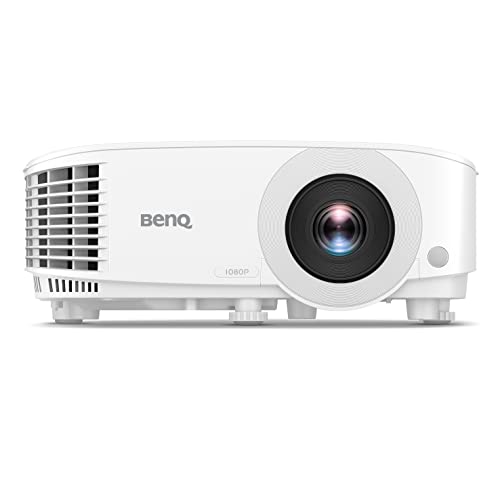
BenQ TH575 1080p Indoor Gaming Projector
The BenQ TH575 is the most gaming-focused projector in this guide, and the one to look at first if your PS4 sessions happen in a living room that is never fully dark. At 3800 lumens, the highest brightness in this roundup, the image stays vivid with lamps on and daylight coming through the curtains, so daytime sessions do not wash out into a grey rectangle.
Input lag is the other reason this model leads the list. BenQ lists 16 milliseconds of input lag at 1080p and 60Hz, which is the exact signal a PS4 sends, so the number applies directly to your console rather than to a faster PC signal. A dedicated Game Mode adjusts the image to lift shadow detail, which helps in dark scenes where enemies or paths hide in murky corners.
The image is native 1080p with a 15000:1 contrast ratio, so dark scenes keep depth instead of turning flat grey. The projector accepts 4K input signals, which matters if you also connect a streaming stick or a newer console, and it handles 3D content for the small number of PS4 games and films that support it. Two HDMI ports mean you can leave the PS4 in one input and a streaming stick or second console in the other, without swapping cables.
Setup is forgiving. Automatic vertical keystone correction squares up the image when the projector sits slightly above or below the screen, and a 1.1x zoom lets you adjust image size without moving the unit. The built-in 10-watt speaker is loud enough for casual play in a small room, though players who want deeper sound will still want external speakers or a soundbar. Lamp life is listed at up to 15000 hours.
Considerations
The TH575 is a 1080p projector, so it will not show the extra detail of a native 4K source the way the 4K model in this guide can. Its fan is audible during quiet scenes, which is common for bright lamp projectors, and the unit is a standard-throw model, so it needs a fair amount of distance from the wall to throw a very large image.
Optoma HD146X

Optoma HD146X High Performance Projector for Movies and Gaming
The Optoma HD146X is a long-running 1080p home entertainment projector with a gaming mode that makes it a strong fit for the PS4. It puts out 3600 lumens, close to the BenQ at the top of this list, and pairs that brightness with a 25000:1 contrast ratio, the highest contrast figure in this roundup. Bright scenes stay punchy while dark scenes keep their shadows, which suits the moody lighting of many PS4 adventure and horror titles.
Gaming is not an afterthought here. The Enhanced Gaming Mode is listed at 16 milliseconds of input lag, the same responsive figure as the BenQ, and a separate Game Display Mode lifts shadow detail so you can spot hazards and hidden paths in dark areas. The PS4 outputs 1080p at 60Hz, and this projector is built to receive exactly that signal and turn it around quickly.
The HD146X throws images up to 301 inches, so a 100-inch or 120-inch screen is well within its range, and a standard throw ratio means a 120-inch image needs roughly 13 to 14 feet of distance from the lens to the wall. A 1.1x zoom and vertical keystone correction of plus or minus 40 degrees give you room to fine-tune placement, and HDMI-CEC lets the projector power on and off together with a connected device.
Lamp life is listed at up to 15000 hours in Dynamic mode, and the projector runs quietly in eco mode at a listed 26 decibels. A single HDMI 1.4 port is the main connection, plus an audio-out jack and a USB-A port for powering a streaming stick, and the built-in speaker covers casual play.
Considerations
The HD146X has one HDMI port rather than two, so connecting a PS4 and another device at the same time needs an HDMI switch. It is a 1080p lamp projector, so it lacks the native 4K sharpness of the ViewSonic PX701-4K in this guide, and the lamp will eventually need replacing. The unit is also a standard-throw projector, so small rooms may limit how large an image you can throw.
ViewSonic PX701HD
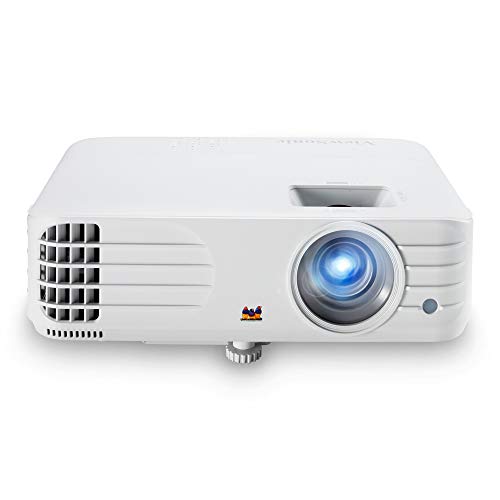
ViewSonic PX701HD 1080p Projector
The ViewSonic PX701HD is the flexible option in this guide. It is a 1080p projector with 3500 lumens of brightness and a listed input latency of 16 milliseconds, which puts it in the same responsive class as the BenQ and Optoma models above. Its SuperColor technology is designed to produce a wide color range, and a 12000:1 contrast ratio keeps a reasonable separation between bright highlights and dark shadows.
Where the PX701HD stands apart is placement. It includes vertical lens shift, a feature the other 1080p models here do not list, which lets you shift the image up or down without moving the projector or tilting it and relying on keystone correction. Combined with dual HDMI inputs, the PX701HD is easy to live with: the PS4 takes one input, a streaming stick or a second console takes the other, and a powered USB port can run a wireless dongle without a separate wall adapter.
The projector throws images up to 300 inches, and SuperEco mode stretches lamp life to a listed 20000 hours, the longest lamp figure among the 1080p models in this guide. The built-in speaker handles casual sessions, and the unit is light enough at 5.7 pounds to move between rooms or take to a friend’s place for a game night.
Considerations
The PX701HD lists 3500 lumens, a step below the BenQ and Optoma models, so in a very bright room it gives up a little punch. Its contrast ratio of 12000:1 is also the lowest in this roundup, which means the darkest scenes will not look quite as deep as on the Optoma.
ViewSonic PX701-4K
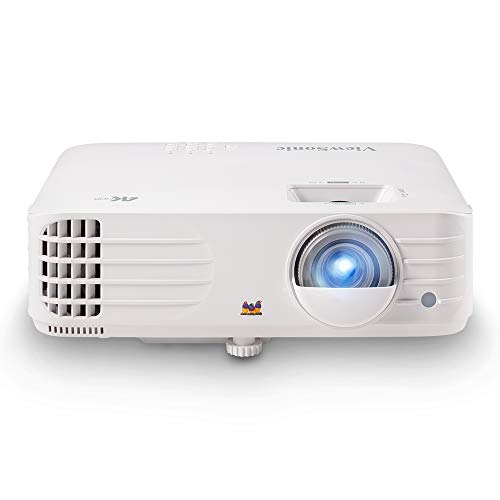
ViewSonic PX701-4K UHD 4K Projector
The ViewSonic PX701-4K is the pick for players who want the sharpest image in this guide and a projector that stays relevant if a newer console joins the setup later. It is a true 4K projector with a 3840 by 2160 native resolution, HDR support, and 3200 lumens of brightness. The PS4 outputs at 1080p, so this projector upscales the console’s signal, and the extra pixels show their value most clearly in films and any 4K source you connect alongside the console.
For gaming, the headline figure is a 4.2-millisecond input lag at a 240Hz refresh rate, with a 240Hz refresh rate available at 1080p. That figure applies to the fastest signal the projector accepts, and the PS4’s 60Hz output will not hit that exact number, but the underlying fast-response panel is what matters: the projector is built to turn input around quickly rather than buffering frames for image processing.
Setup is the most automated in this guide. Automatic horizontal and vertical keystone correction plus four-corner adjustment square the image even when the projector sits off-center, and a warping tool can adjust the picture for curved surfaces. Dual HDMI inputs cover the PS4 and a second source, a built-in USB power output runs a streaming stick, and SuperEco Plus mode extends lamp life to a listed 20000 hours.
Considerations
The PX701-4K is a 4K projector, so the PS4’s 1080p signal is upscaled rather than shown at native resolution, and the sharpness advantage is most visible on very large screens and with 4K sources. At 3200 lumens it is the least bright model in this guide, so it performs best in a room where you can control ambient light. The 4.2-millisecond lag figure applies at 240Hz, and PS4 play at 60Hz will see a higher figure, though still within the range that feels responsive for console games.
How to Choose a Projector for PS4
Start with input lag, because it is the one specification that directly affects how a game feels. Look for a listed input lag of 16 milliseconds or less at 1080p and 60Hz, which is the signal your PS4 sends. Projectors built for movies sometimes hide this number or only list it for faster PC signals, and a model with high lag will make controls feel heavy even when the picture looks great.
Next, match brightness to your room. A projector’s brightness is listed in lumens, and higher numbers hold up better with lamps on or daylight in the room. As a rough guide, a living room with some ambient light suits a projector in the 3200 to 3800 lumen range, while a dedicated dark room can get away with less. Brightness and contrast work together: a bright projector with weak contrast can look washed out, while a high-contrast projector keeps dark scenes readable.
Resolution is simpler than it looks. The standard PS4 outputs at 1080p, so a native 1080p projector shows the console’s image without scaling. The PS4 Pro can output at higher resolutions, and a 4K projector gives you extra sharpness for films and future consoles, but it will upscale the standard PS4’s 1080p signal rather than displaying a native 4K game image.
Check the connections before you buy. The PS4 needs one HDMI port, and a second HDMI port is useful for a streaming stick, a second console, or a Blu-ray player. A powered USB port is a handy extra for running a streaming stick without another wall adapter. Built-in speakers are convenient for casual play, but most players eventually add a soundbar or external speakers, so check for an audio-out jack.
Finally, think about throw distance. Standard-throw projectors need a certain distance from the lens to the wall to fill a given screen size, and the exact numbers vary by model. Measure your room before you commit, and check the distance from your planned projector spot to the wall against the model’s throw range.
Fit and Installation
Placement decides how good any projector looks, so sort it out before you mount anything. The simplest setup is a shelf or table behind the seating area, with the projector lens roughly level with the center of the screen. Keystone correction can fix a tilted image, but it works by digitally reshaping the picture, which can soften the edges, so a level placement with minimal correction always looks better. Vertical lens shift, which the ViewSonic PX701HD includes, is the better tool for this job because it moves the image optically without reshaping it.
For screen size, 100 inches is a good starting point for most living rooms, and 120 inches feels cinematic without overwhelming a medium room. Measure the wall, then check the projector’s throw distance for that size: the Optoma HD146X, for example, needs roughly 13 to 14 feet to fill a 120-inch image. If your room is shorter than that, either choose a smaller screen or pick a model with a shorter throw range.
Cable runs deserve a thought too. The PS4 connects to the projector with a standard HDMI cable, and a run of 10 to 15 feet is typical when the projector sits behind the seating area. Keep the cable tidy and out of walkways. Power is the other cable: the projector needs a wall outlet near its mounting spot, so check that before you drill a ceiling mount.
Light control is the cheapest image upgrade you can make. Curtains or blinds that block direct sunlight make a bigger difference than any specification, and turning off lamps behind the seating area reduces glare on the screen. You do not need a blacked-out room, but a room you can dim will make every projector here look noticeably better.
Sound is the last piece. The built-in speakers on these projectors are fine for casual play, but a soundbar under the screen is the simplest upgrade, and an audio-out jack on the projector lets you route sound to external speakers. If you play late at night, headphones connected to the DualShock 4 controller’s headphone jack are the easiest solution of all.
Frequently Asked Questions
Can I connect a PS4 directly to a projector?
Yes. The PS4 connects to any projector with an HDMI input using a standard HDMI cable, exactly as it connects to a television. Plug one end of the cable into the PS4 and the other into the projector, select the correct HDMI input, and the console’s image appears. No adapter is needed, and the PS4’s audio can play through the projector’s built-in speaker or route to external speakers through the projector’s audio output.
Is a 1080p projector good enough for a PS4?
Yes, a 1080p projector is a natural match for the standard PS4, which outputs at 1080p. The projector displays the console’s signal without scaling, which keeps the image clean. A 4K projector will upscale the PS4’s 1080p signal and can look slightly sharper on very large screens, but for PS4 gaming alone a good 1080p projector with low input lag is the more practical choice.
How much input lag is acceptable for PS4 gaming?
Look for 16 milliseconds or less at 1080p and 60Hz for the most responsive feel, especially in fast action games, racing, and competitive multiplayer. Many players find anything under 30 milliseconds acceptable for slower-paced adventure and story games, but higher lag makes controls feel heavy. Check that the lag figure you are reading applies to a 1080p 60Hz signal, since some projectors quote their lowest lag only at higher refresh rates.
Do I need a screen, or can I project onto a wall?
A plain white wall works well as a first screen, provided it is smooth and evenly painted. A dedicated screen gives a smoother, more uniform surface and can improve contrast and light handling, but it is an upgrade rather than a requirement. If you project onto a wall, choose the smoothest, flattest section you have and avoid walls with visible texture or patches.
Conclusion
The best projector for a PS4 is the one that matches your room and the way you play. For bright living rooms and fast games, the BenQ TH575 leads with its 3800-lumen brightness and 16-millisecond input lag. The Optoma HD146X is a close alternative with strong contrast and the same low-lag gaming mode, while the ViewSonic PX701HD trades a little brightness for flexible placement with vertical lens shift and dual HDMI inputs. The ViewSonic PX701-4K is the choice if you want the sharpest image for films and a projector that stays relevant when a newer console joins the setup.
Whichever model you choose, the fundamentals are the same: keep input lag low, match brightness to your room, measure your throw distance before mounting, and connect the PS4 with a single HDMI cable.
As an Amazon Associate, we earn from qualifying purchases.
FAQ
Can I connect a PS4 directly to a projector?
Is a 1080p projector good enough for a PS4?
How much input lag is acceptable for PS4 gaming?
Do I need a screen, or can I project onto a wall?
More from Amazon
Programs that pair well with the guide above. Offers and eligibility are set by Amazon and may change.
Free shipping on eligible items, Prime Video and more. Eligible new members can start with a free trial.
Start a Prime free trialAd-free music streaming. Eligible new subscribers can start with a free trial.
Try Music Unlimited freeA Prime membership for ages 18-24 with a trial period. Eligibility is set by Amazon.
See Prime for Young AdultsAudiobooks and podcasts to listen to on the go. Eligible new members can start with a free trial.
Try Audible freeAs an Amazon Associate we earn from qualifying purchases.