Key takeaways
- Compare the 5 best keyboards for iMac in November 2026: Mac-layout wireless keyboards with backlit keys, Touch ID, numeric keypads and multi-device switching.
An iMac deserves a keyboard that speaks its language. Mac key labels, a Command key in the right place, and a layout that matches what appears on screen turn daily typing into something smooth instead of a small translation exercise. The wrong keyboard forces constant mental adjustments, while the right one disappears into the work. Five wireless keyboards below cover the main ways people use an iMac, from full-size desks with number entry to compact setups that share space with other devices.
This guide is for iMac owners who want a keyboard that pairs cleanly, types comfortably, and fits their desk. Every pick below comes from its Amazon listing, with specifications taken from the product page itself, so each claim traces back to what the seller states. Whether you type all day, switch between a Mac and an iPad, or simply want the keyboard Apple designed for your machine, the shortlist gives you a clear place to begin.
Quick Picks
As an Amazon Associate we earn from qualifying purchases
| Product | Best for | Key spec from title |
|---|---|---|
| Logitech MX Keys S for Mac | Full-size typing with backlit keys | Backlit Bluetooth keyboard, USB-C rechargeable |
| Logitech MX Keys Mini for Mac | Compact desks and multi-device use | Compact backlit keyboard, USB-C |
| Apple Magic Keyboard (USB-C) | Apple’s own clean match for iMac | USB-C model, Bluetooth, rechargeable |
| Apple Magic Keyboard with Touch ID and Numeric Keypad | Number entry plus Touch ID login | Touch ID and numeric keypad, Bluetooth |
| Satechi Bluetooth Wireless Smart Keyboard | Switching between four devices | 4-device sync, Bluetooth, up to 33 feet |
How to Choose
Mac Layout Comes First
A keyboard built for Mac carries Command, Option, and Control labels in the positions macOS expects, plus media keys that match the system. Windows-layout boards can work, but the labels sit in the wrong order and shortcuts feel scrambled until you remap them. Check the listing for a Mac layout statement before anything else. A board that names iMac compatibility directly saves you from guessing, and function keys for brightness, Mission Control, and dictation only behave properly when the board was designed with macOS in mind. Layout is the first filter, not an afterthought.
Connection and Device Switching
Every keyboard here connects over Bluetooth, yet the details differ in ways that matter. Some pair with three devices and switch with a key press, which suits a desk shared with an iPad or a second Mac. Others pair automatically with a single Mac and keep things simple. Consider how the keyboard charges, since a dead battery stops work until it refills. USB-C charging is now common, and a keyboard that keeps working while plugged in avoids interruptions. Also note what is missing: one pick ships without a USB receiver, so Bluetooth must handle the connection from the first keystroke.
Size and Desk Space
A full-size keyboard with a numeric keypad suits spreadsheets and number-heavy work, but it stretches the desk and pushes the mouse further right. A compact board without the keypad frees space and keeps the mouse closer, which many typists prefer for long sessions. Measure the desk before choosing: a 430 mm board needs noticeably more room than a 296 mm one. Thin, low-profile keys suit a flat typing angle, while taller boards may call for a wrist rest. Weight also matters if the keyboard travels between rooms, since an 810 g board feels very different from a 506 g one in a bag.
Backlighting, Touch ID, and Extra Keys
Extra features should match real habits rather than wish lists. Backlit keys help in dim rooms, and smart backlighting that reacts to approaching hands saves power between uses. Touch ID unlocks an Apple silicon Mac and approves purchases with a fingertip, but it stays silent on Intel Macs, so the chip inside your iMac decides whether the feature works. Dedicated dictation, emoji, and microphone mute keys speed up calls and messages for people who use them daily. If a feature never enters your routine, a simpler board often types just as well for less clutter.
The 5 Best Options
Logitech MX Keys S for Mac

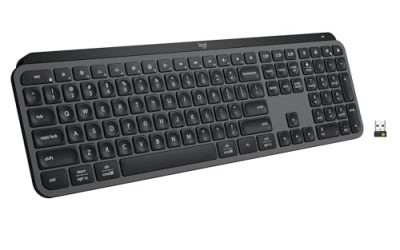
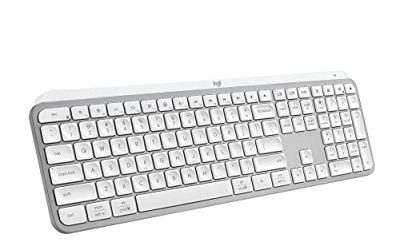
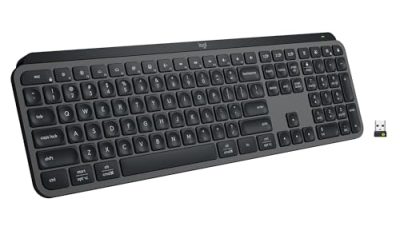
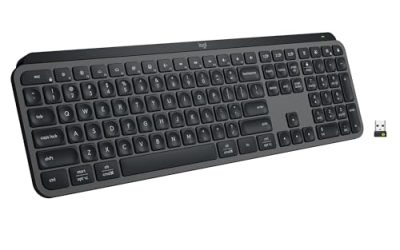
The MX Keys S for Mac is the full-size answer for people who type all day at an iMac. Its low-profile keys sit in a Mac layout with smart backlighting that lights up as your hands approach and dims when they leave. Programmable keys through Logi Options+ let you assign shortcuts and app actions, while pairing with up to three Apple devices covers a Mac, an iPad, and a second machine. The rechargeable battery runs on a 1500 mAh cell, and the board keeps a familiar full-size footprint for number work and long documents.
Specs
- Low-profile full-size Bluetooth keyboard designed for Mac, Mac key layout
- Smart backlighting that lights up as hands approach and auto-adjusts
- Programmable keys via Logi Options+
- Connects to up to 3 Apple devices
- Li-Po 1500 mAh rechargeable battery
- Weight 810 g; dimensions 20.5 x 430.2 x 131.63 mm
- Minimum OS Mac OS 13 Ventura, iPadOS 16
Best for: all-day typing at a full-size iMac desk with a Mac layout and backlit keys.
Watch out for: Logi Bolt USB receiver not included, and FileVault may block Bluetooth password entry at login after a reboot.
Logitech MX Keys Mini for Mac

The Mini takes the same Mac-first typing feel and trims it to a compact frame for smaller desks. Bluetooth Low Energy pairs with up to three Apple devices, so switching between an iMac and an iPad takes one key press. Dedicated dictation, emoji, and mic mute keys suit people who jump between writing and video calls, and the tactile keys give feedback without much noise. A full charge lasts up to 10 days with backlighting on, or up to 5 months with it off, which suits a board that moves between rooms.
Specs
- Compact minimalist keyboard made for creators
- Bluetooth Low Energy, pairs with up to 3 Apple devices
- Dictation key, Emoji key, Mic Mute/Unmute button
- Up to 10 days on a full charge, up to 5 months with backlighting off
- Weight 506.4 g; dimensions 20.97 x 295.99 x 131.95 mm
- LiPo rechargeable battery; USB-C
- Compatible with macOS, iOS, iPadOS
Best for: compact desks and people who switch between an iMac and an iPad.
Watch out for: not compatible with Logitech Unifying Receiver Technology.
Apple Magic Keyboard (USB-C)

Apple’s own keyboard is the simplest match for an iMac, because it was designed alongside the machine it pairs with. The board connects over Bluetooth and carries a rechargeable battery inside, so no cable stays attached during use. It lists compatibility with the 24-inch iMac models from M1 through M4, plus the Retina 4K and 5K iMacs and the iMac Pro, so most modern iMac owners are covered. The USB-C model charges with a modern cable, and the layout is pure Mac, with no Windows labels to translate.
Specs
- Bluetooth wireless keyboard, USB-C model, model number MXCL3LL/A
- Rechargeable, 1 Lithium Ion battery included
- Compatible with iMac 24-inch M4 (2024), M3 (2023), M1 (2021), Retina 4K 21.5-inch (2019), Retina 5K 27-inch (2019-2020), iMac Pro (2017)
- Dimensions 12.13 x 6 x 0.73 inches; weight 14.4 ounces
- Date first available October 28, 2024
Best for: iMac owners who want Apple’s own keyboard with a clean, simple match.
Watch out for: this is the USB-C model — do not confuse it with the older Lightning model.
Apple Magic Keyboard with Touch ID and Numeric Keypad
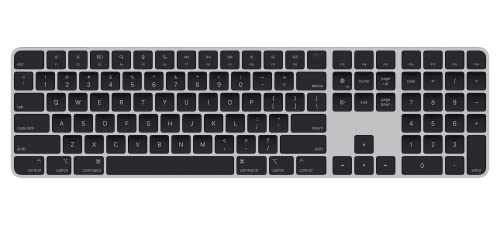
This is the pick for Apple silicon iMac owners who want numbers and fingerprint login in one board. Touch ID pairs automatically with a Mac running Apple silicon, so a fingertip unlocks the machine and approves sign-ins without typing a password. The full-size layout adds a numeric keypad for spreadsheets and data entry, and the rechargeable battery keeps the desk free of cables. A woven USB-C to Lightning cable comes in the box for pairing and charging. The board suits number-heavy work where fingerprint login saves time every day.
Specs
- Wireless Bluetooth keyboard with numeric keypad and Touch ID, model number MMMR3LL/A
- Touch ID pairs automatically with a Mac with Apple silicon
- Requires a Mac with Apple silicon using macOS 11.4 or later
- Rechargeable internal battery; USB-C
- Height 0.16-0.43 inch
- Woven USB-C to Lightning cable included for pairing and charging
- Black keys
Best for: Apple silicon iMac owners who want a numeric keypad plus Touch ID login.
Watch out for: Touch ID does not work on Intel Macs — an Apple silicon Mac with macOS 11.4 or later is required.
Satechi Bluetooth Wireless Smart Keyboard

The Satechi board is the flexible choice for desks where one keyboard serves several machines. It switches between four connected devices, so an iMac, an iPad, and a PC can share a single board without re-pairing. Bluetooth reaches up to 33 feet, and an on-off switch plus a sleep function help the battery last between uses. The layout works with both PC and Mac, which suits households or offices with mixed systems. At one pound and a modest footprint, it also travels well between rooms or to a second desk.
Specs
- Bluetooth wireless keyboard with 4-device sync, model number ST-BWSKMS
- Wireless up to 33 feet; switches between 4 connected devices
- On/Off switch and sleep function
- Dimensions 15.6 x 4.8 x 0.7 inches; weight 1 lb
- Works with PC and Mac
- Compatible with MacBook Pro, MacBook Air, iMac, iMac Pro, iPad Pro and iOS devices
Best for: people who switch one keyboard between an iMac, an iPad, and a PC.
Watch out for: media and iOS hot keys may not support every OS and device.
Which One Fits Your Situation
You Type All Day at a Full-Size Desk
Choose the Logitech MX Keys S for Mac or the Apple Magic Keyboard with Touch ID and Numeric Keypad. Both give you a full-size layout with a numeric keypad, so spreadsheets and long documents stay comfortable. The Logitech adds programmable keys and smart backlighting, while the Apple board adds Touch ID for Apple silicon owners. Pick Logitech for custom shortcuts, Apple for fingerprint login.
Your Desk Is Small or Shared
Pick the Logitech MX Keys Mini for Mac. Its compact frame leaves room for a mouse, a notebook, or a coffee cup, and it still pairs with up to three devices. The dictation and mic mute keys suit video calls from a crowded desk. If you need a numeric keypad as well, accept the larger footprint of a full-size board instead.
You Own an Apple Silicon iMac
Take an Apple keyboard. The Magic Keyboard (USB-C) pairs cleanly and matches the iMac’s design, while the Touch ID model adds fingerprint unlock and a numeric keypad for owners on macOS 11.4 or later. Both are pure Mac layouts with no remapping to learn. Check your iMac model against the compatibility list before ordering, since Touch ID stays silent on Intel machines.
One Keyboard for Mac, iPad, and PC
Choose the Satechi Bluetooth Wireless Smart Keyboard. It switches between four connected devices, so a single board can serve an iMac, an iPad, and a Windows PC without re-pairing. Bluetooth reaches up to 33 feet, and the on-off switch helps the battery last. Keep in mind that some media and iOS hot keys may not work on every system you connect.
Common Mistakes
- Buying a Windows-layout keyboard and living with scrambled shortcuts instead of checking for a Mac layout first.
- Assuming Touch ID works on every iMac, when it needs a Mac with Apple silicon running macOS 11.4 or later.
- Choosing a full-size board with a numeric keypad for a small desk, then finding no room left for the mouse.
- Picking a keyboard that ships without a USB receiver and expecting a wired fallback when Bluetooth cannot connect.
- Expecting every media or iOS hot key to work on every device, when some keys only work on certain systems.
Frequently Asked Questions
Do all of these keyboards work with any iMac?
Most modern iMacs work with all five, since every board connects over Bluetooth and names Mac compatibility in its listing. The exception is Touch ID, which needs an Apple silicon Mac with macOS 11.4 or later. Check the compatibility list on the Apple boards before ordering if you own an older iMac.
Can I use one keyboard with my iMac and iPad?
Yes. The Logitech MX Keys S and MX Keys Mini pair with up to three Apple devices, and the Satechi board switches between four. Pair each device once, then switch with a key press or a button. The Apple Magic Keyboards pair with a single Mac, so they suit a one-machine desk better.
How long does the battery last on these keyboards?
Battery life varies by model and by how much you use the backlight. The MX Keys Mini lasts up to 10 days with backlighting on, or up to 5 months with it off. The MX Keys S listing states a 1500 mAh rechargeable battery but gives no battery-life figure, so treat its runtime as unlisted and recharge over USB-C when needed.
Do I need a numeric keypad?
Only if you enter numbers often. Spreadsheets, accounting, and data entry run faster with a keypad, which the MX Keys S and the Apple Touch ID model both include. If you mostly write, browse, and message, a compact board without a keypad frees desk space and keeps the mouse closer. Let your daily work decide.
FAQ
Do all of these keyboards work with any iMac?
Can I use one keyboard with my iMac and iPad?
How long does the battery last on these keyboards?
Do I need a numeric keypad?
More from Amazon
Programs that pair well with the guide above. Offers and eligibility are set by Amazon and may change.
Free shipping on eligible items, Prime Video and more. Eligible new members can start with a free trial.
Start a Prime free trialAd-free music streaming. Eligible new subscribers can start with a free trial.
Try Music Unlimited freeA Prime membership for ages 18-24 with a trial period. Eligibility is set by Amazon.
See Prime for Young AdultsAudiobooks and podcasts to listen to on the go. Eligible new members can start with a free trial.
Try Audible freeAs an Amazon Associate we earn from qualifying purchases.