Key takeaways
- Compare the 5 best keyboards for Mac mini M1 in November 2026: Mac-layout wireless boards with Command and Option keys, Touch ID, backlighting and multi-device switching.
A Mac mini M1 ships with no keyboard in the box, so the first decision is not which board looks best, it is which one speaks macOS fluently. A Windows-layout keyboard leaves you hunting for Command and Option, remapping keys, and losing the media and brightness controls that make a Mac feel like a Mac. The wrong choice turns every shortcut into a small interruption, while the right one disappears into your work, and that is why layout, connection, and macOS shortcut behaviour matter far more than the logo on the case.
This guide is for Mac mini M1 owners setting up a desk from scratch, replacing a tired keyboard, or adding a second board for a shared workspace. Every keyboard below was picked from its name and specifications on its Amazon product page, with a Mac layout, Command and Option keys in the right places, and a connection that works with the M1 mini, so you can compare them on what actually changes your day.
Quick Picks
As an Amazon Associate we earn from qualifying purchases.
| Product | Best for | Key spec from title |
|---|---|---|
| Apple Magic Keyboard with Touch ID and Numeric Keypad – Black Keys | Unlocking your M1 mini with a fingerprint and typing numbers all day | Touch ID and numeric keypad, wireless, Bluetooth, rechargeable |
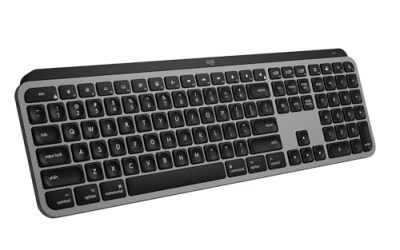
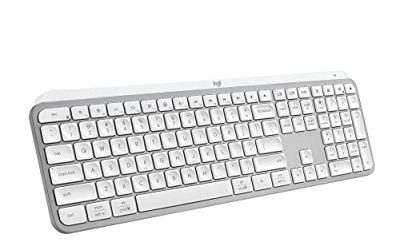
| Logitech MX Keys S for Mac – Pale Grey | Long writing sessions at a full-size desk setup | Backlit, programmable keys, Bluetooth, USB-C rechargeable |
| Logitech MX Keys Mini for Mac – Pale Grey | A compact desk with no room for a number pad | Compact, backlit keys, Bluetooth, USB-C, tactile typing |
| Keychron K2 Version 2 RGB Mechanical Keyboard – Super Brown Switch | Mechanical typing feel with a Mac layout and switchable devices | 75% layout, 84 keys, RGB backlight, Bluetooth, USB-C wired |
| Logitech K380 Multi-Device Bluetooth Keyboard for Mac – Off White | A small, light keyboard that moves between Mac mini, iPad and phone | Compact slim profile, Easy-Switch, 2 year battery, Bluetooth |
How to Choose
Start with the Mac layout, not the brand
A keyboard built for Mac puts Command and Option beside the space bar, labels the function row with brightness, Mission Control, and media symbols, and lets Spotlight, dictation, and emoji shortcuts work exactly as macOS expects. A Windows board can be remapped in System Settings, but the printed legends will still say Alt and Windows, and you will keep pausing to translate. Before you shortlist anything, check the product title and the key legends in the listing photos for Command, Option, and Control in Mac order. If a board is sold in separate Mac and Windows versions, buy the Mac version, because the legends, the function row, and the default shortcuts are already correct out of the box.
Match the size to your desk and your number habits
Full-size boards with a numeric keypad suit spreadsheets, accounting, and data entry, and they keep the arrow keys and navigation cluster spaced out for long sessions. Compact boards without a keypad free up room for a mouse and keep your shoulders in a more natural position, which matters on a narrow desk or a shared table. Tenkeyless and 75 percent layouts sit in between, keeping the function row and arrows while dropping the keypad. Think about how often you type numbers: if you enter figures daily, the keypad earns its space, but if you mostly write and browse, a compact board gives you a cleaner desk and a shorter reach to the mouse.
Choose the connection that fits how you work
Bluetooth is the natural fit for a Mac mini M1 because it leaves the USB ports free for drives, hubs, and other gear, and most boards in this guide pair with up to three devices so you can switch between the mini, an iPad, and a phone with one key press. A wired USB-C connection removes charging and pairing from the equation entirely, and it is the safer pick if your desk sits far from the mini or your Bluetooth environment is crowded. Some boards offer both, which is the most flexible setup of all: use Bluetooth day to day, plug in the cable when the battery runs low, and keep typing without a break.
Weigh key feel, backlighting, and battery life together
Key feel decides whether long typing sessions stay comfortable. Low-profile scissor keys feel close to a MacBook and stay quiet in shared rooms, while mechanical switches give a firmer, more tactile press that many writers and coders prefer. Backlighting matters if you work in dim rooms or late at night, but it drains the battery faster, so check whether the board lets you dim or switch the light off. Battery claims also vary widely, from days with the light on to months with it off, and rechargeable boards need a USB-C cable nearby while battery boards need spare cells in a drawer. Pick the combination that matches your room, your hours, and your tolerance for charging.
The 5 Best Options
Apple Magic Keyboard with Touch ID and Numeric Keypad – Black Keys
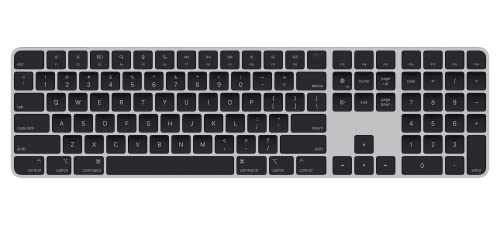
This is the keyboard Apple designed for Apple silicon Macs, and it is the only board here that unlocks your Mac mini M1 with a fingerprint. Touch ID signs you in, approves purchases, and fills passwords without a typed passcode, while the full numeric keypad, document navigation keys, and low-profile scissor mechanism make long sessions quiet and precise. It pairs over Bluetooth and recharges through its included cable, so the desk stays free of dongles and extra receivers. If you want the M1 mini to feel like a complete Apple setup, this is the most direct way to get there.
Specs
- Wireless Bluetooth keyboard, rechargeable
- Touch ID for unlocking Mac and signing in to apps
- Full numeric keypad with document navigation keys
- Works with Mac computers with Apple silicon
- US English layout with Black Keys
- Model number MMMR3LL/A
- Lightning to USB Cable included in the box
Best for: Mac mini M1 owners who want fingerprint sign-in and a full keypad in one Apple board.
Watch out for: Touch ID only works on Macs with Apple silicon, and the board has no backlight, so it is a poor pick for dark rooms.
Logitech MX Keys S for Mac – Pale Grey

The MX Keys S for Mac is built for people who type for hours and want the keyboard to keep up without fuss. Its spherically dished keys guide your fingers into place, the smart backlighting brightens as your hands approach, and programmable keys can trigger Smart Actions such as opening apps or inserting text. It connects over Bluetooth or the included Logi Bolt receiver, pairs with up to three devices, and recharges over USB-C, so switching between the Mac mini and an iPad takes one key press. The pale grey finish and full layout sit comfortably beside an Apple display.
Specs
- Wireless keyboard with fluid, precise laptop-like typing
- Programmable keys for Smart Actions
- Backlit keys with smart illumination
- Bluetooth and USB-C rechargeable
- Pairs with up to three devices with Easy-Switch
- Designed for MacBook Pro, MacBook Air, iMac, and iPad
- Pale Grey finish
Best for: Writers and office workers who want a full-size, backlit Mac keyboard for long days at the desk.
Watch out for: It is wide and heavy for a portable setup, and the Smart Actions need Logitech software on macOS to configure.
Logitech MX Keys Mini for Mac – Pale Grey

The MX Keys Mini for Mac takes the full-size MX Keys experience and trims it to the essentials, dropping the numeric keypad for a compact footprint that fits small desks and travel bags. You still get the same spherically dished keys, backlit illumination that reacts to your hands, and Mac-specific function legends for brightness, emoji, screenshot, and media controls. It pairs with up to three Apple devices over Bluetooth Low Energy and recharges over USB-C, with the backlight off stretching battery life far longer than with it on. For a Mac mini M1 on a crowded desk, this is the tidy option.
Specs
- Minimalist wireless keyboard, compact layout without numeric keypad
- Backlit keys with smart illumination
- Bluetooth Low Energy, pairs with up to three Apple devices
- USB-C rechargeable, LiPo rechargeable battery
- Up to 10 days on a full charge, or up to 5 months with backlighting turned off
- Compatible with macOS, iOS, and iPadOS
- Weight 17.86 oz, dimensions 0.82 x 11.65 x 5.19 in
- Pale Grey finish
Best for: Small desks and minimal setups where a full-size board would crowd out the mouse.
Watch out for: There is no numeric keypad, so number-heavy work means reaching for the top number row.
Keychron K2 Version 2 RGB Mechanical Keyboard – Super Brown Switch

The Keychron K2 Version 2 is the mechanical choice in this guide, and the one that feels most different from an Apple keyboard. Its 75 percent layout keeps the function row and arrow keys while dropping the keypad, and a side switch flips the whole board between Mac and Windows layouts, with extra keycaps for both systems in the box. The tactile Super Brown switches give a clear bump on every press, the RGB backlight lights the keys for night work, and Bluetooth 5.1 connects up to three devices. A large battery and a USB-C wired mode mean it keeps going through long sessions without fuss.
Specs
- 75% layout, 84 keys, RGB backlight, compact Bluetooth mechanical keyboard
- Keychron Super Brown Switch, tactile feel
- Mac layout with all necessary Mac function keys, compatible with Windows
- Extra keycaps for both Windows and Mac operating systems included
- Connects with up to 3 devices via Bluetooth 5.1
- Wired mode with USB Type-C connection
- 4000 mAh battery, up to 72 hours typing or up to 7 days normal use
- N-key rollover on wired mode, 6KRO on wireless mode
- Aluminum frame
Best for: Typists and coders who want a tactile mechanical feel and a Mac layout in a compact board.
Watch out for: The tall frame and mechanical switches are louder than a scissor keyboard, and the board is heavier than the slim options here.
Logitech K380 Multi-Device Bluetooth Keyboard for Mac – Off White
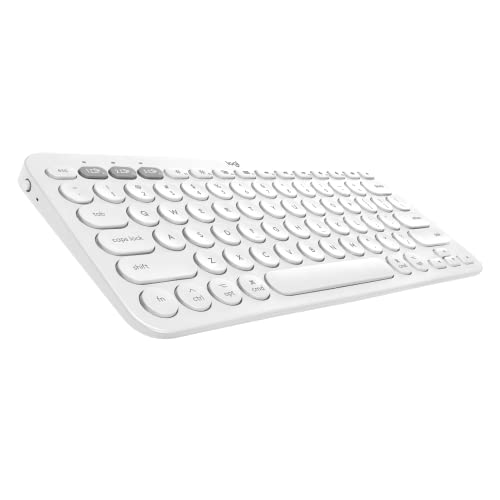
The K380 for Mac is the smallest and lightest board in this guide, and the easiest to move around the house. Its round, low-profile keys feel like a laptop keyboard, and the compact frame slips into a bag or sits neatly in front of a monitor without dominating the desk. Easy-Switch keys pair it with up to three devices, so the same board can type on the Mac mini, an iPad, and a phone, and the long battery life means you rarely think about power at all. It is the sensible pick when the keyboard needs to be portable, quiet, and simple.
Specs
- Multi-device Bluetooth keyboard for Mac
- Compact slim profile with round low-profile keys
- Easy-Switch for up to 3 devices
- 2 year battery life
- Compatible with MacBook Pro, MacBook Air, iMac, and iPad
- Off White finish
Best for: Shared desks, travel, and anyone who wants one small keyboard for the Mac mini and an iPad.
Watch out for: There is no backlight and no numeric keypad, and the round keys take a day or two to get used to.
Which One Fits Your Situation
You want the most Apple-like setup possible
Choose the Apple Magic Keyboard with Touch ID and Numeric Keypad. It is the only board here with fingerprint sign-in, and its layout, key feel, and Bluetooth pairing match the M1 mini exactly. The full keypad also covers spreadsheets and number entry, so it suits a main desk where the Mac mini is the only computer and you want everything to work the way Apple intended.
You type all day and work after dark
Choose the Logitech MX Keys S for Mac. Its backlit keys, dished keycaps, and full layout are built for long writing sessions, and the programmable keys can automate small repetitive tasks. The USB-C rechargeable battery and three-device switching also fit a desk where the Mac mini shares space with an iPad or a second machine.
Your desk is small or you travel with the keyboard
Choose the Logitech MX Keys Mini for Mac if you want backlighting and a premium feel, or the Logitech K380 for Mac if you want the lightest and simplest option. Both drop the keypad to save space, pair with three devices, and fit easily beside a monitor or inside a bag, so either one keeps a crowded desk usable.
You want a mechanical keyboard that still respects macOS
Choose the Keychron K2 Version 2. Its Mac layout switch, Mac function keys, and included Mac keycaps mean you get tactile mechanical typing without losing the shortcuts macOS users rely on. The compact 75 percent layout also keeps the arrows and function row while freeing desk space for the mouse beside it.
Common Mistakes
- Buying a Windows-layout keyboard and expecting Command and Option to sit where macOS puts them, then spending weeks remapping keys.
- Choosing a full-size board for a narrow desk, then pushing the mouse too far right and straining your shoulder.
- Ignoring backlighting until the first late-night session, when an unlit board slows every shortcut down.
- Picking a Bluetooth-only board without checking battery life or keeping a charging cable within reach.
- Assuming Touch ID works on any Mac, when it only works on Macs with Apple silicon such as the M1 mini.
Frequently Asked Questions
Does any USB or Bluetooth keyboard work with a Mac mini M1?
Almost any USB or Bluetooth keyboard will type on a Mac mini M1, but a Windows-layout board labels its modifier keys differently and its function row will not match macOS controls. A Mac-layout keyboard puts Command and Option in the right places and prints the correct symbols for brightness, Mission Control, and media, so shortcuts work as expected without remapping.
Do I need a keyboard with Touch ID for the Mac mini M1?
No, Touch ID is a convenience, not a requirement. The Apple Magic Keyboard is the only board here with a fingerprint sensor, and it unlocks the M1 mini and approves sign-ins without a typed password. If you are happy typing your password, the Logitech and Keychron boards here work just as well for everyday use.
Can one keyboard switch between my Mac mini and my iPad?
Yes, most boards in this guide pair with up to three devices and switch between them with a single key press. The Logitech MX Keys S, MX Keys Mini, and K380 all support this, as does the Keychron K2 over Bluetooth. Pair each device once, then use the Easy-Switch or function keys to move between them.
Is a mechanical keyboard a good choice for a Mac mini M1?
A mechanical keyboard works well if you like a tactile key press and pick one with a Mac layout, such as the Keychron K2 here. Its side switch sets the board to Mac mode and it ships with Mac keycaps, so the function keys and shortcuts behave correctly. Mechanical boards are louder and heavier than slim scissor keyboards, so they suit a private desk more than a shared room.
FAQ
Does any USB or Bluetooth keyboard work with a Mac mini M1?
Do I need a keyboard with Touch ID for the Mac mini M1?
Can one keyboard switch between my Mac mini and my iPad?
Is a mechanical keyboard a good choice for a Mac mini M1?
More from Amazon
Programs that pair well with the guide above. Offers and eligibility are set by Amazon and may change.
Free shipping on eligible items, Prime Video and more. Eligible new members can start with a free trial.
Start a Prime free trialAd-free music streaming. Eligible new subscribers can start with a free trial.
Try Music Unlimited freeA Prime membership for ages 18-24 with a trial period. Eligibility is set by Amazon.
See Prime for Young AdultsAudiobooks and podcasts to listen to on the go. Eligible new members can start with a free trial.
Try Audible freeAs an Amazon Associate we earn from qualifying purchases.