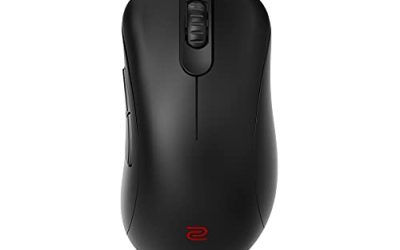
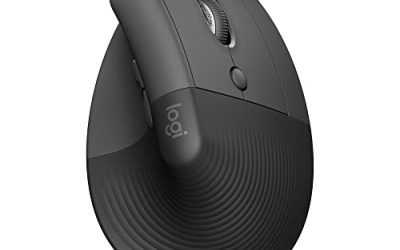
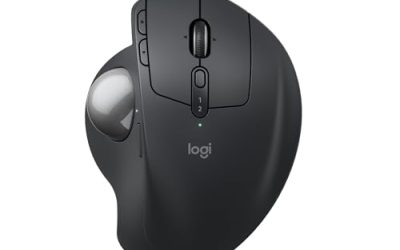
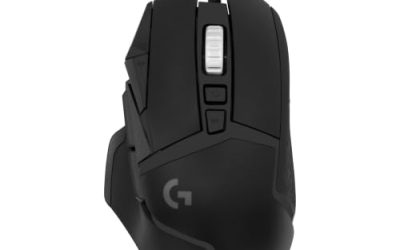
Our Top Picks
Pros & cons
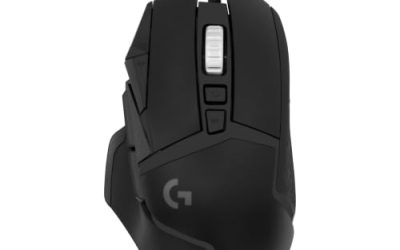
- 11 programmable buttons add extensive control customization
- Adjustable weights let you fine-tune balance and feel
- LIGHTSYNC RGB syncs lighting with other Logitech gear
- Wired connection limits cable-free desk setups
- Heavier than typical lightweight esports mice at 0.27 pounds
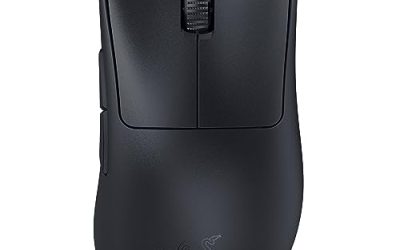
 Razer DeathAdder V3 Pro Wireless Gaming Mouse1000 Hz5.01 x 2.65 x 1.69 inches0.1 poundsCheck on Amazon
 Logitech G Pro X Superlight 2 Lightspeed WirelessClassic1.57 x 2.5 x 4.92 inches0.1 poundsCheck on Amazon
Pros & cons
- 95-hour battery life reduces how often you need to charge
- 60-gram weight suits fast, low-effort mouse movement
- HERO 2 sensor tracks up to 44,000 DPI with no smoothing
- POWERPLAY wireless charging pad is sold separately
- Premium features add a more complex setup than basic mice

As an Amazon Associate we earn from qualifying purchases.

This is a grip guide, not a roundup. It explains the three ways players hold a gaming mouse, how to tell which one you use, and how to match a mouse shape to that grip. The five mice at the end are examples, one or two for each grip style. The best way to hold a gaming mouse is the one that keeps your hand relaxed, your aim steady, and your wrist comfortable over a long session.
The Three Grips
Every grip style answers the same question: which parts of your hand touch the mouse, and which parts do the moving.
Palm grip means the whole hand rests on the mouse. The palm sits flat on the back of the shell, the fingers lie along the buttons, and the thumb rests on the side. The arm does most of the moving, with the wrist guiding smaller adjustments. Palm grip suits long sessions and relaxed play, and it works best with a longer, taller mouse that fills the hand.
Claw grip means the palm rests on the back of the mouse while the fingers arch up and touch only the tips of the buttons. The palm stays in contact, but the fingers are curled, like a claw. Movement comes from the wrist and the fingers, which gives quick, short flicks. Claw grip suits players who want fast reactions and a firm hold without pressing the whole hand down.
Fingertip grip means only the fingertips touch the mouse. The palm floats above the shell and never rests on it. The fingers and thumb do all of the moving, with tiny wrist adjustments for larger turns. Fingertip grip suits fast, precise micro-movements, and it works best with a small, light mouse that the fingers can control without effort.
Palm Grip in Detail
Palm grip is the most relaxed of the three. Your hand lies on the mouse the way it lies on a desk, with no arch in the fingers and no gap under the palm. The thumb rests along the side, and the ring finger and little finger rest on the right edge or curl gently beside it.
The strength of palm grip is comfort. Because the whole hand shares the weight of the mouse, no single finger carries the load, and the wrist stays in a neutral line with the forearm. Long sessions feel easier, and the hand tires slowly. The trade-off is speed. Moving the whole hand takes more effort than moving two fingers, so very fast flick shots feel slower than they do with a claw or fingertip hold.
Palm grip needs a mouse that matches the hand. A mouse that is too short leaves the palm hanging off the back, which forces the wrist to bend and the fingers to curl. A mouse that is too low gives the palm nothing to rest on, which pushes the hand into a claw shape without the player choosing it. Look for a longer shell, a taller hump toward the back, and a shape that supports the thumb. Right-handed ergonomic shapes suit palm grip well, because the curve matches the natural line of the hand.
Claw Grip in Detail
Claw grip is the middle ground. The palm rests on the back of the mouse, the fingers arch up, and only the fingertips press the buttons. The thumb and the outer fingers grip the sides. The wrist stays mostly still while the fingers do the clicking, and the wrist takes over for larger movements.
The strength of claw grip is control at speed. The arched fingers can click fast, and the palm contact keeps the mouse stable during quick turns. Many competitive players use claw grip because it combines the stability of a palm hold with the quick fingers of a fingertip hold. The trade-off is tension. Holding the fingers arched for hours can tire the hand, especially if the mouse is heavy or the buttons need a hard press.
Claw grip needs a mouse with a clear hump under the palm and buttons that sit where arched fingertips land. A medium-length shell works well, because the palm needs support at the back while the fingers need room to arch at the front. A high hump toward the middle of the shell suits claw grip, because it fills the space under the arched fingers. Low, flat mice often feel wrong for claw players, because the palm has nothing to rest on and the fingers have to reach too far forward.
Fingertip Grip in Detail
Fingertip grip is the lightest touch of the three. Only the fingertips and the thumb touch the mouse. The palm floats in the air, and the wrist stays off the desk or rests very lightly. Every movement comes from the fingers, with the wrist adding small corrections.
The strength of fingertip grip is precision at small scales. Tiny adjustments are easy, because the fingers move the mouse in millimeters. Flick shots and micro-corrections feel natural, and the hand can change direction fast. The trade-off is stability. With no palm contact, the mouse can drift during long movements, and the fingers carry all of the weight. Long sessions can tire the fingers, and a heavy mouse makes that worse.
Fingertip grip needs a small, light mouse. A long shell gets in the way, because the palm cannot float comfortably over a mouse that extends past the fingers. A low profile helps, because a tall hump pushes into the floating palm. Symmetrical shapes suit fingertip grip well, because either hand position works and the narrow waist gives the thumb and fingers a clear place to hold.
How to Find Your Grip
The simplest way to find your grip is to pick up a mouse without thinking about it. Hold it the way you would during a game, then look at your hand. If the whole palm is flat on the shell, you are a palm player. If the palm touches the back and the fingers arch, you are a claw player. If only the fingertips touch and the palm floats, you are a fingertip player.
Do this three times, with a short break between each try. The first try often shows the grip you think you use. The second and third tries show the grip your hand falls into when it stops thinking. The grip that repeats is your natural grip.
Hand size shapes the answer. A large hand on a small mouse often falls into a claw or fingertip hold, because the palm cannot fit on the shell. A small hand on a large mouse often falls into a palm hold, because the fingers cannot reach around it. If your grip changes when you change mice, the mouse is shaping the grip, not the other way around. The right mouse is the one that lets your natural grip happen without effort.
Switching Grips
Switching grips takes time, and the hand resists the change at first. A palm player switching to claw grip will feel clumsy for a week. A fingertip player switching to palm grip will feel slow. That is normal, and it passes.
Start with short sessions. Use the new grip for twenty minutes, then go back to the old grip for the rest of the session. Add five minutes a day. The hand learns the new position without tiring, and the aim steadies as the muscles adapt. Do not switch grips during a competitive match. New grips belong in practice, not in games that matter.
Common Mistakes
The most common mistake is gripping too hard. A tight grip tires the hand, makes the aim jumpy, and wears out the fingers. Hold the mouse the way you would hold a pen: firm enough to control, loose enough to move. If your knuckles turn white, you are holding too hard. Relax the hand, and let the mouse do the work.
The second mistake is a bent wrist. A wrist bent up or sideways puts strain on the tendons and makes aiming less steady. Keep the wrist in line with the forearm, and let the arm rest on the desk. If the wrist bends, the mouse shape or the desk height is the problem.
The third mistake is resting the whole forearm on the desk and moving only the wrist. The wrist is a small joint, and asking it to do all of the aiming wears it out. Let the arm move for large turns, and save the wrist for small corrections. Arm aiming feels strange at first, but it is steadier and easier on the hand over a long session.
The Five Mice in This Guide
The five mice below are examples, not a ranking. Each one shows a grip style on a real shape. All five are current Amazon US listings, so confirm a live offer on the listing before ordering.
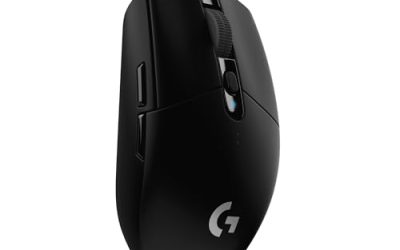
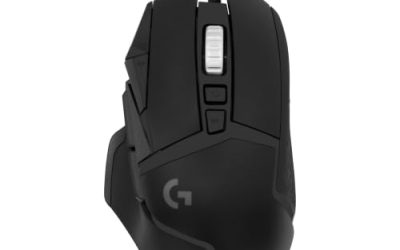
1. Logitech G502 HERO — Palm Grip
The G502 HERO is the classic palm mouse. Its right-handed ergonomic shell is long and tall, with a thumb rest and a sniper button on the side, so a palm player can rest the whole hand on it without reaching. The shape fills a medium to large hand, and the weight system lets the player tune the balance.
Specs
- Sensor: HERO 25K optical, up to 25,600 DPI
- Buttons: 11 programmable buttons, dual-mode hyper-fast scroll wheel with tilt
- Weight: 121 grams, plus five removable 3.6-gram tuning weights
- Connectivity: Wired, braided USB cable
- Shape: Right-handed ergonomic, 132 x 75 x 40 mm, thumb rest
- Lighting: LIGHTSYNC RGB
- Onboard memory: Up to 5 profiles
- Model: 910-005469
- ASIN: B07GBZ4Q68
The G502 HERO suits palm grip because the shell supports the whole hand, the thumb rest gives the thumb a place to sit, and the tall back fills the palm. One thing to know: owner feedback often mentions the switches wearing out over time and producing double clicks, so buy from a seller with an easy return policy and check the buttons early.
2. Razer DeathAdder V3 Pro — Palm and Claw Grip
The DeathAdder V3 Pro is the ergonomic mouse that sits between palm and claw grip. Its shape is a refined version of the long-running DeathAdder line, with a gentle hump and a right-handed curve. Palm players rest the hand on it comfortably, and claw players find the hump sits right under the palm while the fingers arch over the buttons.
Specs
- Sensor: Focus Pro 30K optical sensor
- Buttons: 5 programmable buttons, Gen-3 optical switches
- Weight: 63 grams
- Connectivity: HyperSpeed wireless, USB-C charging
- Battery: Up to 90 hours
- Shape: Right-handed ergonomic
- Model: RZ01-04630100-R3G1
- ASIN: B0B6XZLNHQ
The DeathAdder V3 Pro suits palm and claw grip because the shape is long enough for a palm hold and light enough for a claw hold. At 63 grams it is far lighter than the G502 HERO, so the fingers do not tire when the grip shifts toward claw. The wireless connection keeps the desk clear, and the battery lasts up to 90 hours in published specifications. The shape is right-handed only, so left-handed players need a different mouse.
3. Razer Viper V3 Pro — Claw and Fingertip Grip
The Viper V3 Pro is the symmetrical mouse for claw and fingertip players. Its shape is narrow and low, with no handed curve, so the fingers can hold it from either side. The light weight and the high polling rate suit fast, precise movement, and the flat profile keeps the palm from resting on the shell.
Specs
- Sensor: Focus Pro 35K optical sensor
- Buttons: 8 programmable buttons, Gen-3 optical switches
- Weight: 54 grams
- Connectivity: HyperSpeed wireless, 8K polling
- Battery: Up to 95 hours
- Shape: Symmetrical, ambidextrous
- Model: RZ01-05120100-R3U1
- ASIN: B0CW25XR5R
The Viper V3 Pro suits claw and fingertip grip because it is light, narrow, and flat. At 54 grams it is the lightest mouse in this guide, and the fingers can lift and reposition it without effort. The symmetrical shape works for claw players who want the palm to rest on the back and for fingertip players who want the palm to float. The black model is the listing used here; white and special editions are separate listings, so confirm the color selected.
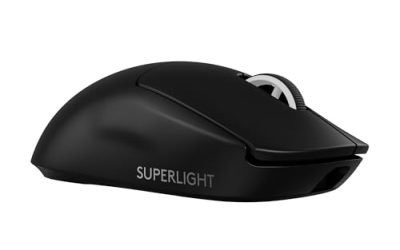
4. Logitech G Pro X Superlight 2 — Fingertip Grip
The G Pro X Superlight 2 is the fingertip mouse in this guide. Its shape is small and symmetrical, its weight is low, and its surface is smooth, so the fingertips can move it in tiny steps. The palm floats above the shell, and the fingers do all of the work.
Specs
- Sensor: HERO 2 sensor, up to 44,000 DPI
- Buttons: 5 programmable buttons, LIGHTFORCE hybrid switches
- Weight: 60 grams
- Connectivity: LIGHTSPEED wireless, 8kHz report rate, USB-C charging
- Shape: Symmetrical, ambidextrous
- Model: G Pro X Superlight 2
- ASIN: B09NBWL8J5
The G Pro X Superlight 2 suits fingertip grip because it is small, light, and free of extra shape. There is no thumb rest and no high hump to push into a floating palm. The 60-gram weight is light enough for the fingers to carry through a long session, and the wireless connection keeps the cable from dragging. The black model is the listing used here; a white model is a separate listing, so confirm the color selected. The smooth shell can feel slippery, and grip tape is a common addition for fingertip players who want more hold.
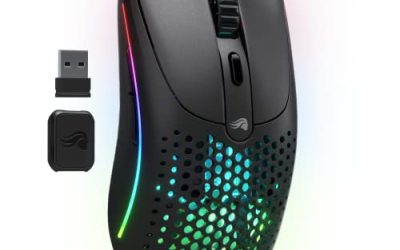
5. Glorious Model O Wireless — Claw and Fingertip Grip
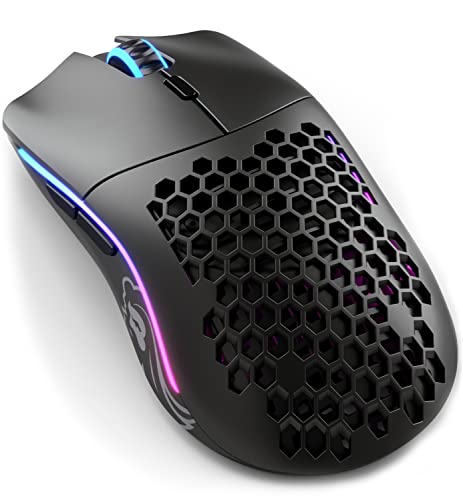
The Model O Wireless is the honeycomb mouse for claw and fingertip players. Its shell has a honeycomb pattern that keeps the weight low, and its ambidextrous shape suits either grip. The sides give the thumb and fingers a clear place to hold, and the light weight keeps the hand fresh.
Specs
- Sensor: BAMF sensor, up to 19,000 DPI in published listings
- Buttons: 6 programmable buttons
- Weight: 69 grams
- Connectivity: 2.4GHz wireless, lag free
- Battery: Up to 71 hours
- Shape: Ambidextrous, honeycomb shell, RGB lighting
- Model: Model O Wireless
- ASIN: B098RDFP3J
The Model O Wireless suits claw and fingertip grip because the honeycomb shell keeps it light while the shape stays narrow enough for the fingers to control. At 69 grams it is light for its size, and the RGB lighting shines through the honeycomb pattern. The battery lasts up to 71 hours in published specifications, and the matte black model is the listing used here. A matte white model is a separate listing, so confirm the color selected.
How the Five Compare
The G502 HERO is the palm mouse: heavy, ergonomic, wired, and full of buttons. The DeathAdder V3 Pro is the bridge between palm and claw: light, ergonomic, and wireless. The Viper V3 Pro is the claw and fingertip mouse: the lightest in the guide, symmetrical, and built for speed. The G Pro X Superlight 2 is the fingertip mouse: small, light, and free of extra shape. The Model O Wireless is the claw and fingertip mouse with a honeycomb shell: light, ambidextrous, and easy on the hand.
Weight tells the story: the G502 HERO is 121 grams before tuning weights, the DeathAdder V3 Pro is 63 grams, the Viper V3 Pro is 54 grams, the G Pro X Superlight 2 is 60 grams, and the Model O Wireless is 69 grams. Palm players often like the heavier mouse, because the hand rests on it. Claw and fingertip players usually like the lighter mice, because the fingers carry them.
Frequently Asked Questions
Which grip is best for gaming?
No single grip is best for every player. Palm grip suits comfort and long sessions, claw grip suits fast reactions, and fingertip grip suits precise micro-movements. The best grip is the one that keeps your hand relaxed and your aim steady.
Can I change my grip style?
Yes, with practice. Use the new grip for short sessions at first, then add a few minutes each day. The hand adapts over one to two weeks. Change the mouse shape too if the old shape fights the new grip, and avoid switching grips during competitive matches until the new grip feels natural.
Does grip style affect aim?
Grip style affects how you move the mouse, which affects aim. Palm grip moves with the arm and suits steady, sweeping aim. Claw grip moves with the wrist and fingers and suits quick flicks. Fingertip grip moves with the fingers and suits tiny corrections. The grip does not set your skill level, but the wrong grip for your hand makes aiming harder than it needs to be.
What mouse should I buy for a claw grip?
Look for a medium-length mouse with a hump under the palm, light weight, and buttons that sit where arched fingertips land. The Viper V3 Pro and the Model O Wireless in this guide are good examples, because both are light, narrow, and shaped for arched fingers. Confirm the size against your hand before ordering, because a mouse that is too long turns a claw hold into a palm hold.
FAQ
Which grip is best for gaming?
Can I change my grip style?
Does grip style affect aim?
What mouse should I buy for a claw grip?
More from Amazon
Programs that pair well with the guide above. Offers and eligibility are set by Amazon and may change.
Free shipping on eligible items, Prime Video and more. Eligible new members can start with a free trial.
Start a Prime free trialAd-free music streaming. Eligible new subscribers can start with a free trial.
Try Music Unlimited freeA Prime membership for ages 18-24 with a trial period. Eligibility is set by Amazon.
See Prime for Young AdultsAudiobooks and podcasts to listen to on the go. Eligible new members can start with a free trial.
Try Audible freeAs an Amazon Associate we earn from qualifying purchases.