Our Short List of 3
All 4 Picks at a Glance
| Product | Specs | Action |
|---|---|---|
 TP-Link Archer AXE75 — Best Overall | Check price on Amazon | |
 TP-Link Archer GXE75 — Best for Gaming Features | Check price on Amazon | |
 ASUS RT-AXE7800 — Best Mid-Range ASUS Pick | Check price on Amazon | |
 NETGEAR Nighthawk RAXE300 — Best NETGEAR Pick | Check price on Amazon |
Our Top Picks
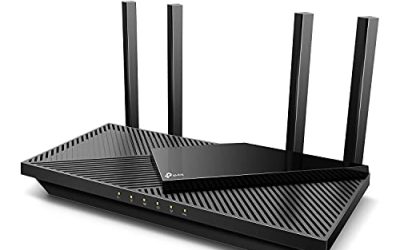
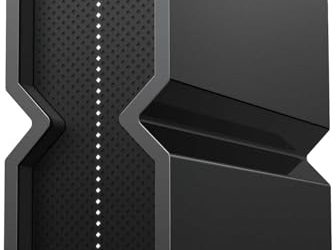
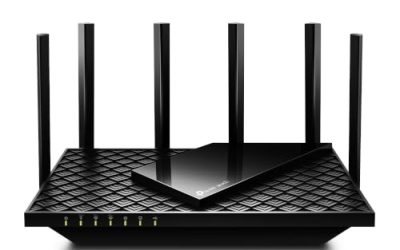
- TP-Link AXE5400 Tri-Band WiFi 6E RouterWiFi 6E, Tri-Band AXE540012.91 x 10.43 x 4.72 inches1.5 poundsCheck on Amazon
As an Amazon Associate I earn from qualifying purchases.
The Short Answer
For most homes, the TP-Link Archer AXE75 is the pick to buy first. It is a tri-band Wi-Fi 6E router in the AXE5400 class, with a dedicated 6 GHz band alongside the familiar 5 GHz and 2.4 GHz bands, in a conventional standalone design that fits on a shelf without a mesh setup or a flagship budget.
Wi-Fi 6E matters because of the 6 GHz band itself. The 2.4 GHz band reaches far but shares airspace with neighbours, Bluetooth devices, and smart home gear. The 5 GHz band is faster and cleaner, yet it is also shared with a large crowd of modern devices. The 6 GHz band is newer, wider, and far less congested, so a compatible laptop, phone, or console can hold a steadier connection with less interference.
Wi-Fi 6E only helps when your devices can use it. A router cannot push a 6 GHz signal to a laptop or phone that only supports 2.4 GHz and 5 GHz. Before you buy, check the wireless specification of the devices you care about most. If your gaming PC uses a Wi-Fi 6E adapter and your laptop lists 6 GHz support, a 6E router makes sense right now. If none of your devices support 6 GHz yet, the benefit waits until you upgrade a device.
All five picks below are standalone tri-band Wi-Fi 6E routers, matched to their Amazon listings by model name and ASIN. Where a specification was not stated clearly on the listing, this guide says so.
Our Top Picks
- Best Overall: TP-Link Archer AXE75 — the balanced tri-band AXE5400 pick for most homes.
- Best for Gaming Features: TP-Link Archer GXE75 — the same AXE5400 class with gaming acceleration, a dedicated gaming port, and RGB lighting.
- Best Mid-Range ASUS Pick: ASUS RT-AXE7800 — a tri-band AXE7800 router with ASUS security tools and AiMesh expansion.
- Best NETGEAR Pick: NETGEAR Nighthawk RAXE300 — a tri-band AXE7800 router in the folding-wing Nighthawk design.
- Best Flagship Gaming Pick: ASUS ROG Rapture GT-AXE11000 — a tri-band AXE11000 gaming router with a 2.5 gigabit port and ROG gaming tools.
Quick Comparison
| Router | Wi-Fi Class | Bands | Wired Ports | Standout Feature |
|---|---|---|---|---|
| TP-Link Archer AXE75 | AXE5400 | Tri-band: 6 GHz, 5 GHz, 2.4 GHz | 2.5 gigabit WAN port and four gigabit LAN ports | Balanced everyday 6E pick with VPN support |
| TP-Link Archer GXE75 | AXE5400 | Tri-band: 6 GHz, 5 GHz, 2.4 GHz | 2.5 gigabit WAN port and four gigabit LAN ports, plus USB 3.0 | Gaming acceleration, gaming port, and game panel |
| ASUS RT-AXE7800 | AXE7800 | Tri-band: 6 GHz, 5 GHz, 2.4 GHz | 2.5 gigabit port | AiMesh support and ASUS network security |
| NETGEAR Nighthawk RAXE300 | AXE7800 | Tri-band: 6 GHz, 5 GHz, 2.4 GHz | Gigabit Ethernet ports; confirm the full port layout on the listing | Folding-wing design with NETGEAR Armor |
| ASUS ROG Rapture GT-AXE11000 | AXE11000 | Tri-band: 6 GHz, 5 GHz, 2.4 GHz | 2.5 gigabit port; confirm the full port layout on the listing | ROG gaming tools, Aura RGB, and AiMesh |
How to Choose
Look at the 6 GHz band, not the headline number
Router boxes advertise a combined class number such as AXE5400, AXE7800, or AXE11000. That number adds together the maximum link rates of every band, and no single device ever uses all of them at once. A more useful comparison is the 6 GHz band rate on its own, because that is the band your newest devices will actually use. The jump from AXE5400 to AXE7800 is worth it when several people use 6 GHz devices at the same time, while the jump to AXE11000 suits households with many simultaneous high-bandwidth devices.
Match the wired ports to your internet plan
Wireless speed gets the attention, but wired ports decide whether a gaming PC or console ever sees the full speed of your internet plan. A gigabit WAN port caps the wired side at one gigabit, no matter how fast the wireless bands are. A 2.5 gigabit WAN port gives a faster internet plan room to breathe. The TP-Link models here list a 2.5 gigabit WAN port alongside four gigabit LAN ports, and the ASUS RT-AXE7800 and the ROG GT-AXE11000 each list a 2.5 gigabit port as well. For the NETGEAR RAXE300, the listing describes gigabit Ethernet ports, so confirm the exact multi-gigabit layout on the listing before you buy.
Think about coverage as placement, not just power
Every router here is built for a medium to large home, and the manufacturers describe coverage in terms of bedrooms or square footage. Those figures assume open space and a central position. Real homes have walls, floors, and furniture, and the 6 GHz band loses strength through solid obstacles faster than 2.4 GHz does. The TP-Link models support EasyMesh expansion, and the ASUS models support AiMesh.
Security and parental controls are part of the decision
A router is the front door of a home network, so its security tools deserve the same attention as its speed. The TP-Link models include WPA3 security and HomeShield network protection. The ASUS RT-AXE7800 includes ASUS Safe Browsing, upgraded network security, Instant Guard, VPN features, and parental controls. The NETGEAR RAXE300 includes NETGEAR Armor and Smart Parental Controls. The ROG GT-AXE11000 includes lifetime internet security through ASUS, per the listing.
Do not buy a mesh system when you need one router
Several Wi-Fi 6E mesh kits share model names with the standalone routers in this guide; the TP-Link Deco XE75, for example, is a mesh system in the same AXE5400 class. This guide covers standalone routers only, so match the model name on the listing and check that it describes a standalone router rather than a multi-pack mesh kit.
The Picks in Detail
TP-Link Archer AXE75 — Best Overall
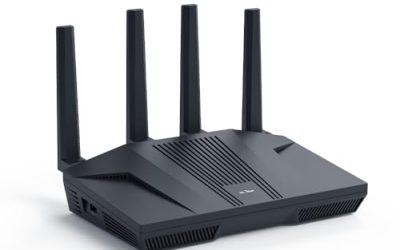
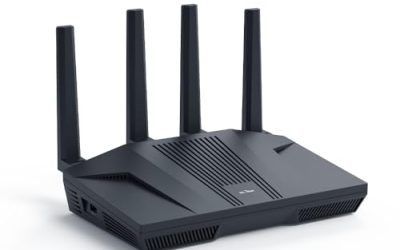
TP-Link Archer AXE75 AXE5400 Tri-Band Wi-Fi 6E Router
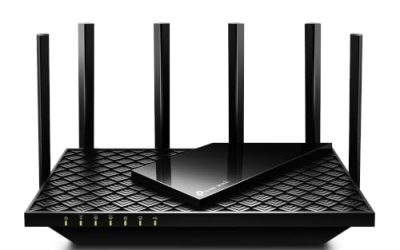
The Archer AXE75 is the most balanced router in this guide: a tri-band Wi-Fi 6E router in the AXE5400 class, with 2402 Mbps on the 6 GHz band, 2402 Mbps on the 5 GHz band, and 574 Mbps on the 2.4 GHz band. A 1.7 GHz quad-core processor and six fixed antennas shape coverage for a two to three bedroom home, and the listing describes support for more than 200 connected devices. It also lists a 2.5 gigabit WAN port, four gigabit LAN ports, a USB 3.0 port, mesh expansion, VPN support, WPA3, and HomeShield protection. The main trade-off is the gigabit LAN ports: a wired gaming PC tops out at one gigabit on a single wired connection, even though the WAN port accepts a faster plan.
Pros:
– Tri-band Wi-Fi 6E with a dedicated 6 GHz band for compatible devices
– 2.5 gigabit WAN port gives a faster internet plan room to breathe
– VPN server and client support, WPA3, and HomeShield protection included
Cons:
– Gigabit LAN ports limit wired connections to one gigabit per port
– Some advanced HomeShield features sit in a higher tier; confirm on the listing
– 6 GHz signal weakens faster through walls than 2.4 GHz, as with every 6E router
TP-Link Archer GXE75 — Best for Gaming Features
TP-Link Archer GXE75 AXE5400 Tri-Band Wi-Fi 6E Gaming Router
The Archer GXE75 takes the same AXE5400 tri-band Wi-Fi 6E foundation as the AXE75 and adds a gaming layer on top. The listing describes 6-stream wireless at a combined 5.4 Gbps, a 2.5 gigabit WAN port with four gigabit LAN ports, and a USB 3.0 port. The gaming additions are the reason to choose it over the AXE75: game acceleration, a dedicated gaming port, a game panel for monitoring, and RGB lighting that suits a gaming desk setup. EasyMesh and HomeShield carry over from the AXE75. Confirm the exact acceleration features on the listing, since TP-Link describes its game, gear, and server acceleration in detail there.
Pros:
– Same tri-band AXE5400 Wi-Fi 6E foundation as the AXE75
– Game acceleration, a dedicated gaming port, and a game panel
– 2.5 gigabit WAN port with four gigabit LAN ports and USB 3.0
Cons:
– Gigabit LAN ports limit wired connections to one gigabit per port
– Gaming extras add little for a household that does not game
– Confirm the exact acceleration features on the listing before buying
ASUS RT-AXE7800 — Best Mid-Range ASUS Pick
ASUS RT-AXE7800 Tri-Band Wi-Fi 6E Router
The ASUS RT-AXE7800 is the mid-range ASUS pick in this guide, and the one to choose if you want ASUS software and the AiMesh ecosystem without paying for the ROG flagship. It is a tri-band Wi-Fi 6E router in the AXE7800 class, with a 6 GHz band, a 5 GHz band, and a 2.4 GHz band, powered by a 1.7 GHz quad-core 64-bit Broadcom processor. The listing highlights a 2.5 gigabit port. The software is the strongest argument for this router: the listing describes ASUS Safe Browsing, upgraded network security, Instant Guard, built-in VPN features, and parental controls. AiMesh support means you can add a compatible ASUS router later and run the two as one network. Confirm the full port layout on the listing, since ASUS lists the 2.5 gigabit port alongside gigabit ports.
Pros:
– Tri-band Wi-Fi 6E in the AXE7800 class with a dedicated 6 GHz band
– 2.5 gigabit port for a faster internet plan or wired device
– ASUS Safe Browsing, Instant Guard, VPN features, and parental controls
– AiMesh support for adding a compatible ASUS router later
Cons:
– Extra wireless capacity only shows up with several active 6 GHz devices
NETGEAR Nighthawk RAXE300 — Best NETGEAR Pick
NETGEAR Nighthawk RAXE300 AXE7800 Tri-Band Wi-Fi 6E Router
The NETGEAR Nighthawk RAXE300 brings the Nighthawk design to Wi-Fi 6E at a mid-range tier. It is a tri-band AXE7800 router with eight streams, a 6 GHz band, and six high-performance antennas hidden inside the folding wings. The listing describes wireless speeds up to 7.8 Gbps, coverage up to 2,500 square feet, and support for up to 40 devices, with a 1.7 GHz quad-core processor driving the network. NETGEAR Armor and Smart Parental Controls are included in the listing. Match the listing by ASIN B0B1LZMH78 and model RAXE300-100NAS, check the condition field, and confirm the port layout on the listing.
Pros:
– Tri-band Wi-Fi 6E in the AXE7800 class with eight streams
– Folding-wing design with six antennas hidden inside the wings
– NETGEAR Armor and Smart Parental Controls included
Cons:
– Confirm the full port layout on the listing; do not assume multi-gigabit ports
– A renewed listing circulates under a separate code, so check the condition field
– 6 GHz signal weakens faster through walls than 2.4 GHz, as with every 6E router
ASUS ROG Rapture GT-AXE11000 — Best Flagship Gaming Pick
ASUS ROG Rapture GT-AXE11000 Tri-Band Wi-Fi 6E Gaming Router
The ASUS ROG Rapture GT-AXE11000 is the flagship gaming router in this guide, and the pick for a household where gaming is the main use of the network. It is a tri-band Wi-Fi 6E gaming router in the AXE11000 class, with a 6 GHz band, a 5 GHz band, and a 2.4 GHz band, eight external antennas, and a 1.8 GHz quad-core processor. The listing describes a 2.5 gigabit port, AiMesh compatibility, Aura RGB lighting, and ROG gaming tools including game acceleration features for prioritising gaming traffic. It is a large router, and its extra capacity only earns its place in a home with enough fast devices to use it. Match the listing by ASIN B08RWBPBBR and model GT-AXE11000, not the similarly named GT-AX11000 Wi-Fi 6 router.
Pros:
– Tri-band Wi-Fi 6E in the AXE11000 class, the highest class in this guide
– 2.5 gigabit port and eight external antennas
– ROG gaming tools, Aura RGB, and AiMesh compatibility
Cons:
– Large gaming design that dominates a shelf
– Extra capacity only earns its place with several fast devices and a fast plan
– Do not confuse it with the similarly named GT-AX11000 Wi-Fi 6 router
– Confirm the full port layout on the listing before buying
Who Should Choose What
- Most homes: Choose the TP-Link Archer AXE75. It covers the 6 GHz band, a 2.5 gigabit WAN port, VPN support, and mesh expansion.
- Gaming-first setup: Choose the TP-Link Archer GXE75 for game acceleration and a dedicated gaming port, or the ASUS ROG Rapture GT-AXE11000 for flagship ROG tools and the highest wireless class.
- ASUS household: Choose the ASUS RT-AXE7800. It gives you AiMesh, ASUS security tools, and a 2.5 gigabit port.
- NETGEAR household: Choose the NETGEAR Nighthawk RAXE300. It gives you the Nighthawk design, eight streams, and NETGEAR Armor in a mid-range AXE7800 package.
- Large home with many devices: Choose the ASUS RT-AXE7800 or the NETGEAR Nighthawk RAXE300 for their eight-stream AXE7800 capacity.
- Fast internet plan: Choose any model with a 2.5 gigabit WAN port, and confirm the port layout on the listing.
Common Mistakes
Buying a 6E router for devices that cannot use 6 GHz
The most common mistake is buying for a band that nothing in the home can use. Check the wireless specification of your gaming PC, laptop, and phone first.
Confusing Wi-Fi 6, Wi-Fi 6E, and Wi-Fi 7
Wi-Fi 6 and Wi-Fi 6E share the same underlying standard, but only 6E adds the 6 GHz band. A router labelled Wi-Fi 6 is not a 6E router, even when the model name looks similar. The ASUS GT-AX11000 and GT-AXE11000 show how close those names can get, so match the model name letter by letter.
Ordering a mesh kit when you need one router
Several Wi-Fi 6E models are sold both as standalone routers and as mesh kits, sometimes under near-identical names. Match the model name and the pack size on the listing to what you actually need.
Hiding the router in a cabinet
A router hidden behind a closed cabinet door, inside a media unit, or on the floor behind a desk will underperform no matter which model you buy. Give the router open air, a central position, and some height.
Ignoring the wired side
A fast wireless router connected to a slow modem or a congested wired link will not fix a slow connection. Check that your modem supports your internet plan, use a wired connection for the gaming PC where possible.
Assuming the renewed listing is the new one
Renewed routers circulate under separate codes for several models in this guide, and the RAXE300 is one of them. Check the condition field and the ASIN on the listing before you buy.
FAQ
Do I need a Wi-Fi 6E router if my internet plan is a gigabit plan?
A gigabit plan does not need a 6E router, but a 6E router still helps a gigabit household when several devices are active at once. The 6 GHz band gives compatible devices a cleaner lane.
Will a Wi-Fi 6E router work with my older devices?
Yes. Every router in this guide is a tri-band router, so it carries the 2.4 GHz and 5 GHz bands alongside the 6 GHz band. Older phones, laptops, consoles, and smart home devices connect to the bands they support, while newer devices use the 6 GHz band.
Is the 6 GHz band faster than 5 GHz?
The 6 GHz band is wider and far less crowded than the 5 GHz band, so compatible devices often hold a steadier and faster connection on it, especially nearby. The 5 GHz band still reaches further through walls, so a device two rooms away may do better on 5 GHz.
How far does the 6 GHz band reach?
The 6 GHz band reaches best in the same room as the router or one room away, and its signal weakens faster through solid walls and floors than the 2.4 GHz band. Central placement, open air, and some height matter more for 6 GHz than for older bands.
Should I choose AXE5400, AXE7800, or AXE11000?
Choose AXE5400 when one or two people use 6 GHz devices and your internet plan is a gigabit plan. Choose AXE7800 when several people use 6 GHz devices at the same time. Choose AXE11000 when gaming is the main use of the network, several gaming devices are active at once.
Conclusion
The best 6e routers share one thing: a real 6 GHz band that gives compatible devices a cleaner lane than the crowded 2.4 GHz and 5 GHz bands. Gamers who want dedicated gaming tools should look at the Archer GXE75 or the ASUS ROG Rapture GT-AXE11000.
Before you buy, check that your devices support 6 GHz, match the model name and ASIN on the listing, and place the router centrally in open air.
FAQ
Do I need a Wi-Fi 6E router if my internet plan is a gigabit plan?
Will a Wi-Fi 6E router work with my older devices?
Is the 6 GHz band faster than 5 GHz?
How far does the 6 GHz band reach?
Should I choose AXE5400, AXE7800, or AXE11000?
More from Amazon
Programs that pair well with the guide above. Offers and eligibility are set by Amazon and may change.
Free shipping on eligible items, Prime Video and more. Eligible new members can start with a free trial.
Start a Prime free trialAd-free music streaming. Eligible new subscribers can start with a free trial.
Try Music Unlimited freeA Prime membership for ages 18-24 with a trial period. Eligibility is set by Amazon.
See Prime for Young AdultsAudiobooks and podcasts to listen to on the go. Eligible new members can start with a free trial.
Try Audible freeAs an Amazon Associate we earn from qualifying purchases.