Our Short List of 3
All 5 Picks at a Glance
| Product | Specs | Action |
|---|---|---|
 Logitech MX Keys S | Check price on Amazon | |
 Logitech MX Mechanical | Check price on Amazon | |
 Apple Magic Keyboard with Touch ID and Numeric Keypad | Check price on Amazon | |
 Keychron K8 Pro | Check price on Amazon | |
 Keychron K2 Max | Check price on Amazon |
Our Top Picks
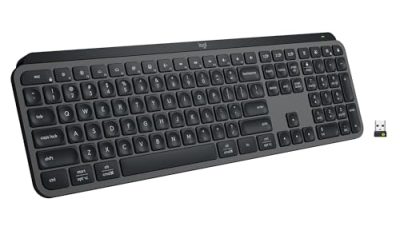
- Logitech MX Mechanical Wireless Illuminated Keyboard TactileFull Size17.9 x 5.9 x 2.1 inches2.55 poundsCheck on Amazon
The best keyboards for graphic design are the ones that disappear while you work. When you are nudging a path by a single pixel, switching between a brush and an eyedropper, or typing a client note between artboards, the keyboard should feel calm, predictable, and fast. A loud, stiff, or cramped board breaks that rhythm, and over a long day the small frictions add up to tired hands and slower work. This guide compares five keyboards that suit design work, from quiet low-profile boards for shared studios to fully programmable mechanical boards for people who live in shortcuts.
Graphic designers ask more of a keyboard than most office workers. You need a full layout or at least a comfortable way to reach modifier keys, because shortcuts in design software lean heavily on combinations with Control, Alt, Shift, and Command. You need keys that feel consistent from corner to corner, so a long press on a brush-size shortcut behaves the same as a tap on the spacebar. You also need a board that sits well beside a drawing tablet or a second monitor, without forcing your shoulders into an awkward angle. The five picks below cover those needs in different ways, and the comparison table at the end makes the trade-offs easy to see at a glance.
How to Choose
1. Key feel and switch type
Key feel is the first thing to get right. Low-profile scissor and membrane-style keys are quiet and gentle, which suits long typing sessions and shared rooms. Mechanical switches give a clearer actuation point and more travel, which many designers prefer for deliberate shortcut presses. There is no single correct answer here. If you type lightly and value silence, lean toward low-profile boards. If you want a distinct tactile bump under each finger, lean toward a mechanical board with quiet or tactile switches rather than loud clicky ones.
2. Layout and the number pad
A full-size layout with a number pad is useful when you enter dimensions, hex colour values, and layer numbers all day. A tenkeyless or compact layout frees desk space for a drawing tablet and keeps the mouse closer to your body, which can ease shoulder strain. Think about how you actually work. If your tablet sits to the right of the keyboard, a compact board may be the better fit. If you enter numbers constantly, keep the number pad.
3. Shortcut support and programmability
Design software rewards people who customise shortcuts. A keyboard with programmable keys, a companion app, or open firmware lets you assign actions such as switching tools, zooming, undoing, or toggling guides to keys you can reach without looking. Even without full programmability, a board with well-placed function keys and reliable modifier keys will serve you well. Check that the board works with your operating system, because some shortcut layouts differ between Windows and Mac.
4. Connection and multi-device switching
Many designers move between a desktop, a laptop, and a tablet during a single project. A keyboard that pairs with three devices over Bluetooth, and also offers a wired USB-C connection, makes that movement painless. A physical switch or a dedicated key for changing devices is quicker than opening a settings menu every time. Battery life matters too, especially on wireless boards, so look for a rechargeable cell with a long working time between charges.
5. Noise level
Noise is a real consideration in a studio, a library, or a home shared with other people. Quiet switches, dampened keycaps, and a solid chassis all reduce the sound of typing. Mechanical boards vary widely here, so pay attention to the switch description. Tactile quiet switches and linear switches with sound-absorbing foam are generally quieter than clicky switches, which are best avoided in shared spaces.
6. Build quality and keycap durability
A keyboard for design work gets used for hours every day, so the chassis and keycaps need to last. An aluminium top plate adds rigidity and a premium feel, while double-shot PBT keycaps resist shine and wear better than thin ABS caps. Look at the feet and the typing angle as well. A board that wobbles on the desk or forces your wrists into a steep angle will cause discomfort over time, no matter how good the switches are.
7. Comfort for long sessions
Comfort comes from the whole setup, not just the keyboard. A low-profile board pairs well with a slim wrist rest, while a taller mechanical board may need a thicker rest to keep your wrists neutral. Consider the weight of the board too. A heavier board stays put when you type firmly, while a very light board can slide around. If you work long hours, try to keep your elbows close to your body and your wrists straight, and take short breaks to stretch your hands.
Top Picks
Logitech MX Keys S
The Logitech MX Keys S is a full-size, low-profile wireless keyboard built for quiet, precise typing. Its spherically dished keys guide your fingertips to the centre of each key, and the smart backlighting brightens as your hands approach and dims when you move away. It connects over Bluetooth or the included Logi Bolt receiver, pairs with up to three devices, and works with Windows, macOS, Linux, and ChromeOS. The companion software lets you assign Smart Actions, which can automate a sequence of steps with a single key press, a handy trick for repetitive design tasks such as exporting or resizing.
For graphic design, the MX Keys S shines in a shared studio or a quiet home office. The low-profile keys are gentle on the fingers during long sessions, the full layout includes a number pad for entering dimensions and colour values, and the multi-device switching is quick enough to move between a desktop and a laptop without breaking concentration. The rechargeable battery lasts for weeks of typical use between charges over USB-C.
Who it is for: designers who want a quiet, full-size board with strong software customisation and smooth switching between computers.
Caveats: the key feel is soft rather than mechanical, so typists who want a distinct tactile bump may prefer a mechanical board. The board is full-size, so it takes up more desk space than a compact board and pushes a mouse or tablet further to the right.
Logitech MX Mechanical
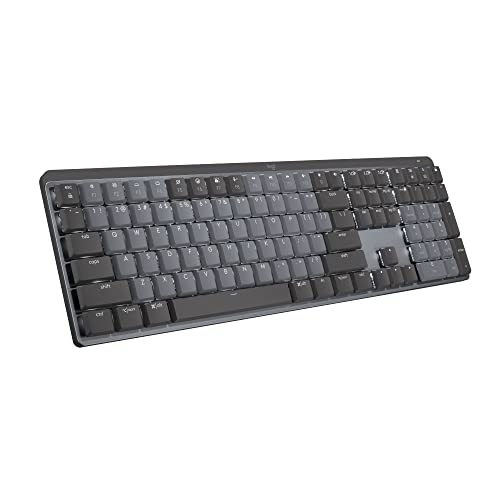
The Logitech MX Mechanical is a full-size, low-profile mechanical keyboard with tactile quiet switches, backlit keys, and an aluminium top case. It offers the same multi-device Bluetooth and Logi Bolt connectivity as the MX Keys S, with up to three paired devices, plus a USB-C rechargeable battery. The low-profile mechanical switches give a clear actuation point without the tall key travel of a traditional mechanical board, and the smart backlighting adjusts to the light in the room and to your hands approaching the keys.
For design work, the MX Mechanical suits people who want mechanical feedback without loud clicks. The tactile quiet switches make shortcut presses feel deliberate, which helps when you are toggling tools or nudging objects in small steps. The full layout keeps the number pad within reach, and the solid metal frame keeps the board stable during fast typing.
Who it is for: designers who like mechanical key feel but need a quiet board for a shared workspace.
Caveats: the low-profile switches feel different from full-height mechanical switches, so enthusiasts who want deep travel may find them shallow. The board is heavier than a plastic membrane board, which is good for stability but less convenient to carry between desks.
Apple Magic Keyboard with Touch ID and Numeric Keypad
Apple Magic Keyboard with Touch ID and Numeric Keypad
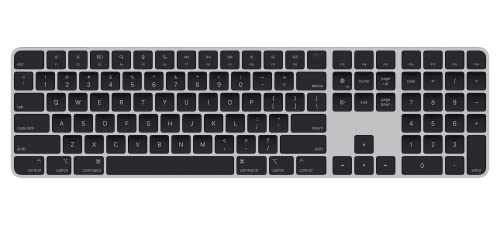
The Apple Magic Keyboard with Touch ID and Numeric Keypad is a slim, full-size wireless keyboard for Mac computers with Apple silicon. It pairs over Bluetooth, charges over USB-C, and includes a Touch ID sensor for unlocking a Mac and approving purchases. The scissor-switch keys are quiet and stable, with short travel and a crisp landing, and the aluminium enclosure matches the look of modern Mac hardware.
For graphic design on a Mac, this board is a natural fit. The layout matches macOS conventions exactly, with Command and Option keys in the expected places, and the numeric keypad is useful for entering values in design software. The slim profile keeps wrists in a comfortable position on a flat desk, and the quiet keys are well suited to a studio where other people are working nearby.
Who it is for: Mac-based designers who want a first-party keyboard with Touch ID and a clean, low-profile design.
Caveats: this board is designed for Mac computers with Apple silicon, so Windows users should choose a different pick. There is no backlighting, which matters if you often work in a dim room, and there is no Windows-style layout option.
Keychron K8 Pro
The Keychron K8 Pro is a tenkeyless wireless mechanical keyboard with QMK and VIA support, hot-swappable switches, and double-shot PBT keycaps. It connects over Bluetooth to up to three devices or over a wired USB-C connection, and it works with both Mac and Windows layouts thanks to a physical system switch and included keycaps for each platform. The aluminium frame and sound-absorbing foam give it a solid, muted typing sound.
For graphic design, the K8 Pro is the customisation pick. QMK and VIA let you remap any key, build layers for different applications, and assign macros for actions you repeat all day. The tenkeyless layout leaves room on the desk for a drawing tablet, and the hot-swappable sockets let you change switches later without soldering if your preferences change.
Who it is for: designers who want to build a personal shortcut layout and who value a compact, customisable mechanical board.
Caveats: the tenkeyless layout has no number pad, so number-heavy work needs the top number row or a separate pad. The board is taller and heavier than a low-profile board, and setting up QMK layers takes some learning time.
Keychron K2 Max
The Keychron K2 Max is a compact 75 percent wireless mechanical keyboard with QMK support, a 2.4 GHz wireless connection, Bluetooth, and a wired USB-C mode. It has 84 keys, a solid aluminium frame, hot-swappable switches, and a white backlight. The layout keeps the function row and arrow keys while trimming the number pad, which saves a useful amount of desk space without losing the keys designers use most.
For graphic design, the K2 Max suits a desk where space is tight. The compact footprint leaves room for a tablet or a large mouse pad, the three connection modes cover a desktop, a laptop, and a spare machine, and QMK support allows the same kind of shortcut customisation as the K8 Pro. The Super Red switches in this version are smooth and linear, with a light touch that suits long typing sessions.
Who it is for: designers with a small desk who want a compact mechanical board with flexible connectivity and remappable keys.
Caveats: there is no number pad, and the white backlight is simpler than full RGB lighting if that matters to you. The 75 percent layout places some keys in slightly different positions than a full-size board, so allow a short adjustment period.
Comparison Table
| Keyboard | Layout | Switch type | Connection | Number pad | Best for |
|---|---|---|---|---|---|
| Logitech MX Keys S | Full-size | Low-profile scissor | Bluetooth, Logi Bolt, USB-C | Yes | Quiet, full-size typing |
| Logitech MX Mechanical | Full-size | Low-profile mechanical, tactile quiet | Bluetooth, Logi Bolt, USB-C | Yes | Quiet mechanical feel |
| Apple Magic Keyboard with Touch ID | Full-size | Scissor | Bluetooth, USB-C | Yes | Mac-based design work |
| Keychron K8 Pro | Tenkeyless | Hot-swappable mechanical | Bluetooth, USB-C wired | No | Custom shortcuts |
| Keychron K2 Max | 75 percent | Hot-swappable mechanical, Super Red | 2.4 GHz, Bluetooth, USB-C wired | No | Compact desks |
Which One Is Right for You?
If you work in a shared studio and want the quietest full-size board with a number pad, start with the Logitech MX Keys S. If you want mechanical feedback in the same quiet, full-size package, the Logitech MX Mechanical is the closer match. Mac-based designers who value Touch ID and a perfectly matched macOS layout should look at the Apple Magic Keyboard with Touch ID and Numeric Keypad, keeping in mind that it is a Mac-only board with no backlighting.
If your priority is customisation, choose between the two Keychron boards by desk space. The K8 Pro gives you a tenkeyless layout with a familiar arrow-key cluster and strong QMK support, while the K2 Max is more compact and adds a 2.4 GHz wireless mode. Both need a separate number pad if you enter numbers all day, so factor that into your desk plan. Whichever board you choose, pair it with a comfortable wrist position and a layout that leaves room for your tablet or mouse, because comfort over a full working day matters as much as any single switch.
Frequently Asked Questions
Do graphic designers need a mechanical keyboard?
No, a mechanical keyboard is not required for graphic design. Many designers work happily on low-profile scissor keyboards, and the most important factors are comfortable key feel, reliable modifier keys, and a layout that fits your desk. A mechanical board is worth considering if you like a distinct actuation point and want to customise switches or key mappings.
Is a number pad important for design work?
A number pad helps when you enter dimensions, hex colour values, and layer numbers frequently, because it keeps your right hand in one place. It is not essential, though. Designers with a compact desk often prefer a tenkeyless or 75 percent board and use the top number row, or add a small standalone number pad when needed.
What makes a keyboard quiet enough for a shared studio?
Quiet keyboards use low-profile scissor keys, tactile quiet or linear switches, sound-absorbing foam, and a solid chassis that does not amplify key noise. Clicky switches are the loudest option and are best avoided in shared spaces. A keyboard with dampened keycaps and a heavier frame will also sound softer than a light, hollow board.
Can one keyboard work well with both Mac and Windows?
Yes, several boards in this guide support both platforms. Look for a board with a physical Mac and Windows switch, keycaps for both layouts, and software or firmware that lets you remap keys. The Logitech MX boards and both Keychron boards in this guide are designed for cross-platform use, while the Apple Magic Keyboard is built specifically for Mac computers with Apple silicon.
Disclosure: As an Amazon Associate, we may earn from qualifying purchases.
FAQ
Which One Is Right for You?
Do graphic designers need a mechanical keyboard?
Is a number pad important for design work?
What makes a keyboard quiet enough for a shared studio?
Can one keyboard work well with both Mac and Windows?
More from Amazon
Programs that pair well with the guide above. Offers and eligibility are set by Amazon and may change.
Free shipping on eligible items, Prime Video and more. Eligible new members can start with a free trial.
Start a Prime free trialAd-free music streaming. Eligible new subscribers can start with a free trial.
Try Music Unlimited freeA Prime membership for ages 18-24 with a trial period. Eligibility is set by Amazon.
See Prime for Young AdultsAudiobooks and podcasts to listen to on the go. Eligible new members can start with a free trial.
Try Audible freeAs an Amazon Associate we earn from qualifying purchases.