Our Short List of 3

- Best for: Households upgrading from an older router on a gigabit-or-slower plan.
- Wi-Fi 6 (802.11ax), dual-band AX3000
- Wireless speeds up to 574 Mbps on 2.4 GHz and 2402 Mbps on 5 GHz
- 1 GHz dual-core processor with 512 MB RAM
- 1 gigabit WAN port and 4 gigabit LAN ports

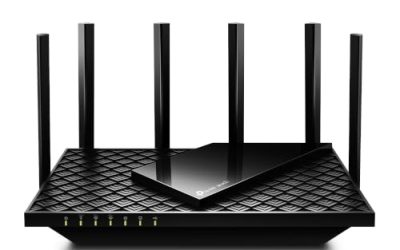
- Best for: Larger homes with many connected devices and heavy simultaneous streaming.
- Wi-Fi 6 (802.11ax), dual-band AX5400
- Wireless speeds up to 574 Mbps on 2.4 GHz and 4804 Mbps on 5 GHz
- 1.5 GHz triple-core processor
- 1 gigabit WAN port and 4 gigabit LAN ports with link aggregation on two LAN ports

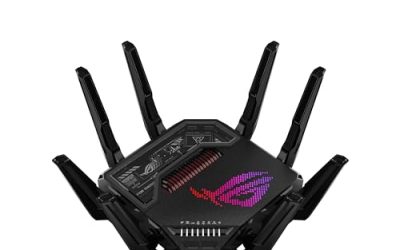
- Best for: Gamers and households on a multi-gig internet plan who want a fast wired port.
- Wi-Fi 6 (802.11ax), dual-band AX5700
- Wireless speeds up to 861 Mbps on 2.4 GHz and 4804 Mbps on 5 GHz
- 2.0 GHz quad-core processor with 1 GB RAM and 256 MB flash
- 1 configurable 2.5G WAN or LAN port, 1 gigabit WAN port, and 4 gigabit LAN ports
All 4 Picks at a Glance
| Product | Specs | Action |
|---|---|---|
| TP-Link Archer AX55 |
| Check price on Amazon |
| TP-Link Archer AX73 |
| Check price on Amazon |
| ASUS RT-AX86U Pro |
| Check price on Amazon |
 TP-Link Archer AXE75 |
| Check price on Amazon |
Our Top Picks
- TP-Link AXE5400 Tri-Band WiFi 6E RouterWiFi 6E, Tri-Band AXE540012.91 x 10.43 x 4.72 inches1.5 poundsCheck on Amazon
A home router decides whether a video call freezes in the next room, whether a download crawls while someone else streams, and whether the far bedroom gets any signal at all. Most households do not need the fastest hardware on the market, but they do need a router whose wireless standard, port layout, and coverage match the size of the home and the number of devices hanging off it.
This guide is written for families replacing an aging ISP-supplied box, for gamers who want a stable wired connection alongside strong wireless, and for households with dozens of phones, laptops, consoles, and smart-home gadgets. Each router below was chosen from its name and listed specifications on Amazon, and every model here is a standalone Wi-Fi router built for home networks.
Quick Picks
As an Amazon Associate we earn from qualifying purchases.
| Product | Best for | Key spec from title |
|---|---|---|
| TP-Link Archer AX55 | Everyday home use on a modest plan | Wi-Fi 6 AX3000 with four antennas |
| TP-Link Archer AX73 | Larger homes with many devices | Wi-Fi 6 AX5400 with six antennas |
| ASUS RT-AX86U Pro | Gaming and multi-gig internet plans | Wi-Fi 6 AX5700 with a 2.5G port |
| TP-Link Archer AXE75 | Crowded wireless airwaves | Tri-band Wi-Fi 6E AXE5400 with a 6 GHz band |
How to Choose
Match the wireless standard to your devices
Wi-Fi 6 routers handle many simultaneous connections far better than older Wi-Fi 5 models, thanks to OFDMA and MU-MIMO, which let the router talk to several devices in the same transmission window instead of one at a time. If most of your phones and laptops were bought in the last few years, a Wi-Fi 6 model is the sensible baseline. Wi-Fi 6E adds a 6 GHz band that newer devices can use to escape crowded 2.4 GHz and 5 GHz airwaves, which matters most in apartment buildings where dozens of neighboring networks overlap. Check which standards your newest devices support before paying for a band none of them can use.
Count the devices and the rooms
A router that copes with ten devices in a flat may struggle with forty devices spread across three bedrooms, because every connected gadget reserves airtime and management overhead even when idle. Look at the number of antennas, the stream count, and the listed device capacity, and be honest about how many phones, tablets, consoles, televisions, and smart-home gadgets will stay connected around the clock. Thick walls and floors eat signal faster than open space does, so a home with plaster, brick, or concrete between rooms needs stronger coverage or a mesh-ready model that can accept an extender later.
Check the wired ports before you buy
Wireless speed gets the attention, but the wired ports decide how well a gaming PC, a console, or a network drive performs. Count how many gigabit LAN ports the router offers, and check whether any port runs faster than gigabit for a multi-gig internet plan or a fast local connection. A USB port adds useful flexibility for sharing a drive across the household, while link aggregation can bond two LAN ports for a wired device that supports it. If your plan is faster than one gigabit, a router with only gigabit ports will cap everything wired to that ceiling.
Weigh security and management tools
Every router in this guide includes WPA3 encryption, which is now the baseline for a home network, but the extra tools differ in ways that matter day to day. Parental controls let you set schedules and filter content for children, while a built-in VPN client or server helps when you work from home or want remote access to your network. Some security suites include a free trial that later asks for a subscription, so read the listing carefully and decide whether the advanced protection is something you will actually keep. A clear companion app also matters, because most setup and troubleshooting happens on a phone.
The 4 Best Options
TP-Link Archer AX55
- Best for: Households upgrading from an older router on a gigabit-or-slower plan.
- Wi-Fi 6 (802.11ax), dual-band AX3000
- Wireless speeds up to 574 Mbps on 2.4 GHz and 2402 Mbps on 5 GHz
- 1 GHz dual-core processor with 512 MB RAM
- 1 gigabit WAN port and 4 gigabit LAN ports
Households upgrading from an older router on a gigabit-or-slower plan.
Gigabit-only ports cap wired speed at one gigabit, so a faster internet plan gains nothing on a cable.
The Archer AX55 suits households that want reliable Wi-Fi 6 without buying features they will never use. Its AX3000 wireless class splits into 574 Mbps on 2.4 GHz and 2402 Mbps on 5 GHz, which covers streaming, video calls, and everyday browsing across a typical family home. Four external antennas with beamforming push signal toward connected devices, while the Tether app keeps setup and guest-network management straightforward for anyone replacing a provider-supplied box for the first time.
Watch out for: Gigabit-only ports cap wired speed at one gigabit, so a faster internet plan gains nothing on a cable.
TP-Link Archer AX73
- Best for: Larger homes with many connected devices and heavy simultaneous streaming.
- Wi-Fi 6 (802.11ax), dual-band AX5400
- Wireless speeds up to 574 Mbps on 2.4 GHz and 4804 Mbps on 5 GHz
- 1.5 GHz triple-core processor
- 1 gigabit WAN port and 4 gigabit LAN ports with link aggregation on two LAN ports
Larger homes with many connected devices and heavy simultaneous streaming.
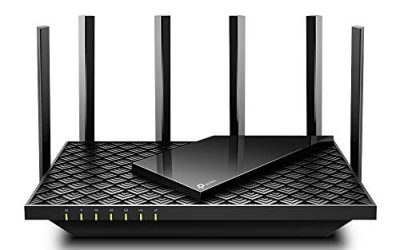
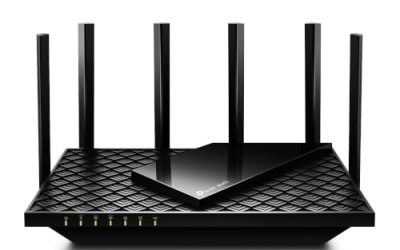
Its six-antenna frame is wide, so measure the shelf or cabinet where it will sit before ordering.
The Archer AX73 is the pick for larger homes where the router must reach distant rooms and keep dozens of devices connected at once. Six high-performance antennas and a 1.5 GHz triple-core processor drive its AX5400 class, with 4804 Mbps available on the 5 GHz band for demanding streaming and downloads. TP-Link lists support for more than 200 connected devices, and the OneMesh system lets you add a compatible extender later if a corner of the house still sits in a dead zone.
Watch out for: Its six-antenna frame is wide, so measure the shelf or cabinet where it will sit before ordering.
ASUS RT-AX86U Pro
- Best for: Gamers and households on a multi-gig internet plan who want a fast wired port.
- Wi-Fi 6 (802.11ax), dual-band AX5700
- Wireless speeds up to 861 Mbps on 2.4 GHz and 4804 Mbps on 5 GHz
- 2.0 GHz quad-core processor with 1 GB RAM and 256 MB flash
- 1 configurable 2.5G WAN or LAN port, 1 gigabit WAN port, and 4 gigabit LAN ports
Gamers and households on a multi-gig internet plan who want a fast wired port.
Some advanced features, including AiProtection and Adaptive QoS, require accepting a third-party license agreement during setup.
The RT-AX86U Pro is built for households where gaming and a fast internet plan sit at the center of the network. Its 2.0 GHz quad-core processor and 1 GB of RAM keep latency-sensitive traffic moving, while a configurable 2.5G port works as either a multi-gig WAN connection or a high-speed LAN link for a gaming PC. A dedicated gaming port prioritizes a connected console or PC, and Mobile Game Mode trims lag for phones, which makes this the most purpose-built model in this roundup.
Watch out for: Some advanced features, including AiProtection and Adaptive QoS, require accepting a third-party license agreement during setup.
TP-Link Archer AXE75
- Best for: Apartments and crowded neighborhoods where the 6 GHz band escapes neighboring networks.
- Wi-Fi 6E (802.11ax), tri-band AXE5400
- Wireless speeds up to 574 Mbps on 2.4 GHz, 2402 Mbps on 5 GHz, and 2402 Mbps on 6 GHz
- 1.7 GHz quad-core processor
- 1 gigabit WAN port and 4 gigabit LAN ports
Apartments and crowded neighborhoods where the 6 GHz band escapes neighboring networks.
Only devices with Wi-Fi 6E hardware can use the 6 GHz band, so older phones and laptops stay on the other two bands.
The Archer AXE75 adds a 6 GHz band to the familiar dual-band layout, giving newer phones and laptops a quieter channel away from neighboring networks. Its tri-band AXE5400 class splits across 2.4 GHz, 5 GHz, and 6 GHz, with 160 MHz channels on the faster bands, and a 1.7 GHz quad-core processor keeps the extra band from becoming a bottleneck. Six antennas spread coverage through the home, and the built-in VPN client and server support remote access without extra hardware.
Watch out for: Only devices with Wi-Fi 6E hardware can use the 6 GHz band, so older phones and laptops stay on the other two bands.
Which One Fits Your Situation
Replacing an old ISP router in a small home
Choose the TP-Link Archer AX55. Its AX3000 wireless, four antennas, and gigabit ports cover everyday browsing, streaming, and video calls without asking you to configure anything complicated. The USB port and mesh compatibility leave room to grow, and the straightforward app setup suits a first-time router swap. Shared storage can use the USB port, and mesh support means a later extender can fill any weak corner.
Covering a larger house full of devices
Choose the TP-Link Archer AX73. Six antennas, a stronger processor, and support for more than 200 devices keep the network steady when televisions, consoles, phones, and smart-home gadgets all connect at once. If one room still drops out, its OneMesh support lets you add an extender instead of starting over.
Gaming seriously on a fast connection
Choose the ASUS RT-AX86U Pro. The 2.5G port accepts a multi-gig plan or feeds a gaming PC at full speed, the dedicated gaming port prioritizes a console, and the quad-core processor with 1 GB of RAM handles heavy traffic without stumbling. Its AiMesh support also means it can anchor a larger network later.
Living where every neighbor has a router
Choose the TP-Link Archer AXE75. Its 6 GHz band gives Wi-Fi 6E devices a channel that older routers cannot touch, which cuts interference in dense apartment buildings. The tri-band layout keeps older devices on 2.4 GHz and 5 GHz while newer hardware moves to the quieter band. The built-in VPN support also helps when you work from home, and the six antennas keep the signal steady across rooms.
Common Mistakes
- Buying a router rated far above the internet plan and expecting the wireless to exceed what the connection delivers.
- Placing the router inside a closed cabinet or behind a television, where walls and metal block the signal before it reaches the next room.
- Ignoring the wired ports, then discovering a gaming PC or console has no free LAN port and must run on wireless.
- Choosing a Wi-Fi 6E model when no device in the house supports the 6 GHz band, leaving the headline feature unused.
- Skipping the security setup, including the admin password and firmware updates, after the first successful connection.
Frequently Asked Questions
Is Wi-Fi 6 enough for a typical family home?
Yes, for most households Wi-Fi 6 is enough, because its OFDMA and MU-MIMO features handle many simultaneous devices far better than Wi-Fi 5. A Wi-Fi 6 router with an AX3000 or AX5400 class covers streaming, video calls, and gaming on a gigabit-or-slower plan. Only homes with Wi-Fi 6E devices and crowded airwaves gain clearly from stepping up to a 6 GHz band.
Do I need a modem as well as a router?
Most of these routers need a separate modem to reach the internet, because they connect through an Ethernet WAN port rather than a phone line or cable input. Check what your internet provider installed: if you already have a modem or a combined unit in bridge mode, the router plugs straight in. If you only have a wall socket, ask your provider what modem the connection requires.
How many devices can a home router handle?
The honest answer depends on the model and on how active those devices are. The Archer AX73 lists support for more than 200 connected devices, while the other models here handle typical family loads of several dozen without trouble. Idle smart-home gadgets use little airtime, but several simultaneous video streams and downloads will strain a weaker processor, so match the router to your busiest evening, not your quietest morning.
Where should I place the router for the best coverage?
Place the router in a central, elevated, open spot, away from thick walls, metal shelves, and large appliances. A hallway shelf or a table near the middle of the home usually beats a corner desk or a basement cabinet. Keep the antennas upright and give the unit airflow, because heat and obstructions both shrink the usable range before any setting can compensate.
FAQ
Is Wi-Fi 6 enough for a typical family home?
Do I need a modem as well as a router?
How many devices can a home router handle?
Where should I place the router for the best coverage?
More from Amazon
Programs that pair well with the guide above. Offers and eligibility are set by Amazon and may change.
Free shipping on eligible items, Prime Video and more. Eligible new members can start with a free trial.
Start a Prime free trialAd-free music streaming. Eligible new subscribers can start with a free trial.
Try Music Unlimited freeA Prime membership for ages 18-24 with a trial period. Eligibility is set by Amazon.
See Prime for Young AdultsAudiobooks and podcasts to listen to on the go. Eligible new members can start with a free trial.
Try Audible freeAs an Amazon Associate we earn from qualifying purchases.