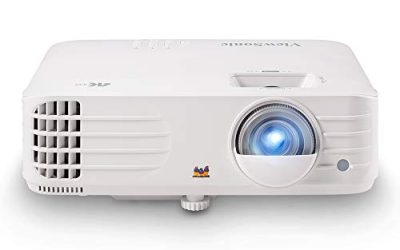
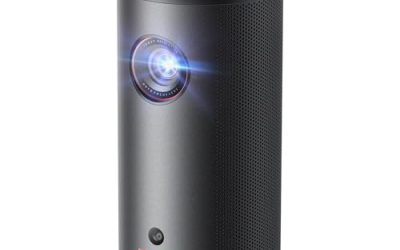
Our Short List of 3

- 2x to 14x enlargement, 5-inch by 5-inch copy size, LED light source, 5,000 lumens, portable tabletop design, non-digital wall projection.

- Up to 14x enlargement, projects images up to 7 inches, opaque art projector for wall or canvas reproduction, non-digital design, top-loading copy area.
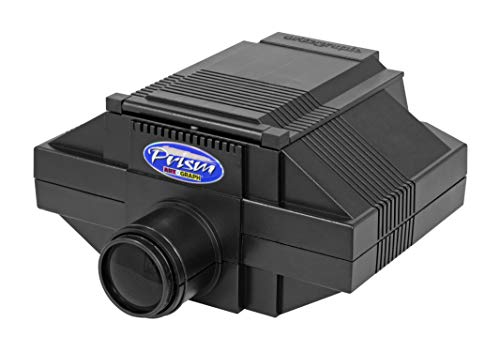
- Up to 20x enlargement, reduces to 80 percent with reversed lens, 200mm optical glass lens, 7-inch by 7-inch copy area, 500-watt lamp, dual-cooling system, about 11 pounds, 7.5-foot cord.
All 3 Picks at a Glance
| Product | Specs | Action |
|---|---|---|
| Artograph LED Tracer Opaque Art Projector |
| Check price on Amazon |
| Artograph Tracer Projector |
| Check price on Amazon |
| Artograph Prism Opaque Art Projector |
| Check price on Amazon |
Key takeaways
- Find the best art projectors for beginners, from simple opaque tracers to bright LED models, with honest guidance on size, brightness, and ease of use.
The best art projectors for beginners turn a small sketch, photo, or printed image into a large, traceable outline on canvas, paper, or a wall. Instead of redrawing a composition freehand and hoping the proportions hold, a beginner can project the reference, trace the key lines, and spend their energy on shading, color, and detail. That single change makes murals, portraits, signs, and craft projects far more approachable for someone who is still building confidence with a pencil or a brush.
An art projector is not the same as a home theater projector. The models in this guide are opaque projectors, sometimes called tracers or enlargers. They shine a bright light through a printed image or a small drawing placed on a glass copy surface, then throw that image onto a vertical surface where it can be traced. There is no computer, no file to open, and no software to learn, which is exactly why they suit beginners. The trade-off is that the room needs to be dim, the image needs to be printed on paper, and the projector itself needs a steady surface at the right distance from the wall.
This guide covers four art projectors that are genuinely sold as art tools, explains how to choose between an opaque tracer and a digital model, and flags the practical details beginners often miss, such as replacement bulbs, copy size, and weight. Every pick below is a complete projector, not an accessory, and each one is suited to a different kind of first project.
How to Choose
1. Opaque or digital
Opaque projectors work with physical originals: a printed photo, a magazine page, a pencil sketch, or a pattern on paper. Digital projectors work with files from a phone or a computer and often add grids, zoom, and focus controls. Beginners who want the simplest possible workflow should start with an opaque projector, because there is nothing to connect and nothing to configure. A digital model makes sense only if the reference art lives on a screen and will never be printed.
2. Enlargement range
The enlargement range tells you how much bigger the projected image can be than the original. A range of 2x to 10x covers most tabletop and wall work, while a range that reaches 14x or 20x suits murals and large signs. Wider is not automatically better: very large projections get dimmer and softer at the edges, so beginners get cleaner results by staying near the middle of the range.
3. Copy size
Copy size is the largest original the projector accepts, and it is one of the most common beginner mistakes. A 4-inch copy area fits a small sketch or a phone-sized print, while a 5-inch or 7-inch area fits a full printed photo or a standard pattern sheet. Measure the reference images you actually plan to use before choosing, because an original that does not fit simply cannot be projected.
4. Brightness and room light
Opaque projectors need a dim room. The brighter the lamp, the more the projected outline holds up against stray light from a window or a hallway. LED models run cooler and keep their brightness steady, while halogen models run hot and need cooling time. If the only available workspace has windows without curtains, brightness should rank near the top of the list.
5. Lens quality and focus
A glass optical lens keeps lines crisp across the whole projected image, while a cheaper plastic lens softens the corners. Look for a lens that adjusts smoothly and holds focus once set, because refocusing mid-trace wastes time and smudges work. A projector that also reduces an image, rather than only enlarging it, adds flexibility for fitting a large original onto a small canvas.
6. Weight and portability
Some art projectors weigh about two pounds and move easily between a desk and a wall. Others weigh ten pounds or more and belong on a dedicated table. Beginners who plan to work in different rooms, take the projector to a class, or store it between sessions should treat weight as a deciding factor, not an afterthought.
7. Bulbs and running costs
Several opaque projectors ship without a bulb, and the bulb is a separate purchase that must match the model exactly. Check whether a bulb is included, what type it takes, and how easy replacements are to find. LED models avoid this issue entirely, which is one reason they appeal to beginners who do not want a second shopping trip before the first project.
Top Picks
Artograph EZ Tracer Opaque Art Projector
Artograph EZ Tracer Opaque Art Projector
The Artograph EZ Tracer is the classic first art projector, and it earns that position by doing one job with almost no learning curve. Place a printed image or a small drawing on the copy surface, switch the lamp on, aim the projector at a wall or canvas, and trace the outline that appears. There are no menus, no apps, and no cables beyond the power cord.
Its enlargement range runs from 2x to 10x, which covers the projects most beginners attempt first: enlarging a portrait sketch onto canvas, scaling a logo for a sign, or transferring a pattern for a mural. The copy area measures 4 inches by 4 inches, so the original needs to be small, roughly the size of a large postage stamp area or a small printed photo. The 163mm optical glass lens keeps lines readable, and the unit weighs about two pounds, so it moves easily from a desk to a floor setup and back into a cupboard.
The main caveat is the bulb. The EZ Tracer ships without a light bulb, so a compatible bulb must be bought separately before the first use. It also needs a dim room, and the small copy area means large reference photos must be printed at a reduced size first. For a beginner who wants the cheapest and simplest entry point and is happy to print small originals, it remains the most straightforward choice.
Specs
- 2x to 10x enlargement, 4-inch by 4-inch copy size, 163mm optical glass lens, 3,000 lumens, 25 watts, about 2 pounds, 5.5-foot power cord, bulb sold separately.
Who it is for: First-time buyers who want the simplest opaque projector for small sketches, signs, and craft projects.
Caveats: Bulb not included; small copy area; needs a dim room.
Artograph LED Tracer Opaque Art Projector
- 2x to 14x enlargement, 5-inch by 5-inch copy size, LED light source, 5,000 lumens, portable tabletop design, non-digital wall projection.
Artograph LED Tracer Opaque Art Projector
The Artograph LED Tracer takes the same opaque-projector idea and replaces the hot halogen bulb with an LED light source. That single change solves the two complaints beginners raise most often about older tracers: heat and bulb replacements. The LED runs cooler, switches on instantly, and never needs a spare bulb kept in a drawer.
Its enlargement range runs from 2x to 14x, and the copy area measures 5 inches by 5 inches, so it accepts larger originals than the EZ Tracer and projects them further. The LED output is listed at 5,000 lumens, which helps the projected image stay visible in a room that is dim rather than fully dark. The unit stays light and portable, so it works as well on a craft table as it does aimed at a bedroom wall for a mural outline.
The trade-off is that it is still an opaque projector, so the original must exist on paper and the room must be dimmed for the best result. It also costs more than the basic halogen models, which is the price of the LED convenience. For a beginner who plans to use the projector often, or who shares a workspace with family and wants to avoid hot lamps and bulb shopping, the LED Tracer is the most practical step up.
Who it is for: Beginners who want a cooler, lower-maintenance tracer for regular use on canvas, walls, and craft projects.
Caveats: Still needs a dim room; originals must be on paper; higher cost than basic halogen tracers.
Artograph Tracer Projector
- Up to 14x enlargement, projects images up to 7 inches, opaque art projector for wall or canvas reproduction, non-digital design, top-loading copy area.
The Artograph Tracer Projector is the original full-size opaque projector in this lineup, and it suits beginners who want the largest enlargement range of the classic models. It enlarges originals up to 14x and projects images up to 7 inches from the original, which makes it a strong choice for wall murals, large signs, and decorative work that smaller tracers cannot reach.
The design is deliberately simple: a top-loading copy area, a lens that adjusts by hand, and a bright lamp that throws a clear outline onto a vertical surface. There is no screen, no software, and no connection to manage. The projector works with printed photos, magazine images, hand-drawn sketches, and patterns, so a beginner can start with whatever reference material is already on hand.
Its size is the main thing to weigh. This is a tabletop unit rather than a handheld one, and it needs a stable surface at a measured distance from the wall, plus a darkened room for the sharpest image. It is also a halogen model, so the lamp runs warm and replacement bulbs are part of long-term ownership. For a beginner with a dedicated workspace and ambitions beyond small canvases, the extra reach is worth the extra bulk.
Who it is for: Beginners planning murals, large signs, and wall art who want maximum enlargement from a classic opaque projector.
Caveats: Larger tabletop unit; needs a dark room and a stable surface; halogen lamp runs warm.
Artograph Prism Opaque Art Projector
- Up to 20x enlargement, reduces to 80 percent with reversed lens, 200mm optical glass lens, 7-inch by 7-inch copy area, 500-watt lamp, dual-cooling system, about 11 pounds, 7.5-foot cord.
Artograph Prism Opaque Art Projector
The Artograph Prism is the most capable opaque projector in this guide, and it suits a beginner who wants room to grow without buying a second projector later. Its 200mm precision-ground optical glass lens enlarges artwork up to 20x, and with the lens reversed it reduces an image to 80 percent of its original size, which is useful for fitting a large pattern onto a smaller canvas.
The copy area measures 7 inches by 7 inches under a glass-covered, top-loading compartment, so full printed photos and standard pattern sheets fit without trimming. A 500-watt lamp provides the brightness needed for large projections, and a dual-cooling system with a safety overload circuit manages the heat that comes with it. The magnetic hinge holds the body in place while the cover adjusts for the right light and angle.
The Prism is heavy at about 11 pounds, with dimensions around 14 by 14 by 7.5 inches, so it is a studio tool rather than a portable one. It also needs a dark or dim room, and the halogen lamp is a running cost to plan for. For a beginner who has a fixed workspace and wants the widest enlargement range, the largest copy area, and the sharpest lens in this group, the Prism is the pick that will not need replacing as projects get bigger.
Who it is for: Beginners with a dedicated workspace who want the largest copy area and the widest enlargement range in an opaque projector.
Caveats: Heavy and bulky; needs a dim room; halogen lamp runs hot and needs replacement over time.
Comparison Table
| Projector | Enlargement | Copy Size | Light Source | Weight | Best For |
|---|---|---|---|---|---|
| Artograph EZ Tracer | 2x to 10x | 4 x 4 inches | Halogen, bulb sold separately | About 2 pounds | First projects and small sketches |
| Artograph LED Tracer | 2x to 14x | 5 x 5 inches | LED, 5,000 lumens | Light and portable | Regular use without bulb changes |
| Artograph Tracer Projector | Up to 14x | Up to 7-inch image | Halogen | Tabletop unit | Murals and large wall art |
| Artograph Prism | Up to 20x, reduces to 80 percent | 7 x 7 inches | 500-watt halogen | About 11 pounds | Large patterns and growing ambitions |
Which One Is Right for You?
Choose the Artograph EZ Tracer if the goal is to try art projection for the first time with the smallest outlay and the simplest setup. Its small copy area and 2x to 10x range cover sketches, signs, and craft projects, and its two-pound weight makes it easy to store and carry. Just remember to buy a compatible bulb before the first session.
Choose the Artograph LED Tracer if the projector will see regular use. The LED light source removes bulb replacements and heat from the equation, the 5-inch copy area fits larger originals, and the brighter output holds up better in a room that is dim rather than fully dark. It is the most beginner-friendly option for someone who plans to trace often.
Choose the Artograph Tracer Projector if the first projects are murals or large wall pieces. Its 14x enlargement and 7-inch projected image reach further than the smaller models, and its classic design has served artists and crafters for years. It needs a stable table and a dark room, so it fits a dedicated workspace better than a shared living room.
Choose the Artograph Prism if there is a fixed workspace and the projects will keep growing. The 20x enlargement, the 7-inch copy area, and the 200mm glass lens handle the largest originals and the most detailed patterns in this guide, and the reduction mode adds flexibility the others lack. The weight and the halogen lamp are real trade-offs, but they buy capability that a beginner will not outgrow quickly.
Whatever the choice, a beginner should plan the first session carefully: print the reference at a size that fits the copy area, darken the room, tape the canvas or paper firmly in place, and trace only the main outlines first. Details and shading come after the projection is switched off, and that is where the art actually happens.
Frequently Asked Questions
Do I need a computer to use an art projector?
No, not for the opaque projectors in this guide. They work with physical originals printed on paper, so there is nothing to connect and no software to install. A computer is only needed if the reference image exists as a digital file and must be printed first, or if a digital projector is chosen instead of an opaque one.
How dark does the room need to be?
The room should be as dark as practical. Opaque projectors compete with ambient light, so daylight through a window washes out the projected outline. Closing curtains, switching off overhead lights, and working in the evening all help. Brighter models hold up better in a dim room, but none of them performs well in bright daylight.
Can I project a photo from my phone?
Not directly with an opaque projector. The photo must be printed on paper first, at a size that fits the projector’s copy area. A phone photo can be printed at home or at a print shop, and a black-and-white print often traces more cleanly than a color one because the outlines stand out more clearly.
What size should I print my reference image?
Print it to fit the copy area of the projector being used: 4 inches for the EZ Tracer, 5 inches for the LED Tracer, and 7 inches for the Prism. Printing larger wastes paper and forces trimming, while printing smaller wastes enlargement range. A test print on plain paper before the final session avoids surprises.
Disclosure: As an Amazon Associate, we may earn from qualifying purchases.
FAQ
Which One Is Right for You?
Do I need a computer to use an art projector?
How dark does the room need to be?
Can I project a photo from my phone?
What size should I print my reference image?
More from Amazon
Programs that pair well with the guide above. Offers and eligibility are set by Amazon and may change.
Free shipping on eligible items, Prime Video and more. Eligible new members can start with a free trial.
Start a Prime free trialAd-free music streaming. Eligible new subscribers can start with a free trial.
Try Music Unlimited freeA Prime membership for ages 18-24 with a trial period. Eligibility is set by Amazon.
See Prime for Young AdultsAudiobooks and podcasts to listen to on the go. Eligible new members can start with a free trial.
Try Audible freeAs an Amazon Associate we earn from qualifying purchases.