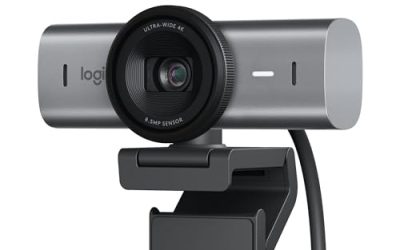
Our Short List of 3

- Best for: Best for a small crew that wants a portable PTZ camera for talks, services, and multi-angle streams.
- 4K at 30 fps and 1080p at 60 fps video
- 1/1.8-inch CMOS sensor with 8.4 megapixels
- 4x digital zoom with f/1.8 aperture
- 320-degree horizontal and 180-degree vertical rotation

- Best for: Best for a solo presenter or teacher who moves around near the camera and wants hands-free framing.
- 4K video at 60 fps with HDR light correction
- 1/1.5-inch sensor with autofocus
- AI tracking with multi-mode and auto zoom
- Voice control and gesture control

- Best for: Best for a speaker who paces a stage and needs fast focus plus a clean voice in a live hall.
- 4K video at 30 fps and 1080p at 60 fps
- 1/2-inch sensor with phase detection autofocus
- AI tracking with HDR and gesture control
- AI noise-canceling microphone built in
All 4 Picks at a Glance
| Product | Specs | Action |
|---|---|---|
| 1. OBSBOT Tail Air |
| Check price on Amazon |
| 3. OBSBOT Tiny 2 |
| Check price on Amazon |
| 4. Insta360 Link 2 |
| Check price on Amazon |
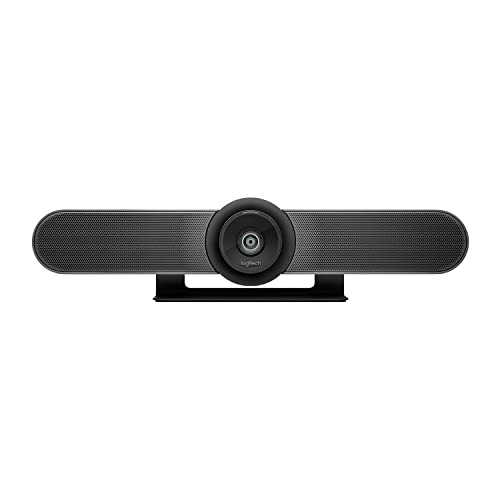 5. Logitech MeetUp |
| Check price on Amazon |
Key takeaways
- Five webcams for a live event compared for sharp video, steady autofocus, wide views, and easy setup for streaming a show, a talk, or a class.
A live event puts a camera to work in a way a desk call never does. The speaker moves across a stage, the light shifts as the program runs, and the audience sits far from the lens. A fixed webcam made for one person at a desk cannot cover that space, so the camera has to pan, tilt, and zoom on its own or from a remote control while the show goes on.
The five cameras below were built for that job. Each one pans and tilts under remote control, follows a moving speaker with AI tracking, or takes in a wide sweep of a room in one frame. All five output sharp 4K video and connect over USB, HDMI, or a network feed, so they slot into a streaming setup for a talk, a class, a service, or a small concert. Pick the one whose zoom, field of view, and outputs match your room.
Quick Picks
As an Amazon Associate we earn from qualifying purchases
| Product | Best for | Key spec from title |
|---|---|---|
| OBSBOT Tail Air | Best for portable multi-angle streaming | 4K PTZ, AI tracking, NDI |
| OBSBOT Tail 2 | Best for pro live production with optical zoom | 4K 60fps, 5x optical zoom, 1/1.5-inch sensor |
| OBSBOT Tiny 2 | Best for a moving presenter at close range | 4K PTZ, 1/1.5-inch sensor, 60 fps |
| Insta360 Link 2 | Best for sharp focus on a moving speaker | 4K PTZ, 1/2-inch sensor, AI tracking |
| Logitech MeetUp | Best for a whole room in one wide frame | 4K, 120-degree view, 3 mics |
How to Choose
Match the Zoom to the Room
Zoom decides whether a camera can sit at the back of a hall and still frame a face. Digital zoom crops the image, so it softens detail as you push in, while optical zoom moves glass and holds sharpness at distance. For a small room, a 4x digital zoom is plenty. For a hall or a sanctuary, look for 5x optical zoom or more, and place the camera where the speaker fills at least a third of the frame at full reach. Measure the throw from the camera mount to the stage before you buy, then match the zoom range to that distance.
Look for Tracking That Follows the Action
A live event never stands still. The speaker walks, the panel turns to each other, and a singer crosses the stage. AI tracking keeps the subject centered without a dedicated operator, which matters when one person runs video, audio, and the stream at the same time. Group tracking is the feature to seek when two or three people share a stage, since it holds the whole group in frame instead of chasing one face. Check whether tracking can be paused from the app or a remote, so you can lock a wide shot during applause or a quiet moment.
Check the Outputs Your Switcher Needs
USB alone works for a laptop stream, but a bigger event often feeds a switcher, a recorder, or a second display. HDMI and SDI carry video to that hardware, while Ethernet opens NDI and other network workflows that run video over a cable you already have in the room. Before you settle on a camera, list every box the signal must reach, then confirm the camera has a matching output for each one. A camera with four output types gives a small team room to grow, while a USB-only camera keeps the setup simple when one laptop does all the work.
Plan Audio and Power Before the Day
A camera mic can cover a quiet talk, but a hall with an audience needs a feed from the house sound system or a mic placed near the speaker. Look for a 3.5mm audio input on the camera, and run a short cable from the mixer so voices arrive clean. Power matters just as much. A battery lets you place a camera where no outlet exists, yet a long event can drain it mid-program, so a USB power bank or a wired supply is the safer call for anything over an hour. Rehearse the full chain once, from camera to stream, before the audience arrives.
The 5 Best Options
1. OBSBOT Tail Air
- Best for: Best for a small crew that wants a portable PTZ camera for talks, services, and multi-angle streams.
- 4K at 30 fps and 1080p at 60 fps video
- 1/1.8-inch CMOS sensor with 8.4 megapixels
- 4x digital zoom with f/1.8 aperture
- 320-degree horizontal and 180-degree vertical rotation
Best for a small crew that wants a portable PTZ camera for talks, services, and multi-angle streams.
Watch out for the 4x digital zoom, which softens the image at full reach, so place the camera near the action.
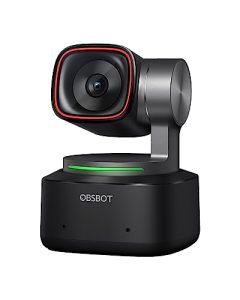
The Tail Air is the smallest 4K PTZ camera in this set, and it was made for crews that move fast. Its two-axis gimbal pans 320 degrees and tilts 180 degrees, so one unit can sweep a stage or follow a speaker across a room. AI tracking follows people, animals, and objects, and gesture control lets a presenter reframe the shot with a hand signal. Four outputs — USB-C, Micro HDMI, Ethernet, and Wi-Fi — feed a laptop, a switcher, or an NDI workflow. A built-in battery runs about two and a half hours, which covers most talks and services without a cable.
Watch out for: Watch out for the 4x digital zoom, which softens the image at full reach, so place the camera near the action.
2. OBSBOT Tail 2
The Tail 2 is the pro camera of the group, built for live production rather than a desk. Its three-axis PTZR gimbal pans, tilts, zooms, and rolls, so it can flip to a vertical frame for a phone-first stream without a crop. A 1/1.5-inch sensor captures 50-megapixel stills and 4K video at 60 frames per second, while 5x optical zoom holds detail from the back of a hall. AI Tracking 2.0 follows a single person or a whole group, and SDI, HDMI, USB-C, and Ethernet outputs feed switchers and network workflows. It is the heaviest camera here, so plan a solid tripod.
Specs
- 4K video at 60 fps and 1080p at 120 fps
- 1/1.5-inch CMOS sensor with 50-megapixel stills
- 5x optical zoom and 12x hybrid zoom
- Three-axis PTZR gimbal with AI Tracking 2.0
- SDI, HDMI, USB 3.0, and Ethernet outputs
- 5,000mAh battery and microSD recording
Best for: Best for a production team that needs optical zoom, 4K at 60 frames per second, and pro outputs for a switcher.
Watch out for: Watch out for the weight and the pro workflow, since this camera suits a planned setup more than a grab-and-go shoot.
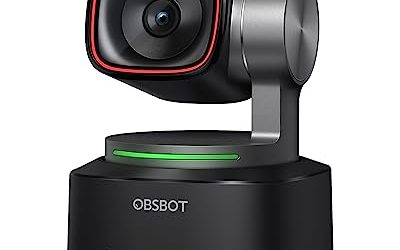
3. OBSBOT Tiny 2
- Best for: Best for a solo presenter or teacher who moves around near the camera and wants hands-free framing.
- 4K video at 60 fps with HDR light correction
- 1/1.5-inch sensor with autofocus
- AI tracking with multi-mode and auto zoom
- Voice control and gesture control
Best for a solo presenter or teacher who moves around near the camera and wants hands-free framing.
Watch out for the USB-only connection, which fits a laptop stream but not a hardware switcher.
The Tiny 2 brings AI tracking to a compact webcam body, and it shines when the speaker stays within a few meters of the lens. Its gimbal pans and tilts to follow movement, and auto zoom adjusts the frame as the speaker steps closer or farther away. A 1/1.5-inch sensor and HDR keep faces clear when stage lights shift, and 4K video at 30 frames per second holds up on a large display. Voice control and gesture control let a presenter steer the camera without touching a keyboard. It is a USB camera, so it pairs with a laptop and a streaming app.
Watch out for: Watch out for the USB-only connection, which fits a laptop stream but not a hardware switcher.
4. Insta360 Link 2
- Best for: Best for a speaker who paces a stage and needs fast focus plus a clean voice in a live hall.
- 4K video at 30 fps and 1080p at 60 fps
- 1/2-inch sensor with phase detection autofocus
- AI tracking with HDR and gesture control
- AI noise-canceling microphone built in
Best for a speaker who paces a stage and needs fast focus plus a clean voice in a live hall.
Watch out for the USB-only link, so pair it with a laptop near the stage rather than a distant switcher.
The Link 2 pairs a 4K camera with a motorized gimbal that tracks a speaker around a room. Its 1/2-inch sensor and phase detection autofocus lock onto a moving face fast, so the image stays sharp when the speaker walks toward the camera. HDR handles mixed light, such as a bright window behind a dim stage, and the AI noise-canceling mic keeps voices clear in a noisy hall. Gesture control begins tracking with a raised hand, and the Link Controller app frames the shot from a laptop. It connects over USB-C, so it suits a laptop-based stream.
Watch out for: Watch out for the USB-only link, so pair it with a laptop near the stage rather than a distant switcher.
5. Logitech MeetUp
- Best for: Best for a panel, a class, or a small hall where one wide shot must hold several people at once.
- Ultra HD 4K sensor with 1080p and 720p modes
- 120-degree field of view with motorized pan and tilt
- 5x HD zoom for a closer frame
- Three beamforming microphones with pickup up to four meters
Best for a panel, a class, or a small hall where one wide shot must hold several people at once.
Watch out for the fixed wide lens, since distant faces lose detail and the zoom cannot match a true PTZ lens.
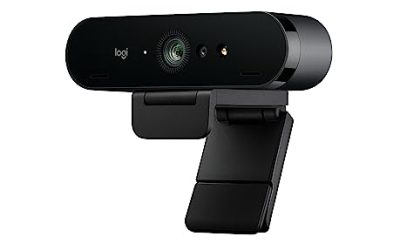
The MeetUp takes a different approach: one wide-angle camera that covers a whole room in a single frame. Its 120-degree field of view fits a panel, a choir, or a row of speakers without a second camera, and motorized pan and tilt extend coverage to 170 degrees. A 4K sensor with 5x HD zoom picks out a single speaker when the moment calls for it. Three beamforming microphones hear voices up to four meters away, and a built-in speaker plays remote voices back into the room. It mounts on a table, a wall, or above a display.
Watch out for: Watch out for the fixed wide lens, since distant faces lose detail and the zoom cannot match a true PTZ lens.
Which One Fits Your Situation
A Small Stage or a Single Speaker
For one speaker on a small stage, the OBSBOT Tiny 2 or the Insta360 Link 2 does the job with the least gear. Set the camera a few meters out, let AI tracking follow the speaker, and run the stream from a laptop at the side of the room. Keep a wired power supply handy, since a long talk can outlast a battery, and aim a mic at the speaker so the hall sound stays clear.
A Full Room With a Moving Presenter
When the presenter roams a hall or a classroom, reach for the OBSBOT Tail Air or the Tail 2. Their gimbals sweep a wide arc, and AI tracking holds the frame while the speaker moves. Mount the camera high at the back of the room, use optical zoom on the Tail 2 for distance, and feed the signal to a switcher over HDMI or Ethernet so the stream stays steady all evening.
A Church Service or a School Assembly
A service or an assembly mixes music, speech, and movement, so a camera with several outputs earns its place. The Tail Air covers the altar or the stage from one mount and sends video over HDMI or a network feed, while the Tail 2 adds optical zoom for a large sanctuary. Bring the house audio into the camera through its audio input, and rehearse the transitions between speakers before the doors open.
A Panel With Several People on Stage
For a panel, a wide shot matters more than a tight close-up. The Logitech MeetUp frames the whole row at once with its 120-degree view, and its microphones hear each panelist without a separate mic on the table. When one person speaks for a while, the 5x zoom can pick them out. Place the camera at eye level across from the panel so every face reads clearly on the stream.
Common Mistakes
- Placing the camera too far from the stage for its zoom range, so faces turn soft and unreadable.
- Relying on a camera mic in a loud hall instead of feeding house audio into the camera.
- Forgetting to charge the battery or bring a wired supply for a long program.
- Skipping a rehearsal, so the first framing problem appears while the audience is already watching.
- Pointing the camera at a bright window, which leaves the speaker as a dark shape.
Frequently Asked Questions
Can one PTZ camera cover a whole live event?
Yes, for a small or mid-size event. One PTZ camera with AI tracking can follow a speaker and reframe on its own, which suits a talk, a class, or a service. For a large hall or a show with several acts, add a second camera for a wide shot, so the stream can cut between the close view and the full stage.
Do I need a switcher for these cameras?
No. A laptop and a streaming app are enough for a single-camera stream over USB, which is how most small events run. A switcher earns its place when you run two or more cameras, mix in slides, or send video to a projector and a stream at the same time. Pick cameras with HDMI or SDI outputs if you plan to grow into that setup.
How far can a PTZ camera sit from the stage?
It depends on the zoom. A camera with 4x digital zoom works best within a few meters, while 5x optical zoom holds detail from the back of a mid-size hall. As a rule, the speaker should fill at least a third of the frame at full zoom. If the room is deeper than that, move the camera closer or add a second unit near the stage.
Can these cameras work with Zoom, Teams, and YouTube?
Yes. All five appear as a standard USB video source, so Zoom, Teams, Meet, and YouTube Live accept them like any webcam. The PTZ models with HDMI, SDI, or NDI outputs can also feed a switcher or a capture device, which then sends the video to the same apps. Check the app settings once before the event so the right camera and mic are selected.
FAQ
Can one PTZ camera cover a whole live event?
Do I need a switcher for these cameras?
How far can a PTZ camera sit from the stage?
Can these cameras work with Zoom, Teams, and YouTube?
More from Amazon
Programs that pair well with the guide above. Offers and eligibility are set by Amazon and may change.
Free shipping on eligible items, Prime Video and more. Eligible new members can start with a free trial.
Start a Prime free trialAd-free music streaming. Eligible new subscribers can start with a free trial.
Try Music Unlimited freeA Prime membership for ages 18-24 with a trial period. Eligibility is set by Amazon.
See Prime for Young AdultsAudiobooks and podcasts to listen to on the go. Eligible new members can start with a free trial.
Try Audible freeAs an Amazon Associate we earn from qualifying purchases.