
Our Short List of 3

- Best for: A fixed home or small business LAN that should stay behind one VPN client connection full time.
- Model: GL-MT6000 (Flint 2), as stated in the listing
- Wi-Fi: Wi-Fi 6, speeds up to 6 Gbps, 8-stream
- Ethernet: 2 x 2.5G Ethernet ports
- Memory and storage: DDR4 1GB, eMMC 8GB, as listed

- Best for: A compact second network for a desk, spare room, or regular travel where the whole small LAN needs the tunnel.
- Model: GL-MT3000 (Beryl AX), as stated in the listing
- Wi-Fi: Wi-Fi 6, 574 Mbps on 2.4 GHz plus 2402 Mbps on 5 GHz
- Ethernet: 2.5G WAN port and Gigabit LAN port
- VPN: OpenVPN up to 150 Mbps and WireGuard up to 300 Mbps, as listed
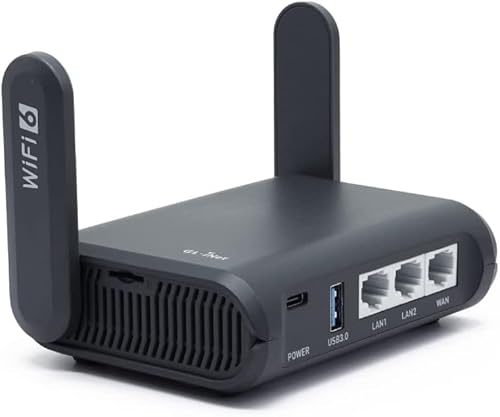
- Best for: Travellers and remote workers who repeatedly convert hotel or public Wi-Fi into a private, tunnelled network.
- Model: GL-AXT1800 (Slate AX), as stated in the listing
- Wi-Fi: Wi-Fi 6, 600 Mbps on 2.4 GHz plus 1200 Mbps on 5 GHz
- Capacity: up to 120 devices simultaneously, as listed
- VPN: OpenVPN up to 120 Mbps and WireGuard up to 550 Mbps, as listed
All 4 Picks at a Glance
| Product | Specs | Action |
|---|---|---|
| GL.iNet GL-MT6000 (Flint 2) |
| Check price on Amazon |
| GL.iNet GL-MT3000 (Beryl AX) |
| Check price on Amazon |
| GL.iNet GL-AXT1800 (Slate AX) |
| Check price on Amazon |
 TP-Link Roam 7 BE3600 (TL-WR3602BE) |
| Check price on Amazon |
Our Top Picks
Buying a router for client-to-LAN VPN is really a decision about where the tunnel lives. If the router itself runs the VPN client, every phone, console, and wired PC behind it shares that one connection, with no per-device app to install or forget. If the router only runs a VPN server, it solves the opposite problem and leaves your LAN traffic uncovered.
This guide is for home gamers who want a whole LAN behind one tunnel, small households splitting traffic by device, and travellers who rebuild a private network in hotels or rentals. Every pick was chosen from its Amazon listing name and stated specifications, and each listing explicitly states VPN client capability rather than server-only support.
Quick Picks
As an Amazon Associate we earn from qualifying purchases
| Product | Best for | Key spec from title |
|---|---|---|
| GL.iNet GL-MT6000 (Flint 2) | A permanent home LAN behind one tunnel | 2 x 2.5G Ethernet ports, Wi-Fi 6 |
| GL.iNet GL-MT3000 (Beryl AX) | A compact second network at home or away | Wi-Fi 6 travel gigabit router with OpenVPN & WireGuard |
| GL.iNet GL-AXT1800 (Slate AX) | Public and hotel Wi-Fi turned private | VPN Client&Server in the listing title |
| TP-Link Roam 7 BE3600 (TL-WR3602BE) | Wi-Fi 7 travel use with an app-led setup | Dual-band Wi-Fi 7, 2.5G port, USB 3.0 |
How to Choose
Confirm the listing says client, not just VPN
The single most important check is wording. A listing that says VPN server, VPN support, or simply VPN may never accept a connection out to your provider, which is the whole job here. Look for the exact phrase VPN client, or for OpenVPN Client and WireGuard Client named separately, as the Flint 2 listing does. The Slate AX puts VPN Client&Server directly in its title, which removes the guesswork. If a listing only promises remote access back into your home, that is server duty, and it belongs in a different guide.
Match VPN throughput to your line and your games
Encryption costs speed, and each listing states its own ceiling. The Beryl AX lists OpenVPN up to 150 Mbps and WireGuard up to 300 Mbps, while the Slate AX lists OpenVPN up to 120 Mbps and WireGuard up to 550 Mbps. WireGuard is the lighter protocol on every model here, so a fast fibre line paired with an OpenVPN-only plan can leave much of that line unused. Compare the stated VPN figures, not the headline Wi-Fi rate, against the speed you actually pay for before choosing.
Count the wired ports your LAN really needs
A client-to-LAN setup only covers devices that pass through this router, so its ports shape the network. The Flint 2 offers two 2.5G Ethernet ports plus further gigabit LAN ports, suiting a modem, a gaming PC, and a console wired at once. The Beryl AX and Roam 7 each pair one faster WAN port with a single gigabit LAN port, which fits a smaller setup or a travel kit. Sketch which devices must be wired, including any switch you plan to add, before the port count decides for you.
Decide how much control you want over routing
Some buyers want the whole LAN in the tunnel; others want only a console or work laptop covered while streaming stays direct. The Beryl AX listing describes VPN cascading and custom VPN policies, and the GL.iNet models run OpenWrt, which suits that split approach. The Roam 7 takes the simpler route through the Tether app and one-step captive portal sign-in, and its listing states it does not support OpenWrt. Neither answer is wrong, but picking the wrong style means fighting the interface every time the setup changes.
The 4 Best Options
GL.iNet GL-MT6000 (Flint 2)
- Best for: A fixed home or small business LAN that should stay behind one VPN client connection full time.
- Model: GL-MT6000 (Flint 2), as stated in the listing
- Wi-Fi: Wi-Fi 6, speeds up to 6 Gbps, 8-stream
- Ethernet: 2 x 2.5G Ethernet ports
- Memory and storage: DDR4 1GB, eMMC 8GB, as listed
A fixed home or small business LAN that should stay behind one VPN client connection full time.
Its VPN speed figures differ between listing versions for OpenVPN, so check the current listing figures against your line before relying on that protocol.
The Flint 2 is the pick that stays home. It is a full-size Wi-Fi 6 router rather than a travel puck, so it can sit permanently between a fibre modem and the rest of the LAN, holding the VPN client connection for wired and wireless devices alike. Its listing names OpenVPN Client and WireGuard Client as built in, alongside the matching server functions, and its stated WireGuard ceiling is the highest in this group. For a gaming household that wants the tunnel always on, rather than rebuilt per trip, this is the natural anchor.
GL.iNet GL-MT3000 (Beryl AX)
- Best for: A compact second network for a desk, spare room, or regular travel where the whole small LAN needs the tunnel.
- Model: GL-MT3000 (Beryl AX), as stated in the listing
- Wi-Fi: Wi-Fi 6, 574 Mbps on 2.4 GHz plus 2402 Mbps on 5 GHz
- Ethernet: 2.5G WAN port and Gigabit LAN port
- VPN: OpenVPN up to 150 Mbps and WireGuard up to 300 Mbps, as listed
A compact second network for a desk, spare room, or regular travel where the whole small LAN needs the tunnel.
With one LAN port, a wired setup beyond a single device needs a switch, and its OpenVPN ceiling is well below its Wi-Fi rate.
The Beryl AX suits a buyer who wants a small, separate network rather than a full router replacement. Its pocket-sized body, USB-C power, and 2.5G WAN port let it front a desk setup, a spare room, or a rental property connection, with every device behind it routed through its VPN client. The listing states that it can simultaneously run VPN client and server, and describes VPN cascading with custom policies, which helps when only part of the traffic should enter the tunnel. It is also the easiest model here to move between locations.
GL.iNet GL-AXT1800 (Slate AX)
- Best for: Travellers and remote workers who repeatedly convert hotel or public Wi-Fi into a private, tunnelled network.
- Model: GL-AXT1800 (Slate AX), as stated in the listing
- Wi-Fi: Wi-Fi 6, 600 Mbps on 2.4 GHz plus 1200 Mbps on 5 GHz
- Capacity: up to 120 devices simultaneously, as listed
- VPN: OpenVPN up to 120 Mbps and WireGuard up to 550 Mbps, as listed
Travellers and remote workers who repeatedly convert hotel or public Wi-Fi into a private, tunnelled network.
The toggle switch has no function by default and must be assigned in the admin panel first, and there is no 2.5G port here.
The Slate AX removes any doubt about the qualifier, because its listing title says VPN Client&Server outright. It is built around turning public and hotel networks into a private one, with repeater mode for wired or wireless uplinks and captive portal handling. A physical toggle switch can be assigned to the OpenVPN Client or WireGuard Client in the admin panel, which is a small but practical touch when you connect and disconnect often. Its listed WireGuard ceiling is strong for its size, making it a good fit for longer stays and remote work between gaming sessions.
TP-Link Roam 7 BE3600 (TL-WR3602BE)
- Best for: Buyers who want Wi-Fi 7 and an app-led setup for a small LAN, at home or on the road.
- Model: TL-WR3602BE (Roam 7 BE3600), as stated in the listing
- Wi-Fi: Wi-Fi 7 dual-band, 2882 Mbps on 5 GHz plus 688 Mbps on 2.4 GHz, no 6 GHz band
- Capacity: up to 90 devices at once, as listed
- Ethernet: 2.5G WAN port and 1G LAN port
Buyers who want Wi-Fi 7 and an app-led setup for a small LAN, at home or on the road.
There is no 6 GHz band despite the Wi-Fi 7 label, and buyers who want OpenWrt should choose one of the GL.iNet models instead.
The Roam 7 is the Wi-Fi 7 option in this group, and the only pick that is not built on OpenWrt. Its listing states OpenVPN and WireGuard support for both VPN client and server, with PPTP and L2TP also supported, so the client-to-LAN job is covered without add-on software. Setup runs through the Tether app, including one-step captive portal authentication for public networks, which will suit buyers who prefer a guided app over an admin panel. It still offers a 2.5G port and USB 3.0, so it can front a small wired and wireless setup at home or away.
Which One Fits Your Situation
Your whole home LAN should stay in the tunnel
Choose the Flint 2. It is the only full-size router here, with two 2.5G ports and the strongest stated WireGuard performance, so it can sit permanently at the centre of a gaming household. Every wired and wireless device behind it inherits the client connection, with no travel features getting in the way of a fixed installation.
You game and work from hotels or rentals
Choose the Slate AX or the Beryl AX. Both repeat a public or wired uplink into a private network and run the VPN client for everything behind them. The Slate AX adds a configurable toggle switch and a higher listed WireGuard ceiling, while the Beryl AX is smaller, USB-C powered, and offers a 2.5G WAN port for a wired feed.
Only some devices should use the VPN
Choose the Beryl AX. Its listing describes VPN cascading and custom VPN policies, which is the language of split routing rather than an all-or-nothing tunnel. That suits a home where a work laptop and a console go through the VPN while a streaming box takes the direct route for simplicity and speed.
You want the newest Wi-Fi with the simplest setup
Choose the Roam 7. It brings dual-band Wi-Fi 7 rates and Tether app setup, including one-step captive portal sign-in, without asking you to learn an OpenWrt admin panel. Its listing confirms both VPN client and server support, so the simpler interface does not cost you the feature this guide is actually about.
Common Mistakes
- Buying a router whose listing only states VPN server support, then discovering it cannot connect out to a VPN provider as a client.
- Comparing headline Wi-Fi speeds instead of the much lower VPN throughput figures the listing states for OpenVPN and WireGuard.
- Forgetting that devices connected to the main router, rather than behind the VPN router, are not covered by its client tunnel.
- Assuming a Wi-Fi 7 label means a 6 GHz band, when the Roam 7 listing states plainly that this model does not support 6 GHz.
- Leaving a travel router’s VPN toggle or policy settings at their defaults and assuming the tunnel is active when it is not.
Frequently Asked Questions
What does client-to-LAN VPN actually mean?
It means the router itself connects out to a VPN service as a client, and every device on the local network behind that router sends its traffic through that single tunnel. Phones, consoles, and PCs need no individual VPN app, because the router holds the connection and covers wired and wireless devices together.
Is a VPN server on a router the same thing?
No. A VPN server accepts incoming connections so you can reach your home network from outside. A VPN client makes the outgoing connection to a provider. Several listings in this guide state both functions, but a server-only router cannot do the client-to-LAN job, which is why the exact listing wording matters so much.
Will a router VPN client slow down gaming?
It can. Encryption adds work, and each listing states a VPN ceiling well below its Wi-Fi rate, with WireGuard consistently higher than OpenVPN here. A router whose stated WireGuard figure comfortably exceeds your line speed leaves more headroom, but the provider, server distance, and your own connection still shape the result.
Do I still need a VPN subscription with these routers?
Yes. These routers provide the client software and the connection settings, not the service itself. The GL.iNet listings describe compatibility with more than 30 VPN service providers, and you add your own account details or configuration files from whichever provider you use. Without an active service, there is no tunnel for the router to join.
FAQ
What does client-to-LAN VPN actually mean?
Is a VPN server on a router the same thing?
Will a router VPN client slow down gaming?
Do I still need a VPN subscription with these routers?
More from Amazon
Programs that pair well with the guide above. Offers and eligibility are set by Amazon and may change.
Free shipping on eligible items, Prime Video and more. Eligible new members can start with a free trial.
Start a Prime free trialAd-free music streaming. Eligible new subscribers can start with a free trial.
Try Music Unlimited freeA Prime membership for ages 18-24 with a trial period. Eligibility is set by Amazon.
See Prime for Young AdultsAudiobooks and podcasts to listen to on the go. Eligible new members can start with a free trial.
Try Audible freeAs an Amazon Associate we earn from qualifying purchases.
