
Our Short List of 3
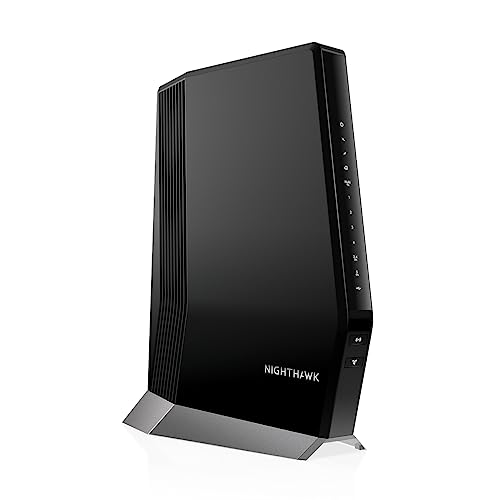
- Best for: Households on gigabit or multi-gigabit cable plans, and gamers who want a wired multi-gig connection.
- Highest plan-speed ceiling in this guide, with genuine multi-gigabit support
- 2.5 Gbps Ethernet port for wired devices on plans above 1 Gbps
- AX6000 WiFi 6 with eight streams for busy, device-heavy households
- Larger and heavier than the other picks, at around 10.4 x 8.5 x 4.3 inches

- Best for: Households on gigabit cable plans who want a wired device to use the full plan speed without flagship pricing.
- 2.5 Gbps Ethernet port at a mid-range position in the lineup
- Covers gigabit cable plans from Xfinity, Spectrum, and Cox
- AX3000 WiFi 6 with coverage rated up to 2,500 sq ft
- Plan ceiling of 1.2 Gbps leaves no room for multi-gigabit upgrades

- Best for: Households on mid-tier to gigabit cable plans who want a dependable all-in-one without paying for flagship speed.
- Balanced speed and coverage for the most common cable plans
- Plan ceiling of 2 Gbps gives headroom for future upgrades
- Four Gigabit Ethernet ports with link aggregation
- No 2.5 Gbps Ethernet port, so wired speeds top out at 1 Gbps per device
All 4 Picks at a Glance
| Product | Specs | Action |
|---|---|---|
| 1. NETGEAR Nighthawk CAX80 — Best Overall DOCSIS Cable WiFi Router |
| Check price on Amazon |
| 2. ARRIS SURFboard G36 — Best Multi-Gig Value |
| Check price on Amazon |
| 3. NETGEAR Nighthawk CAX30 — Best Balanced Mid-Range Pick |
| Check price on Amazon |
 4. ARRIS SURFboard G34 — Best Value for Plans Up to 1 Gbps |
| Check price on Amazon |
Our Top Picks
- NETGEAR Nighthawk DOCSIS 3.1 Modem Router Combo CAX30Pack of 111.93 x 5.39 x 9.92 inchesCheck on Amazon
Introduction
If your home internet arrives through a coaxial cable, the best DOCSIS cable WiFi routers can replace two boxes and one monthly rental fee with a single device. A DOCSIS cable WiFi router, also called a modem router combo or gateway, combines a cable modem and a wireless router in one unit: plug in the coax cable, activate it with your provider, and the same box broadcasts your WiFi network.
That simplicity is the main appeal. Instead of paying a monthly rental fee for hardware you never own, you buy your own combo once and keep it for years. Owning the hardware also means you choose the WiFi standard, the Ethernet ports, and the security features.
This guide covers only genuine DOCSIS cable WiFi routers: devices with a coax input and a built-in WiFi router. Standalone modems, fiber-only routers, and DSL gateways are excluded. Every pick below uses DOCSIS 3.1, the current standard for Xfinity, Spectrum, and Cox.
One limitation applies to every pick: none supports bundled cable voice service. If your plan includes a landline phone through your cable provider, you will need a separate telephony modem or a gateway with phone jacks.
Disclosure: As an Amazon Associate, we earn from qualifying purchases.
How to Choose the Best DOCSIS Cable WiFi Router
Buying a modem router combo differs from buying a standalone router, because the modem half must satisfy your internet provider too. The points below help you avoid the common mistakes: a combo your provider will not activate, far more speed than your plan delivers, or a box that cannot cover your home.
Buy DOCSIS 3.1
DOCSIS 3.1 is the standard to buy in 2026. It supports multi-gigabit cable plans and uses two OFDM channels for DOCSIS 3.1 traffic, with 32 downstream and 8 upstream DOCSIS 3.0 channels as a fallback. DOCSIS 3.0-only combos are cheaper, but they cap out on faster plans and are increasingly absent from provider approval lists for gigabit tiers.
Match the combo to your subscribed speed
Manufacturers advertise two different numbers, and confusing them is the easiest way to overspend. The first is the maximum cable plan speed the modem supports, such as plans up to 1 Gbps or up to 6 Gbps. The second is the combined WiFi speed, such as AX3000 or AX6000, which describes the theoretical throughput of the wireless radios, not the speed of your internet connection. Your real-world download speed can never exceed your subscribed plan.
A household on a 400 Mbps or 800 Mbps plan does not need a combo rated for 6 Gbps plans. A household on a gigabit plan needs a modem whose plan rating covers that tier, plus a multi-gigabit Ethernet port if a wired device should receive more than 1 Gbps. Four 1 Gbps ports cannot deliver 2.5 Gbps to a single device.
Check provider approval first
Xfinity, Spectrum, and Cox each publish an approved-device list, and a combo that works on one network may not be certified on another. Approval also varies by speed tier. Search your provider’s device compatibility page for the exact model number, such as CAX80 or G36, and confirm the tier you subscribe to. If the model is absent, do not buy it: activation is where unapproved hardware fails.
WiFi 6, coverage, and ports
WiFi 6 brings real improvements over WiFi 5 for busy homes: OFDMA for serving many devices at once, better handling of crowded airwaves, and improved efficiency for battery-powered devices. The AX number, such as AX2700 or AX6000, describes combined throughput across the 2.4 GHz and 5 GHz bands. The gap between AX2700 and AX3000 is modest; AX6000 mainly helps households with many simultaneous 4K streams and gaming sessions.
Manufacturers advertise coverage of up to 2,500 square feet for several combos below; treat that as a best-case estimate. Thick walls, multiple floors, and neighboring networks all reduce real coverage. A combo rated for 25 devices can also feel crowded in a smart home, so device-heavy households should favor picks rated for 30 or more devices.
Every pick here has four Gigabit Ethernet ports. Wired connections suit consoles, PCs, and streaming boxes, especially for gaming. Only some picks add a 2.5 Gbps port, which matters if your plan exceeds 1 Gbps and a wired device should use the extra speed.
Security and rental savings
Look for WPA3 encryption, automatic firmware updates, a guest network, and parental controls. NETGEAR Armor adds threat protection on Nighthawk combos, and ARRIS offers the SURFboard Central app for setup and management. Owning your combo removes the monthly rental fee, and over two or three years that saving usually covers the hardware cost.
Top Picks
1. NETGEAR Nighthawk CAX80 — Best Overall DOCSIS Cable WiFi Router
- Best for: Households on gigabit or multi-gigabit cable plans, and gamers who want a wired multi-gig connection.
- Highest plan-speed ceiling in this guide, with genuine multi-gigabit support
- 2.5 Gbps Ethernet port for wired devices on plans above 1 Gbps
- AX6000 WiFi 6 with eight streams for busy, device-heavy households
- Larger and heavier than the other picks, at around 10.4 x 8.5 x 4.3 inches
Households on gigabit or multi-gigabit cable plans, and gamers who want a wired multi-gig connection.
The NETGEAR Nighthawk CAX80 is the most capable DOCSIS cable WiFi router in this guide, and the pick for the fastest combo without splitting the modem and router into two boxes. It pairs a DOCSIS 3.1 cable modem with a dual-band AX6000 WiFi 6 router, rated for cable plans up to 6 Gbps, the highest ceiling of any pick here.
Few households subscribe to a plan near 6 Gbps, so the CAX80’s value is headroom: 32 downstream and 8 upstream DOCSIS 3.0 channels with DOCSIS 3.1 OFDM, eight WiFi streams, and a 2.5 Gbps multi-gig port alongside four Gigabit ports. The multi-gig port lets a wired PC or console actually use a plan above 1 Gbps. Coverage is rated at up to 2,500 square feet for 30 or more devices. Setup runs through the Nighthawk app, NETGEAR Armor is included, and the unit carries a two-year warranty. It works with Xfinity, Spectrum, and Cox, but confirm your plan tier on your provider’s approved list.
Key specs: DOCSIS 3.1; dual-band WiFi 6, AX6000; plans up to 6 Gbps; 1 x 2.5 Gbps + 4 x 1 Gbps Ethernet; coverage up to 2,500 sq ft; 30 or more devices; NETGEAR Armor; Nighthawk app.
Pros:
Cons:
2. ARRIS SURFboard G36 — Best Multi-Gig Value
- Best for: Households on gigabit cable plans who want a wired device to use the full plan speed without flagship pricing.
- 2.5 Gbps Ethernet port at a mid-range position in the lineup
- Covers gigabit cable plans from Xfinity, Spectrum, and Cox
- AX3000 WiFi 6 with coverage rated up to 2,500 sq ft
- Plan ceiling of 1.2 Gbps leaves no room for multi-gigabit upgrades
Households on gigabit cable plans who want a wired device to use the full plan speed without flagship pricing.
The ARRIS SURFboard G36 is the sweet spot for buyers who want multi-gigabit wired speed without flagship pricing. It combines a DOCSIS 3.1 modem with a dual-band AX3000 WiFi 6 router, supports cable plans up to 1.2 Gbps, and includes a 2.5 Gbps Ethernet port plus four Gigabit ports. That port layout is the G36’s defining feature: the least expensive pick that still gives one wired device a connection faster than 1 Gbps.
ARRIS rates the G36 for plans up to 1.2 Gbps, covering the gigabit tiers from Xfinity, Spectrum, and Cox. The modem uses 32 downstream and 8 upstream DOCSIS 3.0 channels with 2×2 OFDM for DOCSIS 3.1 traffic, and the WiFi 6 radios deliver AX3000 throughput with coverage up to 2,500 square feet. Setup runs through the SURFboard Central app, and the unit includes WPA3 security and a two-year warranty.
Compared with the G34, the G36 adds the 2.5 Gbps port and a higher plan ceiling, making it the better choice for a gigabit plan today or an upgrade soon. Some retailers describe the G36 with speeds up to 4 Gbps, which refers to DOCSIS 3.1 channel capacity rather than the supported plan speed of up to 1.2 Gbps.
Key specs: DOCSIS 3.1; dual-band WiFi 6, AX3000; plans up to 1.2 Gbps; 1 x 2.5 Gbps + 4 x 1 Gbps Ethernet; coverage up to 2,500 sq ft; SURFboard Central app; WPA3; 2-year warranty.
Pros:
Cons:
3. NETGEAR Nighthawk CAX30 — Best Balanced Mid-Range Pick
- Best for: Households on mid-tier to gigabit cable plans who want a dependable all-in-one without paying for flagship speed.
- Balanced speed and coverage for the most common cable plans
- Plan ceiling of 2 Gbps gives headroom for future upgrades
- Four Gigabit Ethernet ports with link aggregation
- No 2.5 Gbps Ethernet port, so wired speeds top out at 1 Gbps per device
Households on mid-tier to gigabit cable plans who want a dependable all-in-one without paying for flagship speed.
The NETGEAR Nighthawk CAX30 sits in the middle of this guide, and it fits the largest number of households. It combines a DOCSIS 3.1 cable modem with a dual-band AX2700 WiFi 6 router, supports cable plans up to 2 Gbps, and covers up to 2,500 square feet for around 25 devices. Four Gigabit Ethernet ports handle wired consoles, PCs, and streaming boxes.
The CAX30’s appeal is balance. Its AX2700 WiFi is only a small step below the ARRIS AX3000 picks, and its 2 Gbps plan ceiling gives useful headroom for a later move to a gigabit plan. Link aggregation allows two Ethernet ports to be combined for a faster wired connection to a compatible device. NETGEAR Armor is included, setup runs through the Nighthawk app, and compatibility covers Xfinity, Spectrum, Cox, and other major cable providers.
Renewed versions of this hardware also appear on Amazon under separate listings, so choose the new retail version with the ASIN shown here. For a plan between 400 Mbps and 1 Gbps, the CAX30 delivers everything that matters: DOCSIS 3.1, WiFi 6, solid coverage, and four wired ports. It has no 2.5 Gbps port, so a wired device cannot exceed 1 Gbps, but that only matters on plans above 1 Gbps.
Key specs: DOCSIS 3.1; dual-band WiFi 6, AX2700; plans up to 2 Gbps; 4 x 1 Gbps Ethernet with link aggregation; coverage up to 2,500 sq ft; around 25 devices; NETGEAR Armor; Nighthawk app.
Pros:
Cons:
4. ARRIS SURFboard G34 — Best Value for Plans Up to 1 Gbps
- Best for: Households on cable plans up to 1 Gbps who want a reliable WiFi 6 combo at the lowest cost in this guide.
- Strong value for households on plans up to 1 Gbps
- AX3000 WiFi 6, the same wireless class as the more expensive G36
- Four Gigabit Ethernet ports for wired devices
- No 2.5 Gbps port, so no wired headroom above 1 Gbps
Households on cable plans up to 1 Gbps who want a reliable WiFi 6 combo at the lowest cost in this guide.
The ARRIS SURFboard G34 is the value pick, and the right choice when your cable plan tops out at 1 Gbps and you want a proven DOCSIS 3.1 combo without extra hardware you will never use. It combines a DOCSIS 3.1 modem with a dual-band AX3000 WiFi 6 router, four Gigabit Ethernet ports, and coverage up to 2,500 square feet.
ARRIS positions the G34 for plans up to 1 Gbps, matching the gigabit tiers from Xfinity, Spectrum, and Cox. Some retailer listings describe higher figures, but the 1 Gbps rating is the one ARRIS emphasizes. The modem uses 2×2 OFDM DOCSIS 3.1 channels with 32×8 DOCSIS 3.0 fallback, and the SURFboard Central app handles setup, WiFi customization, and parental controls. The unit carries a two-year limited warranty.
Compared with the G36, the G34 gives up the 2.5 Gbps port and the higher plan ceiling while keeping the same WiFi class, ports, and coverage. For a plan of 1 Gbps or below, that trade costs nothing. Stock has been inconsistent, with some Amazon listing snapshots showing no featured offers, so check availability before ordering and consider the G36 as the closest alternative.
Key specs: DOCSIS 3.1; dual-band WiFi 6, AX3000; plans up to 1 Gbps; 4 x 1 Gbps Ethernet; coverage up to 2,500 sq ft; SURFboard Central app; WPA3; 2-year warranty.
Pros:
Cons:
Comparison Table
| Model | ASIN | Modem | WiFi | Max plan speed | Ethernet ports | Coverage |
|---|---|---|---|---|---|---|
| NETGEAR Nighthawk CAX80 | B082XW53G3 | DOCSIS 3.1 | WiFi 6, AX6000 | Up to 6 Gbps | 1 x 2.5 Gbps + 4 x 1 Gbps | Up to 2,500 sq ft |
| ARRIS SURFboard G36 | B096W6X41Y | DOCSIS 3.1 | WiFi 6, AX3000 | Up to 1.2 Gbps | 1 x 2.5 Gbps + 4 x 1 Gbps | Up to 2,500 sq ft |
| NETGEAR Nighthawk CAX30 | B0D6GZDYS3 | DOCSIS 3.1 | WiFi 6, AX2700 | Up to 2 Gbps | 4 x 1 Gbps | Up to 2,500 sq ft |
| ARRIS SURFboard G34 | B096W716BY | DOCSIS 3.1 | WiFi 6, AX3000 | Up to 1 Gbps | 4 x 1 Gbps | Up to 2,500 sq ft |
Frequently Asked Questions
What is a DOCSIS cable WiFi router?
A DOCSIS cable WiFi router is a single device that combines a cable modem and a wireless router. The modem half connects to your cable provider through a coaxial cable, and the router half broadcasts your WiFi network and manages your wired Ethernet connections. It replaces both the rented gateway and any separate router you might otherwise use.
Do I need DOCSIS 3.1, or is DOCSIS 3.0 enough?
DOCSIS 3.1 is the right choice for any new purchase. It supports multi-gigabit cable plans, handles congestion better than DOCSIS 3.0, and is the standard major providers now list for gigabit tiers. A DOCSIS 3.0 combo can still work on slower plans, but it caps out on faster tiers and is increasingly absent from approval lists.
Will these routers work with Xfinity, Spectrum, and Cox?
Each pick is listed as compatible with at least one major cable provider, and most cover all three, but compatibility is not universal across every plan tier. Providers maintain approved-device lists that vary by model and subscribed speed, so search your provider’s compatibility page for the exact model number before you buy.
Can a DOCSIS cable WiFi router work with fiber or DSL internet?
No. A DOCSIS cable WiFi router only works where internet service arrives over a coaxial cable. Fiber uses an optical network terminal instead of a coax modem, and DSL arrives over a telephone line, so neither can connect to the coax input. If you have fiber or DSL, you need a router designed for that service type.
Do I still need a separate router if I buy one of these?
No, for most households. The router is built in, with WiFi, Ethernet ports, a guest network, and parental controls included. You would only add a separate router for features the combo lacks, such as a mesh WiFi system for a very large home. In that case, buy a standalone DOCSIS 3.1 modem instead and pair it with the router of your choice.
What happens to my cable phone service if I buy one of these?
None of the combos in this guide supports bundled cable voice service, so a landline phone provided through your cable plan will not work through them. If your plan includes cable telephone, keep a separate telephony modem for the phone line, or choose a gateway with phone jacks. Check your plan details before ordering.
Conclusion
The best DOCSIS cable WiFi router for your home matches your plan speed, your provider’s approval list, and the size of your household, not the one with the biggest numbers on the box. Confirm your subscribed speed and check your provider’s approved-device page, then choose from there.
For most buyers, the decision comes down to three picks. The NETGEAR Nighthawk CAX80 is the best overall choice on a gigabit or multi-gigabit plan, with the fastest WiFi, the most device capacity, and a wired multi-gigabit port. The ARRIS SURFboard G36 is the best value for gigabit households that want a 2.5 Gbps Ethernet port without flagship pricing. The NETGEAR Nighthawk CAX30 is the balanced middle pick for mid-tier to gigabit plans.
If your plan tops out at 1 Gbps and you want the lowest cost, the ARRIS SURFboard G34 covers everything you need with WiFi 6, though you should check stock before ordering.
Whichever pick you choose, confirm the exact model on your provider’s approved list, activate it through the manufacturer’s app, and keep the firmware updated. Done right, a single DOCSIS cable WiFi router replaces a rented gateway, removes a monthly fee, and gives you control over the network your whole household depends on.
FAQ
What is a DOCSIS cable WiFi router?
Do I need DOCSIS 3.1, or is DOCSIS 3.0 enough?
Will these routers work with Xfinity, Spectrum, and Cox?
Can a DOCSIS cable WiFi router work with fiber or DSL internet?
Do I still need a separate router if I buy one of these?
What happens to my cable phone service if I buy one of these?
More from Amazon
Programs that pair well with the guide above. Offers and eligibility are set by Amazon and may change.
Free shipping on eligible items, Prime Video and more. Eligible new members can start with a free trial.
Start a Prime free trialAd-free music streaming. Eligible new subscribers can start with a free trial.
Try Music Unlimited freeA Prime membership for ages 18-24 with a trial period. Eligibility is set by Amazon.
See Prime for Young AdultsAudiobooks and podcasts to listen to on the go. Eligible new members can start with a free trial.
Try Audible freeAs an Amazon Associate we earn from qualifying purchases.
