Our Short List of 3


All 3 Picks at a Glance
| Product | Specs | Action |
|---|---|---|
 1. TP-Link Archer AXE75 — Best Overall for Multiple PS4s | Check price on Amazon | |
| 2. NETGEAR Nighthawk Pro Gaming XR1000 — Best Gaming Software for Console Households | Check price on Amazon | |
| 3. TP-Link Archer GXE75 — Best Dedicated Gaming Router for PS4 Households | Check price on Amazon |
Our Top Picks
- TP-Link AXE5400 Tri-Band WiFi 6E RouterWiFi 6E, Tri-Band AXE540012.91 x 10.43 x 4.72 inches1.5 poundsCheck on Amazon
- NETGEAR Nighthawk Pro Gaming 6-Stream WiFi 6 RouterExtra Large11.61 x 7.87 x 2.51 inches1.32 poundsCheck on Amazon
Running two or more PlayStation 4 consoles on one home network is a real test of a router. One console downloading a game update can choke the connection for everyone else, and when two PS4s join the same online match, the router has to juggle identical traffic from two devices without mixing up their connections. The best gaming routers for multiple PS4 consoles solve that problem with enough wired ports, traffic shaping that actually prioritizes gameplay, and wireless capacity built for a busy household.
A PS4 connects over gigabit Ethernet or dual-band Wi-Fi, so it does not need the newest wireless standard to play well. What it needs is a router that keeps latency low when the network is loaded, gives each console a clean path to the internet, and does not fall apart when phones, laptops, and streaming boxes join in. This guide explains what to look for and picks three routers that handle a multi-PS4 household well.
Why Multiple PS4s Stress a Router
Two consoles in one home create a few specific headaches that a single-console setup never sees.
First, both PS4s often want the same network ports for PlayStation Network services and peer-to-peer voice chat. A router with good UPnP support maps those ports dynamically so each console gets its own connection, which is how both consoles can reach NAT Type 2 at the same time. Without working UPnP, the second console often ends up on NAT Type 3, which blocks voice chat and makes joining some matches difficult.
Second, game downloads are enormous. A single update can be tens of gigabytes, and if one PS4 starts downloading while another is in a ranked match, the download will happily swallow every bit of available bandwidth unless the router steps in. Quality of Service, or QoS, is the feature that stops this. A gaming router with good QoS can spot game traffic and protect it, letting the download use whatever bandwidth is left over instead of fighting the match for it.
Third, a PS4 in one room and another in a different room means the router has to serve two demanding clients at once, often through walls. Strong antennas, beamforming, and multi-user technologies such as MU-MIMO and OFDMA help the router talk to several devices in the same time window instead of serving them one at a time.
How to Choose a Gaming Router for Multiple PS4 Consoles
Count the Wired Ports
A wired connection is the single best upgrade for any PS4. Ethernet removes wireless interference, keeps ping steady, and avoids the random lag spikes that Wi-Fi can introduce. For two PS4s, look for at least four gigabit LAN ports so both consoles can be wired and still leave room for a PC or a streaming box. Routers with a 2.5 gigabit WAN port are a bonus if your internet plan is faster than gigabit, but the LAN ports matter more for consoles, since the PS4 itself has a gigabit Ethernet port.
If running cables to both consoles is not possible, prioritize a router with strong 5 GHz coverage and a tri-band design, so console traffic can sit on a cleaner band away from phones and smart home devices.
Look for Real QoS and Gaming Features
Not all QoS is equal. Basic QoS simply labels traffic by device or application and hopes for the best. Gaming routers go further with adaptive QoS, game acceleration modes, or dedicated gaming ports that automatically give a connected console priority. NETGEAR’s DumaOS, found on its Pro Gaming models, adds a geo-filter that can limit matchmaking to nearby servers and a ping heatmap that shows where your connection is actually going.
When you compare routers, check whether QoS can be set per device. Per-device rules let you pin both PS4s to high priority while keeping a background download or a 4K stream from stealing their bandwidth.
Check UPnP and NAT Handling
Multiple consoles sharing one public IP address depend on UPnP or manual port mapping to keep their NAT types open. Confirm the router supports UPnP and that it is enabled by default or easy to switch on in the app. Some routers also include a NAT boost or gaming NAT mode that helps two consoles hold open NAT types simultaneously. If you have ever seen one PS4 report NAT Type 2 and the other report NAT Type 3, the router’s port handling is the first thing to check.
Make Sure It Can Handle the Whole Household
A router for two PS4s is really a router for a busy home. The consoles are only part of the load: phones, tablets, laptops, smart TVs, and streaming sticks all share the same airwaves. MU-MIMO and OFDMA let a modern router serve several devices at once instead of queuing them up, which keeps latency down when the house is full. A quad-core processor and at least 512 MB of RAM help the router keep up with dozens of connected clients and heavy traffic shaping without slowing down.
Tri-band routers add a third radio band, which spreads devices across more spectrum and reduces congestion. Wi-Fi 6E models add a 6 GHz band. Your PS4 cannot use 6 GHz, but moving Wi-Fi 6E laptops and phones onto that band frees the 5 GHz band for your consoles.
Do Not Overpay for Speed the PS4 Cannot Use
The PS4 tops out at gigabit Ethernet and Wi-Fi 5 wireless speeds, so a router advertising multi-gigabit wireless throughput will not make a single PS4 faster. Where a faster router helps is on the wired side: more multi-gigabit ports, a faster processor, and better traffic management keep several consoles and a busy household running smoothly at once. Spend on ports, QoS, and capacity, not on headline wireless numbers your consoles will never reach.
Top Picks
1. TP-Link Archer AXE75 — Best Overall for Multiple PS4s
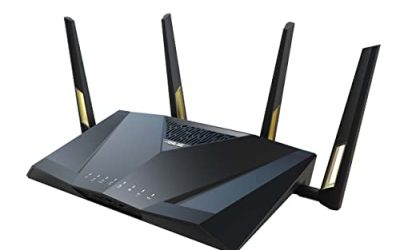
The TP-Link Archer AXE75 is a tri-band Wi-Fi 6E router rated AXE5400, with combined throughput of up to 5,400 Mbps across its 2.4 GHz, 5 GHz, and 6 GHz bands. Its 6 GHz band gives newer devices a clean lane of their own, leaving the 5 GHz band freer for your PS4s, while OFDMA and MU-MIMO keep a crowded household responsive.
For a two-PS4 home, the practical wins are the gigabit LAN ports for wiring both consoles, the 2.5 gigabit WAN port for fast internet plans, and TP-Link’s QoS controls that let you prioritize gaming traffic. The 1.7 GHz quad-core processor handles multiple consoles, streams, and downloads at once without bogging down, and OneMesh support means you can add a compatible extender later if a second console sits far from the router.
Setup is straightforward through the Tether app, and WPA3 security plus HomeShield controls cover the basics of keeping the network safe. This is the pick for most households: it is fast enough for years of use, has the ports a multi-console setup needs, and costs far less than flagship gaming routers.
Check the TP-Link Archer AXE75 on Amazon
2. NETGEAR Nighthawk Pro Gaming XR1000 — Best Gaming Software for Console Households
The NETGEAR Nighthawk Pro Gaming XR1000 is built specifically for the problems a multi-console household runs into. It is a Wi-Fi 6 router rated AX5400, with four gigabit Ethernet LAN ports, so two PS4s can both be wired with ports to spare. Its real advantage is DumaOS 3.0, a gaming operating system that includes a geo-filter, ping heatmap, and bandwidth allocation controls.
The geo-filter is genuinely useful when two consoles play the same game: it limits matchmaking to servers within a distance you choose, which keeps ping consistent instead of dropping you into a faraway lobby. Bandwidth allocation lets you reserve a share of your connection for each PS4, so one console’s download cannot starve the other console’s match. The router also handles UPnP well, which is what keeps both consoles on open NAT types.
With a quad-core processor and six-stream Wi-Fi 6, the XR1000 stays responsive under a heavy load of consoles, phones, and streams. If your household plays competitive shooters and you want the most control over latency, this is the router to buy.
Check the NETGEAR Nighthawk Pro Gaming XR1000 on Amazon
3. TP-Link Archer GXE75 — Best Dedicated Gaming Router for PS4 Households
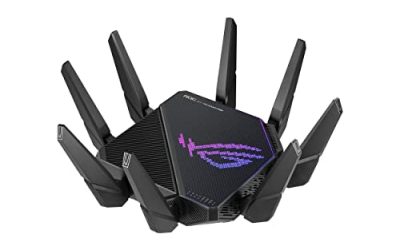
The TP-Link Archer GXE75 is the gaming-focused sibling of the AXE75. It is a tri-band Wi-Fi 6E gaming router rated AXE5400, with a dedicated gaming band, a dedicated gaming port, and a gaming panel that puts latency controls front and center. One 2.5 gigabit port and four gigabit ports give you room to wire both PS4s and still connect a PC or a streaming device.
The gaming port is the headline feature for a multi-PS4 setup: plug a console into it and the router automatically gives that device priority. Combined with the dedicated gaming band, which reserves clean spectrum for gaming traffic, the GXE75 is designed to keep your match stable while the rest of the house streams and scrolls. RGB lighting and the gamer-styled interface are cosmetic, but the underlying hardware, including a quad-core processor and EasyMesh support, is solid.
Choose the GXE75 over the AXE75 if you want gaming-specific controls without paying flagship prices, and if the idea of a dedicated gaming port and band appeals to your setup.
Check the TP-Link Archer GXE75 on Amazon
Comparison Table
| Feature | TP-Link Archer AXE75 | NETGEAR Nighthawk Pro Gaming XR1000 | TP-Link Archer GXE75 |
|---|---|---|---|
| Wi-Fi standard | Wi-Fi 6E, tri-band | Wi-Fi 6, dual-band | Wi-Fi 6E, tri-band |
| Speed rating | AXE5400 | AX5400 | AXE5400 |
| LAN ports | Gigabit Ethernet | 4 x gigabit Ethernet | 4 x gigabit Ethernet |
| WAN port | 2.5 gigabit | Gigabit | 2.5 gigabit |
| Gaming features | QoS, OneMesh | DumaOS 3.0, geo-filter, ping heatmap | Dedicated gaming port and band, gaming panel |
| Best for | Most multi-PS4 households | Competitive players who want latency control | Dedicated gaming controls at a mid-range tier |
| Mesh support | OneMesh | Nighthawk app, extender compatible | EasyMesh |
Setting Up Two PS4s on One Router
Getting the hardware right is half the job. A few setup steps make the difference between two consoles that both play smoothly and one that constantly complains about NAT type.
Wire both consoles if you can. Even a long Ethernet cable run beats a weak Wi-Fi signal for competitive play, and it takes both consoles off the wireless bands entirely. If you must use Wi-Fi, put both PS4s on the 5 GHz band and keep them on the same band so the router can manage them together.
Turn on UPnP in the router settings and reboot both consoles, then check the network status on each PS4. Both should report NAT Type 2. If one reports NAT Type 3, check that UPnP is actually enabled, that the router firmware is current, and that you have not also set manual port forwarding rules that conflict with UPnP. Do not place a console in the DMZ unless you understand the security trade-off; UPnP handles the same job more safely for most households.
Set up QoS before the first argument about lag starts. Give both PS4s high priority and set the router’s bandwidth limits to match your real internet speeds, not the speeds your plan advertises. QoS can only manage traffic accurately when it knows how much bandwidth it has to work with, so run a speed test from a wired PC and enter those numbers.
Keep game downloads under control. Set the PS4 that is not in use to download updates during rest mode overnight, and use the router’s QoS or bandwidth allocation to cap download traffic during play sessions. The XR1000’s bandwidth allocation is built for exactly this, and the TP-Link routers can achieve a similar result with per-device QoS rules.
FAQ
Can two PS4s play online at the same time on one router?
Yes. A router with working UPnP can give both consoles open NAT types so they can play online simultaneously, even in the same match. Wiring both consoles and enabling QoS keeps the connection stable when both are playing at once.
Do I need a gaming router for two PS4s?
Not strictly, but a gaming router makes a real difference. Its QoS protects game traffic from downloads and streams, its UPnP handling keeps both consoles on NAT Type 2, and its extra wired ports let you connect both consoles by Ethernet. A basic ISP router often lacks all three.
Is Wi-Fi 6E or Wi-Fi 7 worth it for a PS4?
The PS4 itself cannot use Wi-Fi 6E or Wi-Fi 7, since it is a Wi-Fi 5 device. The benefit of a newer router is indirect: it moves newer devices onto the 6 GHz band, freeing the 5 GHz band for your consoles, and it brings a faster processor and better traffic management for the whole household.
Why does one PS4 show NAT Type 3 while the other shows NAT Type 2?
This usually means the router is not mapping ports for the second console correctly. Enable UPnP, update the router firmware, remove any conflicting manual port forwarding rules, and reboot the router and both consoles. If the problem persists, your ISP may be using carrier-grade NAT, which you may need to ask them about.
Should I use Ethernet or Wi-Fi for my PS4s?
Ethernet is better whenever it is practical. It delivers lower and steadier latency, avoids wireless interference, and frees Wi-Fi capacity for other devices. If a cable run is impossible, use the 5 GHz band, keep the router in the same room or as close as possible, and avoid placing the console inside a closed cabinet.
Conclusion
The best gaming routers for multiple PS4 consoles are the ones that treat two consoles as the normal case, not an edge case. The TP-Link Archer AXE75 is the best all-round choice for most households, with tri-band Wi-Fi 6E, strong QoS, and the ports to wire both consoles. The NETGEAR Nighthawk Pro Gaming XR1000 is the pick for competitive players, thanks to DumaOS 3.0, the geo-filter, and per-console bandwidth allocation. The TP-Link Archer GXE75 sits between them, adding a dedicated gaming port and band for households that want gaming-first controls without a flagship outlay.
Whatever you choose, wire both consoles when you can, switch on UPnP, and set up QoS before your next match. Those three steps, plus a router that can actually handle a busy household, are what keep two PS4s playing smoothly on one network.
Disclosure: As an Amazon Associate, we earn from qualifying purchases.
FAQ
Can two PS4s play online at the same time on one router?
Do I need a gaming router for two PS4s?
Is Wi-Fi 6E or Wi-Fi 7 worth it for a PS4?
Why does one PS4 show NAT Type 3 while the other shows NAT Type 2?
Should I use Ethernet or Wi-Fi for my PS4s?
More from Amazon
Programs that pair well with the guide above. Offers and eligibility are set by Amazon and may change.
Free shipping on eligible items, Prime Video and more. Eligible new members can start with a free trial.
Start a Prime free trialAd-free music streaming. Eligible new subscribers can start with a free trial.
Try Music Unlimited freeA Prime membership for ages 18-24 with a trial period. Eligibility is set by Amazon.
See Prime for Young AdultsAudiobooks and podcasts to listen to on the go. Eligible new members can start with a free trial.
Try Audible freeAs an Amazon Associate we earn from qualifying purchases.