Our Short List of 3
All 4 Picks at a Glance
| Product | Specs | Action |
|---|---|---|
 1. TP-Link ER605 Omada Gigabit VPN Router | Check price on Amazon | |
 2. TP-Link ER7206 Omada Multi-WAN Gigabit VPN Router | Check price on Amazon | |
 3. Ubiquiti UniFi Express Cloud Gateway | Check price on Amazon | |
 4. Ubiquiti UniFi Dream Router | Check price on Amazon |
Key takeaways
- Find the best gateway routers for home and small office networks, with multi-WAN, VPN, Wi-Fi 6 and Wi-Fi 7 options compared to fit your plan and budget.
The best gateway routers sit at the exact point where a private network meets the internet, and that position makes them more important than almost any other box on a desk or in a rack. A gateway router takes traffic from computers, consoles, phones, and smart devices, decides where each packet should go, applies firewall rules, and sends the traffic out through the internet connection. When that device is weak, every download slows down, every video call stutters, and every connected device shares the same bottleneck. When it is well chosen, the rest of the network simply works, even under load.
This guide focuses on gateway routers in the practical sense: devices that route, protect, and manage a network, rather than simple wireless access points or modems. The picks below cover small offices that need multiple internet connections, homes that want an easy all-in-one gateway with Wi-Fi built in, and growing networks that need room to add switches and access points later.
What Is a Gateway Router?
A gateway router is the device that connects a local network to another network, usually the internet. In a home, the internet service provider delivers a connection to a modem or an optical terminal, and the gateway router plugs into that device. Everything on the local network then talks to the gateway first. The gateway assigns local addresses, translates them for the internet through network address translation, blocks unwanted inbound traffic with a firewall, and forwards traffic to the right device.
Many consumer products combine a gateway router, a wireless access point, and a switch in one box. That is convenient, and for most homes it is the right choice. Business-oriented gateway routers often leave Wi-Fi out entirely. They are wired-only devices that expect separate access points, and in return they offer stronger VPN support, multiple WAN ports, and centralised management.
A related point is the difference between a gateway and a modem. A modem converts the signal from the internet provider into Ethernet. A gateway router does the routing, firewall, and network management. Some provider-supplied boxes combine both jobs. When buying a standalone gateway router, check whether a separate modem or optical terminal is still needed.
How to Choose the Best Gateway Router
Match Throughput to the Internet Plan
The first number to check is routing throughput, not the wireless speed printed on the box. A gateway that can only route at gigabit speed will cap a multi-gigabit fibre plan, while a gateway with a 10 gigabit WAN port will leave headroom for faster plans later. For plans up to one gigabit, a well-built gigabit gateway is enough. For plans above one gigabit, look for 2.5 gigabit or 10 gigabit WAN ports, and check whether features such as intrusion detection or quality of service reduce throughput when switched on.
Decide Between Wired-Only and All-in-One
Wired-only gateways such as the TP-Link Omada models in this guide are a strong fit for small offices, home labs, and anyone who already owns access points or plans to add them. They keep the routing job separate from the wireless job, which makes troubleshooting easier and allows each part to be upgraded on its own schedule. All-in-one gateways such as the Ubiquiti UniFi models below are a better fit for apartments and small homes, where one compact box that provides routing, Wi-Fi, and a management console is simpler to place, power, and maintain.
Count WAN Ports and Plan for Failover
A single WAN port is enough for most homes, but a second or third WAN port changes what happens when the main connection drops. Multi-WAN gateways can spread traffic across two internet connections for load balancing, or keep one connection as a backup that takes over automatically when the primary line fails. That matters for home offices, streamers, and small businesses where an outage means lost work. Look for configurable WAN and LAN ports, USB support for a mobile broadband modem as a backup path, and failover settings that can be tested before they are needed.
Check VPN Support Before Buying
Remote access is one of the main reasons to buy a proper gateway router instead of a basic consumer box. Check which VPN protocols the gateway supports, how many simultaneous tunnels it allows, and whether it can act as both a server and a client. IPsec is common for site-to-site links between offices, while OpenVPN and WireGuard are popular for remote workers connecting back home.
Look at Firewall, VLAN, and Management Features
A gateway router is also the first line of defence for the network, so firewall quality matters. Stateful firewall rules, denial-of-service protection, and filtering by address or domain are useful baselines. VLAN support allows the network to be split into separate segments, for example one for work computers, one for guests, and one for smart home devices, so that a compromised device in one segment cannot easily reach the others.
Consider Ports, Power, and Physical Size
Port count is easy to overlook until the first switch is already full. A gateway with only one LAN port needs a switch for almost any wired setup, while a gateway with several LAN ports can connect a desktop, a console, and a network drive directly. Power over Ethernet is useful when access points need power through the same cable that carries data.
Top Picks
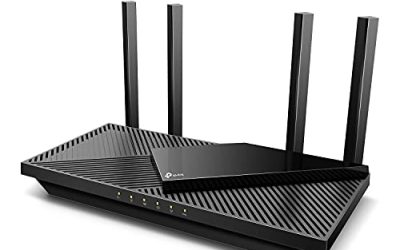
1. TP-Link ER605 Omada Gigabit VPN Router
The TP-Link ER605 is a wired gigabit VPN router built for small offices and home labs that need more than a basic consumer gateway. It has five gigabit ports: one dedicated WAN port, two ports that can be configured as WAN or LAN, and two LAN ports, so it can run up to three WAN uplinks at once for load balancing or automatic failover. A USB port accepts a compatible 4G or 3G modem as a backup internet path, which adds resilience when the main line drops.
VPN capacity is the standout feature at this level. The ER605 supports up to 20 LAN-to-LAN IPsec tunnels, plus 16 OpenVPN, 16 L2TP, and 16 PPTP connections, so a small office can link branch sites and remote workers without a separate VPN appliance. A stateful firewall and denial-of-service defence protect the network from common attacks, and IP, MAC, and domain filtering give administrators fine control over what can pass through. Integration with the TP-Link Omada software-defined networking platform means the router, switches, and access points can be managed from one controller, which is a real advantage when the network grows beyond a single room.
The trade-offs are clear and worth understanding before ordering. There is no built-in Wi-Fi, so access points must be added separately. Five ports are enough for a small setup, but larger deployments will need a downstream switch, and using three WAN ports leaves only two LAN ports free. The ER605 suits buyers who want a capable, affordable wired gateway and are comfortable adding wireless coverage separately.
Check the TP-Link ER605 on Amazon
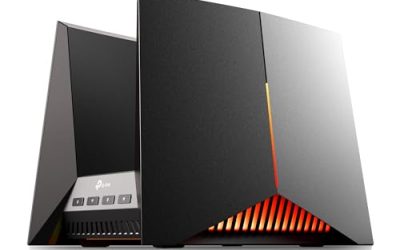
2. TP-Link ER7206 Omada Multi-WAN Gigabit VPN Router
The TP-Link ER7206 steps up from the ER605 with more ports, more VPN capacity, and more room for simultaneous connections. It offers one gigabit SFP WAN port, one gigabit WAN port, two gigabit WAN and LAN ports, and one dedicated gigabit LAN port, giving up to four WAN connections for load balancing or failover. It supports up to 150,000 concurrent sessions, which makes it a good fit for busy small offices, co-working spaces, and homes with dozens of connected devices.
VPN support is substantially larger than on the smaller model. The ER7206 handles up to 100 LAN-to-LAN IPsec tunnels, plus 50 OpenVPN, 50 L2TP, and 50 PPTP tunnels, along with WireGuard support on current firmware. That is more than most small networks will ever use, but it removes VPN capacity as a future constraint. The same Omada software-defined networking integration applies here, so the gateway can be managed alongside Omada switches and access points from one dashboard, with cloud access when a controller is in place. A USB 3.0 port supports a mobile broadband modem or USB storage, depending on configuration.
The main limitation is speed per port: every Ethernet port is gigabit, with no 2.5 gigabit option, so a single wired stream cannot exceed gigabit speed even when the total capacity across sessions is high. Buyers who need multi-gigabit uplinks should look at a different class of gateway. For offices that value session capacity, multi-WAN resilience, and strong VPN support over raw per-port speed, the ER7206 is a solid middle step between a home router and enterprise hardware.
Check the TP-Link ER7206 on Amazon
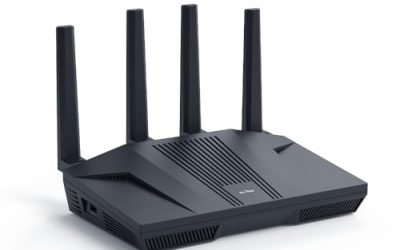
3. Ubiquiti UniFi Express Cloud Gateway
The Ubiquiti UniFi Express, model UX, is a compact all-in-one gateway that combines routing, a firewall, and a Wi-Fi 6 access point in a small box that fits on a shelf or a desk. It runs the UniFi Network application on the device, so it acts as both the gateway and the console for the network, managing itself and a small number of additional UniFi devices. A small display on the front shows live status such as client count and throughput, which makes it easy to check the network at a glance.
In terms of hardware, the UniFi Express has one gigabit WAN port and one gigabit LAN port, with Wi-Fi 6 coverage rated for around 140 square metres and more than 60 connected clients. That is enough for an apartment or a small home, especially when the network is mostly wireless. The software is the real draw: VLANs, firewall rules, VPN support including WireGuard, and content filtering are all available through the UniFi interface, which is readable even for buyers who are new to managed networking. It also works as a mesh access point alongside other UniFi devices, so a second unit can extend coverage without a separate controller.
The limits are the flip side of the compact design. With only one LAN port, a switch is needed for more than one wired device, and there is no multi-WAN failover, no USB port, and no support for intrusion detection features found on larger UniFi consoles. Maximum routing throughput is around one gigabit. Buyers who want a simple, tidy entry point into the UniFi ecosystem, with Wi-Fi included and no separate controller to run, will find the UniFi Express a good match. Buyers who need more ports or faster uplinks should step up to a larger UniFi gateway.
Check the Ubiquiti UniFi Express on Amazon
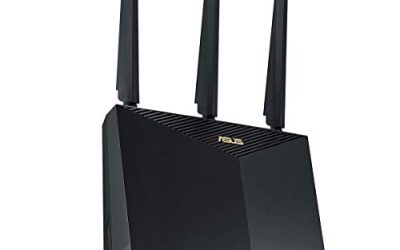
4. Ubiquiti UniFi Dream Router
The Ubiquiti UniFi Dream Router, model UDR, is a larger all-in-one gateway that adds more capability than the UniFi Express while keeping the same idea: one box that routes, protects, and provides Wi-Fi for a home or small office. It is a Wi-Fi 6 router with a built-in UniFi OS console, so it runs the UniFi Network application along with other UniFi applications, and it includes two Power over Ethernet outputs for powering access points or cameras through Ethernet cables.
The Dream Router supports WAN speeds up to 500 megabits per second with its full feature set, which is an important detail to check against the internet plan before buying. For plans at or below that speed, it delivers the full UniFi experience in a single device: VLANs, firewall rules, VPN, content filtering, and device management, plus Wi-Fi 6 coverage for the home. The Power over Ethernet ports make it easier to add an access point in another room without finding a separate power socket, and the console can manage additional UniFi devices as the network grows.
This pick is best for buyers who value the UniFi software and the all-in-one form factor, and whose internet plan sits within the routing limit. Homes on gigabit or multi-gigabit plans that want the same ecosystem with more throughput should look at a newer UniFi gateway with faster WAN support instead. For a small home or a home office on a mid-speed plan, the Dream Router is a tidy, capable centre for the network.
Check the Ubiquiti UniFi Dream Router on Amazon
Comparison Table
| Gateway Router | Best For | WAN Ports | Built-in Wi-Fi | VPN Highlights | Key Limitation |
|---|---|---|---|---|---|
| TP-Link ER605 | Small office, home lab | Up to 3 gigabit | No, add access points | 20 IPsec tunnels, OpenVPN, L2TP, PPTP | Only 5 ports, no Wi-Fi |
| TP-Link ER7206 | Busy small office | Up to 4 gigabit, plus SFP | No, add access points | 100 IPsec tunnels, WireGuard, OpenVPN | All ports gigabit only |
| Ubiquiti UniFi Express | Apartment, small home | 1 gigabit | Yes, Wi-Fi 6 | WireGuard, OpenVPN, L2TP, IPsec | 1 LAN port, no multi-WAN |
| Ubiquiti UniFi Dream Router | Small home, home office | 1 gigabit | Yes, Wi-Fi 6 | UniFi VPN server and client | WAN speed limit to check |
Frequently Asked Questions
What does a gateway router do that a modem does not?
A modem converts the signal from the internet provider into a form the local network can use, while a gateway router decides where traffic goes, assigns local addresses, applies firewall rules, and manages the network. Many provider boxes combine both jobs, but a standalone gateway router still needs a modem or optical terminal in front of it in most installations.
Do I need a gateway router if I already have a Wi-Fi router?
In most homes, the Wi-Fi router already is the gateway router, because it combines routing, firewall, and wireless access in one box. A separate gateway router makes sense when the current box lacks features such as multi-WAN failover, strong VPN support, VLANs, or centralised management, or when the network has grown beyond what a single consumer box handles well.
Is a wired-only gateway router better than an all-in-one?
It depends on the network. A wired-only gateway is better for offices and home labs that want separate access points, stronger VPN capacity, and room to grow, because each part can be upgraded independently. An all-in-one gateway is better for apartments and small homes where simplicity, size, and having Wi-Fi built in matter more than port count or multi-WAN support.
How many WAN ports do I need?
One WAN port is enough for most homes. Two or more WAN ports are useful when an outage would disrupt work, because the gateway can use a second connection for load balancing or automatic failover. Small offices, streamers, and remote workers who depend on a stable connection should consider at least two WAN ports or a USB backup path for a mobile broadband modem.
Can a gateway router improve gaming or video calls?
A good gateway router can help by keeping latency stable under load, prioritising time-sensitive traffic, and avoiding the bottlenecks that appear when many devices share one connection. It cannot make the internet plan faster than the provider allows, and it cannot fix congestion beyond the home network, but quality of service settings and a gateway that is not overloaded will make busy evenings noticeably smoother.
Conclusion
The best gateway routers in this guide cover the two main ways to build a home or small office network. The TP-Link ER605 and ER7206 are wired gateways for buyers who want multi-WAN resilience, strong VPN support, and Omada management, with the ER605 suiting smaller setups and the ER7206 suiting busier offices with more sessions and tunnels. The Ubiquiti UniFi Express and UniFi Dream Router are all-in-one gateways for buyers who want routing, Wi-Fi, and the UniFi console in a single compact box, with the Express fitting apartments and the Dream Router fitting small homes that can use its extra console features and Power over Ethernet ports.
Before ordering, check the internet plan speed against the gateway throughput, count the wired devices that need a port, and confirm whether a separate modem or optical terminal is still required. A gateway router is a long-term purchase that sits at the centre of the network, so choosing one with room to grow is usually better than choosing the smallest box that meets the needs of today. Check the current listing for the chosen model before checkout, as availability and specifications can change.
Disclosure: As an Amazon Associate, we earn from qualifying purchases.
FAQ
What Is a Gateway Router?
What does a gateway router do that a modem does not?
Do I need a gateway router if I already have a Wi-Fi router?
Is a wired-only gateway router better than an all-in-one?
How many WAN ports do I need?
Can a gateway router improve gaming or video calls?
More from Amazon
Programs that pair well with the guide above. Offers and eligibility are set by Amazon and may change.
Free shipping on eligible items, Prime Video and more. Eligible new members can start with a free trial.
Start a Prime free trialAd-free music streaming. Eligible new subscribers can start with a free trial.
Try Music Unlimited freeA Prime membership for ages 18-24 with a trial period. Eligibility is set by Amazon.
See Prime for Young AdultsAudiobooks and podcasts to listen to on the go. Eligible new members can start with a free trial.
Try Audible freeAs an Amazon Associate we earn from qualifying purchases.