Our Short List of 3

- Best for: A dedicated theater room where you want 4K streaming without an extra box.
- Resolution: 4K PRO-UHD (3840 x 2160)
- Display: 3-chip 3LCD
- Brightness: 2,800 lumens of color and white brightness
- HDR: HDR10 and HLG support
- Best for: A bright living room where sharp 4K detail and fast response both matter.
- Resolution: True 4K UHD (3840 x 2160)
- Brightness: 3,200 ANSI lumens
- Refresh rate: 240 Hz
- Input lag: 4.2 ms

- Best for: A living room with some light where brightness matters more than 4K resolution.
- Resolution: Full HD 1080p (1920 x 1080)
- Brightness: 3,600 lumens
- Contrast ratio: 25,000:1
- Display: DLP single-chip design
All 4 Picks at a Glance
| Product | Specs | Action |
|---|---|---|
| Epson Home Cinema 2350 |
| Check price on Amazon |
| ViewSonic PX701-4K |
| Check price on Amazon |
| Optoma HD146X |
| Check price on Amazon |
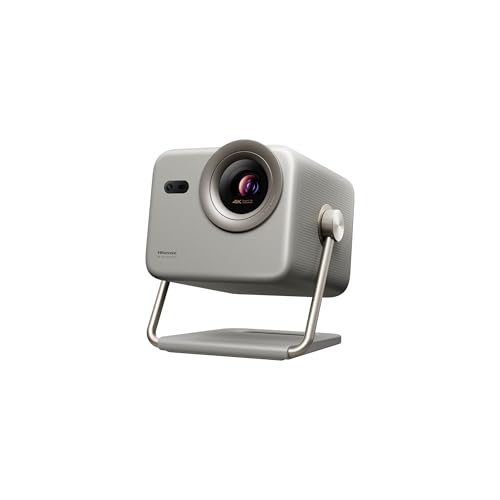 Hisense M2 Pro |
| Check price on Amazon |
Key takeaways
- Compare four projectors built for movie nights at home, from bright 4K models to a portable triple-laser pick, and find the one that fits your room.
A projector for movie nights is really a decision about your room. A bright living room with lamps on and curtains open needs a very different machine from a dark basement, and a small apartment needs a different throw distance from a long media room. Before you compare lumens or resolution, you need to know how far the projector will sit from the wall, how much light you can block, and whether you want streaming built in or are happy plugging in a stick or console.
This guide is for living-room viewers who want a big screen without a television, for dedicated theater rooms, and for households that move the projector between rooms or outdoors. The four projectors below were chosen from their Amazon listings for home movie watching: two 4K models for sharp detail, one bright 1080p model for rooms with some light, and one portable triple-laser model that carries its own smart platform.
Quick Picks
As an Amazon Associate we earn from qualifying purchases.
| Product | Best for | Key spec from title |
|---|---|---|
| Epson Home Cinema 2350 | A dedicated theater room with 4K streaming built in | 4K PRO-UHD, 2,800 lumens |
| ViewSonic PX701-4K | Sharp 4K detail with fast response for movies and games | True 4K UHD, 3,200 ANSI lumens |
| Optoma HD146X | A bright picture in a room with some light | 1080p, 3,600 lumens |
| Hisense M2 Pro | Moving the projector between rooms or outside | 4K triple laser, 1,300 ANSI lumens |
How to Choose
Brightness and Your Room’s Light
Brightness is the first number to match to your room, because it decides whether the picture survives with lamps on. A projector rated around 3,000 lumens or more holds up in a living room with some ambient light, while a dimmer portable model needs curtains drawn and lights off to look its best. Remember that makers quote brightness in different ways, so compare figures only when they use the same unit, and treat a high lumen figure as a hint about light tolerance rather than a guarantee of a great picture. If your room has windows you cannot cover, brightness should outrank resolution in your decision.
Resolution and Image Size
Resolution decides how much fine detail survives when the image grows past 100 inches. Native 1080p looks clean on a modest screen and at normal seating distance, but on a very large screen or from a close seat, the extra detail of a 4K image becomes easy to see. Some listings describe 4K PRO-UHD or pixel shifting, which shifts pixels to build a 4K image rather than using native 4K panels, so read the resolution line closely. Match resolution to your screen size and seating distance, not to the biggest number on the box.
Throw Distance and Placement
Throw distance decides where the projector must sit to fill your screen, and it is the detail most buyers check last. A short-throw model fills a large image from close to the wall, which suits small rooms, while a standard-throw model needs several feet of space behind the seating area. Optical zoom lets you resize the image without moving the projector, and lens shift plus keystone correction help square the picture when the projector sits off center. Measure your wall, your seating distance, and the space behind the seats before you settle on a model.
Sound and Streaming Built In
Many movie projectors now carry a built-in speaker and a smart platform, which can remove the need for a separate streaming stick or sound bar. A 10-watt speaker suits a small room or a casual movie night, but it will not fill a large theater room the way a dedicated sound system can. Check which streaming apps the built-in platform actually carries, since some platforms leave out a service you use every week. Also count the HDMI inputs against every device you plan to connect, because a projector with one input forces you to swap cables or add a switch.
The 4 Best Options
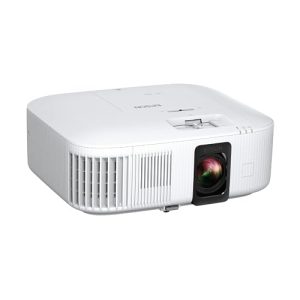
Epson Home Cinema 2350
- Best for: A dedicated theater room where you want 4K streaming without an extra box.
- Resolution: 4K PRO-UHD (3840 x 2160)
- Display: 3-chip 3LCD
- Brightness: 2,800 lumens of color and white brightness
- HDR: HDR10 and HLG support
A dedicated theater room where you want 4K streaming without an extra box.
The listing describes 4K PRO-UHD pixel shifting rather than native 4K panels, so check how that matches your expectations, and confirm the listing you open is the new-unit listing, since a Renewed variant exists under a different ASIN.
The Epson Home Cinema 2350 suits a dedicated theater room where you want a sharp 4K picture and streaming without extra boxes. Its 4K PRO-UHD processing and 3-chip 3LCD design produce a bright, color-rich image at 2,800 lumens, while HDR10 and HLG support help bright and dark scenes hold their detail. Android TV is built in, so streaming apps open on the projector itself, and a 10-watt speaker covers casual viewing in a small room. Input lag under 20 milliseconds also keeps console games responsive, which makes this a strong single-box choice for movies and play alike.
Watch out for: The listing describes 4K PRO-UHD pixel shifting rather than native 4K panels, so check how that matches your expectations, and confirm the listing you open is the new-unit listing, since a Renewed variant exists under a different ASIN.
ViewSonic PX701-4K
- Best for: A bright living room where sharp 4K detail and fast response both matter.
- Resolution: True 4K UHD (3840 x 2160)
- Brightness: 3,200 ANSI lumens
- Refresh rate: 240 Hz
- Input lag: 4.2 ms
A bright living room where sharp 4K detail and fast response both matter.
A separate Renewed listing exists under a different ASIN, so make sure the listing you open is the new-unit listing.
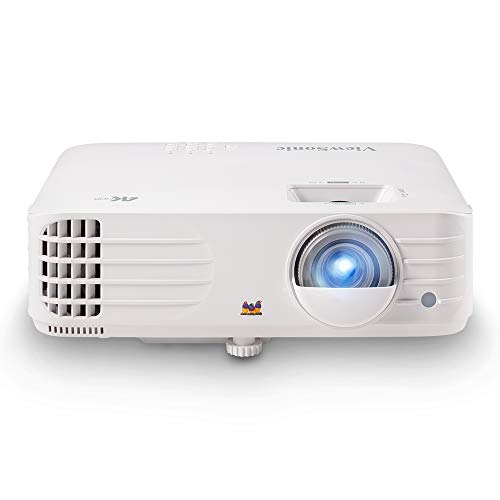
The ViewSonic PX701-4K is the pick for a living room where brightness and sharpness both matter. Its true 4K UHD resolution and 3,200 ANSI lumens keep fine detail visible on a large screen even with some light in the room, and a 240 Hz refresh rate with 4.2-millisecond input lag keeps fast motion smooth. Auto keystone and a 1.1x optical zoom make placement forgiving, while dual HDMI inputs leave room for a console and a streaming stick at the same time. It is a capable all-rounder for movie nights that share the screen with games.
Watch out for: A separate Renewed listing exists under a different ASIN, so make sure the listing you open is the new-unit listing.
Optoma HD146X
- Best for: A living room with some light where brightness matters more than 4K resolution.
- Resolution: Full HD 1080p (1920 x 1080)
- Brightness: 3,600 lumens
- Contrast ratio: 25,000:1
- Display: DLP single-chip design
A living room with some light where brightness matters more than 4K resolution.
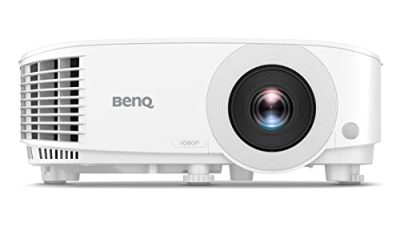
Native resolution is 1080p, so it will not render native 4K detail, and check the listed ports against the sources you plan to connect.
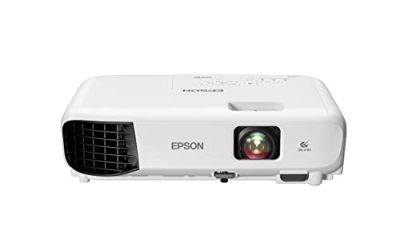
The Optoma HD146X is built for buyers who want the brightest picture in this group without chasing 4K. Its 3,600 lumens push a vivid 1080p image onto screens up to 301 inches, and a 25,000:1 contrast ratio helps dark scenes keep their depth. The DLP single-chip design and an enhanced gaming mode with a 16-millisecond response time keep motion clean for films and casual games alike. It suits a living room with lamps on and curtains open, where raw brightness earns more than extra pixels.
Watch out for: Native resolution is 1080p, so it will not render native 4K detail, and check the listed ports against the sources you plan to connect.
Hisense M2 Pro
- Best for: Movie nights that move between rooms, or a small space where a portable projector earns its keep.
- Resolution: 4K UHD (3840 x 2160)
- Light source: Triple laser
- Brightness: 1,300 ANSI lumens
- HDR: Dolby Vision
Movie nights that move between rooms, or a small space where a portable projector earns its keep.
At 1,300 ANSI lumens it performs best in a dark room, so plan for dimmed lights, and confirm the listing is the US model, since a second ASIN for this model circulates in other regions.
The Hisense M2 Pro is the portable pick in this group, built around a triple-laser light source that delivers 4K UHD color without a lamp. Its 1,300 ANSI lumens and Dolby Vision support produce a rich picture in a dark room, and the 1.0 to 1.3 optical zoom lets you resize the image from 65 to 200 inches without moving the unit. Vidaa OS with Netflix included means streaming starts on the projector itself, so it suits movie nights that move between rooms, or a small space where a fixed setup never made sense.
Watch out for: At 1,300 ANSI lumens it performs best in a dark room, so plan for dimmed lights, and confirm the listing is the US model, since a second ASIN for this model circulates in other regions.
Which One Fits Your Situation
Your Room Has Windows and Lamps You Cannot Fully Block
Pick the ViewSonic PX701-4K or the Optoma HD146X. Both sit at the bright end of this group, with the ViewSonic adding true 4K detail and the Optoma adding the highest lumen figure here. Either one keeps the picture watchable with some light in the room, while the dimmer portable pick would wash out in the same setting.
You Want a Dedicated Theater Room With Streaming Built In
Pick the Epson Home Cinema 2350. Its 4K PRO-UHD picture, HDR10 support, and built-in Android TV make it a single-box setup for a dark room, with a 10-watt speaker for casual viewing and low input lag when the same screen hosts games. Add a sound system later if the room is large.
You Move the Projector Between Rooms
Pick the Hisense M2 Pro. Its portable body, triple-laser light source, and built-in Vidaa OS mean you can carry it from the living room to a bedroom or a backyard screen and start streaming without unpacking extra gear. Just remember it needs a dark room to show its best picture.
Movies and Games Share the Same Screen
Pick the ViewSonic PX701-4K first, with the Optoma HD146X as the brighter 1080p alternative. The ViewSonic pairs true 4K detail with a 240 Hz refresh rate and 4.2-millisecond input lag, while the Optoma answers with a 16-millisecond gaming mode and a brighter image. Either one keeps fast motion smooth for both films and play.
Common Mistakes
- Judging a projector by lumens alone, without checking how much light your room actually has during movie time.
- Skipping the throw-distance check, then finding the image will not fit the wall from the only place the projector can sit.
- Treating every 4K label the same, when some models use pixel shifting instead of native 4K panels.
- Relying on a small built-in speaker for a large room, then discovering dialogue is hard to hear from the back seats.
- Counting on a single HDMI input for a console, a streaming stick, and a player, and ending up swapping cables every night.
Frequently Asked Questions
Do I need a completely dark room to use a projector for movies?
Not always. A bright model rated above 3,000 lumens holds up with some light in the room, while a dimmer portable model needs curtains drawn and lamps off to look its best. If you watch mostly after dark, even a modest-brightness projector can look great; if your movie nights start before sunset, brightness should lead your choice.
Is 1080p enough for movie nights, or do I need 4K?
1080p is enough for many rooms, especially on a modest screen viewed from normal seating distance. 4K shows its advantage on a very large screen or from a close seat, where fine detail becomes easy to see. If your screen stays under 100 inches and your seats sit well back, a bright 1080p projector can look excellent.
What is the difference between 4K PRO-UHD and native 4K?
4K PRO-UHD uses pixel shifting, where the projector rapidly shifts pixels to build a 4K image, while a native 4K panel places each pixel on the chip itself. Both can look sharp on a big screen, but the distinction matters if you compare listings side by side. Read the resolution line on the listing, not just the headline, before you decide.
Can a projector replace my television for everyday watching?
Yes, with the right setup. A bright projector with built-in streaming works well for nightly viewing in a room where you can control the light, and a screen or a smooth light-colored wall gives the best result. Keep in mind that lamp models need lamp care over time, and a separate sound system helps in a large room.
FAQ
Do I need a completely dark room to use a projector for movies?
Is 1080p enough for movie nights, or do I need 4K?
What is the difference between 4K PRO-UHD and native 4K?
Can a projector replace my television for everyday watching?
More from Amazon
Programs that pair well with the guide above. Offers and eligibility are set by Amazon and may change.
Free shipping on eligible items, Prime Video and more. Eligible new members can start with a free trial.
Start a Prime free trialAd-free music streaming. Eligible new subscribers can start with a free trial.
Try Music Unlimited freeA Prime membership for ages 18-24 with a trial period. Eligibility is set by Amazon.
See Prime for Young AdultsAudiobooks and podcasts to listen to on the go. Eligible new members can start with a free trial.
Try Audible freeAs an Amazon Associate we earn from qualifying purchases.