Our Short List of 3

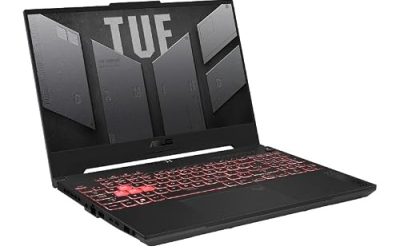
- Best for: A balanced first gaming laptop with a capable processor and a fast screen.
- AMD Ryzen 7 7445HS, 6 cores, up to 4.7 GHz boost
- NVIDIA GeForce RTX 4050, 6 GB GDDR6
- 16 GB RAM, 512 GB SSD
- 15.6 inch FHD IPS display, 144 Hz

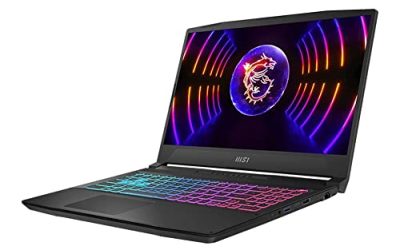
- Best for: Competitive play and big libraries, with the fastest screen and the most storage here.
- Intel Core i7-13620H processor
- NVIDIA GeForce RTX 4050 laptop GPU
- 16 GB DDR5 memory, 1 TB Gen 4 SSD
- 15.6 inch FHD IPS display, 165 Hz

- Best for: Multitasking, streaming, and heavy games from the strongest processor here.
- AMD Ryzen 7 8845HS, 8 cores
- NVIDIA GeForce RTX 4050, 6 GB GDDR6
- 16 GB DDR5 RAM, 512 GB PCIe SSD
- 15.6 inch FHD IPS display, 144 Hz
All 4 Picks at a Glance
| Product | Specs | Action |
|---|---|---|
| HP Victus 15 |
| Check price on Amazon |
| Acer Nitro V 15 |
| Check price on Amazon |
| Lenovo LOQ 15 |
| Check price on Amazon |
 ASUS TUF Gaming A15 |
| Check price on Amazon |
Key takeaways
- Compare the 4 best gaming laptops under 60k: RTX 4050 machines with fast 144Hz displays, 16GB of memory and solid cooling for smooth 1080p play every day.
A gaming laptop in the 60K class is a balancing act: enough graphics power for smooth 1080p play, a fast screen that keeps up with it, and a build that survives daily carry, without the extras that push it into a higher tier. The real decision is which trade-offs you accept, since every laptop here makes different ones, and the right pick depends on whether you value a faster screen, more storage, or cooler running. The four laptops below were chosen from the names and specifications on their Amazon pages, and each one earns its place in this class.
This guide is for first-time gaming laptop buyers, students who need one machine for class and play, and anyone upgrading from an older laptop or a console. Every product below was chosen from the name and specifications shown on its Amazon page. The picks cover four makers with the same class of graphics card, so you can compare them on screens, memory, storage, and cooling, not brand alone.
Quick Picks
As an Amazon Associate we earn from qualifying purchases
| Product | Best for | Key spec from title |
|---|---|---|
| HP Victus 15 | A balanced first gaming laptop | RTX 4050 with 15.6 inch FHD 144Hz display |
| Acer Nitro V 15 | A faster screen and more storage | RTX 4050 with 15.6 inch FHD 165Hz display |
| Lenovo LOQ 15 | A strong processor for multitasking | RTX 4050 with Ryzen 7 and 144Hz display |
| ASUS TUF Gaming A15 | A tough build with a colour-accurate screen | RTX 4050 with 15.6 inch FHD 144Hz display |
How to Choose
Start with the graphics card and its memory
The graphics card decides most of your frame rate, and all four laptops here carry the same class of card with six gigabytes of dedicated graphics memory. That memory is enough for high textures at 1080p in current games, and the card supports modern upscaling and ray tracing features that keep newer titles playable. What differs is the power limit each maker gives the card, so read the listing for the wattage figure where it is stated, because a card fed more power runs faster and hotter. For this class, treat the graphics card as the baseline and compare the machines on everything around it.
Read the screen before the spec sheet
A fast screen is what you actually look at, and the laptops here range from 144Hz to 165Hz, which is fast enough for competitive play and smooth enough for everyday use. Check the panel type too: an IPS panel keeps colours true from wide angles, while a dim or narrow-colour panel washes out no matter how fast the graphics card is. One laptop here covers the full sRGB colour space, which suits creators as well as players. If you play mostly fast shooters, the higher refresh rate matters; if you edit photos or video, colour coverage matters more.
Weigh memory, storage, and upgradability together
Sixteen gigabytes of memory is the sensible floor for a gaming laptop in this class, and all four picks meet it, though they differ in speed and type. Storage is where the picks split: some carry 512GB and some carry a full terabyte, and a larger drive means fewer reinstalls when your library grows. Check whether the listing mentions a second drive slot or expandable memory, because adding storage or memory later is far cheaper than buying a bigger configuration up front. A machine that lets you grow is worth more than one that locks you in.
Check cooling, weight, and battery honestly
Gaming laptops run hot under load, and the cooling design decides whether the machine stays fast or throttles in a long session. Look for the number of fans and heat pipes where the listing states them, and read owner feedback about fan noise, since a loud machine in a shared room is a daily annoyance. Weight matters if you carry the laptop: these machines run around two kilograms, which is portable but not light. Battery life under gaming load is short on every pick here, so treat the charger as part of the machine and check the battery figure only for light work and video playback.
The 4 Best Options
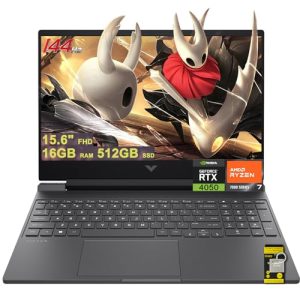
HP Victus 15
- Best for: A balanced first gaming laptop with a capable processor and a fast screen.
- AMD Ryzen 7 7445HS, 6 cores, up to 4.7 GHz boost
- NVIDIA GeForce RTX 4050, 6 GB GDDR6
- 16 GB RAM, 512 GB SSD
- 15.6 inch FHD IPS display, 144 Hz
A balanced first gaming laptop with a capable processor and a fast screen.
This listing appears to be a seller bundle that includes a hub accessory, so confirm exactly what is included and who the seller is before ordering.
The Victus 15 is the balanced pick in this guide, pairing a six-core Ryzen 7 processor with the RTX 4050 and a 144Hz full HD IPS display. The listing states sixteen gigabytes of memory, a 512GB solid-state drive, a backlit keyboard, Wi-Fi 6, and DTS:X Ultra audio, which covers the whole gaming setup without extras to buy. The 15.6-inch screen is the right size for a desk and a bag alike, and the USB-C port handles modern accessories. It suits first-time buyers who want a complete, capable gaming laptop without studying every specification.
Watch out for: This listing appears to be a seller bundle that includes a hub accessory, so confirm exactly what is included and who the seller is before ordering.
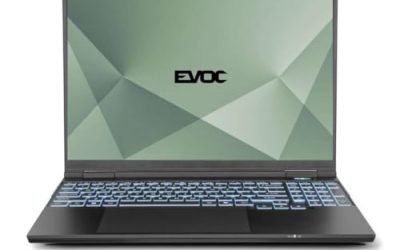
Acer Nitro V 15
- Best for: Competitive play and big libraries, with the fastest screen and the most storage here.
- Intel Core i7-13620H processor
- NVIDIA GeForce RTX 4050 laptop GPU
- 16 GB DDR5 memory, 1 TB Gen 4 SSD
- 15.6 inch FHD IPS display, 165 Hz
Competitive play and big libraries, with the fastest screen and the most storage here.
The faster screen and larger drive add weight, so check the listed weight if you carry the laptop daily; confirm the exact configuration, because Nitro V models vary widely.
The Nitro V 15 is the screen and storage pick, pairing an Intel Core i7 processor with the RTX 4050 and a 165Hz full HD IPS display. The listing states sixteen gigabytes of DDR5 memory and a one-terabyte Gen 4 solid-state drive, which is the largest storage in this guide and means fewer games to uninstall. The 165Hz panel is the fastest screen here, which suits competitive shooters, and the backlit keyboard and Wi-Fi 6 round out the setup. It suits players who want the fastest display and the most room for their library.
Watch out for: The faster screen and larger drive add weight, so check the listed weight if you carry the laptop daily; confirm the exact configuration, because Nitro V models vary widely.
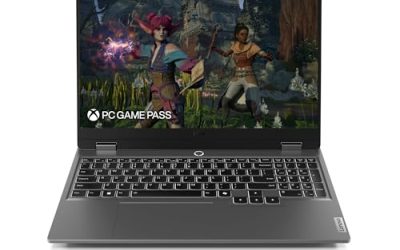
Lenovo LOQ 15
- Best for: Multitasking, streaming, and heavy games from the strongest processor here.
- AMD Ryzen 7 8845HS, 8 cores
- NVIDIA GeForce RTX 4050, 6 GB GDDR6
- 16 GB DDR5 RAM, 512 GB PCIe SSD
- 15.6 inch FHD IPS display, 144 Hz
Multitasking, streaming, and heavy games from the strongest processor here.
The 512GB drive fills quickly with large games, so plan for external storage or a drive upgrade; the processor runs warm under sustained load, so give the vents room to breathe.
The LOQ 15 is the processor pick, built around an eight-core Ryzen 7 chip that handles multitasking, streaming, and heavy games without breaking stride. The listing pairs it with the RTX 4050, sixteen gigabytes of DDR5 memory, a 512GB PCIe solid-state drive, and a 144Hz full HD IPS display, all in a Luna Grey chassis. The eight cores make it the strongest multitasker here, which matters if you stream, edit, or run several apps alongside a game. It suits buyers who want processing headroom as well as gaming speed.
Watch out for: The 512GB drive fills quickly with large games, so plan for external storage or a drive upgrade; the processor runs warm under sustained load, so give the vents room to breathe.
ASUS TUF Gaming A15
- Best for: Daily carry and creative work, with a durable build and a colour-accurate screen.
- AMD Ryzen 7 7735HS, 8 cores, up to 4.7 GHz boost
- NVIDIA GeForce RTX 4050, 6 GB GDDR6
- 16 GB DDR5-4800 memory, 1 TB PCIe SSD
- 15.6 inch FHD display, 144 Hz, 100% sRGB
Daily carry and creative work, with a durable build and a colour-accurate screen.
The durable build adds weight, so it is the least portable-feeling pick here; the 100 percent sRGB figure applies to this configuration, so confirm the exact model before ordering.
The TUF Gaming A15 is the tough, colour-accurate pick, built to military-grade durability standards and fitted with a screen that covers the full sRGB colour space. The listing pairs a Ryzen 7 processor with the RTX 4050, sixteen gigabytes of DDR5 memory, a one-terabyte PCIe solid-state drive, and a 144Hz full HD display with Wi-Fi 6E. The durable chassis suits daily carry, and the colour-accurate screen suits creators as well as players. It suits buyers who want a laptop that survives the bag and looks right doing it.
Watch out for: The durable build adds weight, so it is the least portable-feeling pick here; the 100 percent sRGB figure applies to this configuration, so confirm the exact model before ordering.
Which One Fits Your Situation
You are buying your first gaming laptop
Start with the HP Victus 15. It balances processor, graphics, screen, and memory without a weak point, and its listing is straightforward to read. The 144Hz display is fast enough for competitive play, the backlit keyboard helps in dim rooms, and the machine does everything a first buyer needs without asking you to choose between storage and speed. If you later want more storage, an external drive covers the gap.
You play competitive shooters most nights
Pick the Acer Nitro V 15. Its 165Hz display is the fastest here, and the one-terabyte drive holds a large shooter library without constant reinstalls. The Intel processor and DDR5 memory keep frame times steady, and the backlit keyboard is easy to read in a dark room. Pair it with a good mouse and a desk with room for low-sensitivity arm play, and it will carry you through ranked seasons.
You stream, edit, or multitask while you play
Choose the Lenovo LOQ 15. Its eight-core processor handles a game, a stream, and a browser at the same time, which is where the other picks start to strain. The 144Hz display is fast enough for play, and the DDR5 memory keeps everything responsive. Plan for storage early, since the 512GB drive fills fast with video files and large games.
You carry the laptop everywhere and create as well as play
Take the ASUS TUF Gaming A15. Its durable chassis survives daily bags and commutes, and its colour-accurate screen suits photo and video work as well as games. The one-terabyte drive and Wi-Fi 6E cover storage and connectivity, and the Ryzen 7 processor handles creative apps without complaint. It is the most versatile pick here for a machine that must do everything.
Common Mistakes
- Buying on the graphics card name alone without checking memory size, storage, and the screen.
- Choosing a 512GB drive for a large game library and spending the first month uninstalling games.
- Ignoring the screen’s colour coverage and refresh rate, then wondering why games look dull.
- Forgetting that gaming on battery drains any laptop quickly, and leaving the charger at home.
- Ordering a different configuration from the one you researched and receiving different memory or storage.
Frequently Asked Questions
Is 16GB of memory enough for a gaming laptop?
Yes, for 1080p gaming it is the sensible floor, and all four picks meet it. Sixteen gigabytes covers games, a browser, and chat apps together without stuttering. If you stream or edit video while playing, check whether the laptop lets you add more memory later, because that headroom is worth having even if you never use it.
Does a 144Hz screen really matter for gaming?
Yes, it makes a visible difference in fast games, because the screen draws a new frame more often and motion looks smoother. A 165Hz screen is smoother still, though the gap from 144Hz is smaller than the jump from 60Hz. If you play mostly slow strategy games, the screen matters less than the graphics card and colour quality.
Can these laptops run modern games at high settings?
At 1080p, yes, in most current titles, with high settings in many games and medium in the most demanding ones. The RTX 4050 with six gigabytes of memory handles 1080p well, and upscaling helps in newer releases. For 1440p or ultra settings you would need a stronger card, but for a 1080p screen these machines are well matched to their displays.
Should I worry about the weight of a gaming laptop?
It depends on how far you carry it. These machines run around two kilograms, which is fine in a backpack for a commute or a trip to a friend’s house, but heavy for all-day carry alongside books. If you move the laptop daily, check the listed weight and the charger size, because the charger adds real bulk to the bag.
FAQ
Is 16GB of memory enough for a gaming laptop?
Does a 144Hz screen really matter for gaming?
Can these laptops run modern games at high settings?
Should I worry about the weight of a gaming laptop?
More from Amazon
Programs that pair well with the guide above. Offers and eligibility are set by Amazon and may change.
Free shipping on eligible items, Prime Video and more. Eligible new members can start with a free trial.
Start a Prime free trialAd-free music streaming. Eligible new subscribers can start with a free trial.
Try Music Unlimited freeA Prime membership for ages 18-24 with a trial period. Eligibility is set by Amazon.
See Prime for Young AdultsAudiobooks and podcasts to listen to on the go. Eligible new members can start with a free trial.
Try Audible freeAs an Amazon Associate we earn from qualifying purchases.