Our Short List of 3

- Best for: Players who want a light, silent laptop for native Mac games, streaming, and daily work.
- Chip: Apple M5 with 10-core CPU and 8-core GPU
- Memory: 16GB unified memory
- Storage: 512GB SSD
- Display: 13.6-inch Liquid Retina display, 2560 x 1664 resolution, 500 nits brightness

- Best for: Casual players who want the lightest MacBook for Apple Arcade and older titles.
- Chip: Apple M4 with 10-core CPU
- Memory: 16GB unified memory
- Storage: 256GB SSD
- Display: 13.6-inch Liquid Retina display

- Best for: Players who want long sessions on a bright XDR display with active cooling.
- Chip: Apple M4 with 10-core CPU and 10-core GPU
- Memory: 16GB unified memory
- Storage: 512GB SSD
- Display: 14.2-inch Liquid Retina XDR display, up to 1600 nits peak brightness
All 4 Picks at a Glance
| Product | Specs | Action |
|---|---|---|
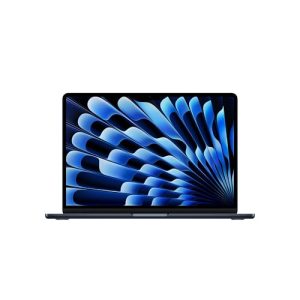
| Apple 2026 MacBook Air 13-inch Laptop with M5 chip, 16GB Unified Memory, 512GB SSD Storage; Midnight |
| Check price on Amazon |
| Apple 2025 MacBook Air 13-inch Laptop with M4 chip, 16GB Unified Memory, 256GB SSD Storage; Silver |
| Check price on Amazon |
| Apple 2024 MacBook Pro Laptop with M4 chip, 14.2-inch Liquid Retina XDR Display, 16GB Unified Memory, 512GB SSD Storage; Silver |
| Check price on Amazon |
 Apple 2024 MacBook Pro Laptop with M4 Pro, 14.2-inch Liquid Retina XDR Display, 24GB Unified Memory, 512GB SSD Storage; Space Black |
| Check price on Amazon |
Key takeaways
- The 4 best Mac laptops for gaming on macOS in November 2026: MacBook Air M5 and M4 plus MacBook Pro M4 and M4 Pro picks for every kind of player.
A Mac laptop is a tricky gaming machine to shop for, because the real question is not how much power you can buy but which games will actually run on it. Apple Silicon has closed much of the old performance gap, yet macOS still supports a smaller library than Windows, so a buyer who picks the strongest chip without checking game support can end up with a fast laptop and a short list of titles. What matters is matching the chip, the memory, and the games you already play or plan to play.
This guide is for Mac owners who want one laptop for work, study, and play, for switchers leaving Windows behind, and for players who enjoy Apple Arcade, Steam titles with native Mac versions, and cloud streaming. Every laptop below was picked from the name and specifications on its Amazon listing, and each is a MacBook with an Apple Silicon chip, so nothing here asks you to give up macOS to play.
Quick Picks
As an Amazon Associate we earn from qualifying purchases
| Product | Best for | Key spec from title |
|---|---|---|
| Apple 2026 MacBook Air 13-inch Laptop with M5 chip, 16GB Unified Memory, 512GB SSD Storage; Midnight | Everyday play plus portable work | M5 chip with 10-core CPU and 8-core GPU |
| Apple 2025 MacBook Air 13-inch Laptop with M4 chip, 16GB Unified Memory, 256GB SSD Storage; Silver | Light gaming in the slimmest MacBook | M4 chip with 10-core CPU |
| Apple 2024 MacBook Pro Laptop with M4 chip, 14.2-inch Liquid Retina XDR Display, 16GB Unified Memory, 512GB SSD Storage; Silver | Longer sessions with a brighter display | M4 chip with 10-core CPU and 10-core GPU |
| Apple 2024 MacBook Pro Laptop with M4 Pro, 14.2-inch Liquid Retina XDR Display, 24GB Unified Memory, 512GB SSD Storage; Space Black | Demanding titles and heavy multitasking | M4 Pro chip with 12-core CPU and 16-core GPU |
How to Choose
Match the chip to the games you actually play
The chip decides which games feel smooth and which ones stutter, so start from your library, not from a spec sheet. The M5 and M4 Pro handle recent native Mac releases and graphically rich indie titles, while the base M4 copes well with Apple Arcade games, older Steam titles, and lighter multiplayer games. Hardware-accelerated ray tracing appears on the newer chips, and it matters only if the games you play support it on macOS. Before settling on a model, search each game you care about for a native Mac version, because a Windows-only title will need streaming or a compatibility layer, and neither of those depends on the chip you buy.
Treat unified memory as a gaming decision, not a footnote
Apple Silicon shares one pool of memory between the processor and the graphics cores, so the memory figure in the listing shapes gaming performance. A 16GB machine runs most current Mac games comfortably, yet a player who keeps a browser, a chat app, and a game open will feel the limit sooner. The 24GB configuration on the M4 Pro model gives that shared pool more room, which shows up as steadier frame pacing when several apps compete for memory. Since memory cannot be upgraded later on any of these laptops, choosing the larger pool at purchase is the only way to keep the machine comfortable as games grow heavier.
Check storage against the size of a modern game library
One game can swallow dozens of gigabytes, so the storage figure in the listing is a hard ceiling on how many titles you can keep installed. The 256GB Air fills up fast once macOS, a few apps, and two or three games share the drive, and moving games to an external drive adds friction whenever you play away from your desk. A 512GB drive suits a player who rotates through a handful of titles, while anyone building a permanent library should think about how often they are willing to uninstall and reinstall. Storage, like memory, is fixed at purchase, so its listing figure deserves the same attention as the chip.
Weigh the display and the fan against long sessions
The screen is where a Mac laptop either earns its keep or disappoints, because you will stare at it for every minute of play. The MacBook Pro models carry a Liquid Retina XDR display with higher peak brightness than the Air, which makes bright outdoor scenes and high-dynamic-range content look noticeably richer. The Pro models also have fans, so they can sustain heavy loads for longer without slowing down, while the fanless Air stays silent and leans on the efficiency of its chip instead. A player who games in short bursts will love the silent Air, but someone planning evening-long sessions should favour the cooled Pro and its brighter panel.
The 4 Best Options
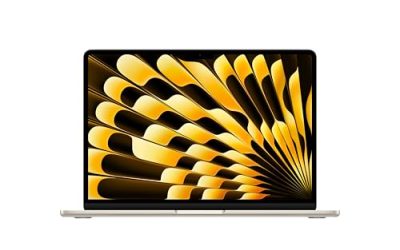
Apple 2026 MacBook Air 13-inch Laptop with M5 chip, 16GB Unified Memory, 512GB SSD Storage; Midnight
- Best for: Players who want a light, silent laptop for native Mac games, streaming, and daily work.
- Chip: Apple M5 with 10-core CPU and 8-core GPU
- Memory: 16GB unified memory
- Storage: 512GB SSD
- Display: 13.6-inch Liquid Retina display, 2560 x 1664 resolution, 500 nits brightness
Players who want a light, silent laptop for native Mac games, streaming, and daily work.
The base M5 graphics configuration uses an 8-core GPU, so confirm the listing shows the 10-core CPU and 8-core GPU combination before ordering, and remember that Windows-only games still need streaming or a compatibility layer.
The newest Air is the easiest Mac gaming laptop to recommend to a player who wants one machine for everything. Its M5 chip pairs a 10-core CPU with an 8-core GPU and hardware-accelerated ray tracing, so native Mac releases and Apple Arcade titles run with room to spare, while the 16GB of unified memory keeps a browser and a chat app open beside the game. At 2.7 pounds with a 13.6-inch Liquid Retina display, it slips into a bag without a second thought, and the silent fanless design means late-night sessions never wake anyone nearby.
Watch out for: The base M5 graphics configuration uses an 8-core GPU, so confirm the listing shows the 10-core CPU and 8-core GPU combination before ordering, and remember that Windows-only games still need streaming or a compatibility layer.
Apple 2025 MacBook Air 13-inch Laptop with M4 chip, 16GB Unified Memory, 256GB SSD Storage; Silver
- Best for: Casual players who want the lightest MacBook for Apple Arcade and older titles.
- Chip: Apple M4 with 10-core CPU
- Memory: 16GB unified memory
- Storage: 256GB SSD
- Display: 13.6-inch Liquid Retina display
Casual players who want the lightest MacBook for Apple Arcade and older titles.
Apple replaced this model with the M5 Air, so remaining Amazon listings are leftover stock; confirm the unit is new, and note that 256GB of storage fills quickly once a few large games are installed.
The M4 Air suits a player whose gaming diet is mostly Apple Arcade, classic titles, and lighter Steam games rather than the newest demanding releases. Its 10-core M4 chip and 16GB of unified memory handle those games smoothly, and the 13.6-inch Liquid Retina display, 12MP Center Stage camera, and Touch ID make it a pleasant daily laptop when the game closes. The fanless body stays completely silent, which matters more than raw power for someone gaming in a shared room or a library, and the slim frame is the easiest of the four to carry everywhere.
Watch out for: Apple replaced this model with the M5 Air, so remaining Amazon listings are leftover stock; confirm the unit is new, and note that 256GB of storage fills quickly once a few large games are installed.
Apple 2024 MacBook Pro Laptop with M4 chip, 14.2-inch Liquid Retina XDR Display, 16GB Unified Memory, 512GB SSD Storage; Silver
- Best for: Players who want long sessions on a bright XDR display with active cooling.
- Chip: Apple M4 with 10-core CPU and 10-core GPU
- Memory: 16GB unified memory
- Storage: 512GB SSD
- Display: 14.2-inch Liquid Retina XDR display, up to 1600 nits peak brightness
Players who want long sessions on a bright XDR display with active cooling.
The listing describes all-day battery life without a fixed hour figure, so expect real gaming time to fall well short of light-use browsing, and check that the listing title matches the Silver finish and 512GB storage you intend to buy.
The 14-inch MacBook Pro with the base M4 chip is the sweet spot for a player who wants the Pro display and cooling without stepping up to the Pro chip. Its 10-core CPU and 10-core GPU drive the 14.2-inch Liquid Retina XDR display, which reaches far higher peak brightness than the Air panels and makes games with bright highlights look striking. The built-in fans let it hold performance through longer sessions, and the 16GB of unified memory with 512GB of storage covers a rotating library of several titles. Three Thunderbolt ports and an HDMI port also make docking to a monitor straightforward.
Watch out for: The listing describes all-day battery life without a fixed hour figure, so expect real gaming time to fall well short of light-use browsing, and check that the listing title matches the Silver finish and 512GB storage you intend to buy.
Apple 2024 MacBook Pro Laptop with M4 Pro, 14.2-inch Liquid Retina XDR Display, 24GB Unified Memory, 512GB SSD Storage; Space Black
- Best for: Demanding players who multitask heavily and want the most headroom in a 14-inch MacBook.
- Chip: Apple M4 Pro with 12-core CPU and 16-core GPU
- Memory: 24GB unified memory
- Storage: 512GB SSD
- Display: 14.2-inch Liquid Retina XDR display, up to 1600 nits peak brightness
Demanding players who multitask heavily and want the most headroom in a 14-inch MacBook.
Some Amazon listings for this configuration are renewed units sold by third parties, so confirm the listing is a new unit before ordering, and confirm the memory figure reads 24GB rather than a lower configuration.
The M4 Pro model is the strongest gaming MacBook in this guide, built for a player who runs demanding native titles while keeping other apps open. Its 12-core CPU and 16-core GPU sit beside 24GB of unified memory, so large game worlds load with more headroom and background apps compete less for the shared memory pool. The 14.2-inch Liquid Retina XDR display reaches the same high peak brightness as the base Pro, and three Thunderbolt 5 ports, an HDMI port, and an SDXC slot cover monitors, capture gear, and fast external drives. At 3.53 pounds it is the heaviest pick here, yet it remains a genuinely portable machine.
Watch out for: Some Amazon listings for this configuration are renewed units sold by third parties, so confirm the listing is a new unit before ordering, and confirm the memory figure reads 24GB rather than a lower configuration.
Which One Fits Your Situation
You want one light laptop for play and everyday life
Choose the MacBook Air 13-inch with the M5 chip. It is the lightest current model in this guide, its fanless body stays silent, and the 512GB drive holds a reasonable rotation of games without constant uninstalling. The M5 graphics and 16GB of memory cover native Mac releases and Apple Arcade comfortably, so it works as a daily laptop first and a gaming machine second.
You play casually and care most about silence and portability
Choose the MacBook Air 13-inch with the M4 chip. It handles Apple Arcade and lighter titles without any fan noise, and its slim frame disappears into a bag. The trade is storage, since 256GB fills quickly, so this pick suits a player who keeps only a few games installed at a time.
You play for hours and want the best screen
Choose the MacBook Pro 14-inch with the M4 chip. Its Liquid Retina XDR display and active cooling are built for long sessions, and the 10-core GPU with 512GB of storage suits a rotating library. It is heavier than either Air, but the brighter panel and sustained performance repay the extra weight.
You run demanding games with apps open beside them
Choose the MacBook Pro 14-inch with the M4 Pro chip. The 24GB of unified memory and 16-core GPU give the most headroom in this guide, and the Thunderbolt 5 ports suit a docked setup with an external monitor. It is the pick for a player who treats the MacBook as a primary gaming machine rather than a secondary one.
Safety Notes
A MacBook is a sealed battery-powered device, so treat charging and heat with basic care. Use the power adapter that ships in the box or a matching Apple adapter, keep vents and the area around the hinge clear while gaming, and avoid covering the laptop with fabric or bedding during long sessions. Never open the case to reach the battery, and if the battery swells, overheats, or the laptop shuts down repeatedly, stop using it and contact Apple support. Keep the laptop away from water and out of hot cars.
Common Mistakes
- Buying the strongest chip before checking whether your games have native Mac versions.
- Choosing 256GB of storage and then discovering that two large games leave almost no room.
- Picking a fanless Air for marathon sessions and wondering why performance softens as heat builds.
- Assuming every listing with the same model name carries the same memory and storage.
- Ordering a renewed unit by mistake when the listing title looks identical to a new one.
Frequently Asked Questions
Can a MacBook run the same games as a Windows laptop?
Not all of them. A MacBook runs native macOS titles, Apple Arcade games, and many Steam games with Mac versions, but a large share of Windows-only releases has no Mac version. Those titles need cloud streaming or a compatibility layer, and results vary by game, so check each title you care about before choosing a model.
Is the MacBook Air good enough for gaming?
Yes, for the right games. The fanless Air handles Apple Arcade, indie titles, and older Steam games smoothly, and the M5 model adds ray tracing support for newer native releases. It is less suited to long sessions in demanding titles, where the fan-cooled MacBook Pro holds performance steadier.
How much memory should a gaming MacBook have?
A 16GB machine covers most current Mac games, including recent native releases with a browser open beside them. A 24GB machine, such as the M4 Pro model in this guide, gives the shared memory pool more room when several apps run at once. Memory cannot be upgraded later, so choose the larger figure if you plan to keep the laptop for years.
Do I need an external monitor or controller for Mac gaming?
No, but both can help. The built-in Liquid Retina displays are sharp and bright, and the keyboard and trackpad work for many titles. A controller suits action and racing games, while an external monitor helps when the laptop stays docked at a desk, especially with the Pro models and their Thunderbolt ports.
FAQ
Can a MacBook run the same games as a Windows laptop?
Is the MacBook Air good enough for gaming?
How much memory should a gaming MacBook have?
Do I need an external monitor or controller for Mac gaming?
More from Amazon
Programs that pair well with the guide above. Offers and eligibility are set by Amazon and may change.
Free shipping on eligible items, Prime Video and more. Eligible new members can start with a free trial.
Start a Prime free trialAd-free music streaming. Eligible new subscribers can start with a free trial.
Try Music Unlimited freeA Prime membership for ages 18-24 with a trial period. Eligibility is set by Amazon.
See Prime for Young AdultsAudiobooks and podcasts to listen to on the go. Eligible new members can start with a free trial.
Try Audible freeAs an Amazon Associate we earn from qualifying purchases.