Our Short List of 3

- Best for: Players who want the smoothest high-refresh play on a larger 16-inch screen.
- Intel Core i7-13650HX processor, 14 cores, up to 4.9GHz
- NVIDIA GeForce RTX 4060 Laptop GPU at 140W Max TGP
- 16-inch Full HD display, 165Hz, full sRGB coverage, Pantone Validation
- 16GB DDR5-4800MHz memory

- Best for: Buyers who want a fast 165Hz screen, Thunderbolt 4 and a light carry in this group.
- Intel Core i7-13620H processor, 10 cores, up to 4.9GHz
- NVIDIA GeForce RTX 4050 Laptop GPU
- 15.6-inch Full HD IPS display, 165Hz
- 16GB DDR5 memory, 2 slots, maximum 32GB

- Best for: Buyers who want a sharper QHD screen and 32GB of memory for heavy multitasking.
- Intel Core i7-13650HX processor, 14 cores, up to 4.9GHz, 24MB cache
- NVIDIA GeForce RTX 4060, 8GB GDDR6, boost clock 2370MHz, 140W TGP
- 16-inch QHD display, 165Hz, G-SYNC
- 32GB DDR5-4800MHz memory
All 3 Picks at a Glance
| Product | Specs | Action |
|---|---|---|
| ASUS ROG Strix G16 (G614JV-AS74) |
| Check price on Amazon |
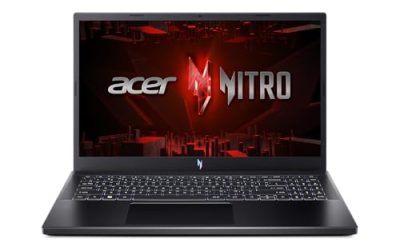
| Acer Nitro V 15 (ANV15-51-723D) |
| Check price on Amazon |
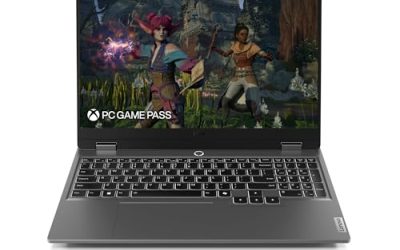
| Lenovo Legion 5i 16 |
| Check price on Amazon |
Our Top Picks
- ASUS ROG Strix G16 Gaming Laptop16GB DDR5 | 1TB SSD13.94 x 0.89 x 10.39 inches5.51 poundsCheck on Amazon
Choosing an i7 gaming laptop is less about the badge on the lid than about the exact configuration behind it. Two machines can share the same processor name and still differ in graphics power, memory, storage and screen, and those differences decide how a laptop feels after six months of daily use. The four laptops below all pair a 13th-generation Intel Core i7 with a dedicated NVIDIA RTX graphics card, yet each one aims at a different kind of buyer, from the player who wants the smoothest 1080p experience to the buyer who needs a sharper screen for work and play.
This guide is for buyers who have settled on Intel Core i7 and want to compare real listings rather than brand promises. It suits competitive players, students who need one machine for class and games, and buyers replacing an older laptop. Every specification below comes from the Amazon listing for that exact configuration, so check the model code on the listing before you order.
Quick Picks
As an Amazon Associate we earn from qualifying purchases.
| Product | Best for | Key spec from title |
|---|---|---|
| ASUS ROG Strix G16 (G614JV-AS74) | Smooth high-refresh play on a 16-inch screen | RTX 4060, 165Hz display, 16GB DDR5 |
| Lenovo LOQ 15IRX9 | Balanced 1080p gaming with a 144Hz panel | RTX 4060, 144Hz display, 16GB DDR5 |
| Acer Nitro V 15 (ANV15-51-723D) | Fast 165Hz play with Thunderbolt 4 docking | RTX 4050, 165Hz display, 1TB SSD |
| Lenovo Legion 5i 16 | Sharp QHD gaming with extra memory | RTX 4060, QHD 165Hz display, 32GB RAM |
How to Choose
Match the processor to the games you play
All four laptops use a 13th-generation Intel Core i7, but the two chips here are not identical. The i7-13650HX in the Strix G16, the LOQ and the Legion 5i has 14 cores and a maximum turbo frequency of 4.9GHz, which suits games with many objects and background tasks. The i7-13620H in the Nitro V has 10 cores with the same 4.9GHz maximum turbo, a solid match for most games at 1080p. If you stream, record or run voice chat beside a game, the extra cores of the HX chip give more headroom. If you play mainly solo titles, the H chip is enough, and savings can go toward memory or storage.
Read the graphics card and its power limit
Three laptops use the RTX 4060 and one uses the RTX 4050, and card memory differs: the RTX 4060 models carry 8GB of GDDR6, while the RTX 4050 in the Nitro V carries 6GB. The card name alone does not settle performance, because the power limit matters too. The Strix G16 and the Legion 5i both state their RTX 4060 at 140W TGP, a documented figure that explains why two laptops sharing a card name differ. The LOQ listing does not state a power limit, so treat its graphics as an open question until you confirm it. Choose the RTX 4060 for newer games and the RTX 4050 for lighter titles.
Check memory and storage on day one
Memory and storage decide how a laptop feels a year after purchase. The Legion 5i lists 32GB of DDR5 memory, double the 16GB in the other three, which suits buyers who keep a game, a browser and voice chat open together. For storage, the Strix G16, the Nitro V and the Legion 5i each list a 1TB SSD, while the LOQ lists 512GB. A 512GB drive holds a handful of large modern games before it fills, so LOQ buyers should plan their library early. The Nitro V listing also documents two memory slots and two M.2 slots, the clearest upgrade path here, while the Strix listing gives no slot count at all.
Weigh the display and the ports
The display sets how every game looks, and the four panels cover two resolutions and two refresh rates. The Legion 5i is the only QHD screen in the group, a sharper match for its RTX 4060, while the other three use Full HD panels. The Strix G16 and the Nitro V run at 165Hz and the LOQ runs at 144Hz, so fast games feel smoother on the 165Hz machines. Ports matter too: the Nitro V is the only laptop here with Thunderbolt 4, and it adds HDMI 2.1 and Ethernet beside USB-C. Before you order, match the ports against your headset, monitor and wired network, because later adapters rarely sit as neatly.
The 4 Best Options
ASUS ROG Strix G16 (G614JV-AS74)
- Best for: Players who want the smoothest high-refresh play on a larger 16-inch screen.
- Intel Core i7-13650HX processor, 14 cores, up to 4.9GHz
- NVIDIA GeForce RTX 4060 Laptop GPU at 140W Max TGP
- 16-inch Full HD display, 165Hz, full sRGB coverage, Pantone Validation
- 16GB DDR5-4800MHz memory
Players who want the smoothest high-refresh play on a larger 16-inch screen.
The listing gives no memory slot count or maximum memory, so confirm upgrade room in the manual before ordering parts.
The Strix G16 is the strongest all-round pick in this group, and the listing gives clear reasons why. Its 13th-generation Intel Core i7-13650HX pairs with an RTX 4060 Laptop GPU that the listing states at 140W Max TGP, so the graphics card has documented room to sustain demanding games. The 16-inch Full HD panel runs at 165Hz with full sRGB coverage, and the combination of 16GB of DDR5 memory with a 1TB PCIe Gen4 SSD keeps loading times short. Liquid metal cooling on the processor and a third intake fan support long sessions, while Wi-Fi 6E helps in crowded home networks.
Watch out for: The listing gives no memory slot count or maximum memory, so confirm upgrade room in the manual before ordering parts.
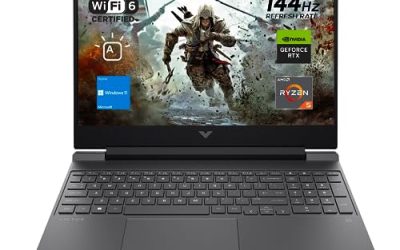
Lenovo LOQ 15IRX9
The LOQ 15IRX9 is the balanced pick for buyers who want RTX 4060 graphics without stepping up to a 16-inch chassis. Its Intel Core i7-13650HX has 14 cores, and the listing pairs it with an RTX 4060 Laptop GPU carrying 8GB of GDDR6 memory. The 15.6-inch Full HD IPS panel runs at 144Hz, a natural match for the graphics card at 1080p, and the machine ships with 16GB of DDR5 memory and a 512GB SSD. A backlit keyboard and Wi-Fi 6 cover late-night sessions and shared networks, and the 15.6-inch body is easier to carry than the larger models here.
Specs
- Intel Core i7-13650HX processor, 14 cores
- NVIDIA GeForce RTX 4060, 8GB GDDR6
- 15.6-inch Full HD IPS display, 144Hz
- 16GB DDR5 memory
- 512GB SSD
- Wi-Fi 6
- Backlit keyboard
- Windows 11 Home
Best for: Buyers who want balanced RTX 4060 gaming in a standard 15.6-inch body.
Watch out for: The 512GB drive fills quickly with large modern games, so plan your library size before you order.
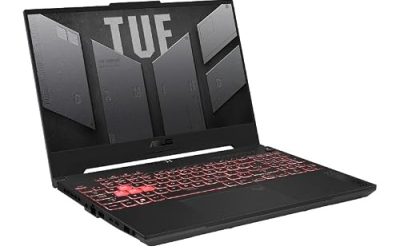
Acer Nitro V 15 (ANV15-51-723D)
- Best for: Buyers who want a fast 165Hz screen, Thunderbolt 4 and a light carry in this group.
- Intel Core i7-13620H processor, 10 cores, up to 4.9GHz
- NVIDIA GeForce RTX 4050 Laptop GPU
- 15.6-inch Full HD IPS display, 165Hz
- 16GB DDR5 memory, 2 slots, maximum 32GB
Buyers who want a fast 165Hz screen, Thunderbolt 4 and a light carry in this group.
The RTX 4050 sits a tier below the RTX 4060 models here, so expect to lower settings sooner in newer demanding games.
The Nitro V 15 is the pick for buyers who want a fast screen and serious connectivity in a lighter frame. Its Intel Core i7-13620H has 10 cores and pairs with an RTX 4050 Laptop GPU, while the 15.6-inch Full HD IPS display runs at 165Hz, the fastest refresh rate among the 15.6-inch models here. The listing records 16GB of DDR5 memory and a 1TB Gen 4 SSD, with two memory slots and two M.2 slots for later upgrades. Thunderbolt 4, HDMI 2.1 and Ethernet give the Nitro V the most flexible docking options in this group, and at 4.66 pounds it travels easily.
Watch out for: The RTX 4050 sits a tier below the RTX 4060 models here, so expect to lower settings sooner in newer demanding games.
Lenovo Legion 5i 16
- Best for: Buyers who want a sharper QHD screen and 32GB of memory for heavy multitasking.
- Intel Core i7-13650HX processor, 14 cores, up to 4.9GHz, 24MB cache
- NVIDIA GeForce RTX 4060, 8GB GDDR6, boost clock 2370MHz, 140W TGP
- 16-inch QHD display, 165Hz, G-SYNC
- 32GB DDR5-4800MHz memory
Buyers who want a sharper QHD screen and 32GB of memory for heavy multitasking.
This listing is sold by a third-party seller, so confirm the seller and whether the 32GB memory is factory-installed or a seller upgrade before you order.
The Legion 5i is the pick for buyers who want a sharper screen and more memory on day one. Its 16-inch QHD display runs at 165Hz with G-SYNC, and the listing pairs an Intel Core i7-13650HX with an RTX 4060 Laptop GPU stated at 140W TGP. The configuration lists 32GB of DDR5 memory and a 1TB PCIe NVMe SSD, double the memory of the other laptops here, which suits heavy multitasking beside games. A four-zone RGB backlit keyboard, a numeric keypad and Legion Coldfront 5.0 cooling round out a machine built for long sessions, and the 230W adapter ships in the box.
Watch out for: This listing is sold by a third-party seller, so confirm the seller and whether the 32GB memory is factory-installed or a seller upgrade before you order.
Which One Fits Your Situation
You want the smoothest play at 1080p
Pick the ASUS ROG Strix G16. Its RTX 4060 at 140W Max TGP and its 165Hz Full HD panel are the strongest pairing for smooth play in this group, and the 1TB SSD leaves room for a large library. The 16-inch screen suits a desk setup, and the liquid metal cooling supports long sessions. Accept the larger body, and confirm the memory upgrade path in the manual before you order.
You want a balanced all-rounder
Pick the Lenovo LOQ 15IRX9. Its i7-13650HX and RTX 4060 cover modern games at 1080p, and the 15.6-inch 144Hz panel is a sensible match for the graphics card. The 16GB of DDR5 memory handles games beside a browser and voice chat, and the standard-size body travels more easily than the 16-inch models. Plan around the 512GB drive, and keep your installed library tidy.
You want the lightest carry with the best ports
Pick the Acer Nitro V 15. At 4.66 pounds it carries easily, and Thunderbolt 4, HDMI 2.1 and Ethernet give it the most flexible docking in the group. The 165Hz display suits fast games, and the 1TB SSD holds a healthy library. The RTX 4050 sits below the RTX 4060 models, so expect to lower settings sooner in newer demanding titles.
You want a sharper screen and more memory
Pick the Lenovo Legion 5i. Its 16-inch QHD 165Hz display with G-SYNC is the sharpest panel here, and the listed 32GB of DDR5 memory suits heavy multitasking beside games. The RTX 4060 at 140W TGP gives the graphics headroom to match the higher resolution. Confirm the seller and the memory installation before you order, since this is a third-party seller listing.
Safety Notes
Gaming laptops draw serious power, so use only the adapter that ships in the box or an exact manufacturer replacement, and keep the vents clear while the machine runs. Never cover a laptop that is charging or gaming, and stop using it if the battery swells, the chassis grows unusually hot, or you notice a strange smell. Let the machine cool before you pack it away, and take a worn battery to a proper electronics recycling point rather than putting it in household waste.
Common Mistakes
- Buying by the model name alone without checking the exact configuration code on the listing.
- Assuming every laptop with the same graphics card name performs the same, without checking the stated power limit.
- Choosing a 512GB drive and then installing several large modern games at once.
- Choosing a higher-resolution screen without checking whether the graphics card suits it.
- Ordering a seller-upgraded listing without asking who installed the extra memory.
Frequently Asked Questions
Is an Intel Core i7 enough for modern games?
Yes. The i7-13650HX and the i7-13620H in this guide both pair with dedicated RTX graphics, and that combination covers modern games at 1080p with room to spare. The processor matters most in games with many objects, background tasks or streaming running beside play. Match the graphics card and the display to the games you play, and the i7 will not be the part holding the laptop back.
What is the difference between the i7-13620H and the i7-13650HX?
The i7-13650HX has 14 cores, while the i7-13620H has 10 cores, and both list a maximum turbo frequency of 4.9GHz. The HX chip suits heavier multitasking, such as streaming or recording while a game runs. The H chip suits mainly gaming and everyday use. Either chip pairs well with an RTX 4050 or RTX 4060 at 1080p, so let your other habits decide.
Is 16GB of memory enough for a gaming laptop?
Yes, for most buyers. The 16GB of DDR5 memory in three of the laptops here handles modern games beside a browser and voice chat without strain. It only feels tight beside heavy creative apps or many background tools. If you plan to keep the laptop for years or multitask heavily, the Legion 5i with 32GB is the safer pick, or choose a model with documented memory slots.
Should I choose a 144Hz or a 165Hz display?
Both are smooth, and the difference is small beside the choice of graphics card. A 165Hz panel, as on the Strix G16 and the Nitro V, gives fast games a little extra fluidity, while the 144Hz panel on the LOQ matches its RTX 4060 at 1080p. If you play fast shooters often, favour 165Hz. If you play slower-paced games, either panel serves well, so weigh graphics and memory first.
FAQ
Is an Intel Core i7 enough for modern games?
What is the difference between the i7-13620H and the i7-13650HX?
Is 16GB of memory enough for a gaming laptop?
Should I choose a 144Hz or a 165Hz display?
More from Amazon
Programs that pair well with the guide above. Offers and eligibility are set by Amazon and may change.
Free shipping on eligible items, Prime Video and more. Eligible new members can start with a free trial.
Start a Prime free trialAd-free music streaming. Eligible new subscribers can start with a free trial.
Try Music Unlimited freeA Prime membership for ages 18-24 with a trial period. Eligibility is set by Amazon.
See Prime for Young AdultsAudiobooks and podcasts to listen to on the go. Eligible new members can start with a free trial.
Try Audible freeAs an Amazon Associate we earn from qualifying purchases.