Our Short List of 3

- Best for: A full-size Ryzen 5000 gaming PC that needs fast WiFi and easy BIOS updates.
- Socket AM4, AMD B550 chipset, ATX form factor
- PCIe 4.0 support
- WiFi 6E wireless networking
- 2.5Gb LAN

- Best for: Ryzen 5000 gaming builds that want a proven board with every modern connection included.
- Socket AM4, AMD B550 chipset, ATX form factor
- Supports AMD Ryzen 5000 series processors
- DDR4 memory support
- PCIe 4.0, SATA 6Gb/s storage
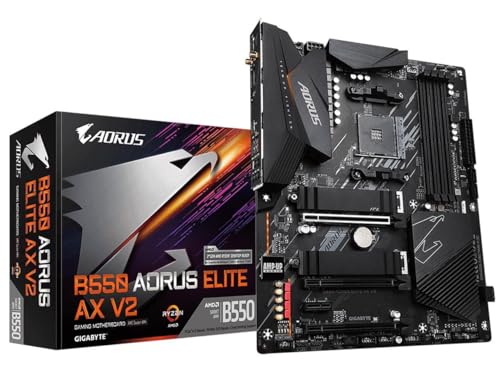
- Best for: Builders moving up to a higher-core Ryzen chip who want stronger power delivery without jumping to flagship pricing tiers.
- Socket AM4, AMD B550 chipset, ATX form factor
- Supports Ryzen 5000, 4000, and 3000 series processors
- DDR4 memory support
- 12+2 power phase design
All 4 Picks at a Glance
| Product | Specs | Action |
|---|---|---|
| ASUS ROG Strix B550-F Gaming WiFi II |
| Check price on Amazon |
| MSI MAG B550 Tomahawk MAX WiFi |
| Check price on Amazon |
| Gigabyte B550 AORUS Elite AX V2 |
| Check price on Amazon |
 MSI B550M PRO-VDH WiFi |
| Check price on Amazon |
Our Top Picks
- MSI MAG B550 Tomahawk MAX WiFi Gaming MotherboardMAG B550 TOMAHAWK MAX WIFI12 x 9.6 x 2.5 inches3.75 poundsCheck on Amazon
Buying an AM4 motherboard in late 2026 is rarely about building from zero. The real decision is whether the board can carry the Ryzen chip you already own, or the discounted 5000-series chip you just picked up, without forcing you into a new DDR5 platform. Chipset, BIOS support for your exact processor, and power delivery matter far more than RGB or box art.
This roundup is for upgraders keeping DDR4 memory alive, budget builders finishing a Ryzen 5 5600 rig, and anyone replacing a dead B450 board. Every pick below was chosen from its Amazon listing name and specifications, and each one is a socket AM4 board that is still on sale. The five picks split into full-size ATX boards with WiFi 6E and 2.5Gb networking, plus smaller micro-ATX boards that cost less and fit compact cases.
Quick Picks
As an Amazon Associate we earn from qualifying purchases
| Product | Best for | Key spec from title |
|---|---|---|
| ASUS ROG Strix B550-F Gaming WiFi II | Full-size gaming rigs that need fast wireless | WiFi 6E with 2.5Gb LAN, PCIe 4.0 |
| MSI MAG B550 Tomahawk MAX WiFi | Ryzen 5000 builds wanting a proven all-rounder | WiFi 6E, Bluetooth 5.2, 2.5Gbps LAN |
| Gigabyte B550 AORUS Elite AX V2 | Higher-core Ryzen chips on a mid-range budget | 12+2 power phases, dual M.2, WiFi 6 |
| MSI B550M PRO-VDH WiFi | Compact micro-ATX builds with built-in WiFi | Micro-ATX, PCIe 4.0, D-SUB/HDMI/DP outputs |
| Gigabyte B550M DS3H AC R2 | The cheapest sensible route into B550 | Dual M.2, WiFi 5, PCIe EZ-Latch |
How to Choose
Start with the chipset, because it locks in PCIe 4.0
B550 is the sweet spot for most AM4 buyers today. It gives the primary graphics slot and one M.2 slot PCIe 4.0 wiring when paired with a Ryzen 3000 or 5000 processor, which keeps modern GPUs and Gen4 NVMe drives at full speed. Older B450 boards still work, but they cap everything at PCIe 3.0 and often need a BIOS update before a 5000-series chip will boot. X570 adds more Gen4 lanes, yet most gaming builds never use them, and many X570 boards rely on a small chipset fan that B550 designs simply do not need.
Match the board to your exact Ryzen chip and BIOS
AM4 lived through several processor generations, so support is not automatic. A board that runs a Ryzen 5 3600 may need a newer BIOS before it accepts a Ryzen 7 5800X3D, and some early boards dropped support for the oldest chips as BIOS files grew. Check the CPU support list on the listing and the vendor site for your exact model. Boards with a BIOS FlashBack or Q-Flash Plus button remove the stress entirely, because you can update the firmware from a USB stick before the processor is even installed.
Power delivery decides which chips the board handles happily
A Ryzen 5 5600 sips power and runs well on almost any B550 board. Twelve- and sixteen-core Ryzen 9 parts, and long rendering or compiling sessions, are a different story: they reward boards with more power phases and real heatsinks over the voltage regulators. The Gigabyte AORUS Elite AX V2 advertises a 12+2 phase design, while the DS3H AC R2 in this list runs a 5+3 layout that suits mid-range chips better. If you plan to keep the board through a later CPU upgrade, buying VRM headroom now is cheaper than replacing the board later.
Count the connections you will actually plug in
Two M.2 slots are worth having if your game library keeps growing, since the second slot avoids SATA cable clutter later. WiFi is the other dividing line: WiFi 6E boards like the two ATX picks here add the 6 GHz band, while WiFi 5 and basic WiFi boards still serve a wired-desk setup poorly if the router sits in another room. Also confirm the rear panel has the video outputs you need if you run a Ryzen G-series chip with integrated graphics, because not every board includes DisplayPort and HDMI together.
The 5 Best Options
ASUS ROG Strix B550-F Gaming WiFi II
- Best for: A full-size Ryzen 5000 gaming PC that needs fast WiFi and easy BIOS updates.
- Socket AM4, AMD B550 chipset, ATX form factor
- PCIe 4.0 support
- WiFi 6E wireless networking
- 2.5Gb LAN
A full-size Ryzen 5000 gaming PC that needs fast WiFi and easy BIOS updates.
The 6 GHz WiFi 6E band only helps if your router also supports it; on an older router it behaves like a WiFi 6 board.
If your AM4 build still deserves a premium foundation, this is the board that feels least like a compromise. The Strix pairs PCIe 4.0 with WiFi 6E and a 2.5Gb Ethernet port, so it suits a main gaming rig that downloads huge patches over wireless and still drives a fast Gen4 SSD. BIOS FlashBack is built in, which makes it a forgiving choice for anyone dropping in a later Ryzen 5000 chip. It fits builders who plan to keep AM4 running as their primary machine rather than a stopgap.
MSI MAG B550 Tomahawk MAX WiFi
- Best for: Ryzen 5000 gaming builds that want a proven board with every modern connection included.
- Socket AM4, AMD B550 chipset, ATX form factor
- Supports AMD Ryzen 5000 series processors
- DDR4 memory support
- PCIe 4.0, SATA 6Gb/s storage
Ryzen 5000 gaming builds that want a proven board with every modern connection included.
MSI sells a plain B550 Tomahawk with no WiFi under a very similar name, so confirm the MAX WiFi wording on the listing before ordering.
The Tomahawk name earned its reputation on VRM cooling, and the MAX WiFi version adds the wireless hardware the original board lacked. WiFi 6E, Bluetooth 5.2, and 2.5Gbps LAN cover the connectivity checklist in one board, and USB 3.2 Gen 2 gives fast external drive transfers. This is the pick for a Ryzen 7 5800X-class build where you want strong power delivery and do not want to shop for a separate WiFi card. It is also a sensible replacement when an older Tomahawk or B450 board dies and everything else in the case is still good.
Gigabyte B550 AORUS Elite AX V2
- Best for: Builders moving up to a higher-core Ryzen chip who want stronger power delivery without jumping to flagship pricing tiers.
- Socket AM4, AMD B550 chipset, ATX form factor
- Supports Ryzen 5000, 4000, and 3000 series processors
- DDR4 memory support
- 12+2 power phase design
Builders moving up to a higher-core Ryzen chip who want stronger power delivery without jumping to flagship pricing tiers.
Gigabyte shipped this model in more than one hardware revision, so check the revision printed on the box if a specific BIOS version matters for your chip.
Gigabyte aimed this board squarely at buyers running hungrier processors. The listing leads with a 12+2 power phase design, which is the kind of headroom that keeps Ryzen 9 chips stable through long sessions, and you still get dual M.2 slots, WiFi 6, and a 2.5 GbE port. A front USB-C header is included for newer cases, and Q-Flash Plus lets you update the BIOS without a CPU installed. For someone upgrading from an entry-level B450 board while keeping their case, memory, and cooler, it lands in a very comfortable middle ground.
MSI B550M PRO-VDH WiFi
- Best for: Compact Ryzen builds in micro-ATX cases that still need WiFi and three display outputs.
- Socket AM4, AMD B550 chipset, Micro-ATX form factor
- Supports AMD Ryzen 5000 series processors
- DDR4 support up to 128GB, rated to 4400MHz
- PCIe 4.0, SATA 6Gb/s storage
Compact Ryzen builds in micro-ATX cases that still need WiFi and three display outputs.
USB tops out at 3.2 Gen 1 speeds and there is no rear USB-C, so fast external SSD transfers are not this board’s strength.
Not every AM4 build needs a full ATX slab. This micro-ATX board keeps the important parts — PCIe 4.0 for the graphics card and M.2 drive, built-in WiFi and Bluetooth, and support for up to 128GB of DDR4 — while fitting the smaller cases that fit under a desk or beside a TV. The rear panel keeps D-SUB, HDMI, and DisplayPort outputs, which is genuinely useful if you run a Ryzen G-series processor as a display driver or a backup output. It has been a default recommendation for sensible Ryzen 5 builds for years, and the listing is still active.
Gigabyte B550M DS3H AC R2
This is the board for finishing an AM4 build without overspending on features you will never open. The R2 version of the DS3H still gives you two M.2 slots and PCIe 4.0, adds WiFi so a cable run is optional, and includes Gigabyte’s PCIe EZ-Latch for easier GPU removal in a tight micro-ATX case. The 5+3 phase power design is honest about its audience: Ryzen 5 and Ryzen 7 chips at stock settings, in a machine built for gaming rather than benchmark chasing. If your budget is better spent on the graphics card, this board protects that choice.
Specs
- Socket AM4, AMD B550 chipset, Micro-ATX form factor
- Supports Ryzen 5000, 4000, and 3000 series processors
- DDR4 memory support
- 5+3 power phase design
- 2 M.2 slots, PCIe 4.0
- WiFi 5 wireless networking
- GbE LAN
- PCIe EZ-Latch and WiFi EZ Plug, RGB Fusion lighting
Best for: Budget Ryzen 5 5600 builds where the money saved goes straight into the GPU.
Watch out for: WiFi is the older WiFi 5 standard and LAN is gigabit rather than 2.5Gb, so heavy network transfers run slower than on the ATX picks above.
ASIN: B0FDLCT35H
Which One Fits Your Situation
You are building around a Ryzen 7 5800X or 5800X3D
Start with the ASUS ROG Strix B550-F Gaming WiFi II or the MSI Tomahawk MAX WiFi. Both pair strong board layouts with BIOS FlashBack-style updating, which matters because X3D chips sometimes need a specific AGESA version before they boot. WiFi 6E on both boards also keeps a high-end build from feeling dated on the networking side.
You are replacing a dead board and keeping everything else
The Gigabyte B550 AORUS Elite AX V2 is the least disruptive swap for most ATX cases. Your DDR4, cooler, and drives carry over, Q-Flash Plus handles a BIOS mismatch without a spare CPU, and the 12+2 phase design means a future secondhand Ryzen 9 upgrade stays on the table instead of forcing another board change.
Your case is small and the PC lives in the living room
Take the MSI B550M PRO-VDH WiFi. Micro-ATX sizing, built-in wireless, and three video outputs make it easy to run a Ryzen G-series chip now and add a graphics card later. It also keeps a legacy D-SUB port, which sounds odd until you need to plug into an older monitor or projector in a pinch.
The budget is tight and the GPU matters more
Choose the Gigabyte B550M DS3H AC R2 and put the savings into graphics power. You still get PCIe 4.0 for the card and main SSD, dual M.2 room for a second drive later, and WiFi for setup flexibility. For a Ryzen 5 5600 gaming machine, the simpler power design and WiFi 5 radio are compromises that rarely show up in frame rates.
Common Mistakes
- Assuming every AM4 board runs every Ryzen chip out of the box, then skipping the CPU support list and BIOS version check.
- Buying a B450 board for a new Gen4 SSD or GPU build and discovering afterward that everything is capped at PCIe 3.0.
- Paying for a WiFi board and then placing the PC where the included antennas stay screwed off in the box, which cripples the wireless signal.
- Forgetting that micro-ATX boards have fewer slots, then finding the second graphics card slot or capture card has nowhere to go.
- Reusing an old DDR3-era parts list out of habit; AM4 boards only accept DDR4 memory, and DDR5 kits will not fit the slots.
Frequently Asked Questions
Is AM4 still worth buying in 2026?
For anyone who already owns DDR4 memory or a Ryzen processor, yes. A B550 board lets those parts keep working with PCIe 4.0 storage and graphics, which covers gaming needs well. It stops making sense if you are buying every component new and want a long upgrade path, because newer platforms have moved to DDR5 and a different socket.
Will a B550 board run a Ryzen 5000 chip without a BIOS update?
Usually, but not always. Boards manufactured later ship with Ryzen 5000 support, while older stock may need an update first, and special chips like the 5800X3D arrived after many boards were boxed. Picking a model with BIOS FlashBack or Q-Flash Plus removes the risk, since you can update from USB without a compatible processor installed.
What is the real difference between B550 and B450?
The headline change is PCIe 4.0: B550 connects the processor to the main graphics slot and one M.2 slot at Gen4 speeds, while B450 stays at Gen3 throughout. B550 boards also tend to offer 2.5Gb LAN, USB 3.2 Gen 2, and better power delivery. If your drives and GPU are older Gen3 parts, a B450 board still works, but it leaves performance unused.
Can I reuse the DDR4 from my current PC?
In most cases, yes, and that reuse is the main economic argument for staying on AM4. Any standard DDR4 desktop kit from a Ryzen or Intel DDR4 system fits these boards. Check the rated speed on the listing if you care about memory overclocking headroom, and remember that four filled slots can be harder to run at high speeds than two.
FAQ
Is AM4 still worth buying in 2026?
Will a B550 board run a Ryzen 5000 chip without a BIOS update?
What is the real difference between B550 and B450?
Can I reuse the DDR4 from my current PC?
More from Amazon
Programs that pair well with the guide above. Offers and eligibility are set by Amazon and may change.
Free shipping on eligible items, Prime Video and more. Eligible new members can start with a free trial.
Start a Prime free trialAd-free music streaming. Eligible new subscribers can start with a free trial.
Try Music Unlimited freeA Prime membership for ages 18-24 with a trial period. Eligibility is set by Amazon.
See Prime for Young AdultsAudiobooks and podcasts to listen to on the go. Eligible new members can start with a free trial.
Try Audible freeAs an Amazon Associate we earn from qualifying purchases.