Our Short List of 3

- Best for: Competitive FPS players who want an ergonomic shape and the highest polling ceiling in the ROG line.
- Sensor: ROG AimPoint Pro optical, up to 42,000 DPI
- Tracking: up to 750 IPS and 50G acceleration
- Polling: up to 4,000 Hz wireless and 8,000 Hz wired with ROG Polling Rate Booster
- Weight: 54 g

- Best for: Claw and fingertip players who want a safe symmetrical esports shape with tri-mode wireless.
- Sensor: ROG AimPoint optical, up to 36,000 DPI
- Weight: 54 g
- Dimensions: 127.5 x 63.7 x 39.6 mm
- Connectivity: tri-mode, 2.4 GHz ROG SpeedNova, Bluetooth and wired USB
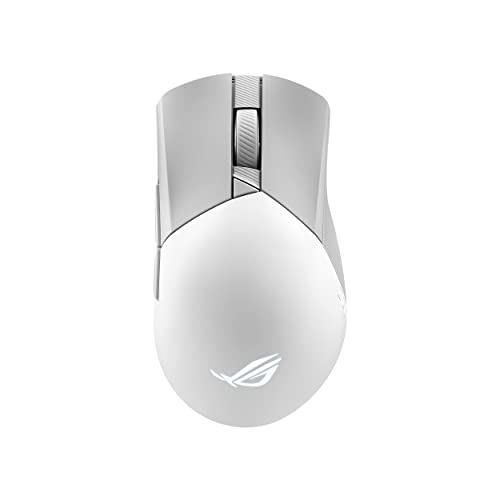
- Best for: Palm-grip players who want long battery life and replaceable switches in an ergonomic shell.
- Sensor: ROG AimPoint optical, up to 36,000 DPI
- Weight: 79 g
- Connectivity: tri-mode, 2.4 GHz ROG SpeedNova, Bluetooth and wired USB
- Battery: up to 119 hours
All 5 Picks at a Glance
| Product | Specs | Action |
|---|---|---|
| ASUS ROG Keris II Ace |
| Check price on Amazon |
| ASUS ROG Harpe Ace Aim Lab Edition |
| Check price on Amazon |
| ASUS ROG Gladius III Wireless AimPoint |
| Check price on Amazon |
 ASUS ROG Spatha X |
| Check price on Amazon |
 ASUS ROG Chakram X Origin |
| Check price on Amazon |
Our Top Picks
Choosing an ASUS gaming mouse is really a decision about shape first and specs second. ROG sells near-identical sensors in shells that feel completely different: a low symmetrical esports shape, a tall ergonomic shell, and two wide MMO bodies with button clusters. Pick the wrong shell and the sensor numbers stop mattering, because your grip fights the mouse on every flick.
This guide is for FPS players chasing a light wireless mouse, palm-grip players who want support through long sessions, and MMO or MOBA players who need extra buttons within thumb reach. Every pick below is a current ASUS or ROG model sold on Amazon, selected from the sensor, weight, connectivity and battery figures printed on its product page, so the comparison rests on listed specifications rather than brand reputation alone.
Quick Picks
As an Amazon Associate we earn from qualifying purchases
| Product | Best for | Key spec from title |
|---|---|---|
| ASUS ROG Keris II Ace | Ergonomic FPS play with high polling | AimPoint Pro sensor, up to 42,000 DPI |
| ASUS ROG Harpe Ace Aim Lab Edition | Symmetrical esports shape for claw grips | 54 g with AimPoint sensor, up to 36,000 DPI |
| ASUS ROG Gladius III Wireless AimPoint | Palm grip comfort plus swappable switches | 79 g, up to 119 hours of battery |
| ASUS ROG Spatha X | MMO players who live on thumb buttons | 12 programmable buttons, 19,000 DPI |
| ASUS ROG Chakram X Origin | MMO and MOBA play with a thumb joystick | 11 programmable buttons plus detachable joystick |
How to Choose
Match the shell to your grip before anything else
ASUS splits its range into three shell families, and they suit different hands. The Harpe Ace is a low, symmetrical shape built for claw and fingertip grips, while the Keris II Ace and Gladius III use right-handed ergonomic shells that fill the palm. The Spatha X and Chakram X Origin are wide, tall bodies designed around button access rather than fast flicks. Measure your current mouse, note whether your palm touches the shell, then buy the family that matches. A sensor upgrade cannot fix a shell your hand dislikes.
Read the sensor and polling figures together
Most ROG mice here use the AimPoint optical sensor rated up to 36,000 DPI, while the Keris II Ace steps up to the AimPoint Pro at 42,000 DPI with tracking up to 750 IPS. DPI ceilings are not what you feel in game, though. Polling rate is: the Keris II Ace reaches 4,000 Hz wirelessly and 8,000 Hz wired through the ROG Polling Rate Booster, while the other wireless models report at the standard rate. If you play competitive shooters on a high-refresh monitor, that polling headroom is the spec worth paying for.
Weigh the weight against the battery
The two esports models weigh 54 grams, the Gladius III weighs 79 grams, and the MMO pair runs 123 to 168 grams. Lighter mice reduce fatigue in low-sensitivity FPS play, but the heavier shells carry bigger batteries and more buttons. Battery ratings follow the same trade: the Harpe Ace lists up to 90 hours, the Keris II Ace up to 107 hours, the Gladius III up to 119 hours, and the Chakram X Origin up to 150 hours. Decide whether you would rather lift less per swipe or charge less often per month.
Count buttons and check the extras you will actually use
Standard FPS mice here carry the usual two side buttons, which is plenty for shooters. The Spatha X jumps to 12 programmable buttons and the Chakram X Origin offers 11 plus a detachable joystick that works as extra inputs or an analog stick. Two models, the Gladius III and Spatha X, add push-fit sockets so worn switches can be swapped without soldering. Extra inputs only help if your games use them, so list the abilities, mounts and macros you press weekly before paying for a button cluster.
The 5 Best Options
ASUS ROG Keris II Ace
- Best for: Competitive FPS players who want an ergonomic shape and the highest polling ceiling in the ROG line.
- Sensor: ROG AimPoint Pro optical, up to 42,000 DPI
- Tracking: up to 750 IPS and 50G acceleration
- Polling: up to 4,000 Hz wireless and 8,000 Hz wired with ROG Polling Rate Booster
- Weight: 54 g
Competitive FPS players who want an ergonomic shape and the highest polling ceiling in the ROG line.
The headline polling figures need the ROG Polling Rate Booster, and black and white are separate listings, so confirm the color on the page before ordering.
The Keris II Ace is the pick for players who want an ergonomic shell without giving up esports hardware. Its sculpted right-handed body supports a palm or relaxed claw grip, yet it still weighs only 54 grams, matching the lightest symmetrical mice here. Under the shell sits the strongest sensor in this roundup and the only one offering boosted polling rates, which makes it the natural choice for competitive FPS players with medium to large hands who found the Harpe shape too flat for long sessions.
ASUS ROG Harpe Ace Aim Lab Edition
- Best for: Claw and fingertip players who want a safe symmetrical esports shape with tri-mode wireless.
- Sensor: ROG AimPoint optical, up to 36,000 DPI
- Weight: 54 g
- Dimensions: 127.5 x 63.7 x 39.6 mm
- Connectivity: tri-mode, 2.4 GHz ROG SpeedNova, Bluetooth and wired USB
Claw and fingertip players who want a safe symmetrical esports shape with tri-mode wireless.
The low profile can feel cramped under a full palm grip, especially for larger hands, so palm players should look at the Keris II Ace instead.
Built with Aim Lab, this is the reference symmetrical shape in the ROG esports line. The low, safe profile suits claw and fingertip grips, the 54-gram shell keeps fast swipes effortless, and the Aim Lab Settings Optimizer suggests sensor settings based on the training software. It lacks the boosted polling of the Keris II Ace, but for players who want a proven shape, tri-mode connectivity and a long battery in one straightforward package, it remains the balanced default among ASUS esports mice.
ASUS ROG Gladius III Wireless AimPoint
- Best for: Palm-grip players who want long battery life and replaceable switches in an ergonomic shell.
- Sensor: ROG AimPoint optical, up to 36,000 DPI
- Weight: 79 g
- Connectivity: tri-mode, 2.4 GHz ROG SpeedNova, Bluetooth and wired USB
- Battery: up to 119 hours
Palm-grip players who want long battery life and replaceable switches in an ergonomic shell.
At 79 grams it is noticeably heavier than the esports pair, and spare switches must match the ROG socket type, so check compatibility before stocking up.
The Gladius III Wireless AimPoint is the comfort-and-tinkering option in this lineup. Its asymmetrical shell is the classic Gladius shape, sized for right-handed palm support, and at 79 grams it feels steadier than the 54-gram esports models without becoming heavy. What sets it apart is maintenance: push-fit sockets let you swap the main switches when they wear, extending the life of the mouse. Add tri-mode connectivity and the second-longest battery rating here, and it suits players who keep one mouse for years.
ASUS ROG Spatha X
- Best for: MMO players who want a full thumb-button cluster and a charging dock on the desk.
- Sensor: optical, up to 19,000 DPI
- Buttons: 12 programmable buttons
- Weight: 168 g
- Connectivity: dual-mode, 2.4 GHz RF and wired USB-C
MMO players who want a full thumb-button cluster and a charging dock on the desk.
At 168 grams it is far too heavy for fast FPS flicks, and there is no Bluetooth, so laptop users lose the cable-free pairing option.
The Spatha X is a dedicated MMO mouse, built around a thumb cluster of programmable buttons for rotations, mounts and consumables. Twelve programmable buttons in total, a wide right-handed body and a magnetic charging dock define it: you play wirelessly over 2.4 GHz, then drop the mouse onto the dock between sessions instead of hunting for a cable. The 19,000 DPI sensor trails the newer AimPoint models on paper, but MMO play rewards button access and comfort far more than sensor ceilings, and this mouse delivers both.
ASUS ROG Chakram X Origin
- Best for: MMO, MOBA and simulation players who want a thumb joystick and the longest battery life here.
- Sensor: ROG AimPoint optical, up to 36,000 DPI
- Buttons: 11 programmable buttons plus a detachable joystick
- Weight: 123 g
- Connectivity: tri-mode, 2.4 GHz RF, Bluetooth and wired USB
MMO, MOBA and simulation players who want a thumb joystick and the longest battery life here.
Stock on this older model fluctuates between sellers, so confirm the listing shows it available before ordering, and expect a learning curve on the joystick.
The Chakram X Origin takes a different route to extra inputs: eleven programmable buttons plus a detachable joystick under the thumb, which can drive movement, camera control or vehicle steering depending on the game. It runs the newer 36,000 DPI AimPoint sensor, connects three ways and posts the longest battery rating in this roundup at up to 150 hours. The 123-gram body is still substantial, but for MMO, MOBA and simulation players who want analog input without a separate controller, nothing else in the ASUS range copies this layout.
Which One Fits Your Situation
You play competitive shooters and use a claw grip
Start with the Harpe Ace Aim Lab Edition. The low symmetrical shell, 54-gram weight and 36,000 DPI sensor cover what ranked FPS play actually demands, and the Aim Lab optimizer gives you a sensible starting sensitivity. If your hand is larger or your claw relaxes into the shell, step across to the Keris II Ace for the same weight in an ergonomic shape with boosted polling.
You want one mouse for work and gaming
The Gladius III Wireless AimPoint fits a mixed desk best. Bluetooth pairing handles the work laptop, the 2.4 GHz receiver handles the gaming PC, and the 119-hour battery means charging becomes a rare event. The ergonomic shell stays comfortable through a full workday, and when the main switches eventually wear, the push-fit sockets let you replace them instead of replacing the whole mouse.
Your main games are MMOs with crowded action bars
Choose between the Spatha X and the Chakram X Origin by input style. The Spatha X gives you the bigger button cluster and a dock that keeps it charged on your desk. The Chakram X Origin trades two buttons for a joystick, adds Bluetooth and stretches battery life to 150 hours, which suits players who also game away from the desk.
You hate charging and just want to forget the cable
The Chakram X Origin posts the longest battery rating here at up to 150 hours, with the Gladius III close behind at 119 hours. Either removes charging from your weekly routine. Pick the Chakram if you can use its extra buttons and joystick; pick the Gladius if you play standard shooters and prefer a simpler, lighter shell for everyday aiming.
Common Mistakes
- Buying by DPI alone, when every mouse here already exceeds the sensitivity any player uses in game.
- Choosing a symmetrical esports shell for a full palm grip, then blaming hand fatigue on the sensor.
- Paying for a 12-button MMO layout and then playing only shooters that use two side buttons.
- Assuming every wireless model has Bluetooth; the Spatha X pairs by receiver or cable only.
- Ignoring listing variants, since colors and editions of the same ROG model often sit on separate Amazon pages.
Frequently Asked Questions
Are ASUS ROG mice good for FPS games?
Yes, the esports models are built for exactly that. The Harpe Ace Aim Lab Edition and Keris II Ace combine 54-gram shells with AimPoint sensors, low-latency SpeedNova wireless and long batteries. Choose the Harpe for a symmetrical claw shape or the Keris II Ace for an ergonomic shell with higher polling rates through the booster.
What is the difference between AimPoint and AimPoint Pro sensors?
The AimPoint sensor tops out at 36,000 DPI and appears in the Harpe Ace, Gladius III and Chakram X Origin. The AimPoint Pro in the Keris II Ace raises that to 42,000 DPI, tracks at up to 750 IPS and supports the ROG Polling Rate Booster for 4,000 Hz wireless and 8,000 Hz wired polling.
Which ASUS gaming mouse has the most buttons?
The Spatha X, with 12 programmable buttons arranged for MMO play, including its thumb cluster. The Chakram X Origin follows with 11 programmable buttons plus a detachable joystick that adds further inputs. The FPS-focused models keep things simpler, with the Gladius III listing 6 programmable buttons.
Can these ROG mice connect to more than one device?
The tri-mode models can. The Keris II Ace, Harpe Ace, Gladius III and Chakram X Origin each offer 2.4 GHz wireless, Bluetooth and wired USB, so you can keep a receiver in the gaming PC and pair Bluetooth to a laptop. The Spatha X is the exception, with 2.4 GHz and wired modes only.
FAQ
Are ASUS ROG mice good for FPS games?
What is the difference between AimPoint and AimPoint Pro sensors?
Which ASUS gaming mouse has the most buttons?
Can these ROG mice connect to more than one device?
More from Amazon
Programs that pair well with the guide above. Offers and eligibility are set by Amazon and may change.
Free shipping on eligible items, Prime Video and more. Eligible new members can start with a free trial.
Start a Prime free trialAd-free music streaming. Eligible new subscribers can start with a free trial.
Try Music Unlimited freeA Prime membership for ages 18-24 with a trial period. Eligibility is set by Amazon.
See Prime for Young AdultsAudiobooks and podcasts to listen to on the go. Eligible new members can start with a free trial.
Try Audible freeAs an Amazon Associate we earn from qualifying purchases.